Please join us in congratulating L'ivia Tak'acs, our Rep of the Month for July 2018!
Livia is a UI developer and visual designer from Hungary and has been part of the Reps program for a bit more than a year. In that time she organized a lot of events with different communities (like LibreOffice) and also workshops.

She also organizes Mozilla Hungary community meetings and a few months ago she organized the Firefox Support Sprint in Budapest.
She is a mentor and teacher at specific workshops where she teaches JavaScript and localization, such as MozSkool teaching JavaScript to 15-18 years old girls and MozScope localization workshops. This is a great example that a community builder can organize events but also mentor and teach new people to help growing the local community.
Thanks L'ivia, keep rocking the Open Web! 
https://blog.mozilla.org/mozillareps/2018/08/10/rep-of-the-month-july-2018/
Privacy is important for everyone, but often in different ways. That’s part of why Firefox Extensions are so powerful. Starting with a browser like Firefox, that’s built for privacy out … Read more
The post Make your Firefox browser a privacy superpower with these extensions appeared first on The Firefox Frontier.
Author’s Note: This post imagines a dystopian future for web video, if we continue to rely on patented codecs to transmit media files. What if one company had a perpetual monopoly on those patents? How could it limit our access to media and culture? The premise of this cautionary tale is grounded in fact. However, the future scenario is fiction, and the entities and events portrayed are not intended to represent real people, companies, or events.

Illustration by James Dybvig
The year is 2029. It’s been two years since the start of the Video Wars, and there’s no end in sight. It’s hard to believe how deranged things have become on earth. People are going crazy because they can’t afford web video fees – and there’s not much else to do. The world’s media giants have irrevocably twisted laws and governments to protect their incredibly lucrative franchise: the right to own their intellectual property for all time.
It all started decades ago, with an arcane compression technology and a cartoon mouse. As if we needed any more proof that truth is stranger than fiction.
Adulteration of the U.S. Legal System
In 1998, the U.S. Congress passed the Sonny Bono Copyright Term Extension Act. This new law extended copyrights on corporate works to the author’s lifetime plus 95 years. The effort was driven by the Walt Disney Company, to protect its lucrative retail franchise around the animated character Mickey Mouse. Without this extension, Mickey would have entered the public domain, meaning anyone could create new cartoons and merchandise without fear of being sued by Disney. When the extension passed, it gave Disney another 20 years to profit from Mickey. The news sparked outrage from lawyers and academics at the time, but it was a dull and complex topic that most people didn’t understand or care about.
In 2020, Disney again lobbied to extend the law, so its copyright would last for 10,000 years. Its monopoly on our culture was complete. No art, music, video, or story would pass into the public domain for millennia. All copyrighted ideas would remain the private property of corporations. The quiet strangulation of our collective creativity had begun.
A small but powerful corporate collective called MalCorp took note of Disney’s success. Backed by deep-pocketed investors, MalCorp had quietly started buying the technology patents that made video streaming work over the internet. It revealed itself in 2021 as a protector of innovation. But its true goal was to create a monopoly on video streaming technology that would last forever, to shunt profits to its already wealthy investors. It was purely an instrument of greed.
Better Compression for Free
Now, there were some good guys in this story. As early as 2007, prescient tech companies wanted the web platform to remain free and open to all – especially for video. Companies like Cisco, Mozilla, Google, and others worked on new video codecs that could replace the patented, ubiquitous H.264 codec. They even combined their efforts in 2015 to create a royalty-free codec called AV1 that anyone could use free of charge.
AV1 was notable in that it offered better compression, and therefore better video quality, than any other codec of its time. But just as the free contender was getting off the ground, the video streaming industry was thrown into turmoil. Browser companies backed different codecs, and the market fragmented. Adoption stalled, and for years the streaming industry continued paying licensing fees for subpar codecs, even though better options were available.
The End of Shared Innovation
Meanwhile MalCorp found a way to tweak the law so its patents would never expire. It proposed a special amendment, just for patent pools, that said: Any time any part of any patent changes, the entire pool is treated as a new invention under U.S. law. With its deep pockets, MalCorp was able to buy the votes needed to get its law passed.
MalCorp’s patents would not expire. Not in 20 years. Not ever. And because patent law is about as interesting as
https://github.com/mozilla-bteam/bmo/tree/release-20180808.1
the following changes have been pushed to bugzilla.mozilla.org:
- [1480891] my dashboard does not show the revision id and title for phabricator review requests
- [1481893] After recent push of bug 1478897 bug/revision syncing has been broken due to coding error
discuss these changes on mozilla.tools.bmo.
https://dlawrence.wordpress.com/2018/08/08/happy-bmo-push-day-46/
the following changes have been pushed to bugzilla.mozilla.org:
- [1479350] “Phabricator Reviews Requested of You” lists bugs which I have reviewed
- [1374266] Improve the “Zarro Boogs found” message
- [1480169] Consider reducing the verbosity of phabricator ‘Revision Approved’ bugzilla comments
- [1478897] ensure phabbugs doesn’t fail outright when encountering invalid bug ids
- [1480599] Add…
In the series introduction, we highlighted the importance of putting people in control their social interactions online, instead of allowing for-profit companies be the arbiters of hate speech or harassment. Our first installment in the Dweb series introduces Secure Scuttlebutt, which envisions a world where users are in full control of their communities online.
In the weeks ahead we will cover a variety of projects that represent explorations of the decentralized/distributed space. These projects aren’t affiliated with Mozilla, and some of them rewrite the rules of how we think about a web browser. What they have in common: These projects are open source, and open for participation, and share Mozilla’s mission to keep the web open and accessible for all.
This post is written by Andr'e Staltz, who has written extensively on the fate of the web in the face of mass digital migration to corporate social networks, and is a core contributor to the Scuttlebutt project. –Dietrich Ayala
Getting started with Scuttlebutt
Scuttlebutt is a free and open source social network with unique offline-first and peer-to-peer properties. As a JavaScript open source programmer, I discovered Scuttlebutt two years ago as a promising foundation for a new “social web” that provides an alternative to proprietary platforms. The social metaphor of mainstream platforms is now a more popular way of creating and consuming content than the Web is. Instead of attempting to adapt existing Web technologies for the mobile social era, Scuttlebutt allows us to start from scratch the construction of a new ecosystem.
A local database, shared with friends
The central idea of the Secure Scuttlebutt (SSB) protocol is simple: your social account is just a cryptographic keypair (your identity) plus a log of messages (your feed) stored in a local database. So far, this has no relation to the Internet, it is just a local database where your posts are stored in an append-only sequence, and allows you to write status updates like you would with a personal diary. SSB becomes a social network when those local feeds are shared among computers through the internet or through local networks. The protocol supports peer-to-peer replication of feeds, so that you can have local (and full) copies of your friends’ feeds, and update them whenever you are online. One implementation of SSB, Scuttlebot, uses Node.js and allows UI applications to interact with the local database and the network stack.

Using Scuttlebot
While SSB is being implemented in multiple languages (Go, Rust, C), its main implementation at the moment is the npm package scuttlebot and Electron desktop apps that use Scuttlebot. To build your own UI application from scratch, you can setup Scuttlebot plus a localhost HTTP server to render the UI in your browser.
Run the following npm command to add Scuttlebot to your Node.js project:
npm install --save scuttlebot
You can use Scuttlebot locally using the command line interface, to post messages, view messages, connect with friends. First, start the server:
$(npm bin)/sbot server
In another terminal you can use the server to publish a message in your local feed:
$(npm bin)/sbot publish --type post --text "Hello world"
You can also consume invite codes to connect with friends and replicate their feeds. Invite codes are generated by pub servers
owned by friends in the community, which act as mirrors of feeds in the community. Using an invite code means the server will allow you to connect to it and will mirror your data too.
$(npm bin)/sbot invite.accept $INSERT_INVITE_CODE_HERE
To create
The San Francisco 2018 All Hands flew by and so did the last two months. I cannot tell you how grateful I am to have been able to attend this event.
If I were to look back on some of the highlights, they would be pretty nitty gritty detailed. But I will share with you a few of them.
Meeting jscher2000 in person was quite an amazing experience. He is one of the contributors around the Mozilla Support Community present for over 10 years. He is certainly a people person, cares so much about helping the user with the easiest course of action to a better Firefox experience and continues to enjoy being a part of the community. Aside from him only being able to attend one day of the week, the interactions between him and the other contributors that were invited to attend were priceless. Many conversations that you may read from behind your computer on [https://support.mozilla.org/en-US/forums/contributors this webpage] came to life during that one day.
My second favorite highlight was meeting some of the French community – Pascal and Christophe. They showed me a lot of the content that they bring to events around France and the world to talk about Firefox VR development, Firefox FR support on social networks, and many other open source projects around the French community. Did you know they have had their own forum since before SUMO? (I hear some chuckles in the background) I also learned a lot about their culture and that many of their users are regular users just like you and me. (Compared to some of the power user communities out there) It opened my eyes to the many different communities all over the internet that provide help to Firefox users.
My third and final was talking to Cynthia and Noah about the upcoming motivations for the SUMO community and the engagement in the social program. During that hour we came up with different ideas on how to engage more people in the program and some of the ideas that they wanted to see happen as more contributors joined the program. (I know we have it on a post-it somewhere.)
(Also, don’t forget some of you went to In-n-Out for the first time! And I heard that some people tried riding electric bikes across the Golden Gate bridge on a nice brisk day! I am so happy that community members had this bonding experience!)
1: 1 SUMO help right now:
If you ever get an invitation to an All Hands, please go if you can. Witnessing the CIID research drive the SUMO team with Open Innovation to help prioritize experiments and projects for the second half of this year side by side with the community was amazing. These experiments are what is driving the community discussions right now. I would highly recommend you check them out as a member of the Mozilla Support Community. Please subscribe to them so you never miss an update.
At the SF All Hands, decisions were also made and are currently in the works. The projects that were prioritized in these discussions help these three SUMO objectives: improve community self-sufficiency, deliver support models for new products and support channels, increase returning user satisfaction when asking for user support.
So you may see the CSAT survey on the sumo site start to work again. You may see discussions around top user issue and see more reports around product releases. You may see a second experiment around Google Play Store reviews and you may see support channels for these new products become part of the support conversations on IRC or in the forums. New contributors are being recruited to help with mobile support, as well as helping monitor new experiments on social media and in the forums. The support is expanding beyond desktop, but also focusing on satisfying users with quality answers to encourage their return and continuous use of Firefox.
Mozilla and Marketing are focused on keeping the Firefox Desktop User, and enriching new mobile use experiences and visiting other planets. SF All Hands MoCo Plenary Session – June 12, 2018 (Watch the recap to understand “the other planets” reference)
What does that mean for user support forums?
The support.mozilla.org questions forums will still be the main official place for support. Even though it is mainly in English, content translated from English articles still support the majority of users that come to the site looking for help in a different language. There are also the Spanish, Czech, Finish, Hungarian, Indonesian(Rocket
This blogpost was composed by Daniele Scasciafratte
As we have entered the second half of the year, the Reps Council has worked on updating the Onboarding Screening Team for 2018-2.
The scope of this team is to help on evaluating the new applications to the Reps program by helping the Reps Council on this process.
In June we opened a call for the new team members on https://discourse.mozilla.org/t/do-you-want-join-the-onboarding-screening-team-for-2018-2/29713
We’ve got 13 applications in total. Out of them 9 applications were fitting in the Selection Criteria defined on https://wiki.mozilla.org/ReMo/Webinar/Screening, you can find the people that applied is on https://github.com/mozilla/Reps/issues/333.
After 2 weeks the Reps Council voted and chose the new members.
The new members of the team for the next 6 months are:
The previous team members were:
The previous team worked on reviewing 17 applications in 7 rounds in the last 7 months. Thanks a lot for your hard work!
Looking into the numbers of applications compared to the 2018-1 team (https://blog.mozilla.org/mozillareps/2018/02/15/reps-on-boarding-team/) the number of applications have declined compared to the previous year.
The new team will start to work soon (we have about 3 applications in queue). A Reps Council Member will also join the team, focusing on communications between applicants and the evaluation of the team.
If you want to congratulate your fellows Reps you can do it in this thread: https://discourse.mozilla.org/t/onboarding-screening-team-2018-2/30794
https://blog.mozilla.org/mozillareps/2018/08/08/onboarding-team-for-2nd-half-of-2018/
These days, operating system kernels provide TCP/IP stacks that can do really fast network transfers. It's not even unusual for ordinary people to have gigabit connections at home and of course we want our applications to be able take advantage of them.
I don't think many readers here will be surprised when I say that fulfilling this desire turns out much easier said than done in the Windows world.
Autotuning?
Since Windows 7 / 2008R2, Windows implements send buffer autotuning. Simply put, the faster transfer and longer RTT the connection has, the larger the buffer it uses (up to a max) so that more un-acked data can be outstanding and thus enable the system to saturate even really fast links.
Turns out this useful feature isn't enabled when applications use non-blocking sockets. The send buffer isn't increased at all then.Internally, curl is using non-blocking sockets and most of the code is platform agnostic so it wouldn't be practical to switch that off for a particular system. The code is pretty much independent of the target that will run it, and now with this latest find we have also started to understand why it doesn't always perform as well on Windows as on other operating systems: the upload buffer (SO_SNDBUF) is fixed size and simply too small to perform well in a lot of cases
Applications can still enlarge the buffer, if they're aware of this bottleneck, and get better performance without having to change libcurl, but I doubt a lot of them do. And really, libcurl should perform as good as it possibly can just by itself without any necessary tuning by the application authors.
Users testing this out
Daniel Jelinski brought a fix for this that repeatedly poll Windows during uploads to ask for a suitable send buffer size and then resizes it on the go if it deems a new size is better. In order to figure out that if this patch is indeed a good idea or if there's a downside for some, we went wide and called out for users to help us.
The results were amazing. With speedups up to almost 7 times faster, exactly those newer Windows versions that supposedly have autotuning can obviously benefit substantially from this patch. The median test still performed more than twice as fast uploads with the patch. Pretty amazing really. And beyond weird that this crazy thing should be required to get ordinary sockets to perform properly on an updated operating system in 2018.
Windows XP isn't affected at all by this fix, and we've seen tests running as VirtualBox guests in NAT-mode also not gain anything, but we believe that's VirtualBox's "fault" rather than Windows or the patch.
Landing
The commit is merged into curl's master git branch and will be part of the pending curl 7.61.1 release, which is due to ship on September 5, 2018. I think it can serve as an interesting case study to see how long time it takes until Windows 10 users get their versions updated to this.
Table of test runs
The Windows versions, and the test times for the runs with the unmodified curl, the patched one, how much time the second run needed as a percentage of the first, a column with comments and last a comment showing the speedup multiple for that test.
Thank you everyone who helped us out by running these tests!
| Version | Time vanilla | Time patched | New time | Comment | speedup |
| 6.0.6002 | 15.234 | 2.234 | 14.66% | Vista SP2 | 6.82 |
| 6.1.7601 | 8.175 | 2.106 | 25.76% | Windows 7 SP1 Enterprise | 3.88 |
| 6.1.7601 | 10.109 | 2.621 | 25.93% | Windows 7 Professional SP1 | 3.86 |
| 6.1.7601 | 8.125 | 2.203 | 27.11% | 2008 R2 |
Gerv was Mozilla’s first intern. He arrived in the summer of 2001, when Mozilla staff was still AOL employees. It was a shock that AOL had allocated an intern to the then-tiny Mozilla team, and we knew instantly that our amazingly effective volunteer in the UK would be our choice.
When Gerv arrived a few things about him jumped out immediately. The first was a swollen, shiny, bright pink scar on the side of his neck. He quickly volunteered that the scar was from a set of surgeries for his recently discovered cancer. At the time Gerv was 20 or so, and had less than a 50% chance of reaching 35. He was remarkably upbeat.
The second thing that immediately became clear was Gerv’s faith, which was the bedrock of his response to his cancer. As a result the scar was a visual marker that led straight to a discussion of faith. This was the organizing principle of Gerv’s life, and nearly everything he did followed from his interpretation of how he should express his faith.
Eventually Gerv felt called to live his faith by publicly judging others in politely stated but damning terms. His contributions to expanding the Mozilla community would eventually become shadowed by behaviors that made it more difficult for people to participate. But in 2001 all of this was far in the future.
Gerv was a wildly active and effective contributor almost from the moment he chose Mozilla as his university-era open source project. He started as a volunteer in January 2000, doing QA for early Gecko builds in return for plushies, including an early program called the Gecko BugAThon. (With gratitude to the Internet Archive for its work archiving digital history and making it publicly available.)
Gerv had many roles over the years, from volunteer to mostly-volunteer to part-time, to full-time, and back again. When he went back to student life to attend Bible College, he worked a few hours a week, and many more during breaks. In 2009 or so, he became a full time employee and remained one until early 2018 when it became clear his cancer was entering a new and final stage.
Gerv’s work varied over the years. After his start in QA, Gerv did trademark work, a ton of FLOSS licensing work, supported Thunderbird, supported Bugzilla, Certificate Authority work, policy work and set up the MOSS grant program, to name a few areas. Gerv had a remarkable ability to get things done. In the early years, Gerv was also an active ambassador for Mozilla, and many Mozillians found their way into the project during this period because of Gerv.
Gerv’s work life was interspersed with a series of surgeries and radiation as new tumors appeared. Gerv would methodically inform everyone he would be away for a few weeks, and we would know he had some sort of major treatment coming up.
Gerv’s default approach was to see things in binary terms — yes or no, black or white, on or off, one or zero. Over the years I worked with him to moderate this trait so that he could better appreciate nuance and the many “gray” areas on complex topics. Gerv challenged me, infuriated me, impressed me, enraged me, surprised me. He developed a greater ability to work with ambiguity, which impressed me.
Gerv’s faith did not have ambiguity at least none that I ever saw. Gerv was crisp. He had very precise views about marriage, sex, gender and related topics. He was adamant that his interpretation was correct, and that his interpretation should be encoded into law. These views made their way into the Mozilla environment. They have been traumatic and damaging, both to individuals and to Mozilla overall.
The last time I saw Gerv was at FOSDEM, Feb 3 and 4. I had seen Gerv only a few months before in December and I was shocked at the change in those few months. Gerv must have been feeling quite poorly, since his announcement about preparing for the end was made on Feb 16. In many ways, FOSDEM is a fitting final event for Gerv — free software, in the heart of Europe, where impassioned volunteer communities build FLOSS projects together.
To memorialize Gerv’s passing, it is fitting that we remember all of Gerv — the full person, good and bad, the damage and trauma he caused, as well as his many positive contributions. Any other view is sentimental. We should be clear-eyed, acknowledge the problems, and appreciate the positive contributions. Gerv came to Mozilla long before we were successful or had much to offer besides our goals and our open source foundations. As Gerv put it, he’s gone home now, leaving untold memories around the FLOSS world.
https://blog.lizardwrangler.com/2018/08/07/in-memoriam-gervase-markham/
The internet today is often like being on a guided tour bus in an unfamiliar city. You end up getting off at the same places that everyone else does. While it’s convenient and doesn’t require a lot of planning, sometimes you want to get a little off the beaten path.
With the latest Firefox experiment, Advance, you can explore more of the web efficiently, with real-time recommendations based on your current page and your most recent web history.
With Advance we’re taking you back to our Firefox roots and the experience that started everyone surfing the web. That time when the World Wide Web was uncharted territory and we could freely discover new topics and ideas online. The Internet was a different place.
We wondered, is it possible to recapture that serependitious moment of discovery, that opens people’s eyes to greater awareness of the topic they were seeking? We explored the idea of a ‘forward button’ to improve the way content is discovered, and launched our Context Graph initiative. It resulted in our first Context Graph feature, Activity Stream, which initially tested in Test Pilot, and shipped in November with our new Firefox Quantum browser. With today’s Advance experiment, we hope to bring the concept of the recommender system more to life. At a point where people no longer need to go backwards in search to move forward to discover new, relevant content.
Here’s how it works:
- Advance is a Web Extension that works by analyzing content you’re into right now in order to provide recommendations based on what you may want to “Read Next” through a sidebar in the browser.
- Additionally, Advance shares recommendations based on your recent online history which is discoverable in the ‘For You’ section of the sidebar. The recommendations will be based on what you visited once you’ve installed the Web Extension.
- The Advance sidebar enables discovery without disrupting workflow.
- Recommendations are purely driven by relevance, the primary goal of this experience is to give you the best and most timely recommendations.
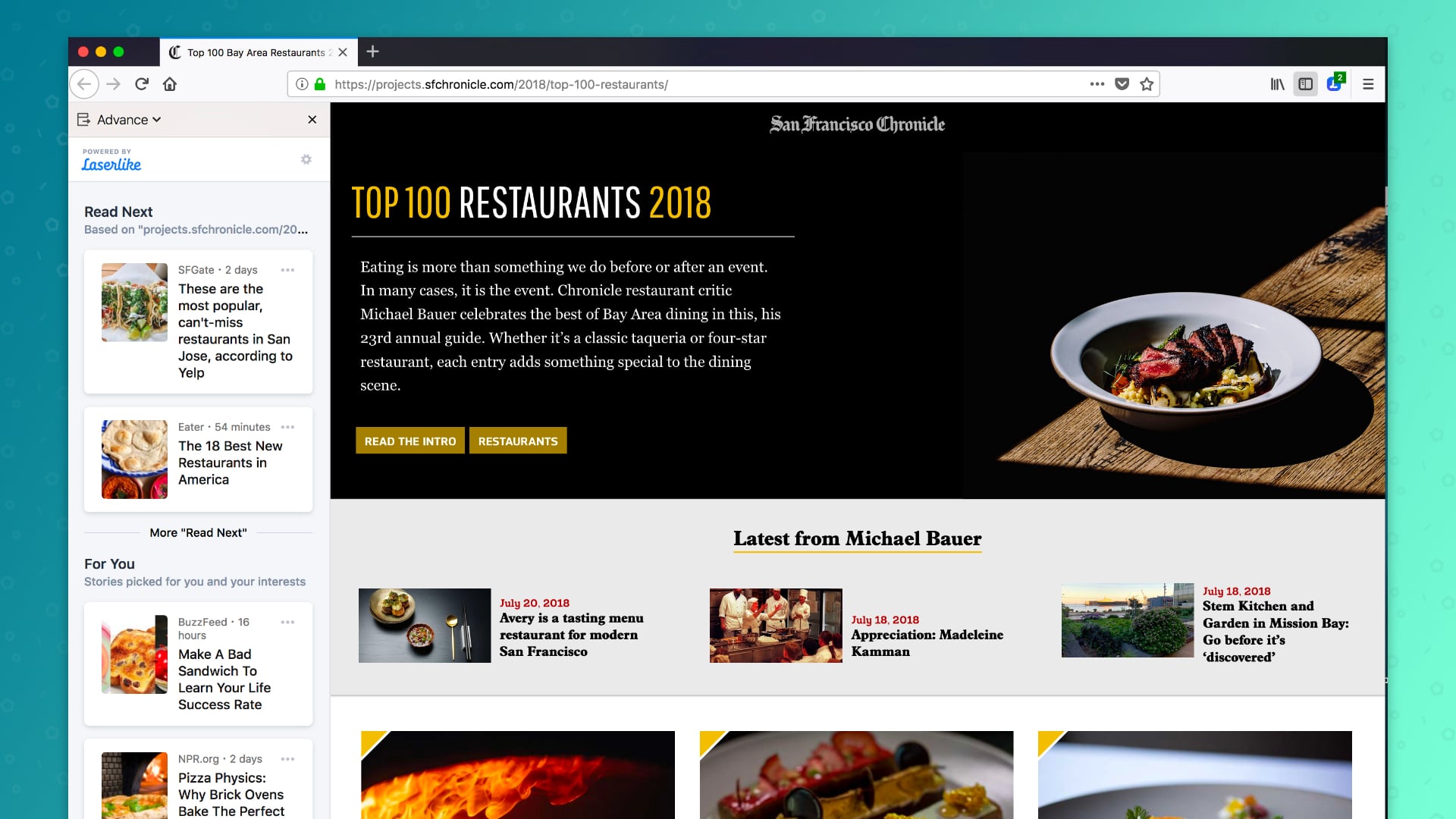
Advance Recommendations listed on the left side
For example, you’re just browsing the internet, and come across a page with a list of the hottest restaurants. Advance starts to recommend similar content around the most popular restaurants so that you can start comparing without having to do all the research on your own. These are based on the trusted sites you’ve already visited, new sites are recommended for you to explore. If there’s a recommendation you don’t want, you have the option to flag it as “Not interesting, off topic/spam, block sites,” or give direct feedback. The recommendations are personalized for you.
Not a foodie? If you’re a sports fan, an opera fan, or into the news, Advance makes current and relevant recommendations so that it’s easy to hop off the bus to explore. Just browse the web normally and keep the sidebar open when you’re feeling adventurous.
The Advance experiment is available for download on Test Pilot and powered by Laserlike, a machine learning startup that has built a web scale Content Search, Discovery and Personalization platform. It enables content discovery based on web browsing activity and getting diverse perspectives on any topic. At Mozilla, we believe browser history is sensitive information and we want people to clearly understand that Laserlike will receive their web browsing history before installing the experiment. We have also included controls so that participants can pause the experiment, see what browser history Laserlike has about them, or request deletion of that information. We’re interested in seeing how our users respond to their browsers having a more active role in helping them explore the web, and we’ll experiment with different methods of providing these recommendations if we see enough interest.
Join our Test Pilot Program
The Test Pilot program is open to all Firefox users. Your feedback helps us test and evaluate a variety of potential Firefox features. We have more than 100,000
The web runs on algorithms. Your search results, product recommendations, and the news you read are all customized to your interests. They are designed to increase the time you spend in front of a screen, build addiction to sites and services, and ultimately maximize the number of times you click on advertisements.
Without discounting the utility that this personalization can provide, it’s important to consider the cost: detailed portfolios of data about you are sitting on a server somewhere, waiting to be used to determine the optimum order of your social media feeds. Even if you trust that the parties collecting that data will use it responsibly, it has to live somewhere and has to be transmitted there, which makes it a juicy target for bad actors who may not act so responsibly.
At Mozilla we think the web deserves better, and we believe that we are uniquely positioned to offer you the best of both words:
Browsers could do so much more, through a better understanding of your behavior and by using the experience of people at human-scale to give you content that enriches your life, regardless of whom you know or where you live.
A number of ongoing Firefox projects attempting to provide these benefits with Mozilla’s sensibilities:
- The Pocket team is experimenting with a privacy-conscious approach to sponsored content.
- Intern Florian Hartmann is investigating use of a machine learning technique that does personalization locally, only sharing models with a central server, rather than the data used to produce those models.
- The Firefox Pioneer program allows users to opt-in to sharing their data with us to help us develop these products.
Today, I’m pleased to announce the next of these efforts: Advance, now available on Test Pilot.
Introducing Advance
Advance offers you a new type of forward button, making real-time content recommendations from elsewhere on the web.
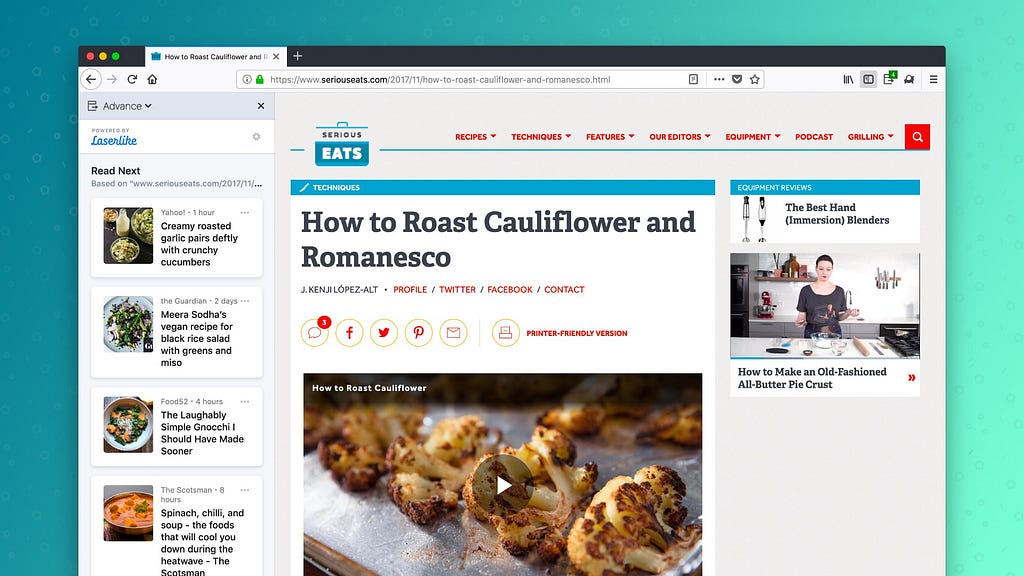
Over time, these recommendations will become personalized to your interests, learning from your interactions with the experiment and the broader internet. In addition to recipes, try it out with book reviews, blog posts, and news stories. We think Advance will help you find your next favorite thing.
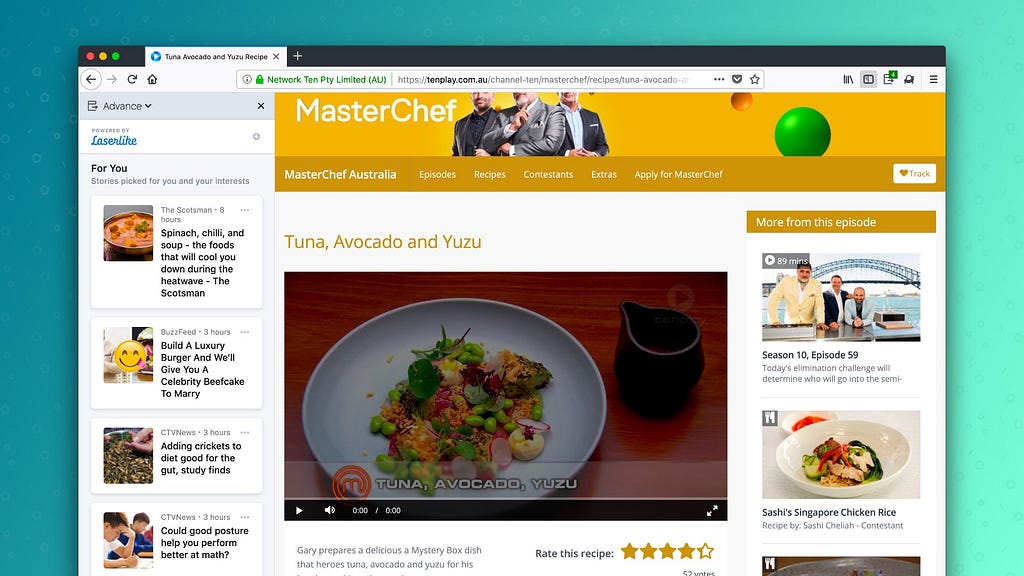
We’re launching Advance in collaboration with Laserlike, a machine learning startup that has built a web scale content search, discovery and personalization platform. They’re our trusted partners on this project, and we’re so grateful for their help in advancing our mission.
We’re trying to prove that we can use these technologies in the right way, and refuse to sacrifice user control to do so. The experiment is opt-in, and at any time you may pause its data collection. You are able to view the data that Advance has collected about you, and may request the deletion of that data at any time.
Advance is available today from Firefox Test Pilot. Try it out, and tell us what you think. You’re helping to shape the future of Firefox.
Advancing the Web was originally published in Firefox Test Pilot on Medium, where people are continuing the conversation by highlighting and responding to this story.

Six months ago, I broke the bank and bought a pair of Runscribe Plus running pods. I was recovering from a nasty sprain of the deltoid ligaments acquired a year ago while running a forest trails, and was looking for ways to reduce the risk of further damage during my runs.
Also, I love gadgets, so that made for a nice excuse! :)
After reading various articles about the value of increasing step rates to decrease risk of injury, I looked into various footpod options, the leading of which is the Stryd, but wanted to monitor both feet which only the Runscribe Plus can do. So I did something I almost never do: ordering a gadget that hasn't been heavily reviewed by many others (to the exception of the5krunner).
Runscribe Plus, which I'll abbreviate RS, is a sensor that monitors your feet movement and impact while you run. It measures:
- pronation: rolling of the foot, particularly useful to prevent sprains
- footstrike: where you foot hits the ground, heel, middle or front
- shock: how much force your feet hit the ground with
- step rate
- stride length
- contact time
- and a bunch of calculation based on these raw metrics


The RunScribe Dashboard displays shock data for each foot recorded during a 5k. The dark red line represents the right foot and is taking a lot more shock that the light red one representing the left foot.
Thunderbird 60, the newest stable release of everyone’s favorite desktop Email client, has been released. This version of Thunderbird is packed full of great new features, fixes, and changes that improve the user experience and make for a worthwhile upgrade. I’ll highlight three of the biggest changes in Thunderbird 60 in this post. For more information on the release check out the list over on the support website and the full release notes over on our website.
Thunderbird’s Photon Look
Like Firefox, Thunderbird now has a new “Photon” look. Tabs are square, the title bar can be toggled on and off, resulting in some saved pixels so your Email can shine. There are also new light and dark themes that ship with Thunderbird by default. Additionally, there are multiple chat themes now available. WebExtension themes are now enabled in Thunderbird as well.

Thunder 60 “Photon” Visual Refresh
Also, Thunderbird has a new logo accompanying the new release! We’re very pleased with the new branding that mirrors the Quantum-y upgrade of our sister project Firefox. You can see all the branding updates on Identihub. Identihub is run by Ura Design and they have been a great design partner for Thunderbird, spearheading the logo update as well as helping out in various other ways.

New Thunderbird Logo
Attachment Management Improvements
Thunderbird 60 features many improvements to attachment handling in the compose window. Attachments can now be reordered by clicking and dragging them around. The “Attach” button has been moved to the right side of the compose window, above the attachment pane. Pressing the Alt+M keys now toggles the attachment pane. It is now also impossible to completely collapse a non-empty attachment pane in order to help protect against attachments accidentally being sent.

Attachment Management in Thunderbird 60
Calendar Improvements
In this new version of Thunderbird there are various improvements to the Calendar. For instance, the calendar allows for copying, cutting or deleting a selected occurrence or the entire series for recurring events. Calendar provides an option to display locations for events in calendar day and week views. Calendar now has the ability to send meeting notifications directly instead of showing a popup. When pasting an event or task, calendar lets the user select a target calendar. Finally, email scheduling is now possible when using CalDAV servers supporting server-side scheduling.
Other Changes
Outside of the changes described above there are many other improvements and bug fixes in Thunderbird 60. To get an idea of the full scope you can check out the great list over at the Mozilla Support site or the release notes.
Lastly, you can give Thunderbird 60 a try by downloading it here. If you want to support the development of Thunderbird, please consider making a donation.
https://blog.mozilla.org/thunderbird/2018/08/whats-new-in-thunderbird-60/
While working on my previous blog post, I came across another great feature you may not know about. Let’s say you use the Share menu, but opening the Page Actions menu requires too much navigation. You need quicker access!
To add an item to the address Bar, right-click on it and select Add to Address Bar.
To remove it, right-click on the item and select Remove from Address Bar.

http://ilias.ca/blog/2018/08/how-to-add-the-share-menu-to-the-firefox-address-bar/
To help improve Firefox performance, the backend for the storage.local API is migrating from JSON to IndexedDB. These changes will soon be enabled on Firefox Nightly and will stabilize when Firefox 63 lands in the Beta channel. If your users switch between Firefox channels using the same profile during this time, they may experience data regression in the extensions they have previously installed.
We recommend that users do not change Firefox channels between now and September 5, 2018. However, if they do and they contact you with questions about why their extensions are not behaving normally (such as losing saved options or other local data), please point them to this post for instructions on how to retrieve and re-import their extension data.
How to retrieve migrated data and re-import the extension data
Go to about:config and check the setting for extensions.webextensions.ExtensionStorageIDB.enabled. If it is set to true, the extension data has been moved to the new backend and is not directly available as a single file in the file system.
If the extension data is not available after it has been moved in the new backend, follow these steps to ask Firefox to re-import the extension data:
- Look up the Extension ID by going to
about:debugging - Navigate to your system profile directory
- Go to the folder called
browser-extension-data - Go to the folder of the Extension ID you found in
about:debugging - You will see a file named storage.js.migrated (or storage.js.migrated.N if the data has migrated more than once). Your data has been moved into this file.
- Uninstall the extension
- Copy the file named storage.js.migrated to a new file named storage.js in the same directory
- Open the browser console.
- Re-install the extension
- Wait for a message “Migrating storage.local data for
” and “storage.local data successfully migrated to IDB Backend for ” to appear in the browser console
How to address errors when re-importing migrated extension data
If you see a QuotaExceededError in the browser console during the final step in the data retrieval and re-importing process, you may have insufficient disk space. After you free additional disk space, you maybe be able to fix this issue by following the steps outlined in the section above.
If the problem persists and the extension is using the new ExtensionStorageIDB backend, please report the issue on Bugzilla. You can see if the extension is using the ExtensionStorageIDB backend by going to about:config and seeing if extensions.webextensions.ExtensionStorageIDB.migrated.EXTENSION_ID is set to true.
Reporting issues with the storage.local API
If you are an extension developer and you encounter any issues that seem to be related to the storage.local API, please file a new issue on Bugzilla and add it as a blocker of bug 1474562 so that we can promptly investigate it.
The post New backend for storage.local API appeared first on Mozilla Add-ons Blog.
https://blog.mozilla.org/addons/2018/08/03/new-backend-for-storage-local-api/
https://github.com/mozilla-bteam/bmo/tree/release-20180803.1
the following changes have been pushed to bugzilla.mozilla.org:
- [1480583] User->match is not paging properly so all user results are not return if more than 100 users
discuss these changes on mozilla.tools.bmo.
https://dlawrence.wordpress.com/2018/08/03/happy-bmo-push-day-45/

It's been another busy week in MR land for the team. We are getting really close to releasing some fun new features.
Browsers
We spent this week fixing more bugs and improving performance in Firefox Reality:
- Completed user studies, resulting in many great recommendations for these products to address a wider base of users.
- Nightly version number is now visible to end users in the"About Firefox Reality" button, and is automatically submitted as part of bug report when user selects "Report an issue" from within FxR
- Focusing on bug fixes, primarily around performance and immersive mode
- Refactor strings.xml to provide better support for l10n
- More UI tweaks to FxR Focus Mode
Check out this video Josh did demoing Firefox Reality and showing how to install it yourself.
Social
Lots of bug fixes to Hubs and prepping to launch some new features for it.
- Pen tool tested at meetup, working on adding drawing expirations, rate limiting, and bugfixes.
- Design pass in prep for user studies, focus on invitations and cleaner/brighter UX for room creation and entry. Visual design for scene landing pages.
Interested in joining our public Friday stand ups? For more details, join our public WebVR Slack #social channel
Content Ecosystem
- A-Frame support for the Oculus Go controller hasn't shipped yet, but you can test it out with these instructions.
Stick around next week for more new features and improvements!