Firefox 62 SUMO Days are around the corner! In a week!
On September 5th, Firefox 62 will be updating for both Desktop and Android platforms. Please join the community for the following SUMO Days focusing on answering questions from Firefox users on Twitter and in the Support Forums:
- Thursday, September 6th
- Friday, September 7th
- Monday, September 10th
- Tuesday, September 11th
- Friday, September 14th.
On these days, Support contributors will be online answering questions live and hanging out. If you do not see anyone active online, please contact Rachel (username: guigs) or another Administrator or Operator in the #sumo IRC channel listed in the wiki.
There is also the two Telegram channels that are active for assignments of tweets and collaboration. You may need an account to participate, so just send a message to social Telegram group – there are guidelines on how to set up Tweetdeck for social if you would like your own workspace, or you can message guigs to add your trello account to the trello board with delegated tweets for the day.
If you do not like live chats, you can check out our forums with all the updates for both social and support forum dwellers to collaborate on: Firefox 62 SUMO Days MozWiki page
Like Twitter and we have not seen you in a while? That is OK!
Welcome back! Please say “hello”! We have some new friends answering questions, you can ask them for help on the live chat IRC channels #aoa or #sumo.
We also have updated Common Responses that you can use when replying with the #fxhelp tweet tag.
If you need a quick reminder of how things work, please use the guidelines to get started again. We can always use your help.
See you online real soon!
https://blog.mozilla.org/sumo/2018/08/27/sumo-day-firefox-62-you-are-invited/
The curl project is happy to introduce official and blessed curl builds for Windows for download on the curl web site.
This means we have a set of recommended curl packages that we advice users on Windows to download.
On Linux, macOS, cygwin and pretty much all the other alternatives you have out there, you don't need to go to random sites on the Internet and download a binary package provided by a (to you) unknown stranger to get curl for your system. Unfortunately that is basically what we have forced Windows users into doing for a few years since our previous maintainer of curl builds for Windows dropped off the project.
These new official curl builds for Windows are the same set of builds Viktor Szakats has been building and providing to the community for a long time already. Now just with the added twist that he feeds his builds and information about them to the main curl site so that users can get them from the same site and thus lean on the same trust they already have in the curl brand in general.
These builds are reproducible, provided with sha256 hashes and a link to the full build log. Everything is public and transparently done.
All the hard work to get these builds in this great shape was done by Viktor Szakats.

https://daniel.haxx.se/blog/2018/08/27/blessed-curl-builds-for-windows/
TenFourFox Feature Parity Release 9 beta 3 is now available (downloads, hashes, release notes). This version has site-specific workarounds for Github's sudden hostility to TenFourFox (fixed using the same workaround we use for Imgur) and pages that use the new version of Cloudflare RocketLoader (by essentially defeating it). I also reduced idle time deferral for a couple rare crashes on the test systems that seemed to be from low memory and added a little tuneup for HTML5 parsing from Firefox 55.
Of the security patches that landed in this version is a specific one for an issue that affects 10.5, but not 10.4. It's more of an information leak than anything else and wouldn't seem to be very common, but I was able to exploit it on the test network, so now it's worked around. Our implementation is completely different from Mozilla's largely for performance reasons since we only have two operating system flavours to worry about.
Watch for the final to emerge this weekend sometime, for public release next Tuesday (not Monday because of the US Labor Day holiday).
http://tenfourfox.blogspot.com/2018/08/tenfourfox-fpr9b3-available.html
Twenty years ago I resigned from my former job at a financial news wire to pursue a career in San Francisco. We were transitioning our news service (Jiji Press, a Japanese wire service similar to Reuters) to being a web-based news site. I had followed the rise and fall of Netscape and the Department of Justice anti-trust case on Microsoft's bundling of IE with Windows. But what clinched it for me was a Congressional testimony of the Federal Reserve Chairman (the US central bank) about his inability to forecast the potential growth of the Internet.
Working in the Japanese press at the time gave me a keen interest in international trade. Prime Minister Hashimoto negotiated with United States Trade Representative Mickey Cantor to enhance trade relations and reduce protectionist tariffs that the countries used to artificially subsidize domestic industries. Japan was the second largest global economy at the time. I realized that if I was going to play a role in international trade it was probably going to be in Japan or on the west coast of the US.
I decided that because Silicon Valley was the location where much of the industry growth in internet technology was happening, that I had to relocate there if I wanted to engage in this industry. So I packed up all my belongings and moved to San Francisco to start my new career.
At the time, there were hundreds of small agencies that would build websites for companies seeking to establish or expand their internet presence. I worked with one of these agencies to build Japanese versions of clients' English websites. My goal was to focus my work on businesses seeking international expansion.
At the time, I met a search engine called LookSmart, which aspired to offer business-to-business search engines to major portals. (Business-to-Business is often abbreviated B2B and is a tactic of supporting companies that have their own direct consumers, called business-to-consumer, which is abbreviated B2C.) Their model was similar to Yahoo.com, but instead of trying to get everyone to visit one website directly, they wanted to distribute the search infrastructure to other companies, combining the aggregate resources needed to support hundreds of companies into one single platform that was customized on demand for those other portals.
At the time LookSmart had only English language web search. So I proposed launching their first foreign language search engine and entering the Japanese market to compete with Yahoo!'s largest established user base outside the US. Looksmart's President had strong confidence in my proposal and expanded her team to include a Japanese division to invest in the Japanese market launch. After we delivered our first version of the search engine, Microsoft's MSN licensed it to power their Japanese portal and Looksmart expanded their offerings to include B2B search services for Latin America and Europe.
I moved to Tokyo, where I networked with the other major portals of Japan to power their web search as well. Because at the time Yahoo! Japan wasn't offering such a service, a dozen companies signed up to use our search engine. Once the combined reach of Looksmart Japan rivaled that of the destination website of Yahoo! Japan, our management brokered a deal for LookSmart Japan to join Yahoo! Japan. (I didn't negotiate that deal by the way. Corporate mergers and acquisitions tend to happen at the board level.)
By this time Google was freshly independent of Yahoo! exclusive contract to provide what they called "algorithmic backfill" for the Yahoo! Directory service that Jerry Yang and David Filo had pioneered at Stanford University. Google started a B2C portal and started offering of their own B2B publishing service by acquiring Yahoo! partner Applied Semantics, giving them the ability to put Google ads into every webpage on the internet without needing users to conduct searches anymore. Yahoo!, fearing competition from Google in B2B search, acquired Inktomi, Altavista, Overture, and Fast search engines, three of which were leading B2B search companies. At this point Yahoo!'s Overture division hired me to work on market launches across Asia Pacific beyond Japan.
With Yahoo! I had excellent experiences negotiating search contracts with companies in Japan, Korea, China, Australia, India and Brazil before moving into their Corporate Partnerships team to focus on the US search distribution partners.
Then in 2007 Apple launched their first iPhone. Yahoo! had been operating a lightweight mobile search engine for html that was optimized for being shown on mobile phones. One of my projects in Japan had been to introduce Yahoo!'s mobile search platform as an expansion to the Overture platform. However, with the ability for the iPhone to actually show full web pages, the market was obviously going to shift.
I and several of my

As I do every week, I was going to say it's mostly be bug fixing. However this week the big news is our update to Hubs, Mozilla's VR chat system. You can now share any kind of media within Hubs: PDFs, images, music, and even Youtube videos.
The Mixed Reality team has been working hard on this release for months. Being in VR is so much more immersive when you can bring other parts of the world with you. You could review 3D models with your co-workers, give a PDF presentation to your meetup group, or watch some funny YouTube clips with your friends. We think you will all find tons of unique new uses for Hubs now.
Browsers
In other news (if Hubs just isn't enough for you), the Firefox Reality team is cleaning up the code and focusing on more bug fixes and performance, as well as getting the developer tools integration finished so you can debug VR easily from your desktop.
The Firefox Reality team has also been polishing the UI, such as adding a splashscreen, working on the icon, and tweaking the keyboard design.
Content Ecosystem
The JS13KCompetion is going strong, with a new prize added: 10 copies of PyxelEdit, a wonderful desktop pixel editor. (I use it myself, actually).
Fernando Serrano demonstrated a multi-view extension for ThreeJS built by our team which promises to greatly speed up VR on the web.
I've also finished the next module in my opensource WebXR workshop series: GLTF and 3D Models. If you are interested in teaching WebXR, please let me know. This workshop series is specifically designed to help you do that.
Virtuleap announced the winners of their Global WebXR Hackathon. The top prize went to Crystalis VR, a unique take on the classic puzzler genre.
That's it for this week folks. Be sure to follow our Twitter account for the latest in WebXR development.
This year, the Firefox User Research team is planning to add two new researchers to our group. The job posting went live last month, and after just a few weeks of accepting applications, we had over 900 people apply.
Current members of the Firefox User Research Team fielded dozens of messages from prospective applicants during this time, most asking for informational meetings to discuss the open role. We decided as a team to decline these requests across the board because we did not have the bandwidth for the number of meetings requested, and more importantly we have spent a significant amount of time this year working on minimizing bias in our hiring process.
We felt that meeting with candidates outside of the formal hiring process would give unfair advantage to some candidates and undermine our de-biasing work. At the same time, in alignment with Mozilla’s values and to build on Mozilla’s diversity and inclusion disclosures from earlier this year, we realized there was an opportunity to be more transparent about our hiring process for the benefit of future job applicants and teams inside and outside Mozilla thinking about how they can minimize bias in their own hiring.
Our Hiring Process Before This Year
Before this year, our hiring process consisted of a number of steps. First, a Mozilla recruiter would screen resumes for basic work requirements such as legal status to work in the regions where we were hiring and high-level relevant work experience. Applicants with resumes that passed the initial screen would then be screened by the recruiter over the phone. The purpose of the phone screen was to verify the HR requirements, the applicant’s requirements, work history, and most relevant experience.
If the applicant passed the screen with the recruiter, two members of the research team would conduct individual phone screens with the applicant to understand the applicant’s experience with different research methods and any work with distributed teams. Applicants who passed the screen with the researchers would be invited to a Mozilla office for a day of 1:1 in-person interviews with researchers and non-researchers and asked to present a research exercise prepared in advance of the office visit.

This hiring process served us well in several ways. It involved both researchers and roles that interact with researchers regularly, such as UX designers and product managers. Also, the mix of remote and in-person components reflected the ways we actually work at Mozilla. The process overall yielded hires — our current research team members — who have worked well together and with cross-functional teams.
However, there were also a lot of limitations to our former hiring process. Each Mozilla staff person involved determined their own questions for the phone and in-person components. We had a living document of questions team members liked to ask, but staff were free to draw on this list as little or as much as they wanted. Moreover, while each staff person had to enter notes into our applicant tracking system after a phone screen or interview with an applicant, we had no explicit expectations about how these notes were to be structured. We were also inconsistent in how we referred to notes during the hiring team debrief meetings where final decisions about applicants were typically made.
Our New Hiring Process: What We’ve Done
Our new hiring process is a work in progress. We want to share the strides we have made and also what we would still like to do. Our first step in trying to reduce bias in our hiring process was to document our current hiring process, which was not documented comprehensively anywhere, and to try and identify areas for improvement. Simultaneously, we set out to learn as much as we could about bias in hiring in general. We consulted members of Mozilla’s Diversity and Inclusion team, dug into materials from Stanford’s Clayman Institute for Gender Research, and talked with several managers in other parts of Mozilla who had undertaken de-biasing efforts for their own hiring. This “discovery” period helped us identify a number of critical steps.
First, we needed to develop a list of essential and desired criteria for job candidates. The researcher job description we had been using reflected many of the criteria we ultimately kept, but the exercise of distilling essential and desired criteria allowed current research team members to make much that was implicit, explicit.
Team members were able to ask questions about the
It’s that time of year again. When we find ourselves pouring over player rosters, reading frustratingly vague injury reports and trying to shake down our friends and colleagues to reveal … Read more
The post Let Firefox’s Side-View extension give you an edge for fantasy football, basketball, hockey and all the other sportsballs appeared first on The Firefox Frontier.
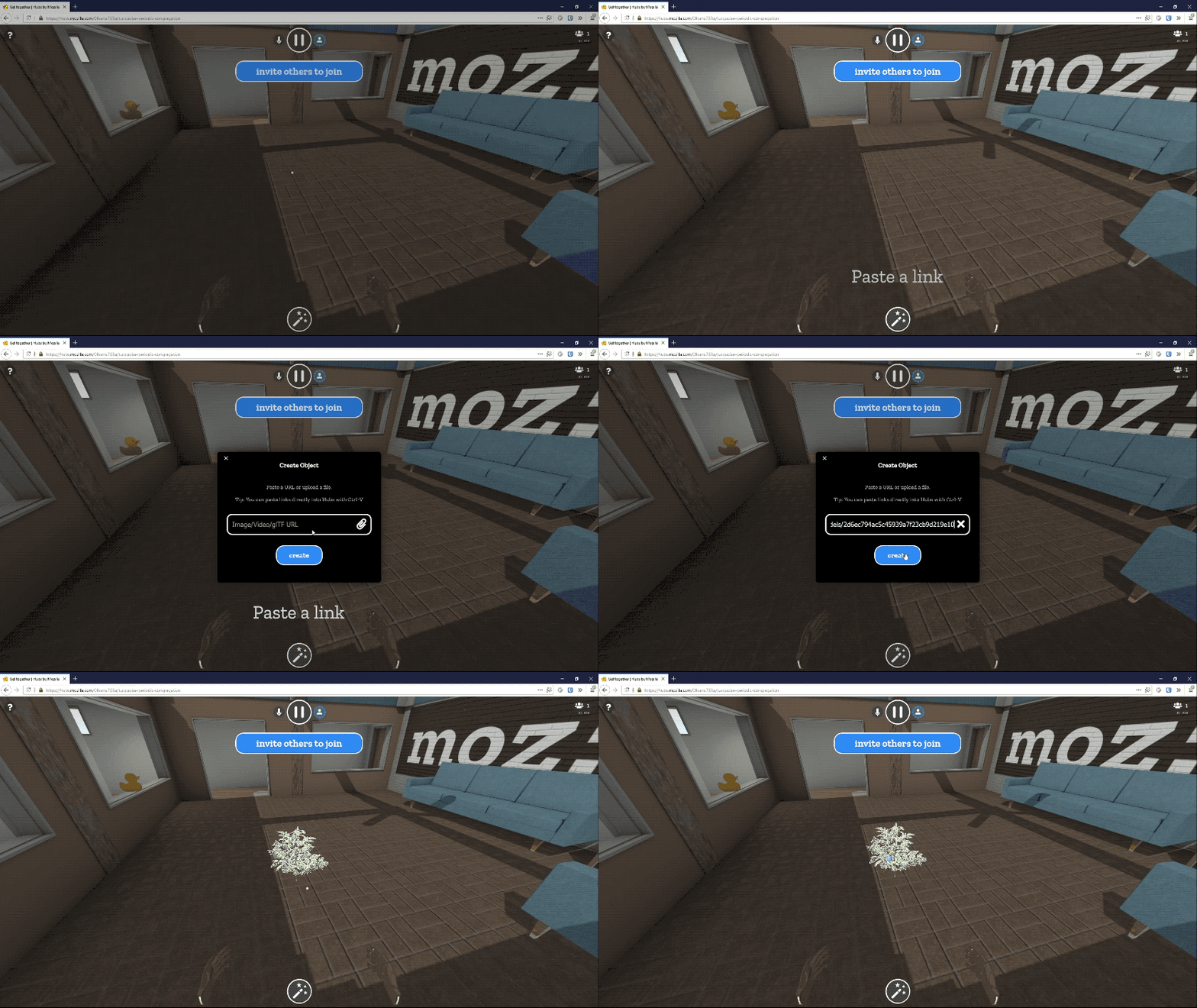
Last April we released Mozilla Hubs, a VR chat system that lets you walk and talk in VR with your friends, no matter where in the world they are. Now we have a game changing new feature: you can share virtually any kind of media with everyone in your Hubs room by just pasting in a URL. Anything you share becomes a virtual object that everyone can interact with. From images to videos to 3D models, Hubs is the best way to collaborate across devices (laptops, phones, headsets) and OSes. Let’s look at a few details.
What can I share?
Hubs supports the common image formats: PNG, JPG, and even animated GIFs.

Hubs also supports streaming media files like MP3s and MP4s, as well as 3D models in GLB format (the compact binary form of GLTF). And finally, Hubs has special support for content from certain websites.
If you paste in a URL to a model on Sketchfab (an online community and marketplace of 3D artists and makers), Hubs will fetch the model and import it into the room, no extra work required. As long as the model is less than 100MB and marked as downloadable, the Hubs server will process the webpage to find the link to the actual 3D model and import only that. Hubs can also perform this same trick with URLs from Giphy, Imgur, Google Poly (only objects made in Blocks, not panoramas), and even YouTube videos. The media is cached into the Hubs server before sending to Hubs clients.
Is it secure?
Yes. When someone in your Hubs room pastes in a URL it does not immediately go to every client logged into the room. Instead the URL is processed by the Hubs server which hosts the encrypted media, sending only the validated data to the other clients. This helps to protect from XSS attacks as well.
The Hubs server will host all content for up to 48 hours after the last time it is accessed, so once everyone is done interacting with it, the media file will eventually disappear. It is never copied anywhere else. The server also encrypts the data, so only clients in your Hubs room can see it. Additionally, Hubs does not track logins, so content has no user-identifiable data that could be used for tracking.
What can I do with content in Hubs?
You can pick up any kind of content object then move it, throw it, or leave it stuck in one place by holding still for a moment before releasing. If you have a 6DoF controller then you can also resize the object.
For audio and video you can click to play and pause the media stream. For PDFs you can advance one page at a time, making Hubs the best way to share presentations in VR, or just join your friends for some YouTube binging.
Are there any other requirements?
Nope. Any content you have on the web you can share. Since the server acts as a proxy you don’t need to worry about CORS. If the content you want to share is not web accessible then you can upload the file directly to Hubs, which will then host and share it automatically. You can even use content from your public Dropbox folder. It all just works.
If you have content that you want to ensure users can share within Hubs, then just make it publicly accessible from the web in one of the file formats we support (as listed above). For data you don’t want to stay public permanently, you can serve up a randomly generated URL which expires after 10 minutes. Once the data is imported into the Hubs server it no longer needs to be accessible on the web.
What now?
Play with it. Join your friends in a room to hang out, work on a presentation, or just watch some videos. All with real-time voice communication as well. As always, Hubs will work on any device with a browser, from 2D desktop to standalone VR headset to smartphone. Hubs will adapt to the device you have available. Just share a link to your room and go.
https://hacks.mozilla.org/2018/08/share-your-favorite-images-and-videos-in-vr-with-mozilla-hubs/
Firefox DevTools has now added a screenshot command, so you can take screenshots directly from the Console (bug #1464461).
To access the command, open the Web Console via Tools -> Web Developer -> Console, type in :screenshot and press ENTER. A screenshot of the current document will be downloaded to your downloads directory.
You can also use the flags, as you could with the old screenshot command that was part of the GCLI. Here is a quick list, generated with screenshot --help
:screenshot --fullpage  // take a screenshot of the whole page

:screenshot --selector “.some-class”// take a screenshot of an element on the page

:screenshot --clipboard --fullpage  // take a screenshot of the full page and add it to your clipboard
About the syntax
You may have noticed the new colon syntax used for the screenshot command. We are using this to represent commands that are not part of the web environment, that can be accessed from the console. Moving screenshot to the console is part of the work we are doing to unship GCLI, you can learn more about this here. The GCLI used a UNIX style input grammar, and after some discussion we decided to keep it. The command is not part of the JavaScript language, or web APIs, and could potentially be confusing. This is why we use the : character to prefix commands. If this is something that works well, we may expand it to include other commands. For example, you can also try out :help to get the same result as help().
If there are other commands that you would like to see available in this format, let us know. If you are working on a web extension and would like to be able to implement your own web commands, let us know about that too, so we can work on getting you what you need.
Autocomplete
If you start typing a command prefixed by the : symbol in the console, you will see an autocomplete menu for commands (done in bug #1473923). At the moment it only contains the two available commands, :screenshot, and :help. We do not yet have support for the flags, but this may be added in a future iteration.
Future work
We have deprecated the “Upload to imgur” functionality with the new screenshot feature. In a future iteration, we plan to allow uploading to Firefox Screenshots directly, and be able to share them from your profile (you can read more about this feature here).
At present, the screenshot feature can be used from the browser console as well, but it will only capture the chrome of the browser and not the content window. This is planned for a future iteration (see bug #1474006)
Known bugs, and where to report issues
We have a couple of known bugs which can be found under this metabug
In my last post, I announced a release candidate for the RLS 1.0. There has been a lot of feedback (and quite a lot of that was negative on the general idea), so I wanted to expand on what 1.0 means for the RLS, and why I think it is ready. I also want to share some of my vision for the future of the RLS, in particular changes that might warrant a major version release.
The general thrust of a lot of the feedback was that the RLS is not ready for a 1.0 release. Where a specific reason was given it was usually regarding code completion. I'll drill deeper in a minute. There were also a few comments along the lines of the RLS architecture being wrong. I'm not going to argue against that one, certainly if we started over I would do some things differently (hindsight is great). However, I don't think that at this point changing the architecture (which basically means starting again from scratch) is going to get us to an excellent product any quicker than continuing with the current architecture. I'm also confident that the current design can evolve over time.
Some clarifications
What does 1.0 mean for the RLS?
There is no backwards compatibility guarantee for the RLS, and no obvious quality cut-off. This is what I meant by "arbitrary" in my last post.
The way I have been thinking of 1.0 is as a signal that the RLS is worth using for a majority of users. It is that signal which is much more important than the 1.0 label. The Rust roadmap has 'a high quality IDE experience' as a key goal, and that is what I want to deliver, regardless of the version number. In terms of "ticking things off on a Powerpoint presentation", it is the 'high quality IDE experience' we're going for, not the 1.0 label.
I believe that for the RLS, quality can be measured along four axes: stability - how often does the RLS crash, fail to respond, or give incorrect results; completeness - how many cases are covered (e.g., code completion not working for some types, type info missing for macro-generated identifiers, etc.); features - what can do the RLS do (e.g., code completion, refactoring); and performance.
I have mainly been thinking in terms of stability for 1.0 - it is essential that for nearly all users, crashes and incorrect results are rare. I believe that we have achieved that (or that we can achieve that by the end of the 'release candidate' phase). Most of the negative feedback around the RC announcement focused on completeness. Features and performance can always be improved; my opinion is that there is minimum core that is required for 1.0 and we have that, though of course there is plenty of room for improvement.
Code completion
Code completion is powered by Racer. Long-term we'd like to drive code completion with the compiler, but that is a long way off. Racer needs to be able to determine the type of the expression with fairly limited input. Given the type, it can be pretty smart about finding implemented traits and providing methods. However, this is not perfect.
There are two ways that code completion is incomplete: we can't give any suggestions where we can't find the type, and even if we can find the type, then sometimes we do not suggest all the things that we should. One could consider incomplete suggestions for a type to be incorrect as well as incomplete; I think that depends on how suggestions are used. Although I haven't observed it, I believe Racer can rarely make incorrect suggestions.
What can be done?
The RLS has three kinds of information source: the compiler, Racer, and external tools (Rustfmt, Clippy, etc.). The latter are not really relevant here. The compiler processes a program semantically, i.e., it knows what the program means. It takes a long time to do that. Racer processes a program syntactically, it only knows what a program looks like. It runs quickly. We use the compiler for 'goto def', showing types and documentation, etc. We use Racer mostly for code completion.
There are some fundamental limitations. The compiler has to be able to build your program, which prevents it working with individual files and some very complex systems like the Rust project. For large programs, it is only feasible to use it 'on save', rather than 'live' as the user types. We can make this better, but it is a very long-term process. In particular, getting the compiler fast enough to do code completion will take at least a year, probably more.
Racer cannot understand every expression in a program. We can't hope for Racer to have perfect completion for all expressions.
Fully complete (i.e., compiler-powered) code completion will take years. Even when completion is powered by the compiler, there will be work to do to understand macros and so forth. Excluding the most complex cases, we're still looking at more than a year for complete
Today we shipped Notes by Firefox 1.1 for Android, all existing users will get the updated version via Google Play.
After our initial testing in version 1.0, we identified several issues with the Android’s “Custom Tab” login features. To fix those problems the new version has switched to using the newly developed Firefox Accounts Android component. This component should resolve the issues that the users experienced while signing in to Notes.
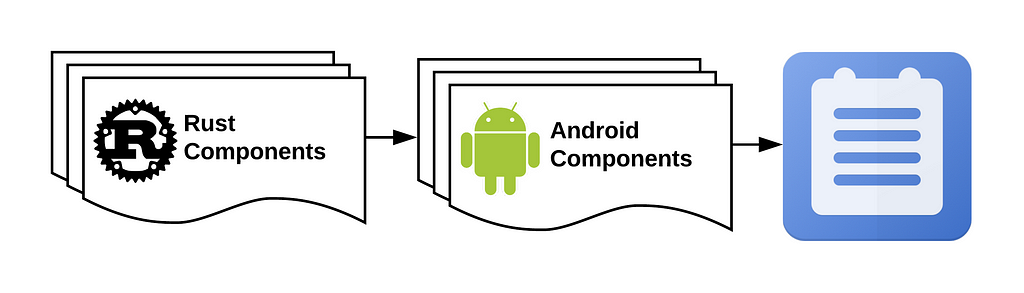
The Android component in Notes uses one of our Rust components in the background to perform authentication actions for Firefox Accounts. The Rust components can be cross-compiled for different environments such as Android, iOS and desktop operating systems. This way we don’t have to rewrite and maintain several copies of the same authentication logic in different languages. There are other reasons why we chose Rust to develop low-level components, such as memory safety, no data races, performance, and more. We hope to bring these new components into our other apps in the near future.
If you are interested in this component architecture and want to contribute, please check out the following links below:

Big thanks to our SoftVision QA, Mozilla Mobile and Mozilla Application Services teams for helping with this release!
Notes now uses Rust & Android components was originally published in Firefox Test Pilot on Medium, where people are continuing the conversation by highlighting and responding to this story.
A major focus of recent developments in Firefox CI has been putting control of the CI process in the hands of the engineers working on the project. For the most part, that means putting configuration in the source tree. However, some kinds of configuration don’t fit well in the tree. Notably, configuration of the trees themselves must reside somewhere else.
CI-Configuration
This information is collected in the ci-configuration repository.
This is a code-free library containing YAML files describing various aspects of the configuration – currently the available repositories (projects.yml) and actions.
This repository is designed to be easy to modify by anyone who needs to modify it, through the usual review processes. It is even Phabricator-enabled!
CI-Admin
Historically, we’ve managed this sort of configuration by clicking around in the Taskcluster Tools. The situation is analogous to clicking around in the AWS console to set up a cloud deployment – it works, and it’s quick and flexible. But it gets harder as the configuration becomes more complex, it’s easy to make a mistake, and it’s hard to fix that mistake. Not to mention, the tools UI shows a pretty low-level view of the situation that does not make common questions (“Is this scope available to cron jobs on the larch repo?”) easy to answer.
The devops world has faced down this sort of problem, and the preferred approach is embodied in tools like Puppet or Terraform:
- write down the desired configuration in a human-parsable text files
- check it into a repository and use the normal software-development processes (CI, reviews, merges..)
- apply changes with a tool that enforces the desired state
This “desired state” approach means that the tool examines the current configuration, compares it to the configuration expressed in the text files, and makes the necessary API calls to bring the current configuration into line with the text files. Typically, there are utilities to show the differences, partially apply the changes, and so on.
The ci-configuration repository contains those human-parsable text files.
The tool to enforce that state is ci-admin.
It has some generic resource-manipulation support, along with some very Firefox-CI-specific code to do weird things like hashing .taskcluster.yml.
Making Changes
The current process for making changes is a little cumbersome. In part, that’s intentional: this tool controls the security boundaries we use to separate try from release, so its application needs to be carefully controlled and subject to significant human review. But there’s also some work to do to make it easier (see below).
The process is this:
- make a patch to either or both repos, and get review from someone in the “Build Config - Taskgraph” module
- land the patch
- get someone with the proper access to run
ci-admin applyfor you (probably the reviewer can do this)
Future Plans
Automation
We are in the process of setting up some automation around these repositories. This includes Phabricator, Lando, and Treeherder integration, along with automatic unit test runs on push.
More specific to this project, we also need to check that the current and expected configurations match.
This needs to happen on any push to either repo, but also in between pushes: someone might make a change “manually”, or some of the external data sources (such as the Hg access-control levels for a repo) might change without a commit to the ci-configuration repo.
We will do this via a Hook that runs ci-admin diff periodically, notifying relevant people when a difference is found.
These results, too, will appear in Treeherder.
Grants
One of the most intricate and confusing aspects of configuration for Firefox CI is the assignment of scopes to various jobs.
The current implementation uses a cascade of role inheritance and * suffixes which, frankly, no human can comprehend.
The new plan is to “grant” scopes to particular targets in a file in ci-configuration.
Each grant will have a clear purpose, with accompanying comments if necessary.
Then, ci-admin will gather all of the grants and combine them into the appropriate role
In this series we are covering projects that explore what is possible when the web becomes decentralized or distributed. These projects aren’t affiliated with Mozilla, and some of them rewrite the rules of how we think about a web browser. What they have in common: These projects are open source, and open for participation, and share Mozilla’s mission to keep the web open and accessible for all.
So far we’ve covered distributed social feeds and sharing files in a decentralized way with some new tools for developers. Today we’d like to introduce something a bit different: Imagine what an entire browser experience would be like if the web was distributed… Beaker browser does exactly this! Beaker is a big vision from a team who are proving out the distributed web from top to bottom. Please enjoy this post from Beaker co-creator Tara Vancil. – Dietrich Ayala
Blue Link Labs and Beaker
We’re Blue Link Labs, a team of three working to improve the Web with the Dat protocol and an experimental peer-to-peer browser called Beaker.

We work on Beaker because publishing and sharing is core to the Web’s ethos, yet to publish your own website or even just share a document, you need to know how to run a server, or be able to pay someone to do it for you.
So we asked ourselves, “What if you could share a website directly from your browser?”
Peer-to-peer protocols like dat:// make it possible for regular user devices to host content, so we use dat:// in Beaker to enable publishing from the browser, where instead of using a server, a website’s author and its visitors help host its files. It’s kind of like BitTorrent, but for websites!
Architecture
Beaker uses a distributed peer-to-peer network to publish websites and datasets (sometimes we call them “dats”).
dat:// websites are addressed with a public key as the URL, and each piece of
data added to a dat:// website is appended to a signed log. Visitors to a dat://
website find each other with a tracker or DHT, then sync the data between each other, acting both as downloaders and uploaders, and checking that the data hasn’t been tampered with in transit.

At its core, a dat:// website isn’t much different than an https:// website — it’s a collection of files and folders that a browser interprets according to Web standards. But dat:// websites are special in Beaker because we’ve added peer-to-peer Web APIs so developers can do things like read, write, and watch dat:// files and build peer-to-peer Web apps.
Create a P2P Website
Beaker makes it easy for anyone to create a new dat:// website with one click (see our tour). If you’re familiar with HTML, CSS, or JavaScript (even just a little bit!) then you’re ready to publish your first dat:// website.
Developers can get started by checking out our API documentation or reading through our guides.
This example shows a website editing itself to create and save a new JSON file. While this example is contrived, it demonstrates a common pattern for storing data, user profiles, etc. in a dat:// website—instead of application data being sent away to a server, it can be stored in the website itself!
// index.html

Submit message
// index.js

// first get an instance of the website's files
var files = new DatArchive(window.location)

document.getElementById('create-json-button').addEventListener('click', saveMessage)

async function saveMessage () {
var timestamp = Date.now()
var filename = timestamp + '.json'
var content = {
timestamp,
message: document.getElementById('message').value
}

// write the message to a JSON file
// this file 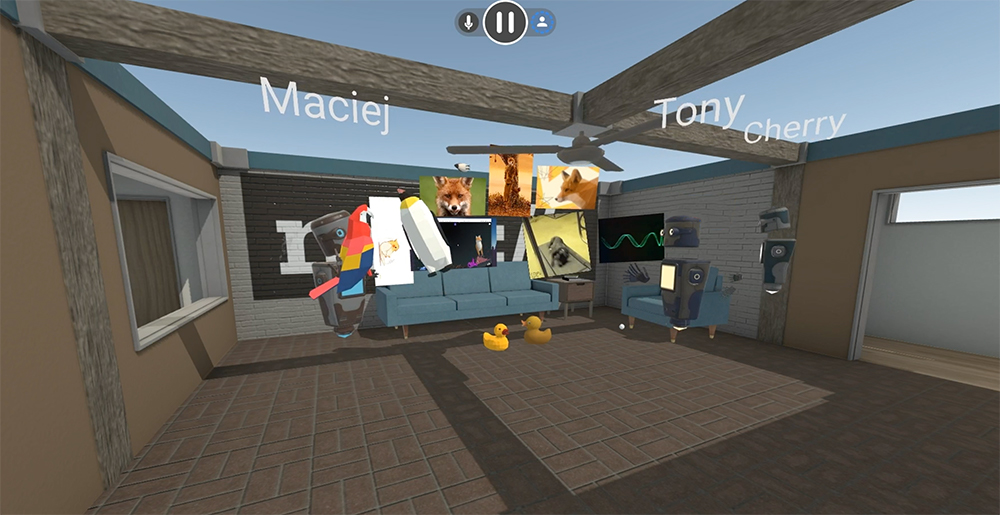
A few months ago, we announced an early preview release of Hubs by Mozilla, an experiment to bring Social Mixed Reality to the browser. Since then, we’ve made major strides in improving usability, performance, and support for standalone devices like the Oculus Go. Today, we’re excited to share our first big feature update to Hubs: the ability bring your videos, images, documents, and even 3D models into Hubs by simply pasting a link.
The progress we’ve made over the last several months has strengthened our view that the open web is the best platform for getting together in Mixed Reality. Today, you can join a room in Hubs using any VR device on the market, as well as your phone or PC. It is so easy to use, our team has switched to using Hubs for our regular VR standup meetings!
Utilizing the browser helps us create features that are easy to understand, because people are already familiar with how the web works. You can invite people into a room on Hubs by simply sharing a link - and now, you can bring your favorite content into the room by pasting a link to anything on the web!
If you want to share a video on YouTube, hop into a Hubs room on your PC or phone and paste the URL to the video. It’s that simple! The video will appear in the space and start playing, and can be moved around or thrown up on a wall.
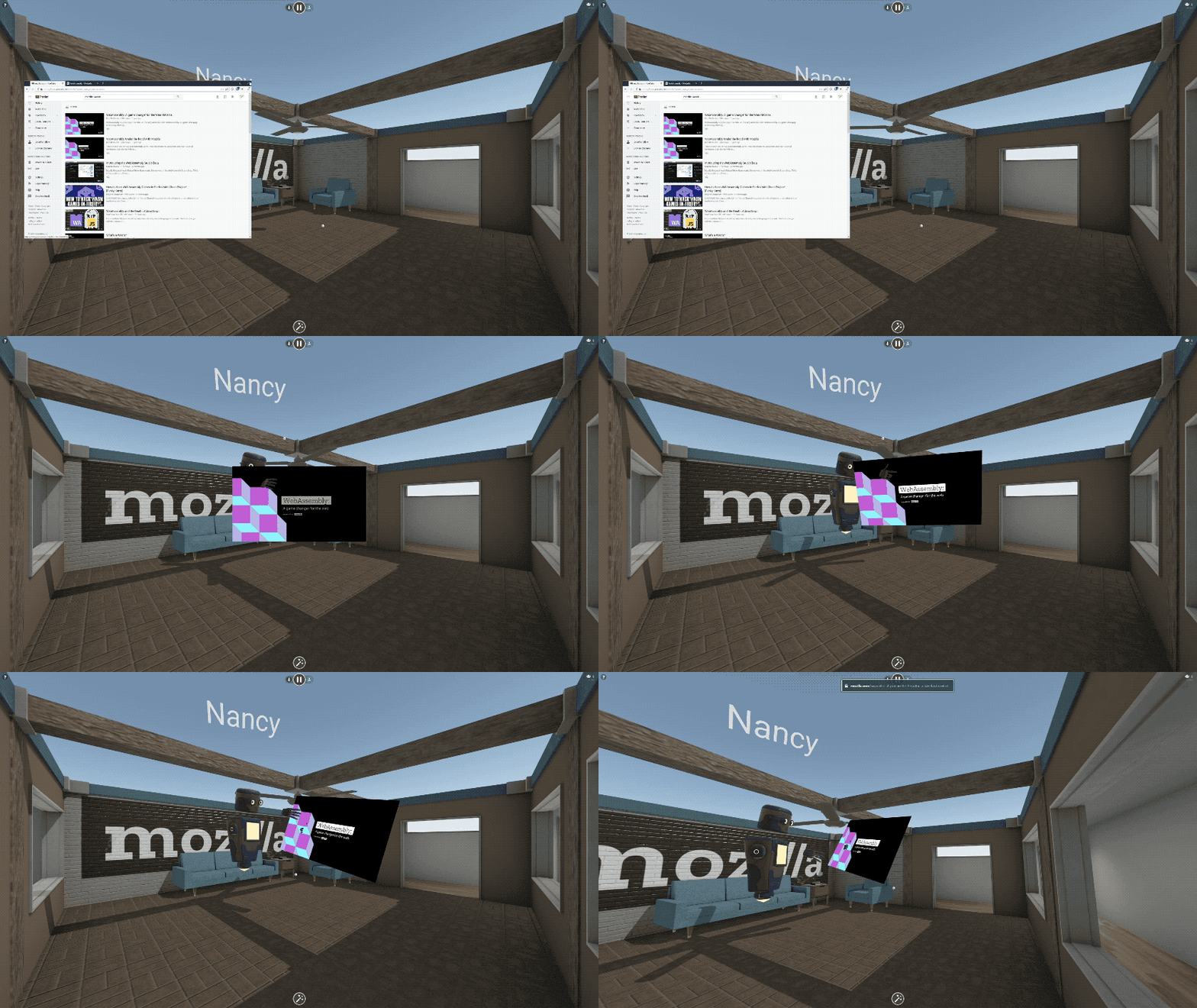
Being able to share a video with friends in VR so easily is transformative, but that’s just the beginning!
You can paste the URL to any image on the web, and we’ve added first-class support for all of your favorite image sites like imgur and Giphy. 3D content also works - you can paste links to 3D models on Sketchfab or Poly, or to any GLTF scene. It’s magical.
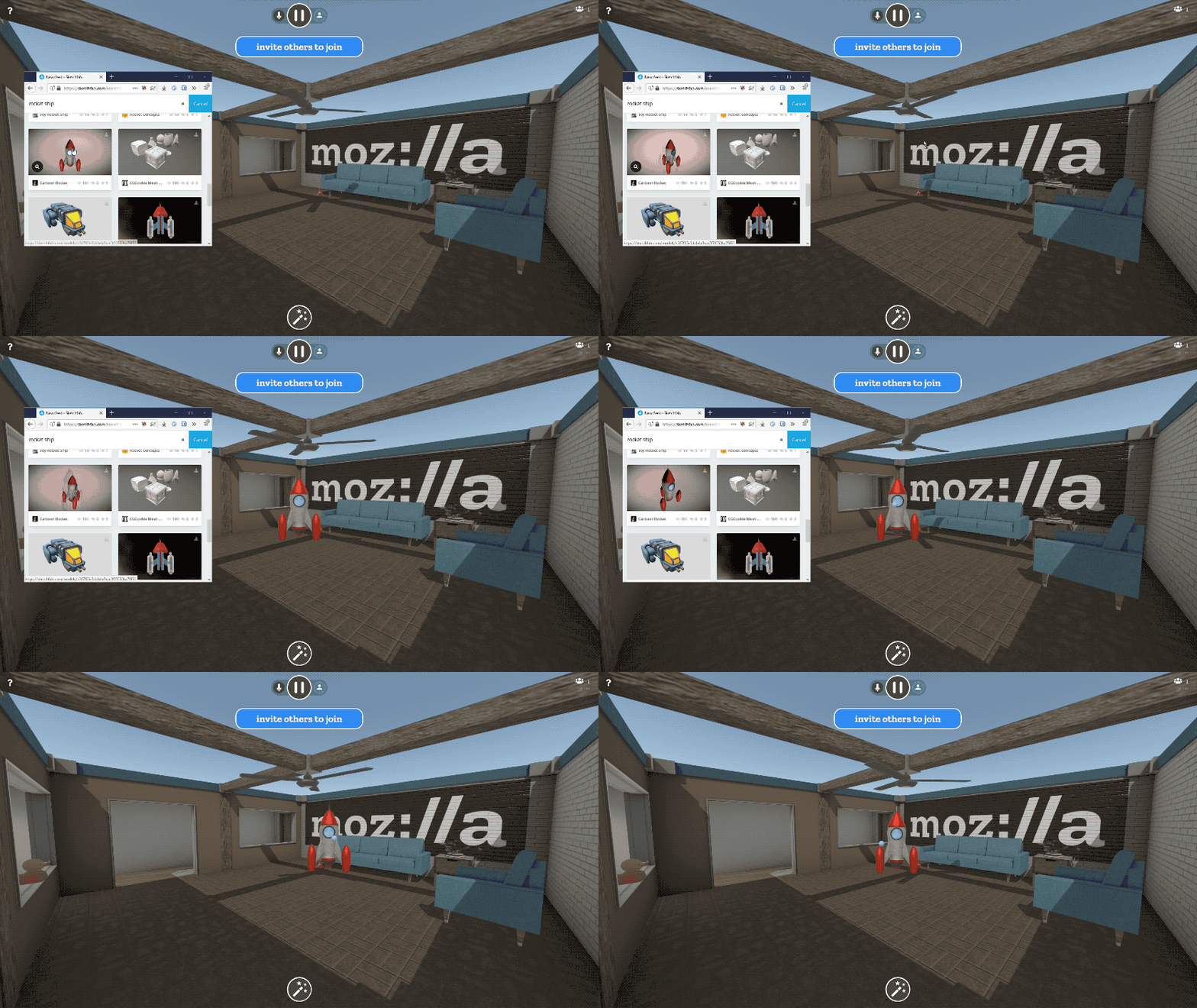
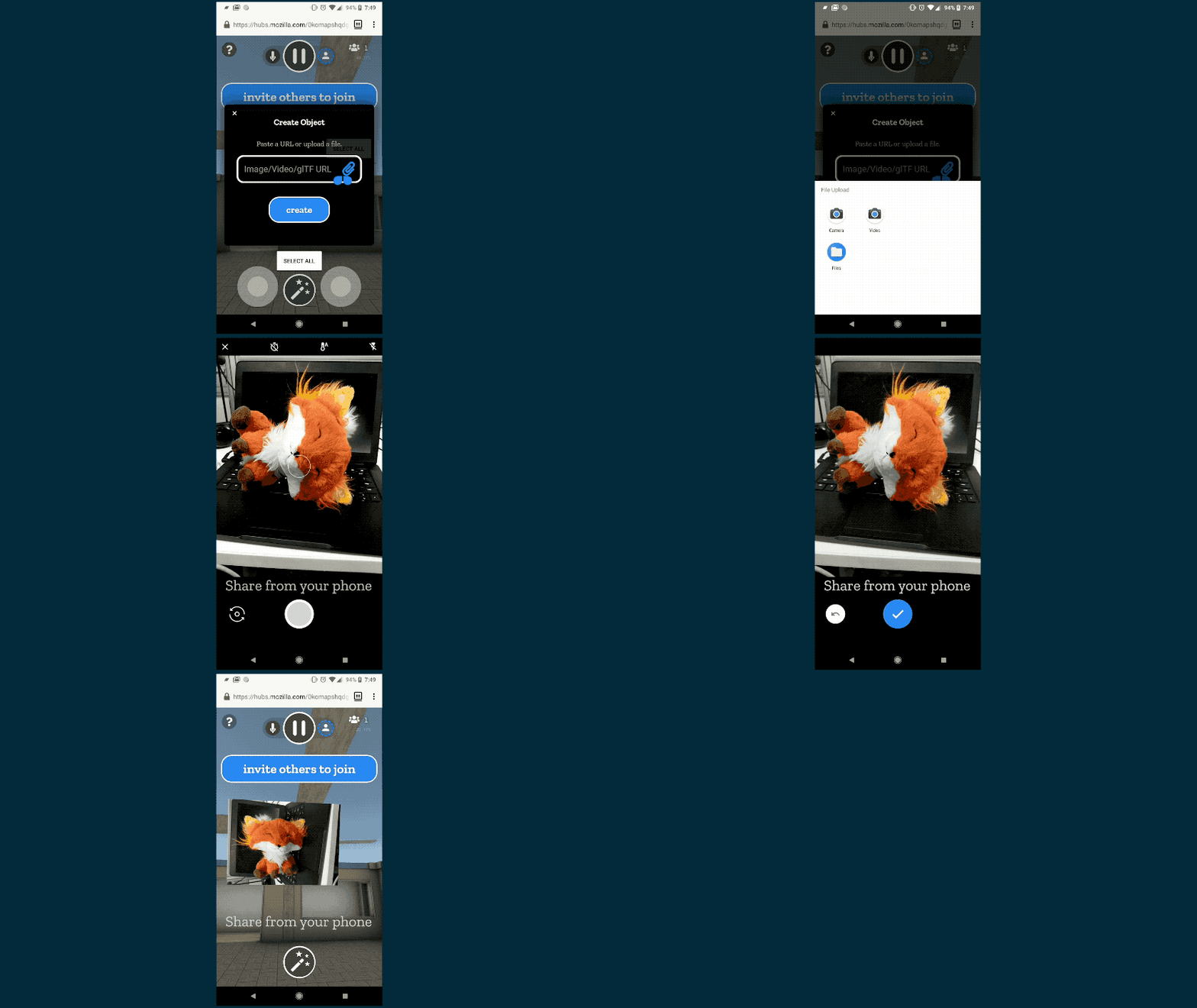
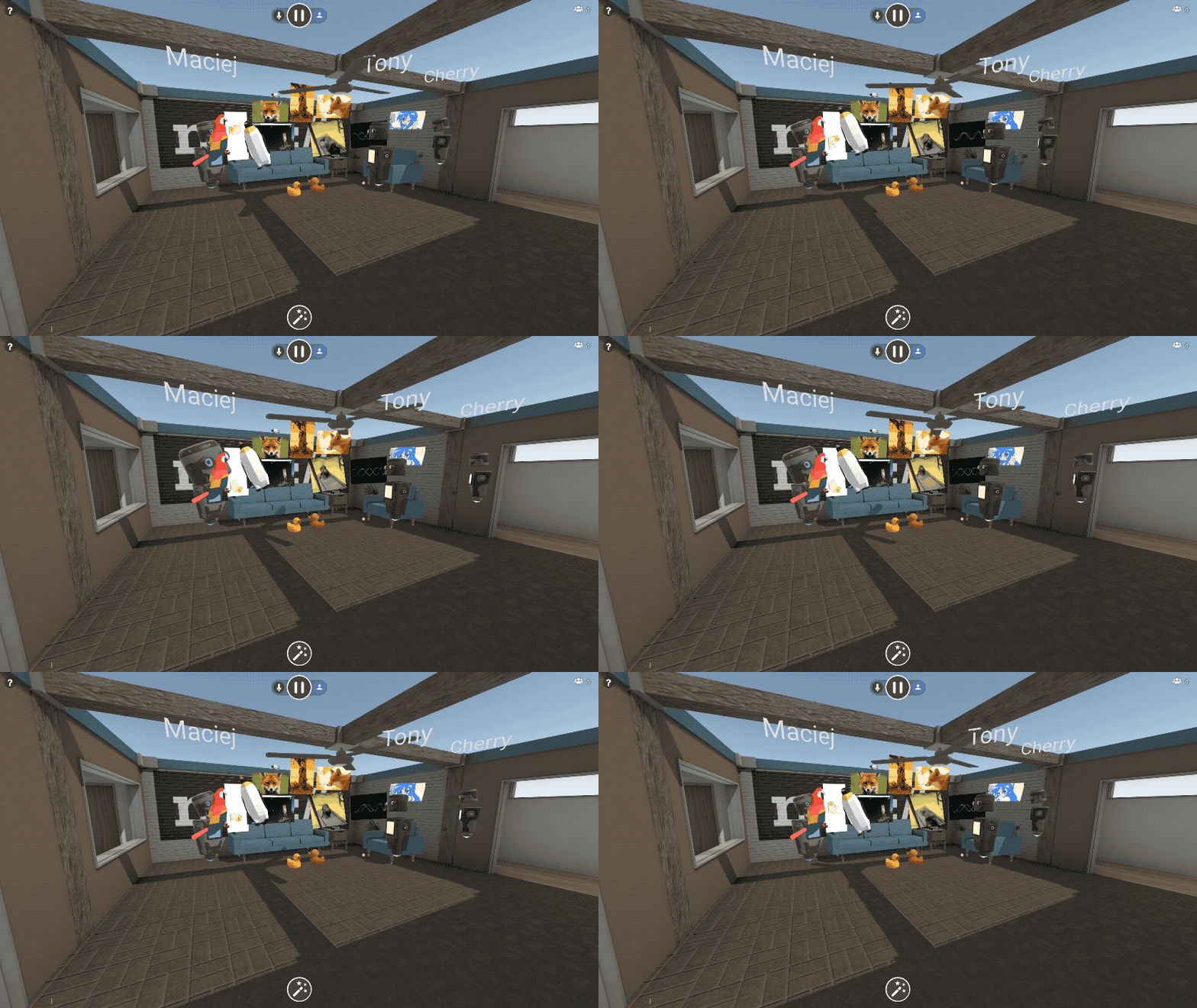
We didn’t stop there. We know that some things you’d like to share, like photos and documents, may be saved on your phone or PC. You can upload files, drag and drop files, or even paste content out of your clipboard right into Hubs. Upload a slide deck as a PDF, and you can flip through it together in VR. Export a 3D model to GLTF and drag it into the browser and everyone else will see it in 3D. Upload a few photos from your phone and everyone can arrange them together into a gallery. Take a screenshot, copy it to your clipboard, and paste it right into the room.
To protect your privacy, we’ve made sure any content you upload is only available to others in the room. It’s encrypted and removed when no longer needed. As always, the code is open source, so you can see how it works for yourself.
We’re beyond excited to see the browser already letting us experience Social Mixed Reality in whole new ways. We think there are endless ways people can use these new features, and we’ll be publishing some short video tutorials to help spark your creativity. We’ll be continually adding more and more supported content types and methods for bringing more media into Hubs. If you have ideas, feedback, or suggestions, please join us in the #social channel on the WebVR Slack or file a Github Issue.
We hope you enjoy this update!
https://blog.mozvr.com/new-in-hubs-images-videos-and-3d-models/
Lawmakers in the EU have proposed a new legal framework that will make it easier for police in one country to get access to user data in another country (so-called ‘e-evidence’) when investigating crimes. While the law seeks to address some important issues, there is a risk that it will inadvertently undermine due process and the rule of law in Europe. Over the coming months, we’ll be working with lawmakers in Europe to find a policy solution that effectively addresses the legitimate interests of law enforcement, without compromising the rights of our users or the security of our communications infrastructure.
Cloud computing is now ubiquitous. Where once law enforcement could get the data it needed with a warrant served against a local company, that data may now be stored halfway around the world, and consequently, those traditional warrants may no longer apply. To illustrate this problem in practice, think of a case in which a criminal gang operating in France and comprised of Dutch nationals commits a crime in Germany, and those who are most affected are Italian. Besides the obvious challenge of trying to establish which national law enforcement authority has jurisdiction to investigate the crime, there is an additional practical challenge of how to manage that investigation process in an efficient manner. Traditionally, for such cross-border investigations law enforcement and judicial authorities are required to cooperate within formal mechanisms and adhere to certain standards of due process and oversight. Yet herein lies the problem – EU lawmakers and law enforcement authorities claim these processes are too slow and burdensome for the modern cloud economy.
Against that backdrop, policymakers in Europe are seeking to create a new law that would make traditional warrants for so-called ‘e-evidence’ issued by an EU Member State enforceable on any company offering services in the EU. The EU’s move follows similar efforts by lawmakers in the US of late, where the recently-adopted US CLOUD Act creates a framework for more easily securing data stored overseas by internet companies.
The EU’s legislative proposal as drafted contains a number of serious weaknesses. For instance:
- It sweeps aside the due process safeguards that are essential to protect our users’ rights and meet their legitimate expectations of privacy;
- It offers preciously little detail on the procedural mechanisms that are a necessary underpinning of these kind of regimes e.g. how can a company like Mozilla be sure that a foreign warrant served on us actually comes from who it says it’s from; and,
- It does not confront the higher-order question of how a country can establish jurisdiction to investigate a crime in the first place, particularly in instances where several Member States have an interest.
In light of this, over the next few months we’ll be engaging closely with lawmakers in Brussels (the EU headquarters) and the Member State capitals to address the existing shortcomings. Our position is that this law will not strike an appropriate balance unless the following safeguards are incorporated:
- Data requests shall be necessary and proportionate, and subject to effective due process;
- There shall be no “gag orders” or other mechanisms that undermine transparency;
- There will be recognition that metadata (e.g. call logs, location data) is sensitive data; and,
- There will be clarity that no company or service should be compelled to undermine or hack the security features of its products and services.
When thinking about due process safeguards, it is crucial to note that the EU’s proposal is a major departure from global norms in this space. The arising interference with users’ expectation of privacy – and the risk that the new regime may engender rights abuses – means that the bar for ‘effective due process’ must necessarily be high. For instance, companies like Mozilla must always have the possibility to seek judicial review of data requests that risk violating our users’ rights and lawmakers must create clearing-houses and national single-points-of-contact to ensure that we can identify malicious attempts that exploit the new rules to misappropriate our users’ personal data.
Linked to this, it must be stressed that the proposed regime in Europe is the product of the unique political and legal culture that binds the EU’s 28 Member States. The level of convergence and integration of the EU Member States means that such a regime is, in principle at least, feasible. It is important that this proposed EU regime is not seen as a model for cross-border jurisdiction challenges per se. Indeed, we would strongly advise against similar mechanisms to regulate the lawful access relation between, say, the EU and the US.
The two institutions that oversee the EU legislative process – the European
Mozilla’s Internet Health Report 2018 explored concentration of power and centralization online through a spotlight article, “Too big tech?” Five U.S. technology companies often hold the five largest market capitalizations of any industry and any country in the world. Their software and services are entangled with virtually every part of our lives. These companies reached their market positions in part through massive innovation and investment, and they created extremely popular (and lucrative) user experiences. As a consequence of their success, though, the product and business decisions made by these companies move socioeconomic mountains.
And, like everyone, tech companies make mistakes, as well as some unpopular decisions. For many years, the negative consequences of their actions seemed dwarfed by the benefits. A little loss of privacy seemed easy to accept (for an American audience in particular) in exchange for a new crop of emojis. But from late 2016 through 2017, things changed. The levels of disinformation, abuse, tracking, and control crossed a threshold, sowing distrust in the public and catalyzing governments around the world to start asking difficult questions.
Since our “Too big tech?” piece was published, this trajectory of government concern has continued. The Facebook / Cambridge Analytica scandal generated testimony from Facebook CEO Mark Zuckerberg on both sides of the Atlantic. The European Commission levied a $5 billion fine on Google for practices associated with the Android mobile operating system. Meanwhile Republican Treasury Secretary Steve Mnuchin called for a serious look at the power of tech companies, and Democratic Senator Mark Warner outlined a 20 point regulatory proposal for social media and technology firms.
Against this backdrop, the Federal Trade Commission has announced a public comment period and a series of hearings to evaluate its mandate in current market environments. The impact of the internet, and the harms we have seen in recent months and years, will be front and center in many ways throughout this proceeding.
We submitted to the FTC written comments to identify a few key pieces that we believe are worthy of discussion over the course of this proceeding, and that speak to the dynamic we are experiencing with the internet today, as well as key pieces of the path forward to improve the health of the internet. Here’s the top-level summary of our filing:
- Centralization online is heading in the wrong direction.
- Existing metrics and tools are insufficient to promote competition.
- Interoperability is a powerful, ready-to-use key to unlock competition in the tech sector.
- Agency processes can be faster and more targeted than litigation.
- Changes to law, policy, and practice regarding internet competition should be grounded in technology and built to benefit all internet users and businesses.
To support competition in the tech sector, we need the FTC to move fast and break bad habits – specifically, outdated theories, measurements, and tools that don’t suffice for the internet era. The U.S. is the home of Silicon Valley, the birthplace of the internet, and the historical heart of tech innovation. And yet, we are headed down a path of excessive centralization and control, where someday the freedom to code and compete will be realized in full only for those who work for a few large corporations.
One particular lever for counterpressure that deserves more attention at the FTC and elsewhere is interoperability – so we made it a focal point for this filing. If the future of the internet stays grounded in standards and built out through an ecosystem of transparent third-party accessible APIs, we can preserve the digital platform economy as a springboard for our collective social and economic welfare, rather than watching it evolve into an oligarchy of gatekeepers over our data.
The post Mozilla files FTC comments calling for interoperability to promote competition appeared first on Open Policy & Advocacy.