Firefox 63 is rolling into Beta and it’s absolutely loaded with new features for extensions. There are some important new API, some major enhancements to existing API, and a large collection of miscellaneous improvements and bug fixes. All told, this is the biggest upgrade to the WebExtensions API since the release of Firefox Quantum.
An upgrade this large would not have been possible in a single release without the hard work of our Mozilla community. Volunteer contributors landed over 25% of all the features and bug fixes for WebExtensions in Firefox 63, a truly remarkable effort. We are humbled and grateful for your support of Firefox and the open web. Thank you.
Note: due to the large volume of changes in this release, the MDN documentation is still catching up. I’ve tried to link to MDN where possible, and more information will appear in the weeks leading up to the public release of Firefox 63.
Less Kludgy Clipboard Access
A consistent source of irritation for developers since the WebExtensions API was introduced is that clipboard access is not optimal. Having to use execCommand() to cut, copy and paste always felt like a workaround rather than a valid way to interact with the clipboard.
That all changes in Firefox 63. Starting with this release, parts of the official W3C draft spec for asynchronous clipboard API is now available to extensions. When using the clipboard, extensions can use standard the WebAPI to read and write to the clipboard using navigator.clipboard.readText() and navigator.clipboard.writeText(). A couple of things to note:
- clipboard.writeText is available to secure contexts and extensions, without requiring any permissions, as long as it is used in a user-initiated event callback. Extensions can request the clipboardWrite permission if they want to use clipboard.writeText outside of a user-initiated event callback. This preserves the same use conditions as document.execCommand(“copy”).
- clipboard.readText is available to extensions only and requires the clipboardRead permission. There currently is no way to expose the clipboard.readText API to web content since no permission system exists for it outside of extensions. This preserves the same use conditions as document.execCommand(“paste”).
In addition, the text versions of the API are the only ones available in Firefox 63. Support for the more general clipboard.read() and clipboard.write() API are awaiting clarity around the W3C spec and will be added in a future release.
Selecting Multiple Tabs
One of the big changes coming in Firefox 63 is the ability to select multiple tabs simultaneously by either Shift- or CTRL-clicking on tabs beyond the currently active tab. This allows you to easily highlight a set of tabs and move, reload, mute or close them, or drag them into another window. It is a very convenient feature that power users will appreciate.
In concert with this user-facing change, extensions are also gaining support for multi-select tabs in Firefox 63. Specifically:
- The tabs.onHighlighted event now handles multiple selected tabs in Firefox.
- The tabs.highlight API accepts an array of tab ID’s that should be selected.
- The tabs.Tab object properly sets the value of the highlighted property.
- The tabs.query API now accepts “highlighted” as a parameter and will return an array of the currently selected tabs.
- The tabs.update API can alter the status of selected tabs by setting the highlighted property.
A huge amount of gratitude goes to Oriol Brufau, the volunteer contributor who implemented every single change listed above. Without his hard work, multi-select tabs would not be available in Firefox 63. Thank you, Oriol!
P.S. Oriol wasn’t satisfied doing all of the work for multi-select tabs, he also fixed several issues with extension

Pick of the Month: Iridium for YouTube
by Particle
Play videos in a pop-out window, only see ads within subscribed channels, take video screenshots, and much more.
“Been using this for a couple of months and it’s the greatest YouTube extension ever. I have tried a lot of different ones and this one melts my heart.”
Featured: Private Bookmarks
by rharel
Password-protect your personal bookmarks.
“This capability was sorely needed, and is well done. Works as advertised, and is easy to use.”
Featured: Universal Bypass
by Tim “TimmyRS” Speckhals
Automatically skip annoying link shorteners.
“Wow you must try this extension.”
Featured: Copy PlainText
by erosman
Easily remove text formatting when saving to your clipboard.
“Works very well and is great for copying from browsers to HTML format emails, which often makes a complete mess of not only fonts but layout spacing as well.”
If you’d like to nominate an extension for featuring, please send it to amo-featured [at] mozilla [dot] org for the board’s consideration. We welcome you to submit your own add-on!
The post September’s featured extensions appeared first on Mozilla Add-ons Blog.
https://blog.mozilla.org/addons/2018/08/31/septembers-featured-extensions-2/
With the upcoming release of Firefox 62, we are pleased to welcome the 48 developers who contributed their first code change to Firefox in this release, 35 of whom were brand new volunteers! Please join us in thanking each of these diligent and enthusiastic individuals, and take a look at their contributions:

This has been another quite week full of bug fixes and UI polish. There are a few notable items, though.
Browsers
- Fixed some gamepad issues in Gecko. issue
- Added a new 3D spinner: issue
- More improvements to remote debugging: issue
Social
Hubs attendance is going strong. Along the way several people requested a space that was wide open and not distracting when they are sharing content, so the team added a new scene style called Wide Open Space, and it's live now!

Content Ecosystem
We are working on a new release of the WebVR exporter for Unity with refactored code, performance improvements, and other optimizations. Look for it soon.
https://blog.mozvr.com/this-week-in-mixed-reality-issue-18-hubs-edition/
Anyone who isn’t an expert on the internet would be hard-pressed to explain how tracking on the internet actually works. Some of the negative effects of unchecked tracking are easy to notice, namely eerily-specific targeted advertising and a loss of performance on the web. However, many of the harms of unchecked data collection are completely opaque to users and experts alike, only to be revealed piecemeal by major data breaches. In the near future, Firefox will — by default — protect users by blocking tracking while also offering a clear set of controls to give our users more choice over what information they share with sites.
Over the next few months, we plan to release a series of features that will put this new approach into practice through three key initiatives:
Improving page load performance
Tracking slows down the web. In a study by Ghostery, 55.4% of the total time required to load an average website was spent loading third party trackers. For users on slower networks the effect can be even worse.
Long page load times are detrimental to every user’s experience on the web. For that reason, we’ve added a new feature in Firefox Nightly that blocks trackers that slow down page loads. We will be testing this feature using a shield study in September. If we find that our approach performs well, we will start blocking slow-loading trackers by default in Firefox 63.
Removing cross-site tracking
In the physical world, users wouldn’t expect hundreds of vendors to follow them from store to store, spying on the products they look at or purchase. Users have the same expectations of privacy on the web, and yet in reality, they are tracked wherever they go. Most web browsers fail to help users get the level of privacy they expect and deserve.
In order to help give users the private web browsing experience they expect and deserve, Firefox will strip cookies and block storage access from third-party tracking content. We’ve already made this available for our Firefox Nightly users to try out, and will be running a shield study to test the experience with some of our beta users in September. We aim to bring this protection to all users in Firefox 65, and will continue to refine our approach to provide the strongest possible protection while preserving a smooth user experience.
Mitigating harmful practices
Deceptive practices that invisibly collect identifiable user information or degrade user experience are becoming more common. For example, some trackers fingerprint users — a technique that allows them to invisibly identify users by their device properties, and which users are unable to control. Other sites have deployed cryptomining scripts that silently mine cryptocurrencies on the user’s device. Practices like these make the web a more hostile place to be. Future versions of Firefox will block these practices by default.
Why are we doing this?
This is about more than protecting users — it’s about giving them a voice. Some sites will continue to want user data in exchange for content, but now they will have to ask for it, a positive change for people who up until now had no idea of the value exchange they were asked to make. Blocking pop-up ads in the original Firefox release was the right move in 2004, because it didn’t just make Firefox users happier, it gave the advertising platforms of the time a reason to care about their users’ experience. In 2018, we hope that our efforts to empower our users will have the same effect.
How to Manually Enable the Protections
Do you want to try out these protections in Firefox Nightly? You can control both features from the Firefox Nightly Control Center menu, accessible on the left-hand side of the address bar. In that menu you’ll see a new “Content Blocking” section. From there, you can:
- Enable the blocking of slow-loading trackers or cross-site tracking through third-party cookies by clicking “Add Blocking…” next to the respective option.
- In the “Content Blocking” preferences panel:
- Click the checkbox next to “Slow-Loading Trackers” to improve page load performance.
- Click the checkbox next to “Third-Party Cookies” and select “Trackers (recommended)” to block cross-site tracking cookies.
- You can disable these protections
Over the Summer I’ve come to organise quite a number of events in Mozilla’s London office. Early Summer we started doing lunchtime brown bags, where staff give a 10 ~ 15 minute informal talk about what they are currently working on or a topic of their interest.

So far we’ve covered MDN’s Browser Compat Data initiative, been given a high-level introduction to Gecko’s graphics stack, learned what goes into releasing Firefox, and had conversations about how web compatibility came about and why it’s a necessary evil. We’ve been given insight into the Spectre security vulnerability (and become mortally terrified as a result of it), learned how TLS 1.3 is analysed and proofed, and been gobsmacked by the meticulousness of Firefox Accounts’ security model.
Organising these small events have had a markedly positive effect on office environment. People have told me they are finding the time to come in to the office more often because of them, and they’ve been great for introducing the six interns we’ve had in London over Summer to Mozilla and our values.
For me as the organiser, they take very little time to put together. My most important piece of advice if you want to replicate this in another office would be to not ask for voluntary signups: I’ve had far greater success conscripting individuals privately. The irony is that nearly everyone I’ve approached thinks that what they do is not interesting enough to present, but I’d say the list above begs to differ.
I didn’t want to write one of those “all@” goodbye emails. At best, they generate ambivalence, maybe some sadness. And maybe they generate clutter in the inboxes of people who prefer their inboxes uncluttered. The point is, they don’t seem to improve things. I’m not sending one.
But I have taken the decision to leave Mozilla as a full-time employee. I’m leaving the industry, in fact. For the last 10 years, for everything I’ve learned, for the many opportunities and for the shared achievements, I’ve got nothing but gratitude towards my friends and colleagues. I cannot imagine I’ll work anywhere quite like this again.
Long before I joined Mozilla, it was the organisation that had restored my optimism about the future of tech. From the dark days of the dot-com crash and the failure of platform-independent client-side internet applications to live up to their initial promise (I’m looking at you, Java applets), Firefox showed the world that openness wins. Working here was always more than a job. It has been a privilege.
At their very least, Mozilla’s products are open platforms that make their users sovereign, serving as a reference and inspiration for others. And at their best, our products liberate developers, bringing them new opportunities, and they delight users such that complete strangers want to hug you (and no, I didn’t invent the Awesome Bar, but I know someone who did…).
So I’ve always been very proud of Mozilla, and of proud of the work the team I’m on – Open Innovation – does. Being Mozilla is not easy. Tilting at windmills is the job. We live in times when the scale of Internet companies means that these giants have resources to buy or copy just about any innovation that comes to market. Building for such a market – as well as the inherent challenge of building world-class user experiences in the extremely complex environment of content on the Web – also means identifying the gaps in the market and who our allies are in filling them. It’s a complex and challenging environment and it needs special people. I will miss them.

I’m in there somewhere [Credit: Gen Kanai, CC BY-NC-ND 2.0]
However, this is probably my last time in the Bay Area for a while. So I took the opportunity to see some old friends (I’ve worked in this industry for over 20 years now). A common theme? Many had gone back to using Firefox since the Quantum release in late 2017.
“Haven’t you heard?”, said one, explaining how his development team asked to prioritise Firefox support for their product, as that’s what they want to use themselves, “Firefox is cool again.”
I had to disagree: it has never stopped being cool.
In this series we are covering projects that explore what is possible when the web becomes decentralized or distributed. These projects aren’t affiliated with Mozilla, and some of them rewrite the rules of how we think about a web browser. What they have in common: These projects are open source, and open for participation, and share Mozilla’s mission to keep the web open and accessible for all.
Some projects start small, aiming for incremental improvements. Others start with a grand vision, leapfrogging today’s problems by architecting an idealized world. The InterPlanetary File System (IPFS) is definitely the latter – attempting to replace HTTP entirely, with a network layer that has scale, trust, and anti-DDOS measures all built into the protocol. It’s our pleasure to have an introduction to IPFS today from Kyle Drake, the founder of Neocities and Marcin Rataj, the creator of IPFS Companion, both on the IPFS team at Protocol Labs -Dietrich Ayala
IPFS – The InterPlanetary File System
We’re a team of people all over the world working on IPFS, an implementation of the distributed web that seeks to replace HTTP with a new protocol that is powered by individuals on the internet. The goal of IPFS is to “re-decentralize” the web by replacing the location-oriented HTTP with a content-oriented protocol that does not require trust of third parties. This allows for websites and web apps to be “served” by any computer on the internet with IPFS support, without requiring servers to be run by the original content creator. IPFS and the distributed web unmoor information from physical location and singular distribution, ultimately creating a more affordable, equal, available, faster, and less censorable web.
IPFS aims for a “distributed” or “logically decentralized” design. IPFS consists of a network of nodes, which help each other find data using a content hash via a Distributed Hash Table (DHT). The result is that all nodes help find and serve web sites, and even if the original provider of the site goes down, you can still load it as long as one other computer in the network has a copy of it. The web becomes empowered by individuals, rather than depending on the large organizations that can afford to build large content delivery networks and serve a lot of traffic.
The IPFS stack is an abstraction built on top of IPLD and libp2p:

Hello World
We have a reference implementation in Go (go-ipfs) and a constantly improving one in Javascript (js-ipfs). There is also a long list of API clients for other languages.
Thanks to the JS implementation, using IPFS in web development is extremely easy. The following code snippet…
- Starts an IPFS node
- Adds some data to IPFS
- Obtains the Content IDentifier (CID) for it
- Reads that data back from IPFS using the CID
Open Console (Ctrl+Shift+K)
That’s it!
Before diving deeper, let’s answer key questions:
Who else can access it?
Everyone with the CID can access it. Sensitive files should be encrypted before publishing.
How long will this content exist? Under what circumstances will it go away? How does one remove it?
The permanence of content-addressed data in IPFS is intrinsically bound to the active participation of peers interested in providing it to others. It is impossible to remove data from other peers but if no peer is keeping it alive, it will be “forgotten” by the swarm.
The public HTTP gateway will keep the data available for a few hours — if you want to ensure long term availability make sure to pin important data at nodes you control. Try IPFS Cluster: a stand-alone application and a CLI client to allocate, replicate and track pins across a cluster of IPFS daemons.
Developer Quick
What is Standup?
Standup is a system for capturing standup-style posts from individuals making it easier to see what's going on for teams and projects. It has an associated IRC bot standups for posting messages from IRC.
Short version
Standups project is done and we're going to decommission all the parts in the next couple of months.
Long version: End of days
Paul and I run Standups and have for a couple of years now. We do the vast bulk of work on it covering code changes, feature implementing, bug fixing, site administration and user support. Neither of us use it.
There are occasional contributions from other people, but not enough to keep the site going without us.
Standups has a lot of issues and a crappy UI/UX. Standups continues to accrue technical debt.
The activity seems to be dwindling over time. Groups are going elsewhere.
In June, I wrote Standup report: June 8th, 2018 in which I talked about us switching to swag-driven development as a way to boost our energy level in the project, pull in contributors, etc. We added a link to the site. It was a sort of last-ditch attempt to get the project going again.
Nothing happened. I heard absolutely nothing from anyone in any medium about the post or any of the thoughts therein.
Sometimes, it's hard to know when a project is dead. You sometimes have metrics that could mean something about the health of a project, but it's hard to know for sure. Sometimes it's hard to understand why you're sitting in a room all by yourself. Will something happen? Will someone show up? What if we just wait 15 minutes more?
I don't want to wait anymore. The project is dead. If it's not actually really totally dead, it's such a fantastic fascimile of dead that I can't tell the difference. There's no point in me waiting anymore; nothing's going to change and no one is going to show up.
Sure, maybe I could wait another 15 minutes--what's the harm since it's so easy to just sit and wait? The harm is that I've got so many things on my plate that are more important and have more value than this project. Also, I don't really like working on this project. All I've experienced in the last year was the pointy tips of bug reports most of them related to authentication. The only time anyone appreciates me spending my very very precious little free time on Standups is when I solicit it.
Also, I don't even know if it's "Standups" with an "s" or "Standup" without the "s". It might be both. I'm tired of looking it up to avoid embarrassment.
Timeline for shutdown
Shutting down projects like Standups is tricky and takes time and energy. I think tentatively, it'll be something like this:
- August 29th -- Announce end of Standups. Add site message (assuming site comes back up). Adjust irc bot reply message.
- October 1st -- Shut down IRC bots.
- October 15th -- Decommission infrastructure: websites, DNS records, Heroku infra; archive github repositories, etc.
I make no promises on that timeline. Maybe things will happen faster or slower depending on circumstances.
What we're not going to do
There are a few things we're definitely not going to do when decommissioning:
First, we will not be giving the data to anyone. No db dumps, no db access, nothing. If you want the data, you can slurp it down via the existing APIs on your own. [1]
Second, we're not going to keep the site going in read-only mode. No read-only mode or anything like that unless someone gives us a really really compelling reason to do that and has a last name that rhymes with Honnen. If you want to keep a historical mirror of the site, you can do that on your own.
Third, we're not going to point www.standu.ps or standu.ps at another project. Pretty sure the plan will be to have those names point to nothing or something like that. IT probably has a process for that.
| [1] | Turns out when we did the rewrite in 2016, we didn't reimplement the GET API. Issue 478 covers creating a temporary new |
Dear developers of password managers, we communicate quite regularly, typically within the context of security bug bounty programs. Don’t get me wrong, I don’t mind being paid for finding vulnerabilities in your products. But shouldn’t you do your homework before setting up a bug bounty program? Why is it the same basic mistakes that I find in almost all password managers? Why is it that so few password managers get AutoFill functionality right?
Of course you want AutoFill to be part of your product, because from the user’s point of view it’s the single most important feature of a password manager. Take it away and users will consider your product unusable. But from the security point of view, filling in passwords on the wrong website is almost the worst thing that could happen. So why isn’t this part getting more scrutiny? There is a lot you can do, here are seven recommendations for you.
1. Don’t use custom URL parsers
Parsing URLs is surprisingly complicated. Did you know that the “userinfo” part of it can contain an @ character? Did you think about data: URLs? There are many subtle details here, and even well-established solutions might have corner cases where their parser produces a result that’s different from the browser’s. But you definitely don’t want to use a URL parser that will disagree with the browser’s — if the browser thinks that you are on malicious.com then you shouldn’t fill in the password for google.com no matter what your URL parser says.
Luckily, there is an easy solution: just use the browser’s URL parser. If you worry about supporting very old browsers, the same effect can be achieved by creating an element and assigning the URL to be parsed to its href property. You can then read out the link’s hostname property without even adding the element to the document.
2. Domain name is not “the last two parts of a host name”
Many password managers will store passwords for a domain rather than an individual host name. In order to do this, you have to deduce the domain name from the host name. Very often, I will see something like the old and busted “last two parts of a host name” heuristic. It works correctly for foo.example.com but for foo.example.co.uk it will consider co.uk to be the domain name. As a result, all British websites will share the same passwords.
No amount of messing with that heuristic will save you, things are just too complicated. What you need is the Public Suffix List, it’s a big database of rules which can be applied to all top-level domains. You don’t need to process that list yourself, there is a number of existing solutions for that such as the psl package.
3. Don’t forget about raw IP addresses
Wait, there is a catch! The Public Suffix List will only work correctly for actual host names, not for IP addresses. If you give it something like 192.168.0.1 you will get 0.1 back. What about 1.2.0.1? Also 0.1. If your code doesn’t deal with IP addresses separately, it will expose passwords for people’s home routers to random websites.
What you want is recognizing IP addresses up front and considering the entire IP address as the “domain name” — passwords should never be shared between different IP addresses. Recognizing IP addresses is easier said that done however. Most solutions will use a regular expression like /^\d{1-3}\.\d{1-3}\.\d{1-3}\.\d{1-3}$/. In fact, this covers pretty much all IPv4 addresses you will usually see. But did you know that 0xC0.0xA8.0x00.0x01 is a valid IPv4 address? Or that 3232235521 is also an IPv4 address?
Things get even more complicated once you add IPv6 addresses to the mix. There are plenty of different notations to represent an IPv6 address as well, for example the last 32 bits of the address can be written like an IPv4 address. So you might want to use an elaborate solution that considers all these details, such as the ip-address package.
4. Be careful with what host names you consider equivalent
It’s understandable that you want to spare your users disappointments like “I added a password on foo.example.com, so
As part of the efforts to build a new artifact system, I wrote a CLI program to handle Taskcluster Artifact upload and download. This is written in Go and as a result the binaries are quite large. Since I'd like this utility to be used broadly within Mozilla CI, which requires a reasonably sized binary. I was curious about what the various methods are and what the trade-offs of each would be.
A bit of background is that Go binaries are static binaries which have the Go runtime and standard library built into them. This is great if you don't care about binary size but not great if you do.

To reproduce my results, you can do the following:
go get -u -t -v github.com/taskcluster/taskcluster-lib-artifact-go
cd $GOPATH/src/github.com/taskcluster/taskcluster-lib-artifact-go
git checkout 6f133d8eb9ebc02cececa2af3d664c71a974e833
time (go build) && wc -c ./artifact
time (go build && strip ./artifact) && wc -c ./artifact
time (go build -ldflags="-s") && wc -c ./artifact
time (go build -ldflags="-w") && wc -c ./artifact
time (go build -ldflags="-s -w") && wc -c ./artifact
time (go build && upx -1 ./artifact) && wc -c ./artifact
time (go build && upx -9 ./artifact) && wc -c ./artifact
time (go build && strip ./artifact && upx -1 ./artifact) && wc -c ./artifact
time (go build && strip ./artifact && upx --brute ./artifact) && wc -c ./artifact
time (go build && strip ./artifact && upx --ultra-brute ./artifact) && wc -c ./artifact
time (go build && strip && upx -9 ./artifact) && wc -c ./artifact
Since I was removing a lot of debugging information, I figured it'd be worthwhile checking that stack traces are still working. To ensure that I could definitely crash, I decided to panic with an error immediately on program startup.

Even with binary stripping and the maximum compression, I'm still able to get valid stack traces. A reduction from 9mb to 2mb is definitely significant. The binaries are still large, but they're much smaller than what we started out with. I'm curious if we can apply this same configuration to other areas of the Taskcluster Go codebase with similar success, and if the reduction in size is worthwhile there.
I think that using strip and upx -9 is probably the best path forward. This combination provides enough of a benefit over the non-upx options that the time tradeoff is likely worth the effort.
A previous post discussed a planned Firefox Nightly experiment involving secure DNS via the DNS over HTTPS (DoH) protocol. That experiment is now complete and this post discusses the results.
Browser users are currently experiencing spying and spoofing of their DNS information due to reliance on the unsecured traditional DNS protocol. A paper from the 2018 Usenix Security Symposium provides a new data point on how often DNS is actively interfered with – to say nothing of the passive data collection that it also endures. DoH will let Firefox securely and privately obtain DNS information from one or more services that it trusts to give correct answers and keep the interaction private.
Using a trusted DoH cloud based service in place of traditional DNS is a significant change in how networking operates and it raises many things to consider as we go forward when selecting servers (see “Moving Forward” at the end of this post). However, the initial experiment focused on validating two separate important technical questions:
- Does the use of a cloud DNS service perform well enough to replace traditional DNS?
- Does the use of a cloud DNS service create additional connection errors?
During July, about 25,000 Firefox Nightly 63 users who had previously agreed to be part of NIghtly experiments participated in some aspect of this study. Cloudflare operated the DoH servers that were used according to the privacy policy they have agreed to with Mozilla. Each user was additionally given information directly in the browser about the project. That information included the service provider, and an opportunity to decline participation in the study.

The experiment generated over a billion DoH transactions and is now closed. You can continue to manually enable DoH on your copy of Firefox Nightly if you like. See the bottom of the original announcement for instructions.
Results
Using HTTPS with a cloud service provider had only a minor performance impact on the majority of non-cached DNS queries as compared to traditional DNS. Most queries were around 6 milliseconds slower, which is an acceptable cost for the benefits of securing the data. However, the slowest DNS transactions performed much better with the new DoH based system than the traditional one – sometimes hundreds of milliseconds better.
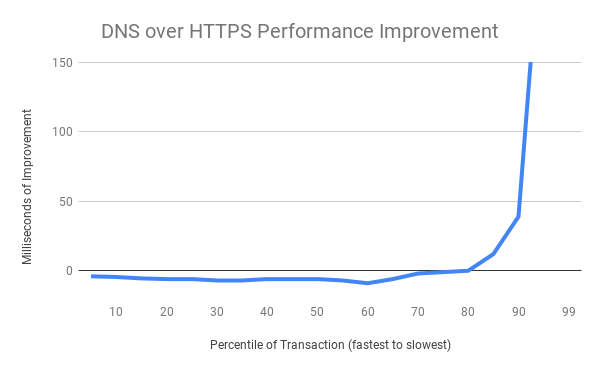
The above chart shows the net improvement of the DoH performance distribution vs the traditional DNS performance distribution. The fastest DNS exchanges are at the left of the chart and the slowest at the right. The slowest 20% of DNS exchanges are radically improved (improvements of several seconds are truncated for chart formatting reasons at the extreme), while the majority of exchanges exhibit a small tolerable amount of overhead when using a cloud service. This is a good result.
We hypothesize the improvements at the tail of the distribution are derived from 2 advantages DoH has compared to traditional DNS. First, is the consistency of the service operation – when dealing with thousands of different operating system defined resolvers there are surely some that are overloaded, unmaintained, or forwarded to strange locations. Second, HTTP’s use of modern loss recovery and congestion control allow it to better operate on very busy or low quality networks.
The experiment also considered connection error rates and found that users using the DoH cloud service in ‘soft-fail’ mode experienced no statistically significant different rate of connection errors than users in a control group using traditional DNS. Soft-fail mode primarily uses DoH, but it will fallback to traditional DNS when a name does not resolve correctly or when a connection to the DoH provided address fails. The connection error rate measures whether an HTTP channel can be successfully established from a name and therefore incorporates the fallbacks into its measurements. These fallbacks are needed to ensure seamless operation in the presence of firewalled services and captive portals.
Moving Forward
We’re committed long term to building a larger ecosystem
Background
At Mozilla, we're developing the Taskcluster environment for doing Continuous Integration, or CI. One of the fundamental concerns in a CI environment is being able to upload and download files created by each task execution. We call them artifacts. For Mozilla's Firefox project, an example of how we use artifacts is that each build of Firefox generates a product archive containing a build of Firefox, an archive containing the test files we run against the browser and an archive containing the compiler's debug symbols which can be used to generate stacks when unit tests hit an error.The problem
In the old Artifact API, we had an endpoint which generated a signed S3 url that was given to the worker which created the artifact. This worker could upload anything it wanted at that location. This is not to suggest malicious usage, but that any errors or early termination of uploads could result in a corrupted artifact being stored in S3 as if it were a correct upload.If you created an artifact with the local contents "hello-world\n", but your internet connection dropped midway through, the S3 object might only contain "hello-w". This went silent and uncaught until something much later down the pipeline (hopefully!) complained that the file it got was corrupted. This corruption is the cause of many orange-factor bugs, but we have no way to figure out exactly where the corruption is happening.
Our old API was also very challenging to use and artifact handling in tasks. It would often require a task writer to use one of our client libraries to generate a Taskcluster-Signed-URL and Curl to do uploads. For a lot of cases, this is really hazard fraught. Curl doesn't fail on errors by default (!!!), Curl doesn't automatically handle "Content-Encoding: gzip" responses without "Accept: gzip", which we sometimes need to serve. It requires each user figure all of this out for themselves, each time they want to use artifacts.
We also had a "Completed Artifact" pulse message which isn't actually sending anything useful. It would send a message when the artifact is allocated in our metadata tables, not when the artifact was actually complete. We could mark a task as being completed before all of the artifacts were finished being uploaded. In practice, this was avoided by avoiding a call to complete the task before the uploads were done, but it was a convention.
Our solution
We wanted to address a lot of issues with Taskcluster Artifacts. Specifically the following issues are ones which we've tackled:- Corruption during upload should be detected
- Corruption during download should be detected
- Corruption of artifacts should be attributable
- S3 Eventual Consistency error detection
- Caches should be able to verify whether they are caching valid items
- Completed Artifact messages should only be sent when the artifact is actually complete
- Tasks should be unresolvable until all uploads are finished
- Artifacts should be really easy to use
- Artifacts should be able to be uploaded with browser-viewable gzip encoding
Code
Here's the code we wrote for this project:- https://github.com/taskcluster/remotely-signed-s3 -- A library which wraps the S3 APIs using the lower level S3 REST Api and uses the aws4 request signing library
- https://github.com/taskcluster/taskcluster-lib-artifact -- A light wrapper around remotely-signed-s3 to enable JS based uploads and downloads
- https://github.com/taskcluster/taskcluster-lib-artifact-go -- A library and CLI written in Go
- https://github.com/taskcluster/taskcluster-queue/commit/6cba02804aeb05b6a5c44134dca1df1b018f1860 -- The final Queue patch to enable the new Artifact API
Upload Corruption
If an artifact is uploaded with a different set of bytes to those which were expected, we should fail the upload. The S3 V4 signatures system allows us to sign a request's headers, which includes an X-Amz-Content-Sha256 and Content-Length header. This means that the request headers we get back from signing can only be used for a request which sets the X-Amz-Content-Sha256 and Content-Length to the value provided at signing. The S3 library checks that the body of each request's Sha256 checksum matches the value provided in this header and also the Content-Length.The requests we get from the Taskcluster Queue can only be used to upload the exact file we asked permission to upload. This means that the only set of bytes that will allow the request(s) to S3 to complete sucessfully will be the ones we initially told the Taskcluster Queue about.
Two years ago, we released the Firefox Hardware Report to share with the public the state of desktop hardware. Whether you’re a web developer deciding what hardware settings to test against or someone just interested in CPUs and GPUs, we wanted to provide a public resource to show exactly what technologies are running in the wild.
This year, we’re continuing the tradition by releasing the Firefox Public Data Report. This report expands on the hardware report by adding data on how Firefox desktop users are using the browser and the web. Ever wanted to know the effect of Spring Festival on internet use in China? (it goes down.) What add-on is most popular this week in Russia? (it’s Визуальные закладки.) What country averages the most browser use per day? (Americans, with about 6 to 6.5 hours of use a day.) In total there are 10 metrics, broken down by the top 10 countries, with plans to add more in the future.
Similar to the hardware report for developers, we hope the report can be a resource for journalists, researchers, and the public for understanding not only the state of desktop browsing but also how data is used at Mozilla. We try to be open by design and users should know how data is collected, what data is collected, and how that data is used.
We collect non-sensitive data from the Firefox desktop browsers’ Telemetry system, which sends us data on the browser’s performance, hardware, usage and customizations. All data undergoes an extensive review process to ensure that anything we collect is necessary and secure. If you’re curious about exactly what data you’re sending to Mozilla, you can see for yourself by navigating to about:telemetry in the Firefox browser (and if you’re uncomfortable with sending any of this data to Firefox, you can always disable data collection by going to about:preferences#privacy.)
With this data, we aggregate metrics for a variety of use cases, from tracking crash rates to answering specific product questions (how many clients have add-ons? 35% this week.) In addition we measure the impact of experiments that we run to improve the browser.
Firefox is an open source project and we think the data generated should be useful to the public as well. Code contributors should be able to see how many users their work impacted last month (256 million), researchers should be able to know how browser usage is changing in developing nations, and the general public should be able to see how we use data.
After all, it’s your data.
The post Let’s be Transparent appeared first on The Mozilla Blog.
https://blog.mozilla.org/blog/2018/08/28/lets-be-transparent/
Cathy Davidson joined the Mozilla Foundation board in 2012, and has been a force helping us broaden our horizons and enter new areas. Cathy was the first person to join the Foundation board without a multi-year history with browsers or open source. This was an act of bravery!
Cathy is a leading educational innovator and a pioneer in recognizing the importance of digital literacy. She co-founded HASTAC (Humanities, Arts, Science, and Technology Advanced Collaboratory) in 2002. HASTAC is dedicated to rethinking the future of learning in the digital age, and is considered to be the world’s first and oldest academic social network (older than Facebook or even MySpace). She’s been directing or co-directing HASTAC since its founding.
Cathy has been using the Mozilla Manifesto in her classes for years, asking students to describe how the Manifesto is applicable in their world.
Cathy has been a forceful figure in Mozilla’s expansions in learning, outreach and more broad-based programs generally. She set the stage for broadening the expertise in the Mozilla Foundation board. We’ve been building a board with an increasing diversity of perspectives ever since she joined.
Three years ago, Cathy took on a new role as a Distinguished Professor and the Director of the Futures Initiative at the City University of New York, a university that makes higher learning accessible to an astounding 274,000 students per year. With these new responsibilities taking up more of her time, Cathy asked that she roll off the Mozilla Foundation board.
Cathy remains a close friend of Mozilla, and we’re in close contact about work we might continue to do together. Currently, we’re exploring the limitations of “STEM” education — in particular the risks of creating new generations of technologists that lack serious training and toolsets for considering the interactions of technology with societies, a topic she explores in her latest book, The New Education: How to Revolutionize the University to Prepare Students for a World in Flux.
Please join me in thanking Cathy for her tenure as a board member, and wishing her tremendous success in her new endeavors.
The post Thank You, Cathy Davidson appeared first on The Mozilla Blog.
https://blog.mozilla.org/blog/2018/08/27/thank-you-cathy-davidson/
3.5 years ago we implemented and integrated SETA. This has a net effect today of reducing our load between 60-70%. SETA works on the premise of identifying specific test jobs that find real regressions and marking them as high priority. While this logic is not perfect, it proves a great savings of test resources while not adding a large burden to our sheriffs.
There are a two things we could improve upon:
- a test job that finds a failure runs dozens if not hundreds of tests, even though the job failed for only a single test that found a failure.
- in jobs that are split to run in multiple chunks, it is likely that tests failing in chunk 1 could be run in chunk X in the future- therefore making this less reliable
I did an experiment in June (was PTO and busy on migrating a lot of tests in July/August) where I did some queries on the treeherder database to find the actual test cases that caused the failures instead of only the job names. I came up with a list of 171 tests that we needed to run and these ran in 6 jobs in the tree using 147 minutes of CPU time.
This was a fun project and it gives some insight into what a future could look like. The future I envision is picking high priority tests via SETA and using code coverage to find additional tests to run. There are a few caveats which make this tough:
- Not all failures we find are related to a single test- we have shutdown leaks, hangs, CI and tooling/harness changes, etc. This experiment only covers tests that we could specify in a manifest file (about 75% of the failures)
- My experiment didn’t load balance on all configs. SETA does a great job of picking the fewest jobs possibly by knowing if a failure is windows specific we can run on windows and not schedule on linux/osx/android. My experiment was to see if we could run tests, but right now we have no way to schedule a list of test files and specify which configs to run them on. Of course we can limit this to run “all these tests” on “this list of configs”. Running 147 minutes of execution on 27 different configs doesn’t save us much, it might take more time than what we currently do.
- It was difficult to get the unique test failures. I had to do a series of queries on the treeherder data, then parse it up, then adjust a lot of the SETA aggregation/reduction code- finally getting a list of tests- this would require a few days of work to sort out if we wanted to go this route and we would need to figure out what to do with the other 25% of failures.
- The only way to run is using per-test style used for test-verify (and the in-progress per-test code coverage). This has a problem of changing the way we report tests in the treeherder UI- it is hard to know what we ran and didn’t run and to summarize between bugs for failures could be interesting- we need a better story for running tests and reporting them without caring about chunks and test harnesses (for example see my running tests by component experiment)
- Assuming this was implemented- this model would need to be tightly integrated into the sheriffing and developer workflow. For developers, if you just want to run xpcshell tests, what does that mean for what you see on your try push? For sheriffs, if there is a new failure, can we backfill it and find which commit caused the problem? Can we easily retrigger the failed test?
I realized I did this work and never documented it. I would be excited to see progress made towards running a more simplified set of tests, ideally reducing our current load by 75% or more while keeping our quality levels high.
Last month, privacy researcher and Mozilla Fellow Hang Do Thi Duc released Public By Default, a sobering look at the vast amount of personal data that’s easily accessible on Venmo, the mobile payment app.
By using Venmo’s public API and its “public by default” setting for user transactions, Hang was able to watch a couple feud on Valentine’s Day, observe a woman’s junk food habits, and peer into a marijuana dealer’s business operations. Seven million people use Venmo every month — and many may not know that their transactions are available for anyone to see.
Privacy, and not publicity, should be the default.
Despite widespread coverage of Hang’s work — and a petition by Mozilla that has garnered more than 17,000 signatures — Venmo transactions are still public by default.
But on August 23, Bloomberg reported that “In recent weeks, executives at PayPal Holdings Inc., the parent company of Venmo, were weighing whether to remove the option to post and view public transactions, said a person familiar with the deliberations. It’s unclear if those discussions are still ongoing.”
Today, we’re urging Venmo: See these important discussions through. Put users’ privacy first by making transactions private by default.
Ashley Boyd is Mozilla’s VP of Advocacy.
The post Dear Venmo: Update Your Privacy Settings appeared first on The Mozilla Blog.
https://blog.mozilla.org/blog/2018/08/27/dear-venmo-update-your-privacy-settings/
Background
Taskcluster uses EC2 instances to run tasks. These instances are created in response to real time demand from the Queue by a combination of services, Aws-Provisioner and EC2-Manager. This post is about how we get Taskcluster credentials onto these instances.In the beginning, we took a simple approach and set credentials in the AMI. The AMI is a snapshot of a machine. This snapshot gets copied over to the disk before booting each machine. This had the disadvantage that the AMI used would need to be kept private.
In this approach, we need to know exactly which worker type an AMI is designed for. This would result in having hundreds of AMIs for each update of the worker program, since each worker type would need its own credentials. We wouldn't be able to have credentials which are time-limited to the desired lifespan of the instance, since they'd need to be generated before doing imaging. The last major limit in this design was that each worker shared the same credentials. There was no way to securely distinguish between two workers.
Our second approach was to build this logic into the Aws-Provisioner in a system called "Provisioner Secrets". This was our first pass at removing credentials from our AMIs. With this system, each worker type definition can have a set of secrets in a JSON field. These secrets would then be inserted into an Azure-Entities entity identified by a UUID, called the security token. This security token was passed to the instance through the EC2 Meta-Data service's UserData field.
The UserData field is readable to any process on the machine which can make a request to the service's IP address. That means we cannot rely on it being secret. To work around this, we required workers call an API on the Aws-Provisioner to delete the secrets and security token.
This approach had a lot of benefits, but still isn't ideal. We are limited in how we could request instances from the EC2 API. Each API request for an instance had to have a unique security token. Since there is no support for batching independent instance requests, we could only ever have one instance per API request. This caused us many problems around API throttling from EC2 and precluded us from using more advanced EC2 systems like Spot Fleet.
Additionally, since the security token is created before the instance id is known, we weren't able to generate instance isolated taskcluster credentials. We want to be able to issue scopes like "worker-type:builder" for things which are specific to the worker type. These let each worker access anything which is limited to its worker type. This is for things like claiming work from the Queue.
We would also like to be able to securely distinguish between two instances. To do this, we want to grant scopes like "worker-group:ec2_us-east-1:worker-id:worker1" and "worker-group:ec2_us-east-1:worker-id:worker2" so that worker1 and worker2 can only call their relevant APIs.
The last concern with this approach is that it's not compatible with the new Worker Manager system which we're building to consolidate management of our instances.
We need a new approach.
The New Approach to Credentials
Through conversations with our wonderful EC2 support team, we were made aware of the signed Instance Identity Documents in the metadata service. These documents are small bits of JSON which are signed by an AWS provided private key.Here's an example of the document:
$ cat test-files/document
{
  "accountId" : "692406183521",
  "architecture" : "x86_64",
  "availabilityZone" : "us-west-2a",
  "billingProducts" : null,
  "devpayProductCodes" : null,
  "imageId" : "ami-6b8cef13",
  "instanceId" : "i-0a30e04d85e6f8793",
  "instanceType" : "t2.nano",
  "kernelId" : null,
  "marketplaceProductCodes" : null,
  "pendingTime" : "2018-05-09T12:30:58Z",
  "privateIp" : "172.31.46.215",
  "ramdiskId" : null,
  "region" : "us-west-2",
  "version" : "2017-09-30"
}
This document is accompanied by two signatures, one based on a SHA-1 digest and one on a SHA-256 digest. After some back and forth on the specifics with EC2, we decided to implement the SHA-256 based digest version. The signatures were provided in S/MIME (PKCS#7) format.
This document, once validated, contains enough information for us to know the region and instance id without having known about the instance before it requested credentials. Since AWS has the private key and the public key is tracked in our server, we can validate that this document was generated by AWS. AWS does not reuse instance ids, so we can generate Taskcluster scopes
Please join us in congratulating Abhiram Ravikumar, our Rep of the Month for August 2018!
Abhiram Ravikumar is an amazing contributor from Bangalore India and a long time Mozillian contributing as a Rep since November 2015. He is the so-called backbone of the Bangalore community keeping activities going in and around the region.

He is also a Rust contributor helping the Rust team evangelize the programming language by speaking at events and organizing them. As a Tech Speaker, he speaks about Rust, Blockchain, Machine Learning, Git and Open Source at events and conferences.
Abhiram is a part of the Mozilla India Rust focus group helping volunteers getting started with Rust. Professionally he works as a machine learning fellow at SAP Labs. A great example of contributions with passion towards open source, Abhiram surely stands out with his contributions to the community.
Thanks Abhiram, keep rocking the Open Web! 
https://blog.mozilla.org/mozillareps/2018/08/27/rep-of-the-month-august-2018/