Yesterday was my fourth Gran Frondo, the last was in 2017.
The Fondo for me has become the signature event of the year. It's at the end of the season, as the days get shorter and the evenings draw closer and the rain starts to arrive. The ride provides a nice gauge for how well the training has gone and your level of fitness over the year. Also, since it's the same ride every year you can compare yourself historically to the ride.
Last year I dropped 17 minutes off my time and that made me really happy. I finished last years post by saying "I'm going to get below 4hr 30min next year". So that was my goal.
Equipment wise I got a new bike and upgraded to a Cerv'elo S3. It's lighter, more aero, bigger gears and faster. I love my S3. I also got a new computer and upgraded to a Wahoo to get a cadence, heart rate and speed monitor.
My riding patterns changed too, partly due to a change in jobs from Mozilla to GitHub. That meant I had no office to go to and no daily commute.
| 2017 (up to Fondo) | 2018 (up to Fondo) | |
| Time | 243h | 232h 16m |
| Distance | 5,050km | 5,279.3km |
| Rides | 198 | 136 |
So in 2018, I spent less time on the bike, but went father and did longer average rides. There was less time grinding out a commute to and from the office, which whilst good exercise, might not have been good training.
I did Mount Seymour 7 times (only made it 3 times last year). I managed quite a few 100km plus rides: including the 160km Tour De Victoria race, the challenge route of the Ride to Conquer Cancer, 150km up the Sunshine Coast to Savary Island - and 173km back, 132km up to Whistler and then back.
The theory was that those long rides would help, if I can do a race lasting 160km, perhaps a 122km race won't seem so bad. Also this year I moved up a group at Steed and rode regularly with the group 3 riders, instead of the group 4. That meant longer rides with less stopping.
Over the winter, I took up running and did my first 10km run and that helped me keep my weight under control and hopefully keep some level of cardio ability over the winter so I didn't have to start all over again.
So yesterday came and I spent a few days before hand excited and not sleeping too well. I realised that I was looking forward to and excited by this ride. Given that my weight loss hadn't been as much as I wanted and some recent times, I wasn't expecting to hit my goal of under 4h 30m. I fully expected to be similar to last year, around 4h 45m.
This year I worked my way into the 4.5 hour area instead of starting further back. Turns out this made a difference as I was able to get into a group of people going similar paces and that really helped. It set a good pace and let me do some good drafting.

Weather was mixed on the first half, some rain - there was a big downpour at Porteau Cove and rain Squamish. But I made good time on the first half. This year instead of focusing on hitting time at check points I focused on two statistics, my heart rate and my average time. Last year 4h 45m meant a speed of 25km/hr. Knowing that the hills are in the second half of the course, I tried to get my average speed high but keep my heart rate low so I had something in the tank.
There's one of the few long flats around Squamish and I got in behind someone pulling along at 38km/hr. That got my average up to 30km/hr and kept my heart rate under control.
Weather improved after Squamish and was dry from then on. My challenge was to take the hills and keep my average up and it started dropping. But I was determined to keep it up above 25 km/hr. Around Daisy Lake, I got a good draft for a while at 35km/hr pace. But had to keep on racing hard to keep that speed up. You can see the effect this had on my heart rate as it
Since the FSFE Fellowship elected me as representative in April 2017, I've received a lot of questions from fellows and the wider community about what the Fellowship actually is. As representative, it is part of my role to help ensure that fellows are adequately informed and I hope to work towards that with this blog.
The FSFE Fellowship was started in 2005 and has grown over the years.
In 2009, around the time the Fellowship elections commenced, Georg Greve, FSFE's founder commented
The Fellowship is an activity of FSFE, and indeed one of the primary ways to get involved in the organisation. It is a place for community action, collaboration, communication, fun, and recruitment that also helps fund the other activities of FSFE, for example, the political work.
Later in 2009, articles appeared in places like Linux Pro Magazine promising
From November 2009, the Free Software Foundation Europe will be offering three free Fellowships each month to open source activists.
In May 2018, when Fellowship elections were abolished by a group of nine people, mainly staff, meeting in Berlin, a small news item was put out on a Saturday, largely unnoticed by the community, arguing that fellows have no right to vote because
the community would never accept similar representation for corporate donors it is inappropriate to have such representation for any purely financial contributor.
How can long-standing FSFE members responsible for "community action, collaboration, communication, fun, and recruitment" be mistaken for a "purely financial contributor"? If open source activists were given free Fellowships, how can they be even remotely compared to a "corporate donor" at all? How can FSFE so easily forget all the effort fellows put in over the years?

The minutes show just one vote to keep democracy.
I considered resigning from the role but I sincerely hope that spending more time in the role might help some remaining Fellows.
Financial contributions
Between 2009 and 2016, fellows gave over EUR 1,000,000 to FSFE. Some are asking what they got in return, the financial reports use just six broad categories to show how EUR 473,595 was spent in 2016. One person asked if FSFE only produced EUR 37,464 worth of t-shirts and stickers, is the rest of the budget just overhead costs? At the very least, better public reporting is required. The budget shows that salaries are by far the biggest expense, with salaries, payroll overheads and office facilities being almost all of the budget.
In 2016 one single donor bequeathed EUR 150,000 to FSFE. While the donor's name may legitimately be suppressed for privacy reasons, management refuse to confirm if this person was a fellow or give the Fellowship representatives any information to ensure that the organization continues to remain consistent to the philosophy in practice whenever the will had been written. For an organization that can so easily abandon its Fellowship and metamorphise into a corporate lobby group, it is easy to imagine that a donor who wrote a will five or ten years ago may not recognize the organization today.
With overall revenues (2016) of EUR 650,000 and fellows contributing less than thirty percent of that, management may feel they don't need to bother with fellows or elections any more and they can rely on corporate funding in future. How easy it is to forget the contributions of individual donors and volunteers who helped FSFE reach the point they are in today.

Force-migration to the supporter program
Ultimately, as people have pointed out, the Fellowship has been a sinking ship. Membership was growing consistently for eight months after the community elected me but went into reverse from about December 2017 when fellows were force-migrated to the supporter program. Fellows have a choice of many free software organizations to contribute their time, skill and
Bugzilla on Mojolicious Talk @ Mojoconf
I gave a talk about how Bugzilla has been ported to Mojolicious and what’s next.
My
Greetings Mozillians!
We are happy to let you know that Friday, September 14th, we are organizing Firefox 63 Beta 6 Testday. We’ll be focusing our testing on Devtools Doorhanger menu, Web Compatibility features and PDF actions. We will also have fixed bugs verification and unconfirmed bugs triage ongoing.
Check out the detailed instructions via this etherpad.
No previous testing experience is required, so feel free to join us on #qa IRC channel where our moderators will offer you guidance and answer your questions.
Join us and help us make Firefox better!
See you on Friday!
https://quality.mozilla.org/2018/09/firefox-63-beta-6-testday-september-14th/
Two days ago I decided to take a look at Keybase. Keybase does crypto, is open source and offers security bug bounties for relevant findings — just the perfect investigation subject for me. It didn’t take long for me to realize that their browser extension is deeply flawed, so I reported the issue to them via their bug bounty program. The response was rather… remarkable. It can be summed up as: “Yes, we know. But why should we care?”
What is Keybase?
The self-description of Keybase emphasizes its secure end-to-end encryption (emphasis in original):
Imagine a Slack for the whole world, except end-to-end encrypted across all your devices. Or a Team Dropbox where the server can’t leak your files or be hacked.
So the app allows you to exchange messages or files with other people, with the encryption happening on sender’s computer in such a way that decryption is only possible by the designated recipient. This app is available for both desktop and mobile platforms. And for desktop you get a bonus: you can install the Keybase browser extension. It will add a “Keybase Chat” button to people’s profiles on Facebook, Twitter, GitHub, Reddit or Hacker News. This button allows you to connect to people easily.

Clicking the button will open a chat window and allow you to enter a message directly in the browser. Only after that initial message is sent the conversation will be transferred to the Keybase app.
So what’s the issue?
The issue here is a very common one, merely a week ago I listed it as #6 in this article. The extension injects its user interface (the button and the chat window) into third-party websites, yet it fails to isolate it from these websites. So the first consequence is: the Keybase message you enter on Facebook is by no means private. Facebook’s JavaScript code can read it out as you type it in, so much for end-to-end encryption. This is quite contrary to the promise Keybase still makes on their Mozilla Add-ons and Chrome Web Store installation pages.

Don’t believe that Facebook would intentionally spy on you? Maybe not, but by now it is pretty common to protocol all of user’s actions, for “site optimization” purposes — this includes anything entered into text fields of course. But in my opinion, that’s not even the worst issue.
A website could do more than passively spying on you. It could just as well instrument the Keybase user interface in order to send messages in your name, while also making this user interface invisible so that you don’t notice anything. Why would Facebook want to do something like that? Not necessary them, rather anybody who discovered a Cross-Site Scripting (XSS) vulnerability in one of the websites that Keybase integrates with. So if hundreds of people complain about you sending them spam messages via Keybase, it might be somebody exploiting the Keybase extension on your computer via an XSS vulnerability in Reddit. Have fun explaining how you didn’t do it, even though the messages were safely encrypted on your computer.
What does Keybase think about this?
According to Keybase, “this is all clearly described on the install page and is known.” In fact, close to the bottom of that page you find the following:
What if my browser is compromised?
The Keybase extension uses a compose box inside your browser. If you fear your browser or the social network site’s JavaScript has been compromised — say by another extension or even the social network acting fishy — then just compose the message inside the Keybase app directly. Or send a quick hello note through the extension and save the jucier private details for inside the app.
To me, this is thoroughly confusing. First of all, “browser is compromised” to me sounds more like malware. Trouble is, malware affecting the browser will affect the Keybase app just as well, so the advise makes no sense. But let’s say that it really is “the social network acting fishy,” how are you supposed to know? And is Facebook spying on you “fishy” or just its usual self?
It’s not that this issue is unavoidable. Avoiding it is fairly easy, by isolating all of the extension’s user interface in an element. This would prevent both the website and other extensions from accessing it. Disaster averted, nothing to
DNS-over-HTTPS (DoH) is being designed (it is not an RFC quite yet but very soon!) to allow internet clients to get increased privacy and security for their name resolves. I've previously explained the DNS-over-HTTPS functionality within Firefox that ships in Firefox 62 and I did a presentation about DoH and its future in curl at curl up 2018.
We are now introducing DoH support in curl. I hope this will not only allow users to start getting better privacy and security for their curl based internet transfers, but ideally this will also provide an additional debugging tool for DoH in other clients and servers.
Let's take a look at how we plan to let applications enable this when using libcurl and how libcurl has to work with this internally to glue things together.
How do I make my libcurl transfer use DoH?
There's a primary new option added, which is the "DoH URL". An application sets the CURLOPT_DOH_URL for a transfer, and then libcurl will use that service for resolving host names. Easy peasy. There should be nothing else in the transfer that changes or appears differently. It'll just resolve the host names over DoH instead of using the default resolver!
What about bootstrap, how does libcurl find the DoH server's host name?
Since the DoH URL itself typically is given using a host name, that first host name will be resolved using the normal resolver - or if you so desire, you can provide the IP address for that host name with the CURLOPT_RESOLVE option just like you can for any host name.
If done using the resolver, the resolved address will then be kept in libcurl's DNS cache for a short while and the DoH connection will be kept in the regular connection pool with the other connections, making subsequent DoH resolves on the same handle much faster.
How do I use this from the command line?
Tell curl which DoH URL to use with the new --doh-url command line option:
$ curl --doh-url https://dns-server.example.com https://www.example.com
How do I make my libcurl code use this?
curl = curl_easy_init();
curl_easy_setopt(curl, CURLOPT_URL,
                 "https://curl.haxx.se/");
curl_easy_setopt(curl, CURLOPT_DOH_URL,
                 "https://doh.example.com/");
res = curl_easy_perform(curl);
Internals
Internally, libcurl itself creates two new easy handles that it adds to the existing multi handles and they are then performing two HTTP requests while the original transfer sits in the "waiting for name resolve" state. Once the DoH requests are completed, the original transfer's state can progress and continue on.
libcurl handles parallel transfers perfectly well already and by leveraging the already existing support for this, it was easy to add this new functionality and still work non-blocking and even event-based correctly depending on what libcurl API that is being used.
We had to add a new little special thing that makes libcurl handle the end of a transfer in a new way since there are now easy handles that are created and added to the multi handle entirely without the user's knowledge, so the code also needs to remove and delete those handles when they're done serving their purposes.
Was this hard to add to a 20 year old code base?
Actually, no. It was surprisingly easy, but then I've also worked on a few different client-side DoH implementations already so I had gotten myself a clear view of how I wanted the functionality to work plus the fact that I'm very familiar with the libcurl internals.
Plus, everything inside libcurl is already using non-blocking code and the multi interface paradigms so the foundation for adding parallel transfers like this was already in place.
The entire DoH patch for curl, including documentation and test cases, was a mere 1500 lines.
Ship?
This is merged into the master branch in git and is planned to ship as part of the next release: 7.62.0 at the end of October 2018.
Firefox 62 has been released. Go give it a try!
At the same time, on the Extended Support Release channel, we released Firefox ESR 60.2 and stopped supporting Firefox ESR 52: the final version of Firefox with Windows XP support.
Now, we don’t publish all-channel user proportions grouped by operating system, but as part of the Firefox Public Data Report we do have data from the release channel back before we switched our XP users to the ESR channel. At the end of February 2016, XP users made up 12% of release Firefox. By the end of February 2017, XP users made up 8% of release Firefox.
If this trend continued without much change after we switched XP users to ESR, XP Firefox users would presently amount to about 2% of release users.
That’s millions of users we kept safe on the Internet despite running a nearly-17-year-old operating system whose last patch was over 4 years ago. That’s a year and a half of extra support for users who probably don’t feel they have much ability to protect themselves online.
It required effort, and it required devoting resources to supporting XP well after Microsoft stopped doing so. It meant we couldn’t do other things, since we were busy with XP.
I think we did a good thing for these users. I think we did the right thing for these users. And now we’re wishing these users the very best of luck.
…and that they please oh please upgrade so we can go on protecting them into the future.
:chutten
https://chuttenblog.wordpress.com/2018/09/05/the-end-of-firefox-windows-xp-support/
Mozilla has recently announced a change in our approach to protecting users against tracking. This announcement came as a result of extensive research, both internally and externally, that shows that users are not in control of how their data is used online. In this post, I describe why we’ve chosen to pursue an approach that blocks tracking by default.
People are uncomfortable with the data collection that happens on the web. The actions we take on the web are deeply personal, and yet we have few options to understand and control the data collection that happens on the web. In fact, research has repeatedly shown that the majority of people dislike the collection of personal data for targeted advertising. They report that they find the data collection invasive, creepy, and scary.
The data collected by trackers can create real harm, including enabling divisive political advertising or shaping health insurance companies’ decisions. These are harms we can’t reasonably expect people to anticipate and take steps to avoid. As such, the web lacks an incentive mechanism for companies to compete on privacy.
Opt-in privacy protections have fallen short. Firefox has always offered a baseline set of protections and allowed people to opt into additional privacy features. In parallel, Mozilla worked with industry groups to develop meaningful privacy standards, such as Do Not Track.
These efforts have not been successful. Do Not Track has seen limited adoption by sites, and many of those that initially respected that signal have stopped honoring it. Industry opt-outs don’t always limit data collection and instead only forbid specific uses of the data; past research has shown that people don’t understand this. In addition, research has shown that people rarely take steps to change their default settings — our own data agrees.
Advanced tracking techniques reduce the effectiveness of traditional privacy controls. Many people take steps to protect themselves online, for example, by clearing their browser cookies. In response, some trackers have developed advanced tracking techniques that are able to identify you without the use of cookies. These include browser fingerprinting and the abuse of browser identity and security features for individual identification.
The impact of these techniques isn’t limited to the the website that uses them; the linking of tracking identifiers through “cookie syncing” means that a single tracker which uses an invasive technique can share the information they uncover with other trackers as well.
The features we’ve announced will significantly improve the status quo, but there’s more work to be done. Keep an eye out for future blog posts from us as we continue to improve
The web doesn’t have to be boxy. Historically, every element in a page is rendered as a rectangle of some kind, but it doesn’t have to be this way. With CSS Shapes you can create web layouts every bit as stylish as print magazines, but with all of the advantages of the web.
CSS Shapes let your web designs break out of the rectangular grid. All of those classic magazine design elements like non-rectangular text flow and shaped images can be yours, for the low low price of using a new CSS standard. Text can flow, images can be rounded, even just a few non-parallel lines can make your site stand out and make your brand distinctive. Standing out is the biggest challenge most sites face today. Shapes can help!

Image by Sara Soueidan
The Standard
The shape of your elements can be controlled with just two CSS properties: shape-outside and clip-path.
The shape-outside property changes the way content flows outside of a floated DOM element. It affects layout, not drawing. The clip-path property changes the clipping boundary of how the DOM element is drawn. It affects drawing, not layout.

The clip-path and shape-outside properties.
Because these two properties are separate, you can use one, or both, or none — to get just exactly the effect you are looking for. The good news is that both of these use the same basic-shape syntax.
Want to clip your image to be in a circle? Just use clip-path: circle(50%). Want to make text wrap around your image as if it were a circle, just use shape-outside: circle(50%). The shape syntax supports rectangles, circles, ellipses, and full polygons. Of course, manually positioning polygons with numbers is slow and painful. Fortunately there is a better way.
The Shape Path Editor
With the Shape Path Editor in Firefox 62, you can visually edit the shape directly from the CSS inspector. Open your page in Firefox, and use Firefox Developer Tools to select the element whose shape you want to modify. Once you select the element there will be a little icon next to the shape-outside and clip-path properties if you have used one of them. If not, add shape-outside and clip-path to that element first. Click on that little icon to start the visual editor. Then you can directly manipulate the shape with your mouse.

Image courtesy of placekitten, text courtesy of catipsum.
Open the Inspector and select the element you want to modify:

Click the icon next to clip-path or shape-outside. If the element doesn’t have one of these properties, add it, then select it.

Edit the clip path:

Edit the outside shape:
The latest versions of Firefox for desktop, Android and iOS launched today. Since our last release update, we’ve been working on a couple improvements and laying the foundation for upcoming future releases. To get the details on what’s new with today’s release, check out the release notes.
In the coming months, we’ll unveil and share new features that help people feel safe while on the web, and worry less about who’s collecting their personal data. You can read more about it in our blog post where we talked about our approach to Anti-tracking.
Latest Firefox for iOS Updates Add Greater Personalization
Recently, we unveiled the latest features in Firefox for iOS to personalize your web experience.
Change your Firefox from Dark to Light
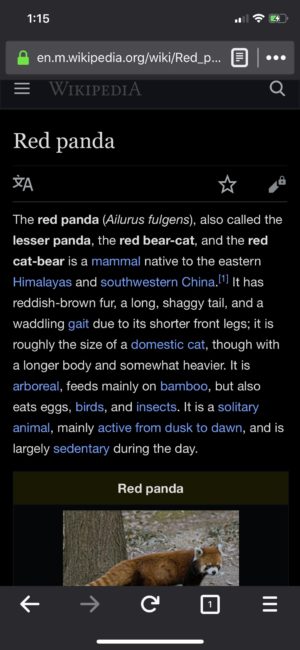
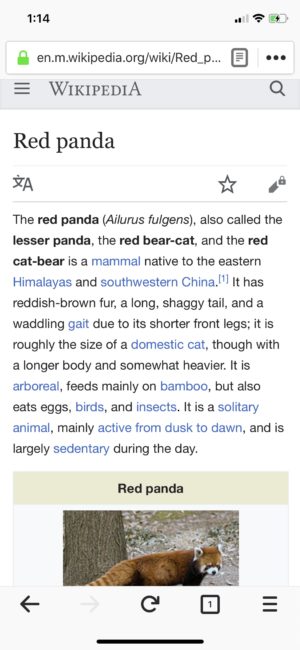
Now, in Firefox for iOS you have the ability to change your theme from dark to light just as easily as you can switch up the wallpaper on your phone. For some people, it might depend on the sites they visit, and for others it’s just a matter of preference. Whatever your choice, you can easily switch between dark and light themes either manually or automatically.
There are two ways to accomplish this. You can tap “Settings” in the menu panel. Then, tap “Display,” and choose either Light or Dark. And you’re all set. Another option, you can also automatically turn it on by using the Automatic switch.
Search, Switch and Easily Manage Tabs
We’re making it much simpler to get to the content you want with several improvements to tabs in Firefox for iOS. You can now manage tab settings in a single view allowing you to make changes easily and quickly. Additionally, you’ll be able to search your open tabs and seamlessly switch between normal and private browsing.
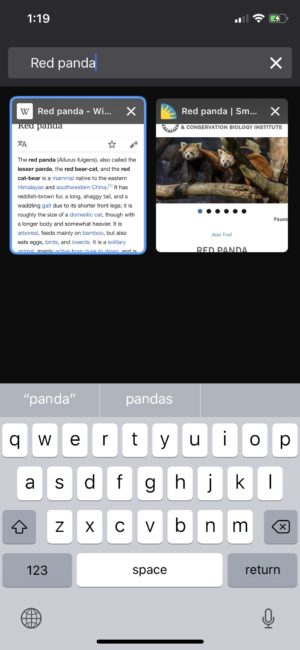
Manage tab settings in a single view
Check out and download the latest version of Firefox Quantum available here. For the latest version of Firefox for iOS, visit the App Store.
The post Latest Firefox Releases Available Today appeared first on The Mozilla Blog.
https://blog.mozilla.org/blog/2018/09/05/latest-firefox-releases-available-today/
Already at the time when we shipped the previous release, 7.61.0, I had decided I wanted to do a patch release next. We had some pretty serious HTTP/2 bugs in the pipe to get fixed and there were a bunch of other unresolved issues also awaiting their treatments. Then I took off on vacation and and the HTTP/2 fixes took a longer time than expected to get on top of, so I subsequently decided that this would become a bug-fix-only release cycle. No features and no changes would be merged into master. So this is what eight weeks of only bug-fixes can look like.
Numbers
the 176th release
0 changes
56 days (total: 7,419)
102 bug fixes (total: 4,640)
151 commits (total: 23,439)
0 new curl_easy_setopt() options (total: 258)
0 new curl command line option (total: 218)
46 contributors, 21 new (total: 1,787)
27 authors, 14 new (total: 612)
1 security fix (total: 81)
Notable bug-fixes this cycle
Among the many small fixes that went in, I feel the following ones deserve a little extra highlighting...
NTLM password overflow via integer overflowThis latest security fix (CVE-2018-14618) is almost identical to an earlier one we fixed back in 2017 called CVE-2017-8816, and is just as silly...
The internal function Curl_ntlm_core_mk_nt_hash() takes a password argument, the same password that is passed to libcurl from an application. It then gets the length of that password and allocates a memory area that is twice the length, since it needs to expand the password. Due to a lack of checks, this calculation will overflow and wrap on a 32 bit machine if a password that is longer than 2 gigabytes is passed to this function. It will then lead to a very small memory allocation, followed by an attempt to write a very long password to that small memory buffer. A heap memory overflow.
Some mitigating details: most architectures support 64 bit size_t these days. Most applications won't allow passing in passwords that are two gigabytes.
This bug has been around since libcurl 7.15.4, released back in 2006!
Oh, and on the curl web site we now use the CVE number in the actual URL for all the security vulnerabilities to make them easier to find and refer to.
HTTP/2 issues This was actually a whole set of small problems that together made the new crawler example not work very well - until fixed. I think it is safe to say that HTTP/2 users of libcurl have previously used it in a pretty "tidy" fashion, because I believe I corrected four or five separate issues that made it misbehave. It was rather pure luck that has made it still work as well as it has for past users!
Another HTTP/2 bug we ran into recently involved us discovering a little quirk in the underlying nghttp2 library, which in some very special circumstances would refuse to blank out the stream id to struct pointer mapping which would lead to it delivering a pointer to a stale (already freed) struct at a later point. This is fixed in nghttp2 now, shipped in its recent 1.33.0 release.
Windows send-buffer tuningMaking uploads on Windows from between two to seven times faster than before is certainly almost like a dream come true. This is what 7.61.1 offers!
Upload buffer size increasedIn tests triggered by the fix above, it was noticed that curl did not meet our performance expectations when doing uploads on really high speed networks, notably on localhost or when using SFTP. We could easily double the speed by just increasing the upload buffer size. Starting now, curl allocates the upload buffer on demand (since many transfers don't need it), and now allocates a 64KB buffer instead of the previous 16KB. It has been using 16KB since the 2001, and with the on-demand setup and the fact that computer memories have grown a bit during 17 years I think it is well motivated.
A future curl version will surely allow the
https://github.com/mozilla-bteam/bmo/tree/release-20180820.1
the following changes have been pushed to bugzilla.mozilla.org:
- [602313] Allow creation of attachments by pasting an image from clipboard, as well as by drag-and-dropping a file from desktop
- [1482475] Add extensive testing framework
- [1480878] Monitor the health of PhabBugz connector job processing
- [1473958] Update Thunderbird logo, replace Data Platform and Tools icon on easy product selector
- [1482145] PhabBot changes are showing up as from the wrong user, and also sending email incorrectly (based on the wrong current user)
discuss these changes on mozilla.tools.bmo.
https://dlawrence.wordpress.com/2018/09/04/happy-bmo-push-day-47/
Firefox 62, which lands in general release this week, adds support for Variable Fonts, an exciting new technology that makes it possible to create beautiful typography with a single font file. Variable fonts are now supported in all major browsers.
What are Variable Fonts?
Font families can have dozens of variations: different weights, expanded or condensed widths, italics, etc. Traditionally, each variant required its own separate font file, which meant that Web designers had to balance typographic nuance with pragmatic concerns around page weight and network performance.
Compared to traditional fonts, variable fonts contain additional data, which make it possible to generate different styles of the font on demand. For one example, consider Jost*, an open-source, Futura-inspired typeface from indestructible type*. Jost* comes in nine weights, each with regular and italic styles, for a total of eighteen files.

Jost* also comes as a single variable font file which is able to generate not only those same eighteen variations, but also any intermediate weight at any degree of italicization.
Design Axes
Jost* is an example of a “two-axis” variable font: it can vary in both weight and italics. Variable fonts can have any number of axes, and each axis can control any aspect of the design. Weight is the most common axis, but typographers are free to invent their own.

One typeface that invented its own axis is Slovic. Slovic is a Cyrillic variable font with a single axis, style, that effectively varies history. At one extreme, characters are drawn similarly to how they appear in 9th century manuscripts, while at the other, they adopt modern sans-serif forms. In between are several intermediate styles. Variable font technology allows the design to adapt and morph smoothly across the entire range of the axis.

The sky’s the limit! To see other examples of variable fonts, check out v-fonts.com and Axis Praxis.
Better Tools for Better Typography on the Web
Great features deserve great tools, and that’s why we’re hard at work building an all new Font Editor into the Firefox DevTools. Here’s a sneak peek:
You can find the Font Editor as a panel inside the Page Inspector in the Dev Tools. If you have enough space on your screen, it’s helpful to enable 3-pane mode so you can see the DOM tree, CSS Rules, and Font Editor all side-by-side.
When you click on an element in the DOM tree, the Font Editor updates to show information about the selected element’s font, as well as tools for editing its properties. The Font Editor works on all fonts, but really shines with variable ones. For instance, the weight control subtly changes from stepped slider to continuous one in the presence of a variable font with a weight axis.

I’m excited to announce that Alan Davidson is joining us today as our new Vice President of Global Policy, Trust and Security.
At a time when people are questioning the impact of technology on their lives and looking for leadership from organizations like Mozilla, Alan will add considerable capacity to our public policy, trust and security efforts, drawing from his extensive professional history working to advance a free and open digital economy.
Alan will work closely with me to help scale and reinforce our policy, trust and security capabilities and impact. He will be responsible for leading Mozilla’s public policy work promoting an open Internet and a healthy web around the world. He will also supervise a trust and security team focused on promoting innovative privacy and security features that put people in control of their online lives.
“For over 15 years, Mozilla has been a driving force for a free and open Internet, building open source products with industry-leading privacy and security features. I am thrilled to be joining an organization so committed to putting the user first, and to making technology a force for good in people’s lives,” says Alan Davidson, Mozilla’s new Vice President of Global Policy, Trust and Security.
Alan is not new to Mozilla. He was a Mozilla Fellow for a year in 2017-2018. During his tenure with us, Alan worked on advancing policies and practices to support the nascent field of public interest technologists — the next generation of leaders with expertise in technology and public policy who we need to guide our society through coming challenges such as encryption, autonomous vehicles, blockchain, cybersecurity, and more.
“Alan was a tremendous asset to the Commerce Department in our groundbreaking work to promote a strong and prosperous digital economy for all Americans,” said Penny Pritzker, former United States Secretary of Commerce and the Chairman of PSP Capital. “I am sure he will be a terrific addition to Mozilla and its role as a leading voice for a free and open Internet around the world.” Until early 2017, Alan served as the first Director of Digital Economy at the U.S. Department of Commerce and a Senior Advisor to the Secretary of Commerce.
Alan joins Mozilla from his most recent engagements as Senior Program Fellow with New America in Washington D.C. and as a private consultant. Prior to joining the U.S. Department of Commerce, he was the director of New America’s Open Technology Institute. Prior to that, Alan opened and grew Google’s Washington D.C. office, and led the company’s public policy and government relations efforts in North and South America for seven years.
Join me in welcoming Alan to Mozilla!
-Denelle
The post Welcome Alan Davidson, Mozilla’s new VP of Global Policy, Trust and Security appeared first on The Mozilla Blog.
TenFourFox Feature Parity Release 9 final is now available (downloads, hashes, release notes). There are no changes from beta 3 except for outstanding security patches. Assuming no changes, it will go live Tuesday evening Pacific due to the US Labor Day holiday.
Allow me to also take the wraps off of Talospace, the new spin-off blog primarily oriented at the POWER9 Raptor Talos family of systems but will also be where I'll post general Power ISA and PowerPC items, refocusing this blog back to Power Macs specifically. Talospace is a combination of news bits, conjecture and original content "first person" items. For a period of time until it accumulates its own audience, I'll crosspost links here to seed original content (for the news pieces, you'll just have to read it or subscribe to the RSS feed).
As the first long-form article, read this two-part series on running Mac OS X under KVM-PPC (first part, second part). Upcoming: getting the damn Command key working "as you expect it" in Linux.
http://tenfourfox.blogspot.com/2018/08/tenfourfox-fpr9-available-and.html