History
Around 2015 a couple of projects had started using ESLint in mozilla-central. In the last quarter of 2015, there was a big push to enable ESLint for browser/ and toolkit/ – the two main directories containing the javascript source behind Firefox.
Since then, we have come a long way. We have commands and hooks for developers to use, checks during the review phase, and automatic tests that run against our review tools and our continuous integration branches. Not only that, but we’ve also expanded our coverage to more directories, and expanded the amount of rules that are enabled.
As we’ve done this work, we’ve caught lots of bugs in the code or in our tests (there’s much more than just those links). Some of those have been small, some have been user facing issues. There are also now the countless potential bugs that we don’t get to see where ESLint catches issues for us before they even hit the core source trees. All this helps to save developer time and leaves more for fixing bugs and implementing new features.
Where to next?
There are several things high on the list that we should have as the next, future goals:
- Finish enabling ESLint on all our JavaScript code in mozilla-central
We are already covering the vast majority of production code in mozilla-central, however there are still a lot of unit tests that aren’t covered. Increasing linting coverage here will help to ensure these are functioning as we expect.
There’s always a few things it won’t make sense for, e.g. third-party imports, or the occasional piece of preprocessed code, but I think we should strive towards 100% coverage where we sensibly can.
- Harmonize our rules
Whilst we have a core set of rules, various directories are overriding and extending the rules. We should aim for having the majority of rules being the same everywhere, with additional rules being only occasional (e.g. experimental).
This will make it far easier for developers working across modules to be able to work in a consistent style, and help spread the useful rules across the tree.
Example rules that fall into this category: mozilla/var-only-at-top-level, block-scoped-var, no-shadow, no-throw-literal, no-unused-expressions, yoda
- Improve developer tools
For me, I find most use for ESLint when it is integrated into my editor. However, there’s various other occasions where we’re not doing quite enough to make it easy for developers, e.g. automatically installing hooks, or setting up editor support automatically.
These help developers to catch issues earlier whilst the developer is still focussed on the patch, reducing context switching. We should be getting these working as seamlessly as possible.
- Improve automatic fixing
Currently the automatic fixing doesn’t work fully if you run it across the whole tree (you can run it in segments), we should fix it to help make applying new rules globally a lot easier.
We need your help!
- Find a
In my last post, I talked about the features and limitations of the Rules System within the Things Gateway by Mozilla graphical user interface. Today, I'm going to show an alternate rule system that interacts with the Things Gateway entirely externally using the Web Thing API. The Web Thing API enables anyone armed with a computer language that can use Web Sockets to create entirely novel applications or rules systems that can control the Things Gateway.
In the past few months, I've blogged several times about controlling the Things Gateway with the Web Thing API using Python 3.6. In each one was a stand alone project, opening and managing Web Sockets in an asynchronous programming environment. By writing these projects, I've explored both functional and object oriented idioms to see how they compare. Now with some experience, I feel free to abstract some of the underlying common aspects to create a rule engine of my own.

Implementing a similar system based on parse trees is tempting for its flexibility, but usually results in a new chimera language halfway between the programming language used and the language represented in the parse tree. See the SQLAlchemy encapsulation of the SQL language in Python as an example. I'm less fond of this technique than I used to be. I think I can get away with a simpler implementation just using fairly straightforward Python.
In my last post, I discussed the differences between "While" rules and "If" rules in the GUI Rules System. Recall that the "While" style of rule takes an action and then undoes the action when the rule condition is no longer True. However, an "If" style of rule never undoes its action.
Here's an example of the "If" style rule from my last blog post:

class ExampleIfRule(Rule):(see this code in situ in the example_if_rule.py file in the pywot rule system demo directory)
def register_triggers(self):
return (self.Philips_HUE_01,)
def action(self, *args):
if self.Philips_HUE_01.on:
self.Philips_HUE_02.on = True
self.Philips_HUE_03.on = True
self.Philips_HUE_04.on = True
Creating a rule starts by creating a class derived from the base class Rule. The programmer is responsible for implementing two methods: register_triggers and action. Optionally, a third method, initial_state, and a constructor can be included, too.
The register_triggers method is a callback function. It returns a tuple of objects responsible for triggering the rule's
Today is German Unity Day, Germany’s National Day. Half of my team live in Berlin, so I vaguely knew they wouldn’t be around… but I’d likely have forgotten if not for a lovely tradition of “Holiday Inbound” emails at Mozilla.
Mozilla is a broadly-distributed organization with employees in dozens of countries worldwide. Each of these countries have multiple days off to rest or celebrate. It’s tough to know across so many nations and religions and cultures exactly who will be unable to respond to emails on exactly which days.
So on the cusp of a holiday it is tradition in Mozilla to send a Holiday Inbound email to all Mozilla employees noting that the country you’re trying to reach can’t come to the phone right now, so please leave a message at the tone.
More than just being a bland notification some Mozillians take the opportunity to explain the history and current significance of the event being celebrated. I’ve taken a crack at explaining the peculiarly-Canadian holiday of Christmas (pronounced [kris-muhs]) in the past.
Sometimes you even get some wonderful piece of alternate history like :mhoye’s delightful, 50% factual exploration of the origins of Canadian Labour Day 2016.
I delight in getting these notifications from our remotees and offices worldwide. It really brings us closer together through understanding, while simultaneously highlighting just how different we all are.
Maybe I should pen a Holiday Inbound email about Holiday Inbound emails. It would detail the long and fraught history of the tradition in a narrative full of villains and heroes and misspellings and misunderstandings…
Or maybe I should just try to get some work done while my German colleagues are out.
:chutten
https://chuttenblog.wordpress.com/2018/10/03/distributed-teams-regional-holidays/
Firefox is shipped using a train model. Without going into too much details, this means that we maintain several channel in parallel (Nightly, Beta, Release and ESR). Normal changes happen in Nightly. When a change needs to be cherry-picked from Nightly to another branch, the process is called “Uplift”.
Uplifting is a key tool in the Firefox release management world. When developers want to apply a patch from Nightly to another branch, they will use Bugzilla, answering some questions in a textarea. Then, release managers will make a risk assessment to accept or reject the uplift. As an example, release managers will see the following comment:

The release and quality management team is plugging more and more automation (and Machine Learning in the future) in Bugzilla, and the freeform textarea was making it more difficult (also because developers are free to do anything they want with the prefilled text, even deleting fields). For this reason, we are moving to a typical form directly in the Bugzilla interface. The change, developed by Kohei who is volunteering as a Bugzilla UX designer, has been deployed yesterday (October 2nd)
A screenshot is a better explanation than words:
Once submitted, the comment will be displayed just like before!
We are planning to move to a similar system for tracking and release notes requests.
As always, don’t hesitate to share feedback to release-mgmt@mozilla.com
https://release.mozilla.org/tooling/bugzilla/2018/10/03/uplift-form.html
happy bmo push day – mojolicious edition
As previously announced at FOSDEM 2018 and then re-announced at MojoConf, bugzilla.mozilla.org is now running on Mojolicious “A next generation web framework for the Perl programming language”
This release incorporates 28 changes and the Mojolicious migration is the least interesting to the end-user, but it is pretty important in terms of being able to deliver rich experiences moving forward.
As…
The HTTP Referrer Value
Navigating from one webpage to another or requesting a sub-resource within a webpage causes a web browser to send the top-level URL in the HTTP referrer field. Inspecting that HTTP header field on the receiving end allows sites to identify where the request originated which enables sites to log referrer data for operational and statistical purposes. As one can imagine, the top-level URL quite often includes user sensitive information which then might leak through the referrer value impacting an end users privacy.
The Referrer Policy
To compensate, the HTTP Referrer Policy allows webpages to gain more control over referrer values on their site. E.g. using a Referrer Policy of “origin” instructs the web browser to strip any path information and only fill the HTTP referrer value field with the origin of the requesting webpage instead of the entire URL. More aggressively, a Referrer Policy of ‘no-referrer’ advises the browser to suppress the referrer value entirely. Ultimately the Referrer Policy empowers the website author to gain more control over the used referrer value and hence provides a tool for website authors to respect an end users privacy.
Expanding the Referrer Policy to CSS
While Firefox has been supporting Referrer Policy since Firefox 50 we are happy to announce that Firefox will expand policy coverage and will support Referrer Policy within style sheets starting in Firefox 64. With that update in coverage, requests originating from within style sheets will also respect a site’s Referrer Policy and ultimately contribute a cornerstone to a more privacy respecting internet.
For the Mozilla Security and Privacy Team,
Christoph Kerschbaumer & Thomas Nguyen
The post Supporting Referrer Policy for CSS in Firefox 64 appeared first on Mozilla Security Blog.
https://blog.mozilla.org/security/2018/10/02/supporting-referrer-policy-for-css-in-firefox-64/
From Saturday, September 22 to Monday, September 24, more than twenty people met in London to work on improving accessibility on MDN Web Docs — both the content about accessibility and the accessibility of the site itself. While much remains to be done, the result was a considerable refresh in both respects.

Attendees at Hack on MDN listen to a lightning talk by Eva Ferreira. Photo by Adrian Roselli.
Hack on MDN events
Hack on MDN events evolved from the documentation sprints for MDN that were held from 2010 to 2013, which brought together staff members and volunteers to write and localize content on MDN over a weekend. As implied by the name, “Hack on MDN” events expand the range of participants to include those with programming and design skills. In its current incarnation, each Hack on MDN event has a thematic focus. One in March of this year focused on browser compatibility data.
The Hack on MDN format is a combination of hackathon and unconference; participants pitch projects and commit to working on concrete tasks (rather than meetings or long discussions) that can be completed in three days or less. People self-organize to work on projects in which a group can make significant progress over a long weekend. Lightning talks provide an unconference break from projects.
Accessibility on MDN Web Docs
Making websites accessible to a wide range of users, including those with physical or cognitive limitations, is a vital topic for creators on the web. Yet information about accessibility on MDN Web Docs was sparse and often outdated. Similarly, the accessibility of the site had eroded over time. Therefore, accessibility was chosen as the theme for the September 2018 Hack on MDN.
Hack on MDN Accessibility in London
The people who gathered at Campus London (thanks to Google for the space), included writers, developers, and accessibility experts, from within and outside of Mozilla. After a round of introductions, there was a “pitch” session presenting ideas of projects to work on. Participants rearranged themselves into project groups, and the hacking began. Adrian Roselli gave a brief crash course on accessibility for non-experts in the room, which he fortunately had up his sleeve and was able to present while jet-lagged.
At the end of each morning and afternoon, we did a status check-in to see how work was progressing. On Sunday and Monday, there were also lightning talks, where anyone could present anything that they wanted to share. Late Sunday afternoon, some of us took some time out to explore some of the offerings of the Shoreditch Design Triangle, including playing with a “font” comprised of (more or less sit-able) chairs.

Glenda Sims, Estelle Weyl, Janet Swisher and Adrian Roselli pose with metal letter-shaped chairs spelling “HACK” and “MdN”. Photo by Dan Rubin.
Outcomes
One project focused on updating the WAI-ARIA documentation on MDN Web Docs, using a new ARIA reference page template created by Estelle Weyl. Eric Bailey, Eric Eggert, and several others completed documentation on 27 ARIA roles, including recommending appropriate semantic HTML elements to use in preference to an ARIA role. The team even had remote contributors, with Shane Hudson writing about the
When we first launched Firefox Focus, we wanted to quickly deliver a streamlined private browsing experience for your mobile device. Since then, we’ve been pleasantly surprised by how many people use Focus for more than just private browsing and we’ve made Focus better with a thoughtful set of features based on what our users are telling us. Custom tabs, tracker counter, full screen mode and so much more have been the result. Today, we’re pleased to announce another big update with another much-requested feature, a design refresh, and an exciting change to the underlying technology behind Focus for Android.
Learn more: search suggestions and home screen tips
Missed one of the feature releases? No problem! Now, we’re going to present the core functionalities of Firefox Focus on the start screen to give an overview of the whole range of possibilities your privacy browser has to offer – in a clear and unobtrusive way, not interrupting the usage at all and automatically refreshing after each click on the Erase button.
 Just open the browser and you’ll see helpful feature recommendations in your preferred language on the Firefox Focus start screen (Android). For iOS users, the feature is currently available in English language.
Search suggestions are a key part of web search that can make searching more convenient. Easily activate the feature by opening the app settings > “Search” > select the checkbox “Get search suggestions”.
We’re aware that privacy is a top priority for many Firefox Focus users and you might not want to share what you’re typing in the address bar with your search provider. So, the feature is turned “off” by default and we let you choose whether or not you want to turn it on. Why? Because that’s our style!
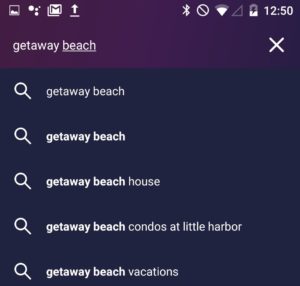
 Find what you’re looking for quickly – with search recommendations.
Siri Shortcuts for iOS users
In addition to home screen tips, iOS users will receive another much asked feature with today’s release: Siri Shortcuts. Siri is one of the more popular features on iOS devices and we’re all about ease for our users. So, in order to improve the Firefox Focus for iOS user experience further, you’ll now be able to set and open a favorite website, erase and open Firefox Focus, as well as erase in the background via shortcuts.
In line with updated designs
Style is key to today’s Firefox Focus release: the browser’s visual design is now completely optimized for the recently released Android Pie. New icons, a customized URL bar and a simplified settings menu make it easier to use and provide for a consistent user experience.
But no need for iOS users to feel left out: the new Firefox Focus has a fresh look for iOS 12.

 Presentation matters: the new Firefox Focus comes with an updated design system, optimized for Android Pie (left) and iOS 12 (right).
A new engine for the Firefox Android browsers
While the new app design is obviously an eye-catcher, we’ve also made a groundbreaking change to the underlying Firefox Focus framework that’s not visible at first glance – but will make a huge difference in future releases. Focus is now based on GeckoView, Mozilla’s own mobile engine, making it a pioneer among our Android apps.
Switching to GeckoView will give Focus the benefits of Gecko’s Quantum improvements and enables Mozilla to implement unique privacy-enhancing features in the future, such as reducing the potential of third party collection. For now, you won’t notice much, but you’ll be helping us create the next generation of Firefox browsers just by using Focus, and we’ll return the favor by giving our Focus users unique features that other browsers on Android simply won’t be able to offer.
We’ll make sure to keep you updated on the progress as well as all new developments around Firefox Focus on this blog and are looking forward to your feedback! For now, if you’d like to learn more about the future of our privacy browser, please have a look at

Pick of the Month: Default Bookmark Folder
by Teddy Gustiaux
Do you keep multiple bookmark folders? This extension makes it simple to add new bookmarks to specific folders.
“So useful and powerful. I no longer have to change bookmark locations every time!”
Featured: Search Site WE
by DW-dev
Perform website-specific searches.
“Fast, very cool & useful.”
Featured: Dark Reader
by Alexander Shutov
Turn the entire web dark. This extension inverts bright colors to make all websites easier on the eyes.
“This is hands down the best looking dark theme extension for Firefox that I have tried.”
Featured: Vertical Tabs Reloaded
by Croydon
Arrange your open tabs in an orderly vertical stack.
“This is great. Vertical tabs should be the standard nowadays.”
Featured: Text MultiCopy
by erosman
Save multiple snippets of text to paste and organize later.
“So very useful and it works flawlessly.”
Featured: Cookiebro
by Nodetics
Simple yet powerful cookie management. Automatically deletes unwanted cookies, while sparing those on your whitelist.
“I really like that Cookiebro recognizes session cookies, so deleting unwanted cookies will still keep you logged in on most sites.”
If you’d like to nominate an extension for featuring, please send it to amo-featured [at] mozilla [dot] org for the board’s consideration. We welcome you to submit your own add-on!
The post October’s Featured Extensions appeared first on Mozilla Add-ons Blog.
https://blog.mozilla.org/addons/2018/10/01/octobers-featured-extensions-2/

This article first appeared on October 1st, 2018 in the Times of India print edition.
The Aadhaar judgment holds important lessons (and warnings) for how courts and the polity should respond to the technological vision of the state. The task before the Supreme Court was to evaluate the constitutionality of a specific choice and design of technology made by the government. Note that this choice, of a single biometric identifier for each resident linked to a centralised database, was made almost a decade ago. And decisions about this project have largely evolved within the closed quarters of the executive, including the one to roll it out, and the subsequent call to link Aadhaar to essential services. All this was done without any statutory backing, until its hurried passage as a money bill in 2016.
As one reads through the decision of the three judges that formed the majority opinion, it becomes clear that there are limits to this delayed judicial scrutiny of a technology-driven project that has already reached scale (over 99% of the population is already enrolled). While the judgment does well to impose limits on its scope, it disappoints in its reluctance to engage with its underlying technical and evidentiary claims, and the application of weak legal standards.
Take the issue framed by the majority opinion as “whether the Aadhaar project has the tendency to create a surveillance state.” The judges offer a very cursory analysis of security safeguards already in place, accepting UIDAI’s claim that the database is “sufficiently secure” and “strongly regulated”. The contrary evidence put forth by the petitioners is largely ignored, including the fact that 49,000 Aadhaar enrolment agencies have been blacklisted for fraud by UIDAI itself.
They do not engage with multiple news reports of recent security breaches, reasoning that this evidence came after the hearings concluded, but noting that these too have been “emphatically denied by the UIDAI.” They conclude that the project cannot be shelved “only (based) on apprehensions.” So while concerns of unrealised (or imperceptible) state surveillance are treated as anxieties that must be soothed, UIDAI is rewarded with the benefit of doubt to not overstep the limits it has set for itself.
On the other hand Justice Chandrachud, who dissents from the majority, pulls us out of this false fait accompli and finds the project to be wholly unconstitutional. He reframes the question in terms of power and asks how the technological architecture of Aadhaar, specifically its use of biometric data and the ability to link distinct databases, could alter the power relationship between citizen and the state. Not only does he differ in his factual analysis of the surveillance capability of Aadhaar as it appears today, he also takes seriously possible future risks to individual liberty.
The court separately considers the issue of whether the Aadhaar project violates the fundamental right to privacy. While the judges all accept that Aadhaar enabled some degree of state intrusion into the privacy of individuals, they differ on whether such intrusion could pass the test of proportionality. Asserted most recently in the case of Puttaswamy vs Union of India, this test is by no means straightforward. In an analysis that eventually rests on weak factual and legal foundations the majority judgment in the Aadhaar case only adds further ambiguity.
On facts, they find that Aadhaar collects “minimal data”, simply because information like names and photos are already routinely collected by a variety of services. This misunderstands a fundamental precept of data privacy. There is risk associated with collecting sensitive information like biometrics in the first place. However, there is potential for even greater harm when an individual’s personal data is linked with other datasets and used across contexts. Given this finding of “minimal data” use, they conclude that individuals have no “reasonable expectation of privacy” in such data, and therefore the intrusion is proportionate. It is worth noting that in the Puttaswamy judgment, Justice Nariman categorically rejected this legal standard, reasoning that our right to privacy cannot be reduced only to the subjective notion of what an individual may “reasonably expect”, and instead, that the law must in fact set out how our privacy should be protected.
The infirmities of the majority’s judgment aside, it seems there is a broader issue with courts being forced to constantly catch-up with technological choices, resigned to scrutinise them in hindsight and to lessen the blow with safeguards. With Aadhaar, this need not have been the case. The
Summary
Socorro is the crash ingestion pipeline for Mozilla's products like Firefox. When Firefox crashes, the Breakpad crash reporter asks the user if the user would like to send a crash report. If the user answers "yes!", then the Breakpad crash reporter collects data related to the crash, generates a crash report, and submits that crash report as an HTTP POST to Socorro. Socorro saves the crash report, processes it, and provides an interface for aggregating, searching, and looking at crash reports.
2018q3 was a busy quarter. This blog post covers what happened.
Read more… (7 mins to read)
http://bluesock.org/~willkg/blog/mozilla/socorro_2018q3.html
On Friday the adventure continued. A pit stop in Trento for fresh tyres and then north to the renowned Stelvio Pass, 2757m a.s.l., 75 challenging hairpin corners. There are plenty of helmet-cam videos of this ride online.



Mortirolo Pass
After Stelvio, I had to head south and the most direct route suggested by OpenStreetmap took me over the Mortirolo pass.

Dinner
At the end of all that, I had to hack my own Tiramisu but like the mountain passes, it was worth the effort:

Simplon Pass
Returned home using the Simplon Pass. It is a relatively easy road compared to the others, with nice views at the top and along the route.

I gave a talk about Rust and WebAssembly for SFHTML5’s “All About WebAssembly” meetup. You can find the slide deck here. Use your arrow keys to cycle through the slides. Video recording embedded below.
You can watch the other (great!) talks from the meetup in this playlist.
http://fitzgeraldnick.com/2018/10/01/sfhtml5-rust-and-wasm-talk.html
Following on the heels of our submission to the U.S. Federal Trade Commission last month, we have submitted a written filing to the European Commission Directorate-General for Competition, as part of a public consultation in advance of the Commission’s forthcoming January 2019 conference on competition challenges in the digital era. In our filing, we focus on two specific, related issues: the difficulty of measuring competitive harm in a data-powered and massively vertically integrated digital ecosystem, and the role played by interoperability (in particular, through technical interfaces known as APIs) in powering the internet as we know it.
Mozilla’s Internet Health Report 2018 explored concentration of power and centralization online through a spotlight article, “Too big tech?” The software and services offered by a few companies are entangled with virtually every part of our lives. These companies reached their market positions in part through massive innovation and investment, and they created extremely popular (and lucrative) user experiences. But we are headed today down a path of excessive centralisation and control, where someday the freedom to code and compete will be realised in full only for those who work for a few large corporations.
Our submission examines modern digital competition through the following key considerations:
- Increasing centralisation poses competition concerns;
- Traditional metrics and tools are insufficient to promote competition;
- Interoperability is a powerful, ready-to-use key to unlock competition in the tech sector; and
- Changes to law, policy, and practice regarding internet competition should be grounded in technology and built to benefit all internet users and businesses.
The EU has a well established track record in enforcing competition in digital markets. We encourage the Commission to continue its leadership by embracing interoperability as a core principle in its approach to digital competition. If the future of the internet stays grounded in standards and built out through an ecosystem of transparent third-party accessible APIs, we can preserve the digital platform economy as a springboard for our collective social and economic welfare, rather than watching it evolve into an oligarchy of gatekeepers over our data.
The post Contributing to the European Commission’s review of digital competition appeared first on Open Policy & Advocacy.

Hubs by Mozilla lets people meet in a shared 360-environment using just their browser. Hubs works on any device from head-mounted displays like HTC Vive to 2D devices like laptops and mobile phones. Using WebVR, a JavaScript API, Mozilla is making virtual interactions with avatars accessible via Firefox and other browser that people use every day.
In the course of building the first online social platform for VR and AR on the web, Mozilla wanted confirm it was building a platform that would bring people together and do so in a low-friction, safe, and scalable way. With her years of experience and seminal studies examining the successes and pitfalls of social VR systems across the ecosystem, Jessica Outlaw and Tyesha Snow of The Extended Mind, set out to generate insights about the user experience and deliver recommendations of how to improve the Hubs product.
BACKGROUND ON THE RESEARCH STUDY
In July 2018, The Extended Mind recruited five pairs of people (10 total) to come to their office in Portland, OR and demo Hubs on their own laptops, tablets, and mobile phone. We provided them with head-mounted displays (HTC Vive, Oculus Rift & Go) to use as well.
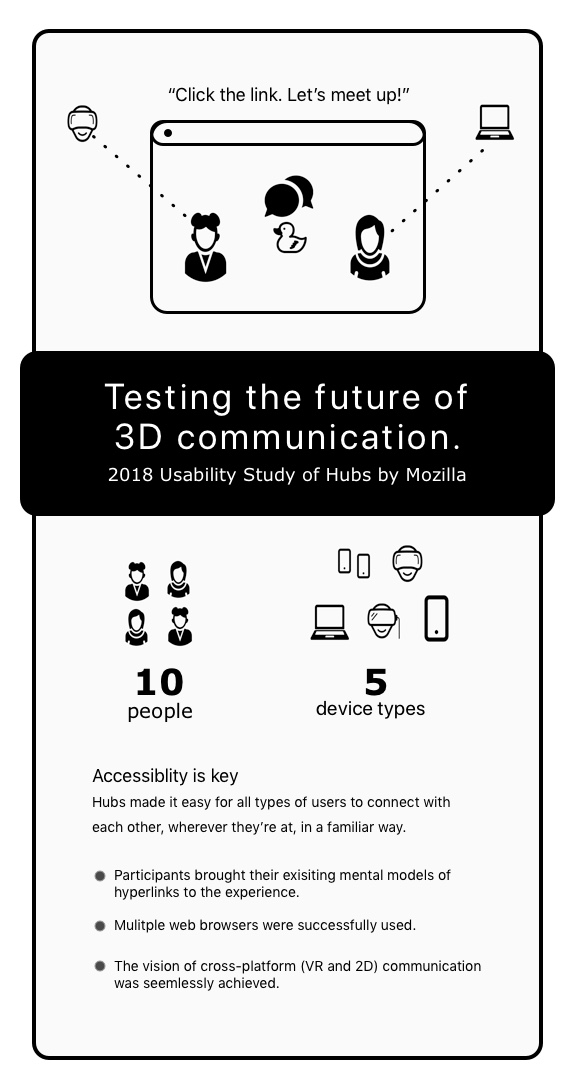
Users were a relatively tech savvy crowd and represented a range of professions from 3D artist and engineer to realtor and psychologist. Participants in the study were all successful in entering Hubs from every device and had a lot of fun exploring the virtual environment with their companion’s avatar. Some of the participants in their early twenties also made a point to say that Hubs was better than texting or a phone call because:
“This makes it easier to talk because there are visual cues.”
And…
“Texting doesn’t capture our full [expression]”
In this series blog posts, The Extended Mind researchers will cover some of the research findings about the first-time user experience of trying Hubs. There are some surprising findings about how the environment shaped user behavior and best practices for usability in virtual reality to share across the industry.
BROWSER BASED VR (NO APP INSTALL REQUIRED)
Today, the focus is on how the accessibility of Hubs via a browser differentiates it from other social VR apps as well as other 2D communication apps like Skype, BlueJeans, and Zoom.
The process for creating a room and inviting a friend begins at hubs.mozilla.com. Once there, participants generated a link to their private room and then copied and pasted that link into their existing communication apps, such as iMessage or e-mail.
Once their companion received the link, they followed instructions and met the person who invited them in a 360-environment. This process worked for HMDs, computers, and mobile phone. When participants were asked afterward about the ease of use of Hubs, accessibility via link was listed as a top benefit.
“It’s pretty cool that it’s as easy as copy and pasting a link.”
And
“I’m very accustomed to virtual spaces having their own menu and software boot up and whole process to get to, but you open a link. That’s really cool. Simple.”
Some believed that because links are already familiar to most people, they would be able to persuade their less technologically sophisticated friends & family members to meet them in Hubs.
Another benefit of using the browser is that there is already one installed on people’s electronic devices. Obstacles to app installation range from difficulty finding them in the app store, to lack of space on a hard drive. One person noted that IT must approve any app she installs on her work computer. With Hubs, she could use it right away and wouldn’t need to jump that hurdle.
Because Hubs relies on people’s existing mental models of how hyperlinks work, only requires an internet browser (meaning no app installation), and is accessible from an XR or 2D device it the most accessible communication platform today. It could possibly be the first digital experience that people have which gets them familiar with the with the concepts of 360 virtual spaces and interacting with avatars, which subsequently launches them into further exploration of virtual and extended reality.
Now that you've got a sense of the capabilities of Hubs, the next blog posts will cover more specific findings of how people used it for conversation and how the environment shaped interections.
The DevTools GCLI has been removed from the Firefox codebase (bug), which roughly translates into 20k less lines of code to think about, and the associated tests which are not running anymore, so yay for saving both brain and automation power!
We triaged all the existing bugs, and moved a bunch worth keeping to DevTools -> Shared Components, to avoid losing track of them (they’re mostly about taking screenshots). Then the ever helpful Emma resolved the rest as incomplete, and moved the component to the DevTools Graveyard in Bugzilla, to avoid people filing bugs about code that does not exist anymore.
During this removal process we’ve heard from some of you that you miss certain features from GCLI, and we’ve taken note, and will aim to bring them back when time and resourcing allow. In the meantime, thank you for your feedback! It helps us better understand how you use the tools.
We also want to thank Eric Meyer for his everlasting appreciation of the screenshot feature, and his continuous dedication to making sure the world knows about this feature over the years. Thank you!
PS For background on why we removed it, you can read the initial intent to unship email.
https://blog.nightly.mozilla.org/2018/09/28/the-developer-toolbar-or-gcli-is-no-longer-in-devtools/
Also: A new Mozilla-Ipsos poll reveals a majority of respondents want privacy, and not publicity, as their default setting online
Earlier this week, Mozilla visited Venmo’s headquarters in New York City and delivered a petition signed by more than 25,000 Americans. The petition urges the payment app to put users’ privacy first and make Venmo transactions private by default.
Also this week: A new poll from Mozilla and Ipsos reveals that 77% of respondents believe payment apps should not make transaction details public by default. (More on our poll results below.)
Millions of Venmo users’ spending habits are available for anyone to see. That’s because Venmo transactions are currently public by default — unless users manually update their settings, anyone, anywhere can see whom they’re sending money to, and why.
Mozilla’s petition urges Venmo to change these settings. By making privacy the default, Venmo can better protect its seven million users — and send a powerful message about the importance of privacy. But so far, Venmo hasn’t formally responded to our petition and to the 25,000 Americans who signed their names.
Earlier this year, Mozilla Fellow Hang Do Thi Duc exposed the serious implications of Venmo’s settings. Her project, Public By Default, revealed how Venmo users’ drug habits, junk food vices, personal finances, and fights with significant others are available for all to see. Here’s what TV reporters had to say about Hang’s findings:
Mozilla and Ipsos conducted an opinion poll this month, asking 1,009 Americans how they feel about the policy of “public by default.” Americans’ opinions were clear:
77% of respondents believe payment apps should not make transaction details public by default.
92% of respondents do not support Venmo’s justification for making transactions public by default. (In July, Venmo told CNET that transactions should be public because “it’s fun to share [information] with friends in the social world.”)
89% of respondents believe the most responsible default setting for payment apps is for transactions to be visible only to those involved.
Find the full poll results here.
The post 25,000 Americans Urge Venmo to Update Its Privacy Settings appeared first on The Mozilla Blog.