Firefox is only as strong as its passionate users. Because we’re independent, people need to make a conscious choice to use a non-default browser on their system. We’re most successful when happy users tell others about an alternative worth trying.
If you’re a Firefox user and want to show your support, we’ve made a collection of badges you can add to your website to tell users, “I use Firefox, and you should too!”
You can browse the badges and grab the code to display them on a dedicated microsite we’ve built, so there’s no need to download them (though you’re welcome to if you want). Images are hosted on a Mozilla CDN for convenience and performance only. We do no tracking of traffic to the CDN. We’ll be adding more badges as time goes on as well.
So whether you’re excited to use a browser from a non-profit with a mission to build a better Internet, or just think Firefox is a kick-ass product, we’d love for you to spread the word.
Thank you for your support!
The post Show your support for Firefox with new badges appeared first on Mozilla Hacks - the Web developer blog.
https://hacks.mozilla.org/2018/10/show-your-support-for-firefox-with-new-badges/
Mozilla’s ninth-annual festival — slated for October 22-28 in London — examines how the internet and human life intersect
Workshops that teach you how to detect misinformation and mobile trackers. A series of art installations that turn online data into artwork. A panel about the unintended consequences of AI, featuring a former YouTube engineer and a former FBI agent. And a conversation with the inventor of the web.
These are just a handful of the experiences at this year’s MozFest, Mozilla’s annual festival for, by, and about people who love the internet. From October 22-28 at the Royal Society of Arts (RSA) and Ravensbourne University in central London, more than 2,500 developers, designers, activists, and artists from dozens of countries will gather to explore privacy, security, openness, and inclusion online.
Tickets are just lb45, and provide access to hundreds of sessions, talks, art, swag, meals, and more.
Says Mark Surman, Mozilla’s Executive Director: “At MozFest, people from across the globe — technologists from Nairobi, educators from Berlin — come together to build a healthier internet. We examine the most pressing issues online, like misinformation and the erosion of privacy. Then we roll up our sleeves to find solutions. In a way, MozFest is just the start: The ideas we bat around and the code we write always evolves into new campaigns and new open-source products.”
You can learn more and purchase tickets at mozillafestival.org. In the meantime, here’s a closer look at what you can expect:
Hundreds of hands-on workshops
MozFest is built around hands-on participation — many of your fellow attendees are leading sessions themselves. These sessions are divided among six spaces: Decentralisation; Digital Inclusion; Openness; Privacy and Security; Web Literacy; and the Youth Zone.
Sessions range from roundtable discussions to hackathons. Among them:

A scene from MozFest 2017
- “Get the Upper Hand on Misinformation,” a session exploring concepts like confirmation bias, disinformation, and fake news. Participants will also suggest their own tools to combat these issues
- “Tracking Mobile Trackers,” a session that teaches you how to detect — and jam — the mobile trackers that prey on your personal data
- “Message Delayed: Designing Interplanetary Communication Tools,” a session exploring what interplanetary messaging might look like. It’s led by a researcher from MIT’s Media Lab
- “Combating Online Distraction and Addiction,” a session sharing techniques and tools that help us have a more focused and deliberate online experience
- “Build Your own Air Quality Sensor,” a session that teaches participants how to build an open-source device for monitoring pollution in their neighborhood
- Plus, an entire Youth Zone, featuring sessions for kids, by kids
Talks
The MozFest Dialogues & Debates stage features leading thinkers from across the internet health movement. This year, 18 luminaries from France, India, Afghanistan, and beyond will participate in solo talks and spirited panels. Among them:

A scene from MozFest 2017
- “AI’s Collateral Damage,” a panel exploring artificial intelligence’s unintended impact on human rights. Featuring former YouTube engineer Guillaume Chaslot; Social Science Research Council president Alondra Nelson; author and former FBI special agent Clinton Watts; and Mozilla Fellow Camille Francois
Do you love extensions? Do you have a keen sense of what makes a great extension? Want to help users discover extensions that will improve how they experience the web? If so, please consider applying to join our Featured Extensions Community Board!
Board members nominate and select new featured extensions each month to help millions of users find top-quality extensions to customize their Firefox browsers. Click here to learn more about the duties of the Featured Extension Advisory Board. The current board is currently wrapping up their six-month tour of duty and we are now assembling a new board of talented contributors for the months January – June, 2019.
Extension developers, designers, advocates, and fans are all invited to apply to join the board. Priority will be given to applicants who have not served on the board before, followed by those from previous boards, and finally from the outgoing board.
To apply, please send us an email at amo-featured [at] mozilla [dot] org with your name and a few sentences about how you’re involved with AMO and why you are interested in joining the board. The deadline is Monday, October 22, 2018 at 11:59pm PDT. The new board will be announced shortly thereafter.
We look forward to hearing from you!
The post Apply to Join the Featured Extensions Advisory Board appeared first on Mozilla Add-ons Blog.
https://blog.mozilla.org/addons/2018/10/15/apply-to-join-the-featured-extensions-advisory-board-2/

In previous research, The Extended Mind has documented how a 3D space automatically signals to people the rules of behavior. One of the key findings of that research is that when there is synchrony in the design of a space, it helps communicate behavioral norms to visitors. That means that when there is complementarity among content, affordances, and avatars, it helps people learn how to act. One example would be creating a gym environment (content), with weights (affordances), but only letting avatars dress in tuxedos and evening gowns. The contraction of people’s appearances could demotivate weight-lifting (the desired behavior).
This article shares learnings from the Hubs by Mozilla user research on how the different locations that they visited impacted participant’s behavior. Briefly, the researchers observed five pairs of participants in multiple 3D environments and watched as they navigated new ways of interacting with one another. In this particular study, participants visited a medieval fantasy world, a meeting room, an atrium, and a rooftop bunker.
To read more about the details and set up of the user study, read the intro blog post here.
The key environmental design insights are:
- Users want to explore
- The size of the space influences the type of conversation that users have
- Objects in the environment shaped people’s expectations of what the space was for
The rest of the article will provide additional information on each of the insights.
Anticipate that people will want to explore upon arrival
Users immediately began exploring the space and quickly taught themselves to move. This might have been because people were new to Hubs by Mozilla and Social VR more generally. The general takeaway is that XR creators should give people something to discover once they arrive. Finding something will will be satisfying to the user. Platforms could also embrace novelty and give people something new to discover every time they visit. E.g., in Hubs, there is a rubber duck. Perhaps the placement of the duck could be randomly generated so people would have to look for it every time they arrive.
One thing to consider from a technical perspective was that the participants in this study didn’t grasp that by moving away from their companion it would be harder to hear that person. They made comments to the researchers and to each other about the spatialized audio feature:
“You have to be close to me for me to hear you”
While spatialized audio has multiple benefits and adds a dimension of presence to immersive worlds, in this case, people’s lack of understanding meant that they sometimes had sound issues. When this was combined with people immediately exploring the space when they arrived earlier than their companion, it was sometimes challenging for people to connect with one another. This leads to the second insight about size of the space.
Smaller spaces were easier for close conversations
When people arrived in the smaller spaces, it was easier for them to find their companion and they were less likely to get lost. There’s one particular world that was tested called a Medieval Fantasy book and it was inviting with warm colors, but it was large and people wandered off. That type of exploration sometimes got in the way of people enjoying conversations:
“I want to look at her robot face, but it’s hard because she keeps moving.”
This is another opportunity to consider use cases for for any Social VR environment. If the use case is conversation, smaller rooms lead to more intimate talks. Participants who were new to VR were able to access this insight when describing their experience.
"The size of the space alludes to…[the] type of conversation. Being out in this bigger space feels more public, but when we were in the office, it feels more intimate."
This quote illustrates how size signaled privacy to users. It is also coherent with past research from The Extended Mind on how to configure a space to match users’ expectations.
…when you go to a large city, the avenues are really wide which means a lot of traffic and people. vs. small streets means more residential, less traffic, more privacy. All of those rules still apply [to XR].
The lesson for all creators is that the more clear that they are on the use case of a space, the easier

Apparently, this is the Election time for voting the nominated candidates for the Council who will spearhead the program for the next session. Since I am new to the program reading about everyone's election campaign and hearing about what they will do for the program was not giving me any clear motivation to vote for anyone specific. Though this wasn't anything super important, I still thought since I have a bit of time in my hand why not do something interesting about it.
This is my own impartial way of voting for those candidates.
How the voting works:
What I did:
The "voodoo" behind it


In March of 2020, Firefox will disable support for TLS 1.0 and TLS 1.1.
On the Internet, 20 years is an eternity. TLS 1.0 will be 20 years old in January 2019. In that time, TLS has protected billions – and probably trillions – of connections from eavesdropping and attack.
In that time, we have collectively learned a lot about what it takes to design and build a security protocol.
Though we are not aware of specific problems with TLS 1.0 that require immediate action, several aspects of the design are neither as strong or as robust as we would like given the nature of the Internet today. Most importantly, TLS 1.0 does not support modern cryptographic algorithms.
The Internet Engineering Task Force (IETF) no longer recommends the use of older TLS versions. A draft document describes the technical reasons in more detail.
We will disable TLS 1.1 at the same time. TLS 1.1 only addresses a limitation of TLS 1.0 that can be addressed in other ways. Our telemetry shows that only 0.1% of connections use TLS 1.1.
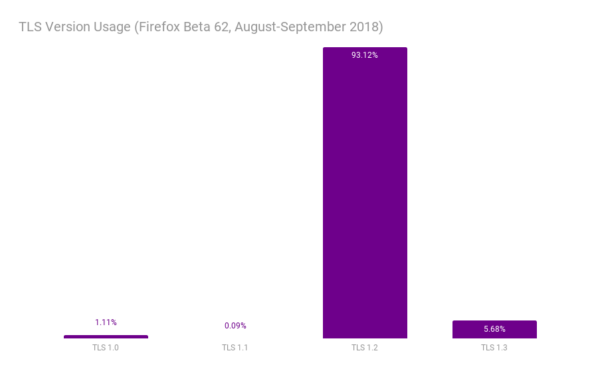
TLS versions for all connections established by Firefox Beta 62, August-September 2018
Our telemetry shows that many sites already use TLS 1.2 or higher (Qualys says 94%). TLS 1.2 is a prerequisite for HTTP/2, which can improve site performance. We recommend that sites use a modern profile of TLS 1.2 unless they have specialized needs.
For sites that need to upgrade, the recently released TLS 1.3 includes an improved core design that has been rigorously analyzed by cryptographers. TLS 1.3 can also make connections faster than TLS 1.2. Firefox already makes far more connections with TLS 1.3 than with TLS 1.0 and 1.1 combined.
Be aware that these changes will appear in pre-release versions of Firefox (Beta, Developer Edition, and Nightly) earlier than March 2020. We will announce specific dates when we have more detailed plans.
We understand that upgrading something as fundamental as TLS can take some time. This change affects a large number of sites. That is why we are making this announcement so far in advance of the March 2020 removal date of TLS 1.0 and TLS 1.1.
Other browsers have made similar announcements. Chrome, Edge, and Safari all plan to make the same change.
The post Removing Old Versions of TLS appeared first on Mozilla Security Blog.
https://blog.mozilla.org/security/2018/10/15/removing-old-versions-of-tls/
A few days ago Google announced ensuring privacy for your Android data backups. The essence is that your lockscreen PIN/pattern/passcode is used to encrypt your data and nobody should be able to decrypt it without knowing that passcode. Hey, that’s including Google themselves! Sounds good? Past experience indicates that such claims should not always be taken at face value. And in fact, this story raises some red flags for me.
The trouble is, whatever you use on your phone’s lockscreen is likely not very secure. It doesn’t have to be, because the phone will lock up after a bunch of failed attempts. So everybody goes with a passcode that is easy to type but probably not too hard to guess. Can you derive an encryption key from that passcode? Sure! Will this encryption be unbreakable? Most definitely not. With passwords being that simple, anybody getting their hands on encrypted data will be able to guess the password and decrypt the data within a very short time. That will even be the case for a well-chosen key derivation algorithm (and we don’t know yet which algorithm Google chose to use here).
Google is aware of that of course. So they don’t use the derived encryption key directly. Instead, the derived encryption key is used to encrypt a proper (randomly generated) encryption key, only the latter being used to encrypt the data. And then they find themselves in trouble: how could one possibly store the encryption key securely? On the one hand, they cannot keep it on user’s device because data might be shared between multiple devices. On the other hand, they don’t want to upload the key to their servers either, because of how unreliable the encryption layer on top of it is — running a bruteforce attack to extract the actual encryption key would be trivial even without having Google’s resources.
So they used a trick. The encryption key isn’t uploaded to a Google server, it is uploaded to a Titan security chip on a Google server. Presumably, your Android device will establish an encrypted connection directly to that Titan chip, upload your private key and the Titan chip will prevent bruteforce attacks by locking up after a few attempts at guessing your passcode. Problem solved?
Not quite. First of all, how do you know that whatever your Android device is uploading the private key to is really a Titan chip and not a software emulation of it? Even if it is, how do you know that it is running unmodified firmware as opposed to one that allows extracting data? And how do you know that Google really has no means of resetting these chips without all data being cleared? It all boils down to: you have to trust Google. In other words: it’s not that Google cannot access your data, they don’t want to. And you have to take their word on it. You also have to trust them when they claim that the NSA didn’t force them into adding a backdoor to those Titan chips.
Don’t take me wrong, they probably produced the best solution given what they have to work with. And for most Android users, their solution should still be a win, despite the shortcomings. But claiming that Google can no longer access users’ backup data is misleading.
https://palant.de/2018/10/15/so-google-is-now-claiming-no-one-including-google-can-access-your-data

A polite reminder: if you're going to link to this build, link to this post please so that people can understand this build doesn't have, nor will it ever have, official support.
It's back! It's undead! It's ugly! It's possibly functional! It's totally unsupported! It's ... TenFourFox for Intel Macs!
Years ago as readers of this blog will recall, Claudio Leite built TenFourFox 17.0.2 for Intel, which the update check-in server shows some determined users are still running to this day on 10.5 and even 10.4 despite various problems such as issue 209. However, he didn't have time to maintain it, and a newer version was never built, though a few people since then have made various attempts and submitted some patches.
One of these attempts is now far enough along to the point where I'm permitted to announce its existence. Riccardo Mottola has done substantial work on getting TenFourFox to build and run again on old Intel Macs with a focus on 32-bit compatibility, and his patches have been silently lurking in the source code repository for some time. Along with Ken Cunningham's additional work, who now also has a MacPorts portfile so you can build it yourself (PowerPC support in the portfile is coming, though you can still use the official instructions, of course), enough functions in the new Intel build that it can be used for basic tasks.
There are still known glitches in the build, including ones which may be severe, and currently Ken's portfile disables the JavaScript JIT due to crash bugs which have not yet been smoked out. (That said, even running in strict interpreter mode, the browser is still much faster than TenFourFox under Rosetta which has no JIT and must run emulated.) If you find one of these glitches, you get to deal with it all by yourself because the support level (i.e., none) hasn't changed. To wit:
- The Power Mac is still the focus of development for TenFourFox, and anything else is best effort. Don't expect any Intel-specific bugs to ever be fixed. If anything does actually get fixed on Intel, be grateful.
- The Intel version will never supersede the PowerPC version. Although I'll try not to intentionally break the Intel build, I may unintentionally do so, and if a bug crops up which requires breaking the Intel build to fix an issue with the PowerPC build, the Intel build will be broken until someone figures out what to do.
- Intel builds remain unsupported and will probably never be supported. Do not post problems with the build to Tenderapp. Don't complain to Riccardo or Ken. Definitely don't complain to me. In fact, unless you're willing to figure out how to solve a problem you're encountering, don't expect anybody to care about any problem you have running the Intel build.
- There may never be any Intel builds issued by anyone ever again except for whatever build you make for your own use. Don't complain about this on Tenderapp. Don't beg (bug) Riccardo or Ken for updates. Definitely don't beg (bug) me.
As before, good news if it works for you, too bad if it doesn't, and please don't make Riccardo, Ken or me regret ever bringing the Intel build back. Again, do not report bugs in the Intel version to Tenderapp, and do not open Github issues unless you have code to contribute.

My External Rule System provides an alternative for more sophisticated rules that leverage the full power and readability of the Python programming language. However, I must ensure the capabilities are a proper superset of the built in Thing Gateway capabilities. The built in GUI Rule System has a special object called the "Clock" that can trigger a rule every day at a specific time. This is for the classic "turn the porch light on in the evening" home automation idea. My External Rule System needs the same capabilities, but as you'll see, it is easy to extend beyond basic time of day idea.
class MorningWakeRule(Rule):(see this code in situ in the morning_wake_rule.py file in the pywot rule system demo directory)
def register_triggers(self):
morning_wake_trigger = AbsoluteTimeTrigger("morning_wake_trigger", "06:30:00")
return (morning_wake_trigger,)
def action(self, *args):
self.Bedside_Ikea_Light.on = True
Having only two parts, a trigger and an action, this rule is about as terse as a rule can be. In the register_triggers method, I defined an AbsoluteTimeTrigger that will fire every day at 6:30am. That means that everyday at my wake up alarm time, the action method will run. The body of that method is to set the "on" property of my bedside Ikea light to True. That turns it on.
There are a number of triggers in the pywot.rule_triggers module. It is useful to understand how they work. The code that runs the AbsoluteTimeTrigger consists of two parts: the constructor and the trigger_detection_loop. The constructor takes the time for the alarm in the form of a string. The trigger_detection_loop method is run when the enclosing RuleSystem is started.
class AbsoluteTimeTrigger(TimeBasedTrigger):
    def __init__(
        self,
        name,
        # time_of_day_str should be in the 24Hr form "HH:MM:SS"
        time_of_day_str,
    ):
        super(AbsoluteTimeTrigger, self).__init__(name)
        self.trigger_time = datetime.strptime(time_of_day_str, '%H:%M:%S').time()

    async def trigger_detection_loop(self):
        logging.debug('Starting timer %s', self.trigger_time)
        while True:
            time_until_trigger_in_seconds = self.time_difference_in_seconds(
                self.trigger_time,
                datetime.now().time()
            )
            logging.debug('timer triggers in %sS', time_until_trigger_in_seconds)
            await asyncio.sleep(time_until_trigger_in_seconds)
The Rust team is happy to announce a new version of Rust, 1.29.2. Rust is a systems programming language focused on safety, speed, and concurrency.
If you have a previous version of Rust installed via rustup, getting Rust 1.29.2 is as easy as:
$ rustup update stable
If you don’t have it already, you can get rustup from the
appropriate page on our website, and check out the detailed release notes for
1.29.2 on GitHub.
What’s in 1.29.2 stable
This patch release introduces a workaround to a miscompilation bug introduced in Rust 1.29.0. We haven’t found the root cause of the bug yet, but it showed up after a LLVM version upgrade, and it’s caused by an optimization. We disabled that optimization until the root cause is fixed.
This release also includes the rls-preview rustup component for Windows GNU
users, which wasn’t included in the 1.29.0 release due to a build failure. We
also added safeguards in the release infrastructure to prevent stable and beta
releases with missing components for Tier 1 platform in the future.
String interning is:
a method of storing only one copy of each distinct string value, which must be immutable. Interning strings makes some string processing tasks more time- or space-efficient at the cost of requiring more time when the string is created or interned. The distinct values are stored in a string intern pool. The single copy of each string is called its intern.
In Firefox’s code we use the term atom rather than intern, and atom table rather than string intern pool. I don’t know why; those names have been used for a long time.
Furthermore, Firefox distinguishes between static atoms, which are those that are chosen at compile time and can be directly referred to via an identifier, and dynamic atoms, which are added on-demand at runtime. This post is about the former.
In 2016, Firefox’s implementation of static atoms was complex and inefficient. I filed a bug about this that included the following ASCII diagram showing all the data structures involved for a single atom for the string “foobar”.
static nsFakeStringBuffer foobar_buffer (.data, 8+2N bytes)
/-----------------------------------------\ <------+
| int32_t mRefCnt = 1 // never reaches 0  |        |
| uint32_t mSize = 14 // 7 x 16-bit chars |        |
| u"foobar"           // the actual chars | <----+ |
\-----------------------------------------/      | |
                                                 | |
PermanentAtomImpl (heap, 32 bytes)               | |
/----------------------------------------------\ | | <-+
| void* vtablePtr    // implicit               | | |   |
| uint32_t mLength = 6                         | | |   |
| uint32_t mHash = ...                         | | |   |
| char16_t* mString = @------------------------|-+ |   |
| uintptr_t mRefCnt  // from NS_DECL_ISUPPORTS |   |   |
\----------------------------------------------/   |   |
                                                   |   |
static nsIAtom* foobar (.bss, 8 bytes)             |   |
/---\ <-----------------------------------+        |   |
| @-|-------------------------------------|------------+
\---/                                     |        |   |
                                          |        |   |
static nsStaticAtom (.d.r.ro.l, 16 bytes) |        |   |
(this element is part of a larger array)  |        |   |
/------------------------------------\    |        |   |
| nsStringBuffer* mStringBuffer = O--|----|--------+   |
| nsIAtom** mAtom = @----------------|----+            |
\------------------------------------/                 |
                                                       |
AtomTableEntry (heap, ~2 x 16 bytes[])                |
(this entry is part of gAtomTable)                     |
/-------------------------\                            |
| uint32_t mKeyHash = ... |                            |
| AtomImpl* mAtom = @-----|----------------------------+
\-------------------------/                            |
                                                       |
StaticAtomEntry (heap, ~2 x 16 bytes[])               |
(this entry is part of gStaticAtomTable)               |
/-------------------------\                            |
| uint32_t mKeyHash = ... |                            |
| nsIAtom* mAtom = @------|----------------------------+
\-------------------------/

[] Each hash table is half full on average, so each entry takes up
approximately twice its actual size.
There is a lot going on in that diagram, but putting that all together gave the following overhead per atom.
- Static shared: 0 bytes
- Static unshared: 8 + 2(length+1) + 8 + 16
- Dynamic: 32 + ~32 + ~32 bytes
- Total bytes: (2(length+1) + 64 + ~64) * num_processes
(Although these atoms are “static” in the sense of being known at compile-time, a lot of the associated data was allocated dynamically.)
At the time there were about 2,700 static atoms, and avg_length was about 11, so the overhead was roughly:
- 0 bytes fixed, and
- 410,400 bytes per process. (Or more, depending on how the relocations required for the static pointers were represented, which depended on the platform.)
Today, things have improved greatly and now look like the following.
const char16_t[7] (.rodata, 2(N+1) bytes)
(this is detail::gGkAtoms.foobar_string)
/-----------------------------------------\ <--+
| u"foobar"
TL;DR: from Firefox 64 onwards, RSS/Atom feed support will be handled via add-ons, rather than in-product.
What is happening?
After considering the maintenance, performance and security costs of the feed preview and subscription features in Firefox, we’ve concluded that it is no longer sustainable to keep feed support in the core of the product. While we still believe in RSS and support the goals of open, interoperable formats on the Web, we strongly believe that the best way to meet the needs of RSS and its users is via WebExtensions.
With that in mind, we have decided to remove the built-in feed preview feature, subscription UI, and the “live bookmarks” support from the core of Firefox, now that improved replacements for those features are available via add-ons.
Why are you doing this?
By virtue of being baked into the core of Firefox, these features have long had outsized maintenance and security costs relative to their usage. Making sure these features are as well-tested, modern and secure as the rest of Firefox would take a surprising amount of engineering work, and unfortunately the usage of these features does not justify such an investment: feed previews and live bookmarks are both used in around 0.01% of sessions.
As one example of those costs, “live bookmarks” use a very old, very slow way to access the bookmarks database, and it would take a lot of time and effort to bring it up to the performance standards we expect from Quantum. Likewise, the feed viewer has its own “special” XML parser, distinct from the main Firefox one, and has not had a significant update in styling or functionality in the last seven years. The engineering work we’d need to bring these features, in their current states, up to modern standards is complicated by how few automated tests there are for anything in this corner of the codebase.
These parts of Firefox are also missing features RSS users typically want. Live bookmarks don’t work correctly with podcasts, don’t work well with sync, and don’t work at all on any of Mozilla’s mobile browsers. They don’t even understand if an article has been read or not, arguably the most basic feature a feed reader should have. In short, the in-core RSS features would need both a major technical overhaul and significant design and maintenance investments to make them useful to a meaningful portion of users.
Looking forward, Firefox offers other features to help users discover and read content, and the move to WebExtensions will make it much easier for the Mozilla community to bring their own ideas for new features to life as well.
What will happen to my existing live bookmarks?
When we remove live bookmarks, we will:
- Export the details of your existing live bookmarks to an OPML file on your desktop, which other feed readers (including ones that are webextensions) support importing from.
- Replace the live bookmarks with “normal” bookmarks pointing to the URL associated with the live bookmark.
- Open a page on support.mozilla.org that explains what has happened and offers you options for how you could continue consuming those feeds.
This will happen as part of Firefox 64, scheduled for release in December 2018. We will not change anything on Firefox 60 ESR, but the next major ESR branch (currently expected to be Firefox 68 ESR) will include the same changes.
https://www.gijsk.com/blog/2018/10/firefox-removes-core-product-support-for-rss-atom-feeds/
When it comes to smart home devices, protecting the safety and security of your home when you aren’t there is a popular area of adoption. Traditional home security systems are either completely offline (an alarm sounds in the house, but nobody is notified) or professionally monitored (with costly subscription services). Self monitoring of your connected home therefore makes sense, but many current smart home solutions still require ongoing service fees and send your private data to a centralised cloud service.

The latest version of the Things Gateway rolls out today with new home monitoring features that let you directly monitor your home over the web, without a middleman. That means no monthly fees, your private data stays in your home by default, and you can choose from a variety of sensors from different brands.
Version 0.6 adds support for door sensors, motion sensors and customisable push notifications. Other enhancements include support for push buttons and a wider range of Apple HomeKit devices, as well as general robustness improvements and better error reporting.
Sensors
The latest update comes with support for door/window sensors and motion sensors, including the SmartThings Motion Sensor and SmartThings Multipurpose Sensor. These sensors make great triggers for a home monitoring system and also report temperature, battery level and tamper detection.
Push Notifications
You can now create rules which trigger a push notification to your desktop, laptop, tablet or smartphone. An example use case for this is to notify you when a door has been opened or motion is detected in your home, but you can use notifications for whatever you like!
To create a rule which triggers a push notification, simply drag and drop the notification output and customize it with your own message.
 Thanks to the power of Progressive Web Apps, if you’ve installed the gateway’s web app on your smartphone or tablet you’ll receive notifications even if the web app is closed.
Push Buttons
We’ve also added support for push buttons, like the SmartThings Button, which you can program to trigger any action you like using the rules engine. Use a button to simply turn a light on, or set a whole scene with multiple outputs.

Error Reporting
0.6 also comes with a range of robustness improvements including connection detection and error reporting. That means it will be easier to tell whether you have lost connectivity to the gateway, or one of your devices has dropped offline, and if something goes wrong with an add-on, you’ll be informed about it inside the gateway UI.
If a device has dropped offline, its icon is displayed as translucent until it comes back online. If your web app loses connectivity with the gateway, you’ll see a message appear at the bottom of the screen.
We know that when you save something to Pocket, there is a reason why. You are saving something you want to learn about, something that fascinates you, something that will help shape and change you. That’s why we’ve worked hard to make Pocket a dedicated, quiet place to focus so that you can come back and absorb what you save when you are ready.
The trick is, in the reality of our lives, it’s not always that simple. Our lives don’t always have a quiet moment with a coffee cup in hand with Pocket in the other. We have work to do, kids to take care of, school to attend. But with Pocket we’ve always worked hard to ensure that Pocket gives you tools to fit content around your life, freeing you from the moment of distraction and putting you in control.
Today, we’re excited to share a new Pocket, that makes it easier than ever to read, watch, listen to all that you’ve saved across all of the ways you use it: iOS, Android and Web.
Listen: A new way to read
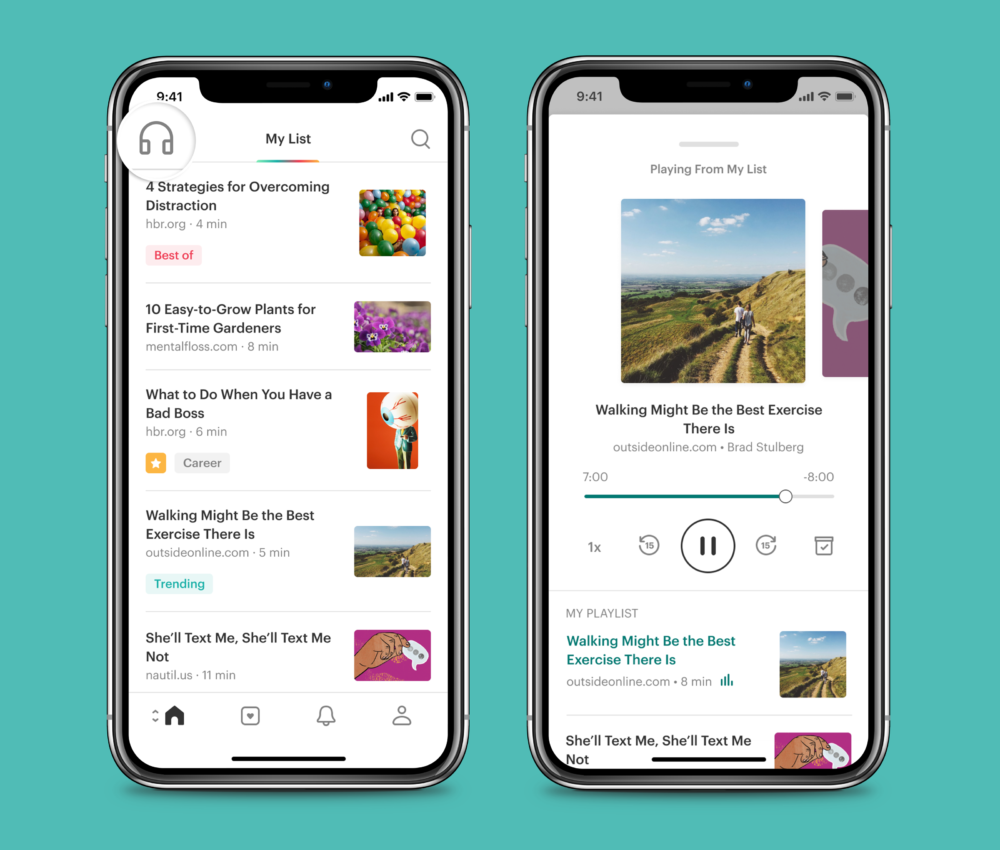
You can listen to content you’ve saved from favorite publishers from all across the web—all from Pocket. Your Pocket list just became your own personal podcast, curated by you. Our new listen feature frees the content you’ve saved to fit into your busy life. It enables you to absorb articles whenever and wherever, whether you are driving, or walking, working out, cooking, or on the train.
With the latest version of listen on iOS and Android, we’re introducing a more human sounding voice, powered by Amazon Polly, and the ability to play through your list easily and hands-free. To start listening, simply open Pocket and tap the new listen icon in the top left corner.
A new Pocket, just for you
With Pocket’s app, we’ve intended it to be a different space from anything else on your device. It’s intentionally an uncluttered and distraction-free environment, built with care so you can really read.
We’ve doubled down on this with a new fresh design, tailored to let you focus, tune out the world and tune into your interests. When you open Pocket, you’ll see a Pocket that’s been redesigned top to bottom. We’ve created a new, clean, clutter-free article view to help you absorb and focus. Introduced new app-wide dark and sepia themes to make reading comfortable, no matter what time of day it is. And updated fonts and typography to make long reads more comfortable.
“At Mozilla, we love the web. Sometimes we want to surf, and the Firefox team has been working on ways to surf like an absolute champ with features like Firefox Advance,” said Mark Mayo, Chief Product Officer, Firefox. “Sometimes, though, we want to settle down and read or listen to a few great pages. That’s where Pocket shines, and the new Pocket makes it even easier to enjoy the best of the web when you’re on the go in your own focused and uncluttered space. I love it.”
Working hard for you
We’re excited to get Pocket 7.0 into your hands today. You can get the latest Pocket on Google Play, App Store, and by joining our Web Beta.
As always, we want to hear from you – let us know what you think.
— Nate
The post Pocket Offers New Features to Help People Read, Watch and Listen across iOS, Android and Web appeared first on The Mozilla Blog.
As usual, WebRender is making rapid progress. The team is working hard on nailing the remaining few blockers for enabling WebRender in Beta, after which focus will shift to the Release blockers. It’s hard to single out a particular highlight this week as the majority of bugs resolved were very impactful.
Notable WebRender and Gecko changes
- Kats fixed a parallax scrolling issue.
- Kats fixed the trello scrollbar jumping bug.
- Kats fixed a crash.
- Kats fixed various other things.
- Matt finished the work on shader compile times. The startup times with and without WebRender are now on par.
- Lee made WebRender more aggressively clean up evicted font instances in the font backend.
- Lee fixed a bug with Windows variation fonts.
- Emilio fixed some pixel snapping issues with fallback content.
- Emilio fixed filter and fallback scaling issue.
- Glenn fixed nested scroll frame clipping.
- Glenn fixed large SVG clipping on google docs.
- Glenn made various refactorings towards picture caching.
- Glenn reduced the amount of work we do when building clip chain instances.
- Nical added support for applying filters in linear space to WebRender.
- Sotaro avoided scheduling repaints during animation if the animation values haven’t actually changed.
- Sotaro fixed a frame scheduling bug.
- Sotaro fixed a crash with cross process texture synchronization on windows.
Ongoing work
- Bobby is improving memory usage by figuring out what set of OpenGL incantations with which planet alignment don’t cause ANGLE to opt into mipmapping where we don’t need it.
- Chris and Andrew are looking into why we aren’t getting as much data as we hoped from the latest shield study.
- Gankro making progress on blob recoordination.
- Nical is adding support for running a subset of SVG filters on the GPU (instead of falling back to blob images).
- A confabulate of graphics folks are thinking very hard about frame scheduling strategies to avoid uneven frame rates when certain parts of the pipeline are struggling.
Enabling WebRender in Firefox Nightly
- In about:config set “gfx.webrender.all” to true,
- restart Firefox.
https://mozillagfx.wordpress.com/2018/10/11/webrender-newsletter-25/
Hello Mozillians,
We are happy to let you know that Friday, October 12th, we are organizing Firefox 63 Beta 14 Testday. We’ll be focusing our testing on: Flash Compatibility and Block Autoplay V2.
Check out the detailed instructions via this etherpad.
No previous testing experience is required, so feel free to join us on #qa IRC channel where our moderators will offer you guidance and answer your questions.
Join us and help us make Firefox better!
See you on Friday!
https://quality.mozilla.org/2018/10/firefox-63-beta-14-testdayoctober-12th/

Firefox Reality 1.0.1 is now available for download in the Viveport, Oculus, and Daydream app stores. This is a minor point release, focused on fixing several performance issues and adding crash reporting UI and (thanks to popular request!) a reclined viewing mode.
New Features:
- Crash reporting
- Reclined viewing mode
- MSAA in immersive mode
Bug Fixes:
- Improved WebVR stability
- Added some missing keys to keyboard
- General stability fixes
Full release notes can be found in our Github repo here.
We’ve been collecting feedback from users, and are working on a more fully-featured version for November with performance improvements, bookmarks, and an improved movie/theater mode (including 180/360 video support).
Keep the feedback coming, and don't forget to check out new content weekly!
https://blog.mozvr.com/firefox-reality-1-0-1-with-recline-mode/
happy bmo push day! This is a “just general bugfixes” sort of release.
the following changes have been pushed to bugzilla.mozilla.org:
- [1496803] Suggested component links ignore cloned bug data
- [1497234] Remove Personas Plus GitHub link from Custom Bug Entry Forms index
- [1497070] In-page links are broken due to added during Mojo migration
- [1497437] The crash graph should display Exact Match results by default
- [623384] Use Module::Runtime…