TenFourFox Feature Parity Release 10 final is now available (downloads, hashes, release notes). This version is live now. Other than outstanding security updates, in this version I also retracted the change (by flipping the pref) for unique data URL origins in issue 525 because of some reported add-on incompatibility. I'm looking at a way add-ons can get around this with their existing code for FPR11, but you're warned: many sites rely on this behaviour to reduce their cross-site scriping surface, and we will have to turn it back on sooner or later.
The changes for FPR11 (December) and FPR12 will be smaller in scope mostly because of the holidays and my parallel work on the POWER9 JIT for Firefox on the Talos II. For the next couple FPRs I'm planning to do more ES6 work (mostly Symbol and whatever else I can shoehorn in) and to enable unique data URI origins, and possibly get requestIdleCallback into a releaseable state. Despite the slower pace, however, we will still be tracking the Firefox release schedule as usual.
http://tenfourfox.blogspot.com/2018/10/tenfourfox-fpr10-available.html
Mozilla has long played an important role in the online world, and we’re proud of the impact we’ve had. But we want to do even more, and that means exploring ways to keep you safe beyond the browser’s reach. Across numerous studies we’ve consistently heard from our users that they want Firefox to protect their privacy on public networks like cafes and airports. With that in mind, over the next few months we will be running an experiment in which we’ll offer a virtual private network (VPN) service to a small group of Firefox users.
This experiment is also important to Mozilla’s future. We believe that an innovative, vibrant, and sustainable Mozilla is critical to the future of the open Internet, and we plan to be here over the long haul. To do that with confidence we also need to have diverse sources of revenue. For some time now Mozilla has largely been funded by our search partnerships. With this VPN experiment which kicks off Wednesday, October 24th, we’re starting the process of exploring new, additional sources of revenue that align with our mission.
What is a VPN?
A VPN is an online service and a piece of software that work together to secure your internet connection against monitoring and eavesdropping. By encrypting all your internet traffic and routing it through a secure server, a VPN prevents your ISP (internet service provider), school, or government from seeing which websites you visit and tracing your online activity back to your IP address. A VPN can also offer valuable peace of mind when you’re using an unsecured public Wi-Fi network, like the one at the airport or your local coffee shop.
How will it work?
A small, random group of US-based Firefox users will be presented with an offer to purchase a monthly subscription to a VPN service that’s been vetted and approved by Mozilla. After signing up for a subscription (billed securely using payment services Stripe and Recurly) they will be able to download and install the VPN software. Windows, macOS, Linux, iOS, and Android are all supported. The VPN can be easily turned on or off as needed, and the subscription can be cancelled at any time.
Screenshots of the experiment’s user experience:


Partnership with ProtonVPN
Using a VPN service means placing a great deal of trust in its provider because you depend upon both the safety of its technology and its commitment to protecting your privacy. There are many VPN vendors out there, but not all of them are created equal. We knew that we could only offer our users a VPN product if it met or exceeded our most rigorous standards. We also knew that the practices, policies, and character of these vendors would be just as important in our decision.
We therefore set out to conduct a thorough evaluation of a long list of market-leading VPN services. Our team looked closely at a wide variety of factors, ranging from the design and implementation of each VPN service and its accompanying software, to the security of the vendor’s own network and internal systems. We examined each vendors’ privacy and data retention policies to ensure they logged as little user data as possible. And we considered numerous other factors, including local privacy laws, company track record, transparency, and quality of support.
As a result of this evaluation we’ve selected ProtonVPN for this experiment. ProtonVPN offers a secure, reliable, and easy-to-use VPN service and is operated by the makers of ProtonMail, a respected, privacy-oriented email service. Based in Switzerland, ProtonVPN has a strict privacy policy and does not log any data about your usage of their service. As a company they have a track record of fighting for online privacy and they share our dedication to internet safety and security.
Your purchase supports Mozilla’s work
ProtonVPN will be providing the service in this experiment. Mozilla will be the party collecting
People have a misconception about WebAssembly. They think that the WebAssembly that landed in browsers back in 2017—which we called the minimum viable product (or MVP) of WebAssembly—is the final version of WebAssembly.
I can understand where that misconception comes from. The WebAssembly community group is really committed to backwards compatibility. This means that the WebAssembly that you create today will continue working on browsers into the future.
But that doesn’t mean that WebAssembly is feature complete. In fact, that’s far from the case. There are many features that are coming to WebAssembly which will fundamentally alter what you can do with WebAssembly.
I think of these future features kind of like the skill tree in a videogame. We’ve fully filled in the top few of these skills, but there is still this whole skill tree below that we need to fill-in to unlock all of the applications.

So let’s look at what’s been filled in already, and then we can see what’s yet to come.
Minimum Viable Product (MVP)

The very beginning of WebAssembly’s story starts with Emscripten, which made it possible to run C++ code on the web by transpiling it to JavaScript. This made it possible to bring large existing C++ code bases, for things like games and desktop applications, to the web.
The JS it automatically generated was still significantly slower than the comparable native code, though. But Mozilla engineers found a type system hiding inside the generated JavaScript, and figured out how to make this JavaScript run really fast. This subset of JavaScript was named asm.js.
Once the other browser vendors saw how fast asm.js was, they started adding the same optimizations to their engines, too.
But that wasn’t the end of the story. It was just the beginning. There were still things that engines could do to make this faster.
But they couldn’t do it in JavaScript itself. Instead, they needed a new language—one that was designed specifically to be compiled to. And that was WebAssembly.
So what skills were needed for the first version of WebAssembly? What did we need to get to a minimum viable product that could actually run C and C++ efficiently on the web?
Skill: Compile target
 The folks working on WebAssembly knew they didn’t want to just support C and C++. They wanted many different languages to be able to compile to WebAssembly. So they needed a language-agnostic compile target.
They needed something like the assembly language that things like desktop applications are compiled to—like x86. But this assembly language wouldn’t be for an actual, physical machine. It would be for a conceptual machine.
Skill: Fast execution
 That compiler target had to be designed so that it could run very fast. Otherwise, WebAssembly applications running on the web wouldn’t keep up with users’ expectations for smooth interactions and game play.
Skill: Compact
 In addition to execution time, load time needed to be fast, too. Users have certain expectations about how quickly something will load. For desktop applications, that expectation is that they will load quickly because the application is already
The protocol we fondly know as DoH, DNS-over-HTTPS, is now officially RFC 8484 with the official title "DNS Queries over HTTPS (DoH)". It documents the protocol that is already in production and used by several client-side implementations, including Firefox, Chrome and curl. Put simply, DoH sends a regular RFC 1035 DNS packet over HTTPS instead of over plain UDP.
I'm happy to have contributed my little bits to this standard effort and I'm credited in the Acknowledgements section. I've also implemented DoH client-side several times now.
Firefox has done studies and tests in cooperation with a CDN provider (which has sometimes made people conflate Firefox's DoH support with those studies and that operator). These studies have shown and proven that DoH is a working way for many users to do secure name resolves at a reasonable penalty cost. At least when using a fallback to the native resolver for the tricky situations. In general DoH resolves are slower than the native ones but in the tail end, the absolutely slowest name resolves got a lot better with the DoH option.
To me, DoH is partly necessary because the "DNS world" has failed to ship and deploy secure and safe name lookups to the masses and this is the one way applications "one layer up" can still secure our users.
https://daniel.haxx.se/blog/2018/10/19/dns-over-https-is-rfc-8484/
Another year at Mozilla. They certainly don’t slow down the more you have of them.
For once a year of stability, organization-wise. The two biggest team changes were the addition of Jan-Erik back on March 1, and the loss of our traditional team name “Browser Measurement II” for a more punchy and descriptive “Firefox Telemetry Team.”
I will miss good ol’ BM2, though it is fun signing off notification emails with “Your Friendly Neighbourhood Firefox Telemetry Team (:gfritzsche, :janerik, :Dexter, :chutten)”
We’re actually in the market for a Mobile Telemetry Engineer, so if you or someone you know might be interested in hanging out with us and having their username added to the above, please take a look right here.
In blogging velocity I think I kept up my resolution to blog more. I’m up to 32 posts so far in 2018 (compared to year totals of 15, 26, and 27 in 2015-2017) and I have a few drafts kicking in the bin that ought to be published before the end of the year. Part of this is due to two new blogging efforts: So I’ve Finished (a series of posts about video games I’ve completed), and Ford The Lesser (a series summarizing the deeds and tone of the new Ontario Provincial Government). Neither are particularly mozilla-related, though, so I’m not sure if the count of work blogposts has changed.
Thinking back to work stuff, let’s go chronologically. Last November we released Firefox Quantum. It was and is a big deal. Then in December all hands went to Austin, Texas.
Electives happened again so I did a reprise of Death-Defying Stats (where I stand up and solve data questions, Live On Stage). We saw Star Wars: The Last Jedi (I’m not sure why the internet didn’t like it. I thought it was grand. Though the theatre ruined the impact of That One Scene by letting us know that no, the sound didn’t actually cut out it was deliberate. Yeesh). We partied at a pseudo-historical southwestern US town, drinking warm beverages out of gigantic branded mugs we got to take home afterwards.
Then we launched straight into 2018. Interviews increased to a crushing density for the role that was to become Jan-Erik’s and for two interns: one (Erin Comerford) working on redesigns for the venerable Telemetry Measurement Dashboards, and another (Agnieszka Ciepielewska) working on automatic change detection and explanation for Telemetry metrics.
In June we met again in San Francisco, but this time without Georg who was suffering a cold. Sunah and I gave a talk about Event Telemetry, Steak Club met again, and we got to mess around with science stuff at the Exploratorium.
This year’s Summer Big Project… y’know, there were a few of them. The first was the Event Telemetry “event” ping. Then there was the Measurement Dashboard redesign project where I ended up mentoring more than I expected due to PTO and timezones.
Also in the summer I was organizing and then going on a trip to celebrate a different anniversary (my tenth wedding anniversary) for nearly the entire month of July.
In August the team met in Berlin, and this time I was able to join in. That was a fun and productive time where we settled matters of team identity, ownership, process, and developed some delightful in-jokes to perplex anyone not in the in-group. I acted as an arm of Ontario Craft Beer Tourism by importing a few local cans (Waterloo Dark and Mad & Noisy Lagered Ale) while asking (well-intentioned but numerous and likely ignorant) questions about European life and politics and food and history and …
And that brings us more or less to now. September was busy. October is busy. I’m helping :frank put authentication on the old Measurement Dashboards so we can put release-channel data back up there without someone taking it and misinterpreting it. (As an org we’ve made the conscious decision to use our public data in a deliberate fashion to support truthful narratives about our products and our users. Like on the Firefox Public Data Report.) I’m looking into how we might take what we learned with Erin’s redesign prototype and productionize it with real data. I’m also improving documentation and consulting with a variety of teams on a variety of data things.
So, resolutions for
One of my major contributions to Debian in 2018 has been participation as a mentor and admin for Debian in Google Summer of Code (GSoC).
Here are a few observations about what happened this year, from my personal perspective in those roles.
Making a full report of everything that happens in GSoC is close to impossible. Here I consider issues that span multiple projects and the mentoring team. For details on individual projects completed by the students, please see their final reports posted in August on the mailing list.
Thanking our outgoing administrators
Nicolas Dandrimont and Sylvestre Ledru retired from the admin role after GSoC 2016 and Tom Marble has retired from the Outreachy administration role, we should be enormously grateful for the effort they have put in as these are very demanding roles.
When the last remaining member of the admin team, Molly, asked for people to step in for 2018, knowing the huge effort involved, I offered to help out on a very temporary basis. We drafted a new delegation but didn't seek to have it ratified until the team evolves. We started 2018 with Molly, Jaminy, Alex and myself. The role needs at least one new volunteer with strong mentoring experience for 2019.
Project ideas
Google encourages organizations to put project ideas up for discussion and also encourages students to spontaneously propose their own ideas. This latter concept is a significant difference between GSoC and Outreachy that has caused unintended confusion for some mentors in the past. I have frequently put teasers on my blog, without full specifications, to see how students would try to respond. Some mentors are much more precise, telling students exactly what needs to be delivered and how to go about it. Both approaches are valid early in the program.
Student inquiries
Students start sending inquiries to some mentors well before GSoC starts. When Google publishes the list of organizations to participate (that was on 12 February this year), the number of inquiries increases dramatically, in the form of personal emails to the mentors, inquiries on the debian-outreach mailing list, the IRC channel and many project-specific mailing lists and IRC channels.
Over 300 students contacted me personally or through the mailing list during the application phase (between 12 February and 27 March). This is a huge number and makes it impossible to engage in a dialogue with every student. In the last years where I have mentored, 2016 and 2018, I've personally but a bigger effort into engaging other mentors during this phase and introducing them to some of the students who already made a good first impression.
As an example, Jacob Adams first inquired about my PKI/PGP Clean Room idea back in January. I was really excited about his proposals but I knew I simply didn't have the time to mentor him personally, so I added his blog to Planet Debian and suggested he put out a call for help. One mentor, Daniele Nicolodi replied to that and I also introduced him to Thomas Levine. They both generously volunteered and together with Jacob, ensured a successful project. While I originally started the clean room, they deserve all the credit for the enhancements in 2018 and this emphasizes the importance of those introductions made during the early stages of GSoC.
In fact, there were half a dozen similar cases this year where I have interacted with a really promising student and referred them to the mentor(s) who appeared optimal for their profile.
After my recent travels in the Balkans, a number of people from Albania and Kosovo expressed an interest in GSoC and Outreachy. The students from Kosovo found that their country was not listed in the application form but the Google team very promptly added it, allowing them to apply for GSoC for the first time. Kosovo still can't participate in the Olympics or the World Cup, but they can compete in GSoC now.
At this stage, I was still uncertain if I would mentor any project myself in 2018 or only help with the admin role, which I had only agreed to do on a very temporary basis until the team evolves.
Over in Bug 1359822, the fine folks on the JS team tried to make error messages for null or undefined property keys nicer in Firefox. So rather than something super lame (and sometimes confusing) like:
TypeError: window.pogs is undefined
You'd get something more helpful like:
TypeError: win.pogs is undefined, can't access property "slammer" of it
This was supposed to land in the Firefox 64 release cycle, but we ran into a few snags.
It turns out that sites (big ones like Flipkart) and libraries depend on the exact shape of an error message, and will fail is craptastic ways if their regular expressions expectations are not met. Like, blank pages and non-stop loading loops.
Facebook's idx's library is an example:
const nullPattern = /^null | null$|^[^(]* null /i;
const undefinedPattern = /^undefined | undefined$|^[^(]* undefined /i;
Bug 1359822 adds a comma to the error message, so undefinedPattern doesn't match anymore.
And yeah, you can't really break the sixth biggest site in India and expect to have users, so we backed out the error improvements patches.
But what does the spec say?, you ask, because you're like, really smart and care about specs and stuff (obviously, because you're reading this blog for and by really smart people™).
ECMAScript® 3000, in section 19.5.6 says:
When an ECMAScript implementation detects a runtime error, it throws a new instance of one of the NativeError objects defined in 19.5.5. Each of these objects has the structure described below, differing only in the name used as the constructor name instead of NativeError, in the name property of the prototype object, and in the implementation-defined message property of the prototype object.
That's spec-talk for "these error messages can be different between browsers, and there's no guarantee they won't change, so attempting to rely on them is harmful to making things better in the future" (approximately).
I filed a bug, but getting upstream open source libraries fixed is way less hard than getting downstream sites to update.

(Almost as hard as pog math.)
The moral of the story is: don't write regular expressions against unstandardized browser-specific messages. Or maybe just never write regular expressions ever again. Seems easier?
https://miketaylr.com/posts/2018/10/(native)-error-prototype-message.html
On Monday, Oct 15, starting at approximately 20:00 UTC, crates.io sustained an operational incident. You can find the status page report here, and our tweets about it here.
Root Cause
A user called cratesio was created on crates.io and proceeded to upload
packages using common, short names. These packages contained nothing beyond a
Cargo.toml file and a README.md instructing users that if they wanted to use
the name, they should open an issue on the crates.io issue tracker.
The rate at which this user uploaded packages eventually resulted in our servers being throttled by GitHub, causing a slowdown in all package uploads or yanks. Endpoints which did not involve updating the index were unaffected.
We decided to take action on this behavior because:
- The contents of the uploaded packages appeared to be an attempt to impersonate
the crates.io team (both through the username
cratesio, as well as directing people to the crates-io issue tracker in the crates’Readmefiles) - the rate of uploading impacted the stability of the service
Action Taken
The user’s IP address was banned immediately. We then backdated the users’ packages to remove
their packages from the homepage. We also redirected the cratesio user’s page to a 404.
Finally, the cratesio user, and all crates they uploaded were deleted.
The user was reported to GitHub, and has since been banned by them.
Timeline of events
- 20:09 UTC: The GitHub user
cratesioregisters an account - 20:13 UTC: This user begins uploading packages at a rate of roughly one package every 2 seconds
- 20:17 UTC: All requests updating the index begin to take 10+ seconds
- 20:41 UTC: An email is sent to the Rust moderation team reporting this user
- 20:46 UTC: The report is forwarded to the crates.io team
- 20:50 UTC: The user is reported in the crates.io team Discord.
- 21:00 UTC: The user’s IP address is blocked from accessing the site
- 21:20 UTC: The user’s packages were removed from the crates.io homepage
- 21:20 UTC: The incident is announced on status.crates.io
- 22:49 UTC: The user’s account page on crates.io is removed.
- 23:58 UTC: The packages, all associated data, and the user’s account are deleted from crates.io
- 00:40 UTC: The packages are removed from the index.
Future measures
It should not have been possible for a single user or IP address to upload that many packages in a short period of time. We will be introducing rate limiting on this endpoint to limit the number of packages a script is able to upload in the future.
We are also looking into disallowing usernames that could be impersonating official Rust teams. We will be updating our policies to clearly state that this form of impersonation is not allowed. We will be deciding the exact wording of this policy in the coming weeks.
While it is impossible to tell a user’s intent, many, including the team, have speculated that this action was either associated with or directly related to the recent esclation in community frustration around crates.io policies, in particular, the squatting policy.
Regardless of whether this incident had this intent, the cratesio team would like to reiterate that taking actions such as the one we experienced on Tuesday is not an appropriate way nor effective way to contribute to dialogue about crates.io policy. We will be adding a policy making it clear that attempting to disrupt crates.io in order to make or further a point is not approrpriate and will be considered a malicous attack. We will be deciding on the exact wording of this policy in the coming weeks.
If you feel that a policy is problematic, the correct place to propose a change is by creating an RFC or messaging the team at help@crates.io.
We also have seen a lot of frustration that the crates.io team is not listening to the concerns that are being raised on both official and unofficial Rust forums. We agree that we should improve our communication with the community and intend to develop more processes for folks to communicate with us, as well as for the team to communicate to the general community.
Background
There has been a growing amount of discussion in the community around our squatting policy, and our decision not to have namespacing.
The original squatting policy, published in 2014, contains a lot more information about the rationale behind the
Here comes the 26th issue of WebRender’s newsletter. Let’s see what we have this week:
Notable WebRender and Gecko changes
- Bobby reduced GPU memory usage on Windows by making it so ANGLE doesn’t allocate mipmaps for all textures.
- Bobby further reduced GPU memory usage by sharing the depth buffer for all intermediate targets.
- Andrew improved animated image frame recycling.
- Andrew fixed a rendering bug.
- Andrew fixed an issue that caused some configurations that should have WebRender enabled to disable it.
- Emilio fixed a bug.
- Emilio fixed another bug.
- Glenn switched line decoration from being clip masks to cached primitives.
- Glenn cached the current batch for opaque and alpha batch lists during batching.
- Glenn moved the generation of border segments from frame building to scene building.
- Glenn improved the detection of opaque border segments (moving primitives to the opaque pass improves performance).
- Sotaro fixed a flickering issue a startup on Windows.
- Sotaro fixed a frame scheduling issue.
Ongoing work
- Doug is making progress on document splitting. This will allow us to render the UI and the web content independently.
- Kats and Markus are looking into standing up WebRender in GeckoView (Android). It’s not quite usable yet but early performance profiles are very encouraging.
- Nical is auditing WebRender’s resistance to timing attacks.
- Matt is investigating SVG performance.
- Bobby is looking into further reducing GPU memory usage by improving the texture cache heuristics.
- Gankro is making progress on blob image re-coordination.
Enabling WebRender in Firefox Nightly
- In about:config set “gfx.webrender.all” to true,
- restart Firefox.
https://mozillagfx.wordpress.com/2018/10/18/webrender-newsletter-26/
Do you know who is trying to influence your vote online? The votes of your friends and neighbors? Would you even know how to find out? Despite all the talk of election security, the tech industry still falls short on political ad transparency. With the U.S. midterm elections mere weeks away, this is a big problem.
We can’t solve this problem alone, but we can help by making it more visible and easier to understand. Today we are announcing the release of our experimental extension, Ad Analysis for Facebook, to give you greater transparency into the online advertisements, including political ads, you see on Facebook.
Big tech companies have acknowledged this problem but haven’t done enough to address it. In May, Facebook released the Ad Archive, a database of political ads that have run on the platform. In August, Facebook announced a private beta release of its Ad Archive API. But these are baby steps at a time when we need more. The Ad Archive doesn’t provide the integrated, transparent experience that users really need, nor provide the kind of data journalists and researchers require for honest oversight. The Ad Archive API is only available to select organizations. Facebook’s tools aren’t very useful today, which means they won’t provide meaningful transparency before the midterm elections.
This is why we’re launching Ad Analysis for Facebook. It shows you why you were targeted, and how your targeting might differ from other users. You may be surprised! Facebook doesn’t just target you based on the information you’ve provided in your profile and posts. Facebook also infers your interests based on your activities, the news you read, and your relationships with others on Facebook.
Beyond giving you insight into how you were targeted, Ad Analysis for Facebook provides a view of the overall landscape to help you see outside your filter bubble. The extension also displays a high-level overview of the top political advertisers based on targeting by state, gender, and age. You can view ads for each of these targeting criteria — the kinds of ads you would never normally see.
Political ad transparency is just one of the many areas we need to improve to strengthen our electoral processes for the digital age. Transparency alone won’t solve misinformation problems or election hacking. But at Mozilla, we believe transparency is the most critical piece. Citizens need accurate information and powerful tools to make informed decisions. We encourage you to use our new Ad Analysis for Facebook experiment, as well as our other tools and resources to help you navigate the US midterm elections. It’s all part of learning more about who is trying to influence your vote.
The post Getting serious about political ad transparency with Ad Analysis for Facebook appeared first on Open Policy & Advocacy.

Today we’re thrilled to announce the beta release of Spoke: the easiest way to create your own custom social 3D scenes you can use with Hubs.
Over the last year, our Social Mixed Reality team has been developing Hubs, a WebVR-based social experience that runs right in your browser. In Hubs, you can communicate naturally in VR or on your phone or PC by simply sharing a link.
Along the way, we’ve added features that enable social presence, self-expression, and content sharing. We’ve also offered a variety of scenes to choose from, like a castle space, an atrium, and even a wide open space high in the sky.
However, as we hinted at earlier in the year, we think creating virtual scenes should be easy for anyone, as easy as creating your first webpage.
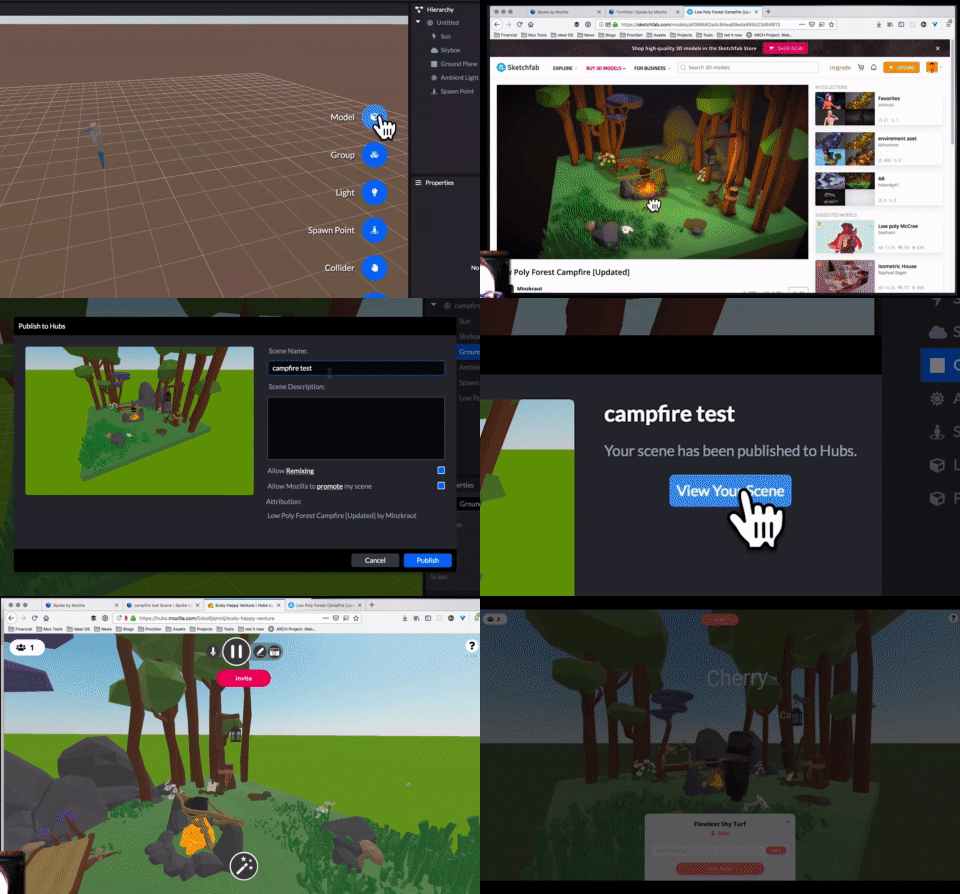
Spoke lets you quickly take all the amazing 3D content from across the web from sites like Sketchfab and Google Poly and compose it into a custom scene with your own personal touch. You can also use your own 3D models, exported as glTF. The scenes you create can be published, shared, and used in Hubs in just a few clicks. It takes as little as 5 minutes to create a scene and meet up with others in VR. Don’t believe us? Check out our 5 minute tutorial to see how easy it is.
With Spoke, all of the freely-licensed 3D content by thousands of amazing and generous 3D artists can be composed into places you can visit together in VR. We’ve made it easy to import and arrange your own 3D content as well. In a few clicks, you can meet up in a custom 3D scene, in VR, all by just sharing a link. And since you’re in Hubs, you can draw, bring in content from the web, or even take selfies with one another!
We’re beyond excited to get Spoke into your hands, and we can’t wait to see the amazing scenes you create. We’ll be adding more capabilities to Spoke over the coming months which will open up even more possibilities. As always, please join us on our Discord server or file a GitHub issue if you have feedback.
You can download the Spoke beta now for Windows, MacOS, and Linux, or browse our Sketchfab collections for inspiration.
Low Poly Campfire by Mintzkraut
TL;DR: Firefox Nightly now supports encrypting the TLS Server Name Indication (SNI) extension, which helps prevent attackers on your network from learning your browsing history. You can enable encrypted SNI today and it will automatically work with any site that supports it. Currently, that means any site hosted by Cloudflare, but we’re hoping other providers will add ESNI support soon.
Concealing Your Browsing History
Although an increasing fraction of Web traffic is encrypted with HTTPS, that encryption isn’t enough to prevent network attackers from learning which sites you are going to. It’s true that HTTPS conceals the exact page you’re going to, but there are a number of ways in which the site’s identity leaks. This can itself be sensitive information: do you want the person at the coffee shop next to you to know you’re visiting cancer.org?
There are four main ways in which browsing history information leaks to the network: the TLS certificate message, DNS name resolution, the IP address of the server, and the TLS Server Name Indication extension. Fortunately, we’ve made good progress shutting down the first two of these: The new TLS 1.3 standard encrypts the server certificate by default and over the past several months, we’ve been exploring the use of DNS over HTTPS to protect DNS traffic. This is looking good and we are hoping to roll it out to all Firefox users over the coming months. The IP address remains a problem, but in many cases, multiple sites share the same IP address, so that leaves SNI.
Why do we need SNI anyway and why didn’t this get fixed before?
Ironically, the reason you need an SNI field is because multiple servers share the same IP address. When you connect to the server, it needs to give you the right certificate to prove that you’re connecting to a legitimate server and not an attacker. However, if there is more than one server on the same IP address, then which certificate should it choose? The SNI field tells the server which host name you are trying to connect to, allowing it to choose the right certificate. In other words, SNI helps make large-scale TLS hosting work.
We’ve known that SNI was a privacy problem from the beginning of TLS 1.3. The basic idea is easy: encrypt the SNI field (hence “encrypted SNI” or ESNI). Unfortunately every design we tried had drawbacks. The technical details are kind of complicated, but the basic story isn’t: every design we had for ESNI involved some sort of performance tradeoff and so it looked like only sites which were “sensitive” (i.e., you might want to conceal you went there) would be willing to enable ESNI. As you can imagine, that defeats the point, because if only sensitive sites use ESNI, then just using ESNI is itself a signal that your traffic demands a closer look. So, despite a lot of enthusiasm, we eventually decided to publish TLS 1.3 without ESNI.
However, at the beginning of this year, we realized that there was actually a pretty good 80-20 solution: big Content Distribution Networks (CDNs) host a lot of sites all on the same machines. If they’re willing to convert all their customers to ESNI at once, then suddenly ESNI no longer reveals a useful signal because the attacker can see what CDN you are going to anyway. This realization broke things open and enabled a design for how to make ESNI work in TLS 1.3 (see Alessandro Ghedini’s writeup of the technical details.) Of course, this only works if you can mass-configure all the sites on a given set of servers, but that’s a pretty common configuration.
How do I get it?
This is brand-new technology and Firefox is the first browser to get it. At the moment we’re not ready to turn it on for all Firefox users. However, Nightly users can try out this enhancing feature now by performing the following steps: First, you need to make sure you have DNS over HTTPS enabled (see: https://blog.nightly.mozilla.org/2018/06/01/improving-dns-privacy-in-firefox/). Once you’ve done that, you also need to set the “network.security.esni.enabled” preference in about:config to “true”). This should automatically enable ESNI for any site that supports it. Right now, that’s just Cloudflare, which has enabled ESNI for all its customers, but we’re hoping that other providers will follow them. You can go to:

The Opus Audio Codec gets another major update with the release of version 1.3 (demo).
Opus is a totally open, royalty-free audio codec that can be used for all audio applications, from music streaming and storage to high-quality video-conferencing and VoIP. Six years after its standardization by the IETF, Opus is now included in all major browsers and mobile operating systems. It has been adopted for a wide range of applications, and is the default WebRTC codec.
This release brings quality improvements to both speech and music compression, while remaining fully compatible with RFC 6716. Here’s a few of the upgrades that users and implementers will care about the most.
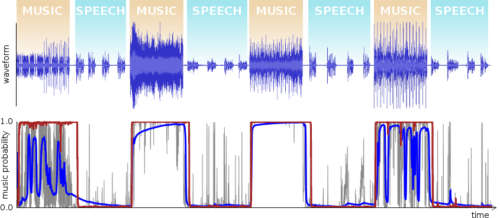
Opus 1.3 includes a brand new speech/music detector. It is based on a recurrent neural network and is both simpler and more reliable than the detector that has been used since version 1.1. The new detector should improve the Opus performance on mixed content encoding, especially at bitrates below 48 kb/s.
There are also many improvements for speech encoding at lower bitrates, both for mono and stereo. The demo contains many more details, as well as some audio samples. This new release also includes a cool new feature: ambisonics support. Ambisonics can be used to encode 3D audio soundtracks for VR and 360 videos.
You can read all the details of The Release of Opus 1.3.
The post Introducing Opus 1.3 appeared first on Mozilla Hacks - the Web developer blog.
Mozilla and the Khronos Group collaborate to bring glTF capabilities to Blender
Mozilla is committed to the next wave of creativity in the open Web, in which people can access, create and share immersive VR and AR experiences across platforms and devices. What it takes though is an enthusiastic, skilled and growing community of creators, artists, and also businesses forming a healthy ecosystem, as well as tool support for web developers who build content for it. To overcome a fragmented environment and to allow for broad adoption, we need the leading content format to be open, and frameworks and toolsets to be efficient and interoperable. Ensuring that tools for creation, modification and viewing are open to the entire community and that there aren’t gatekeepers to creativity is one of the main working areas for Mozilla’s Mixed Reality (WebXR) Team. Building on its “Open by Design” strategy Open Innovation partnered with that team around Lars Bergstrom to find neat, yet impactful ways to stimulate external collaboration, co-development and co-funding of technology.
In this case: together with the Khronos Group and developers of existing open source Blender tools, we are providing a complete GL Transmission Format (glTF) import AND export add-on for Blender, offering a powerful and free round-trip workflow for WebXR creators. This effort builds on the work of existing open source tools, and adds support for the newest Blender and glTF features. The tool itself along with further technical details will be available in the coming weeks. The blueprint for the collaboration model that allowed us to get there already exists. This article will explain how we got there, how this model works, and why it can accelerate the ecosystem.
Where do we start? Understand the ecosystem!

The glTF format, the “JPEG of 3D”, is a cornerstone for interoperable 3D tools and services. It is royalty free and coordinated by the Khronos consortium. It not only finds uses in consumer products, such as games, or social VR tools like Mozilla Hubs, but also in industrial contexts. This means that there is a complex ecosystem with very diverse parties, different motivations and business models. If we wanted to align interests to maximise impact we needed to better understand the value creation and value capture across this ecosystem. In order to identify the best leverage points for our efforts we started an analysis focusing on the content creators, their motivations, their current pain points, and the expected impact of tools that could empower them.
The initial analysis was shared with the Khronos glTF working group. This working group brings together ecosystem stakeholders “to cooperate in the creation of open standards that deliver on the promise of cross-platform technology”. Several partners participated in the next iteration analysis of the tools for content creators, the contributions of Don McCurdy from Google, Patrick Cozzi from Cesium and our own Fernando Serrano Garc'ia were particularly helpful. The result was a clear recommendation to support the development of Blender tools for glTF.
Leveraging Common Interests
Blender holds a unique place among 3D content creation tools — it is free, open source, popular, and available to anyone. We are especially excited by the timing, as the upcoming release of Blender 2.8 promises powerful physically-based rendering (PBR) and a greatly-improved user interface. Round-trip glTF import and export in Blender raises the baseline for WebXR developers, designers, and creators. Anyone, anywhere in the world, can create, edit, and remix glTF models without having to purchase specialized software.


Blender is not only used by professional filmmakers (think Wonder
I tend to do a lot of try pushes for testing changes to Gecko and other stuff, and by using one of TreeHerder's (apparently) lesser-known features, managing these pushes to see their results is really easy. If you have trouble managing your try pushes, consider this:
Open a tab with an author filter for yourself. You can do this by clicking on your email address on any of your try pushes (see highlighted area in screenshot below). Keep this tab open, forever. By default it shows you the last 10 try pushes you did, and if you leave it open, it will auto-update to show newer try pushes that you do.
With this tab open, you can easily keep an eye on your try pushes. Once the oldest try pushes are "done" (all jobs completed, you've checked the result, and you don't care about it anymore), you can quickly and easily drop it off the bottom by clicking on the "Set as bottom of range" menu item on the oldest push that you do want to keep. (Again, see screenshot below).
[photo]
This effectively turns this tab into a rotating buffer of the try pushes you care about, with the oldest ones moving down and eventually getting removed via use of "Set as bottom of range" and the newer ones automatically appearing on top.
Note: clicking on the "Set as bottom of range" link will also reload the TreeHerder page, which means errors that might otherwise accumulate (due to e.g. sleeping your laptop for a time, or a new TreeHerder version getting deployed) get cleared away, so it's even self-healing!
Bonus tip: Before you clear away old try pushes that you don't care about, quickly go through them to make sure they are all marked "Complete". If they still have jobs running that you don't care about, do everybody a favor and hit the push cancellation button (the "X" icon next to "View Tests") before resetting the bottom of range, as that will ensure we don't waste machine time running jobs nobody cares about.
Extra bonus tip: Since using this technique this makes all those "Thank you for your try submission" Taskcluster emails redundant, set up an email filter to reroute those emails to the /dev/null of your choice. Less email results in a happier you!
Final bonus tip: If you need to copy a link to a specific try push (for pasting in a bug, for example), right-click on the timestamp for that try push (to the left of your email address), and copy the URL for that link. That link is for that specific push, and can be shared to get the desired results.
And there you have it, folks, a nice simple way to manage all your try pushes on a single page and not get overwhelmed.
Being able to search code while reviewing can be really useful, but unfortunately it’s not so straightforward. Many people resort to loading the patch under review in an IDE in order to be able to search code.
Being able to do it directly in the browser can make the workflow much smoother.
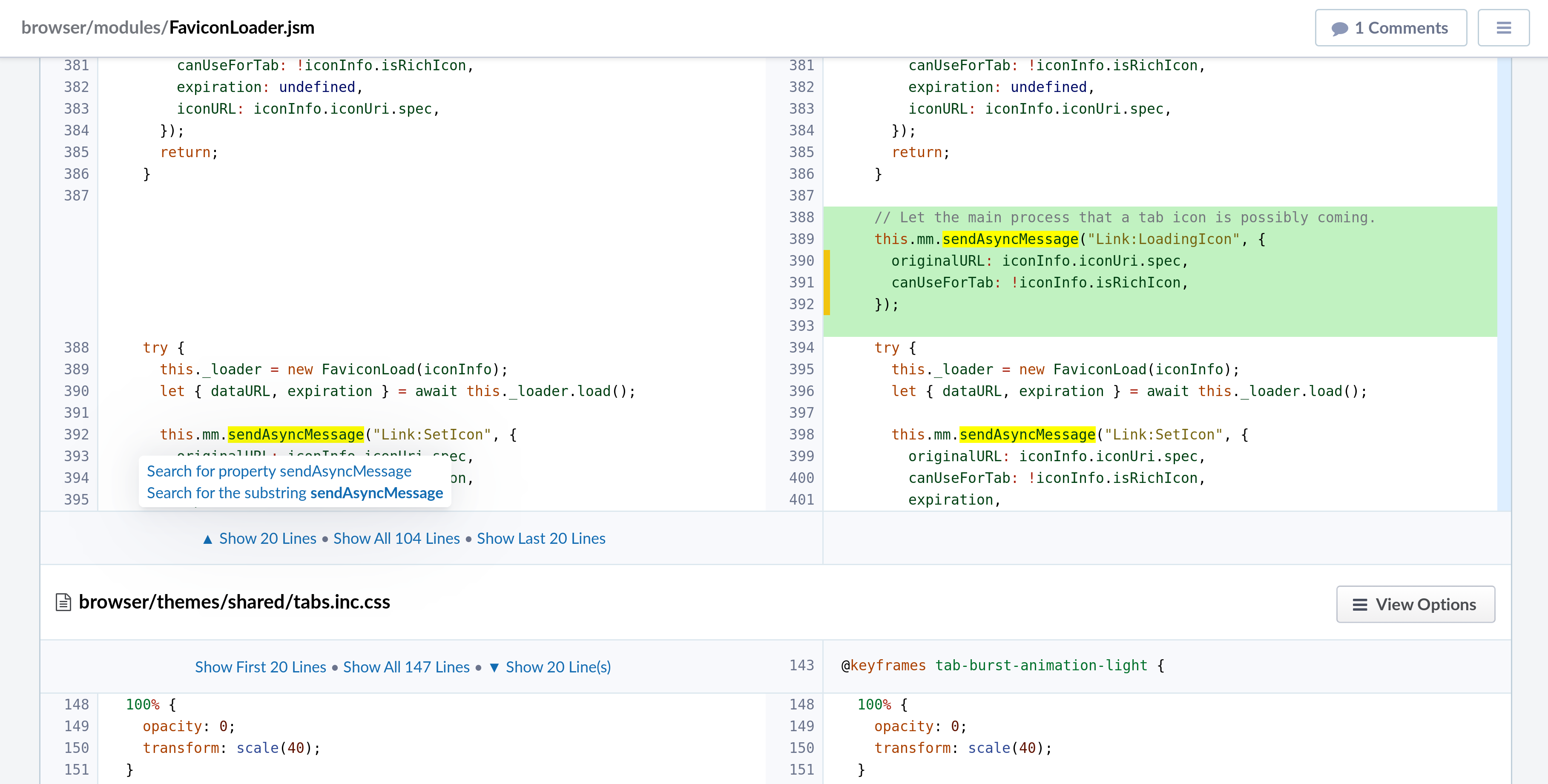
To support this use case, I’ve built an extension for Phabricator that integrates Searchfox code search functionality directly in Phabricator differentials. This way reviewers can benefit from hovers, go-to-definition and find-references without having to resort to the IDE or without having to manually navigate to the code on searchfox.org or dxr.mozilla.org. Moreover, compared to searchfox.org or dxr.mozilla.org, the extension highlights both the pre-patch view and the post-patch view, so reviewers can see how pre-existing variables/functions are being used after the patch.
To summarize, the features of the extension currently are:
- Highlight keywords when you hover them, highlighting them both in the pre-patch and in the post-patch view;
- When you press on a keyword, it offers options to search for the definition, callers, and so on (the results are opened on Searchfox in a new tab).
Here’s a screenshot from the extension in action:
I’m planning to add support for sticky highlighting and blame information (when hovering on the line number on the left side). Indeed, being able to look at the past history of a line is another sought after feature by reviewers.
You can find the extension on AMO, at https://addons.mozilla.org/addon/searchfox-phabricator/.
The source code, admittedly not great as it was written as an experiment, lives at https://github.com/marco-c/mozsearch-phabricator-addon.
Should you find any issues, please file them on https://github.com/marco-c/mozsearch-phabricator-addon/issues.
https://marco-c.github.io/2018/10/18/searchfox-in-phabricator.html
Search is one of the most common activities that people do whenever they go online. At Mozilla, we are always looking for ways to streamline that experience to make it fast, easy and convenient for our users.
Our Firefox browser provides a variety of options for people to search the things and information they seek when they’re on the web, so we want to make search even easier. For instance, there are two search boxes on every home or new tab page – one is what we call the “awesome bar” also known as the URL bar, and the other is the search box in the home/new tab pages.
In the awesome bar, users can use a shortcut to their queries by simply entering a predefined keyword (like @google) and typing the actual search term they are seeking, whether it’s the nearest movie theater location and times for the latest blockbuster movie or finding a sushi restaurant close to their current location. These Search Keywords have been part of the browser experience for years, yet it’s not commonly known. Here’s a hint to enable it: Go to “Preferences,” then “Search” and check “ One-Click Search Engines”.
This brings us back to why we started our latest refinement: Search shortcuts, which is starting to roll out to US users today.
How does it work?
We are getting one step closer to making the search experience even faster and more straightforward. Users in the US will start to see Google and Amazon as pinned top sites, called “Search shortcuts”. Tapping on these top sites redirects the user to the awesome bar, and automatically fills the corresponding keyword for the search engine. Typing any search term or phrase after the keyword “@google” or “@amazon” and hitting enter, will result in searching for the term in Google or Amazon accordingly, without having to wait for a page to load.

These shortcuts are easy to manage right from the new tab page, so you can add or remove them as you please. To remove the default search shortcuts, simply click on the dots icon and select “unpin.” If you have a search engine you’d rather have listed, click on the three dots on the right side of your Top Sites section and select “Add search engine.”

What to expect next
We are currently exploring how to expand this utility outside of the US. We expect to learn a great deal in the coming weeks by analyzing the user sentiment and usage of the new feature. User feedback and comments will help us determine next steps and future improvements.
In the spirit of full transparency that Mozilla has always stood for, we anticipate that some of these search queries may fall under the agreements with Google and Amazon, and bring business value to the company. Not only are users benefiting from a new utility, they are also helping Mozilla’s financial sustainability.
In the meantime, check out and download the latest version of Firefox Quantum for the desktop in order to use the Search Shortcuts feature when it becomes available.
Download Firefox for Windows, Mac, Linux
The post Searching Made Faster, the Latest Firefox Exploration appeared first on Future Releases.
In the Dweb series, we are covering projects that explore what is possible when the web becomes decentralized or distributed. These projects aren’t affiliated with Mozilla, and some of them rewrite the rules of how we think about a web browser. What they have in common: These projects are open source and open for participation, and they share Mozilla’s mission to keep the web open and accessible for all.
While Scuttlebutt is person-centric and IPFS is document-centric, today you’ll learn about Matrix, which is all about messages. Instead of inventing a whole new stack, they’ve leaned on some familiar parts of the web today – HTTP as a transport, and JSON for the message format. How those messages get around is what distinguishes it – a system of decentralized servers, designed with interoperability in mind from the beginning, and an extensibility model for adapting to different use-cases. Please enjoy this introduction from Ben Parsons, developer advocate for Matrix.org.
– Dietrich Ayala
What is Matrix?
Matrix is an open standard for interoperable, decentralised, real-time communication over the Internet. It provides a standard HTTP API for publishing and subscribing to real-time data in specified channels, which means it can be used to power Instant Messaging, VoIP/WebRTC signalling, Internet of Things communication, and anything else that can be expressed as JSON and needs to be transmitted in real-time over HTTP. The most common use of Matrix today is as an Instant Messaging platform.
- Matrix is interoperable in that it follows an open standard and can freely communicate with other platforms. Matrix messages are JSON, and easy to parse. Bridges are provided to enable communication with other platforms.
- Matrix is decentralised – there is no central server. To communicate on Matrix, you connect your client to a single “homeserver” – this server then communicates with other homeservers. For every room you are in, your homeserver will maintain a copy of the history of that room. This means that no one homeserver is the host or owner of a room if there is more than one homeserver connected to it. Anyone is free to host their own homeserver, just as they would host their own website or email server.
Why create another messaging platform?
The initial goal is to fix the problem of fragmented IP communications: letting users message and call each other without having to care what app the other user is on – making it as easy as sending an email.
In future, we want to see Matrix used as a generic HTTP messaging and data synchronization system for the whole web, enabling IoT and other applications through a single unified, understandable interface.
What does Matrix provide?
Matrix is an Open Standard, with a specification that describes the interaction of homeservers, clients and Application Services that can extend Matrix.
There are reference implementations of clients, servers and SDKs for various programming languages.
Architecture
You connect to Matrix via a client. Your client connects to a single server – this is your homeserver. Your homeserver stores and provides history and account information for the connected user, and room history for rooms that user is a member of. To sign up, you can find a list of public homeservers at hello-matrix.net, or if using Riot as your client, the client will suggest a default location.
Homeservers synchronize message history with other homeservers. In this way, your homeserver is responsible for storing the state of rooms and providing message history.
Let’s take a look at an example of how this works. Homeservers and clients are connected as in the diagram in figure 1.
Figure 1. Homeservers with clients

Figure 2.
