In the Dweb series, we are covering projects that explore what is possible when the web becomes decentralized or distributed. These projects aren’t affiliated with Mozilla, and some of them rewrite the rules of how we think about a web browser. What they have in common: These projects are open source and open for participation, and they share Mozilla’s mission to keep the web open and accessible for all.
We’ve covered a number of projects so far in this series that require foundation-level changes to the network architecture of the web. But sometimes big things can come from just changing how we use the web we have today.
Imagine if you never had to remember a password to log into a website or app ever again. IndieAuth is a simple but powerful way to manage and verify identity using the decentralization already built into the web itself. We’re happy to introduce Aaron Parecki, co-founder of the IndieWeb movement, who will show you how to set up your own independent identity on the web with IndieAuth.
– Dietrich Ayala
Introducing IndieAuth
IndieAuth is a decentralized login protocol that enables users of your software to log in to other apps.
From the user perspective, it lets you use an existing account to log in to various apps without having to create a new password everywhere.
IndieAuth builds on existing web technologies, using URLs as identifiers. This makes it broadly applicable to the web today, and it can be quickly integrated into existing websites and web platforms.
IndieAuth has been developed over several years in the IndieWeb community, a loosely connected group of people working to enable individuals to own their online presence, and was published as a W3C Note in 2018.
IndieAuth Architecture
IndieAuth is an extension to OAuth 2.0 that enables any website to become its own identity provider. It builds on OAuth 2.0, taking advantage of all the existing security considerations and best practices in the industry around authorization and authentication.
IndieAuth starts with the assumption that every identifier is a URL. Users as well as applications are identified and represented by a URL.
When a user logs in to an application, they start by entering their personal home page URL. The application fetches that URL and finds where to send the user to authenticate, then sends the user there, and can later verify that the authentication was successful. The flow diagram below walks through each step of the exchange:

Get Started with IndieAuth
The quickest way to use your existing website as your IndieAuth identity is to let an existing service handle the protocol bits and tell apps where to find the service you’re using.
If your website is using WordPress, you can easily get started by installing the IndieAuth plugin! After you install and activate the plugin, your website will be a full-featured IndieAuth provider and you can log in to websites like https://indieweb.org right away!
To set up your website manually, you’ll need to choose an IndieAuth server such as https://indieauth.com and add a few links to your home page. Add a link to the indieauth.com authorization endpoint in an HTML tag so that apps will know where to send you to log in.
Then tell indieauth.com how to authenticate you by linking to either a GitHub account or email address.
GitHub
Email
Note: This last step is unique to indieauth.com and isn’t part of the IndieAuth spec. This is how indieauth.com can authenticate you without you creating a password there. It lets you switch out the mechanism you use to authenticate, for example in case you decide to stop using GitHub, without changing your identity at the site you’re logging in to.
If you don’t want to rely on any third party services at all, then you can host your own IndieAuth authorization endpoint using an
Mozilla is announcing the seven recipients of its Creative Media Awards — projects that use art and advocacy to highlight the unintended consequences of artificial intelligence
The artificial intelligence (AI) behind our screens has an outsized impact on our lives — it influences what news we read, who we date, and if we’re hired for that dream job.
More than ever, it’s essential for internet users to understand how this AI works — and how it can go awry, from radicalizing YouTube users to promoting bias to spreading misinformation.
Today, Mozilla is announcing funding for seven art and advocacy projects that shine a light on the AI at work in our everyday lives.
These seven projects are winners of Mozilla’s latest $225,000 Creative Media Awards. They hail from five countries. And they make AI’s impact on society understandable using science fiction, short documentaries, games, and more. These projects will launch to the public by June 2019.
Mozilla’s Creative Media Awards are part of our mission to support a healthy internet. They fuel the people and projects on the front lines of the internet health movement — from digital artists in the Netherlands to computer scientists in the United Arab Emirates to science fiction writers in the U.S.
The winners:
[1] Stealing Ur Feelings | by Noah Levenson in the U.S. | $50,000 prize
Stealing Ur Feelings will be an interactive film that reveals how social networks and apps use your face to secretly collect data about your emotions. The documentary will explore how emotion recognition AI determines if you’re happy or sad — and how companies use that information to influence your behavior.

An early version of Stealing Ur Feelings
[2] Do Not Draw a Penis | by Moniker in the Netherlands | $50,000 prize
Do Not Draw a Penis will address automated censorship and algorithmic content moderation. Users will visit a web page and will be met with a blank canvas. Users can draw whatever they like, and an AI voice will comment on their drawings (e.g. “nice landscape!”). But if the drawing resembles a penis or other “forbidden” content, the AI will scold the user, take control, and destroy the image.
[3] A Week With Wanda | by Joe Hall in the UK | $25,000 prize
A Week With Wanda will be a web-based simulation of the risks and rewards of artificial intelligence. Wanda — an AI assistant — will interact with users over the course of one week in an attempt to “improve” their lives. But she quickly goes off the rails. Along the way, Wanda might send uncouth messages to Facebook friends, order you anti-depressants, or freeze your bank account. (Wanda’s actions are simulated, not real.)
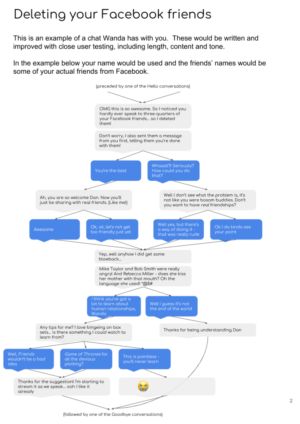
A potential conversation from A Week With Wanda
[4] Survival of the Best Fit | by Alia ElKattan in the United Arab Emirates, and Gabor Csapo, Jihyun Kim, and Miha Klasinc | $25,000 prize
Survival of the Best Fit is a web simulation of how blind usage of AI in hiring can reinforce workforce inequality. Users will operate an algorithm and see first-hand how white-sounding names are often prioritized, among other biases.
[5] The Training Commission | by Ingrid Burrington and Brendan Byrne in the U.S. | $25,000 prize
The Training Commission is a work of web-based speculative fiction that tells the stories of AI’s unintended consequences and harms to public life. It unfolds from the perspective of a journalist who is reckoning with how deeply AI has scarred society.
[6] What Do You See? | by Suchana Seth in India | $25,000 prize
What Do You See? highlights how differently humans and algorithms “see” the same image, and how easily bias can take root. Humans will
With €1.5m in EU funding, this paid PhD program will explore how to build a more open, secure, and trustworthy Internet of Things
This week, the University of Dundee and Mozilla are announcing a new, innovative PhD program: OpenDoTT (Open Design of Trusted Things). This program will train technologists, designers, and researchers to create and advocate for connected products that are more open, secure, and trustworthy. The project is made possible through €1.5m in funding from the EU’s Horizon 2020 program.
As IoT evolves, the internet becomes more deeply entwined in humans’ everyday lives. Data flows around us in ever more complex ways: wearable technologies monitor our heartbeat, AI voice assistants cohabit our kitchens and our children’s bedrooms, smart cities know our every move, and facial recognition determines our access across country borders.
These technologies need to be built responsibly, and this practice requires the cultivation of design research and advocacy. OpenDoTT addresses this need on a systems level. By training the very people who will develop and influence IoT technology, we can create positive change that starts at the drawing board.
The challenges of the Internet of Things (IoT) require interdisciplinary thinking. And so the program will be hosted across several locations with training by leading organizations in different fields. The doctoral researchers will begin at the University of Dundee to learn about design research, and then move to Mozilla’s office in Berlin to focus on internet health. Throughout their studies, they will receive training on open hardware from Officine Innesto; field research from Quicksand and STBY; internet policy from the Humboldt Institute for Internet and Society; responsible IoT from Thingscon; and digital security from SimplySecure.
University of Dundee will lead training in design research, building on their world-class work on the Internet of Things, co-creation, and craft technology. The university’s past projects have explored the future of voice assistants in the home and IoT for independent retailers.
Mozilla will lead training around open technology and healthy internet practices. Mozilla focuses on fueling the movement for a healthy internet by connecting open internet leaders with each other and by mobilizing grassroots activists around the world.
Professor Jon Rogers, the project coordinator and a Mozilla Fellow, says: “This program is a game changer for the future of IoT because it’s about developing leadership. Change happens through people, and this project will bring future leaders together for a radical training programme that is located between university research and industry advocacy.”
Dr. Nick Taylor of University of Dundee adds: “This project builds on our long-term collaboration with Mozilla and provides an amazing platform to make a real difference in the IoT landscape. These doctoral researchers represent a huge boost to Dundee’s growing capacity for design-led IoT research.”
Michelle Thorne, the program coordinator at Mozilla, states: “With training at the intersection of design, technology and policy, OpenDoTT will produce a cohort of leaders in the internet health movement who are uniquely qualified to steer the field not only toward what is possible, but what is also responsible.”
The program will begin recruiting doctoral trainees in late 2018, and the first trainees will begin in July 2019. There are five available slots in the program. Further details can be found on the project website (OpenDoTT.org), where potential applicants can register their interest.
The project is a Marie Sklodowska-Curie Innovative Training Network (ITN), which are designed to support mobility of young researchers across borders, while providing the training needed to support European industries. This project has received funding from the European Union’s Horizon 2020 research and innovation programme under the Marie Sklodowska-Curie grant agreement No 813508.
The post University of Dundee and Mozilla Announce Doctoral Program for ‘Healthier IoT’ appeared first on
The curl project is happy to invite you to the city of Prague, the Czech Republic, where curl up 2019 will take place.
curl up is our annual curl developers conference where we gather and talk Internet protocols, curl's past, current situation and how to design its future. A weekend of curl.
Previous years we've gathered twenty-something people for an intimate meetup in a very friendly atmosphere. The way we like it!
In a spirit to move the meeting around to give different people easier travel, we have settled on the city of Prague for 2019, and we'll be there March 29-31.
Symposium on the Future of HTTP
This year, we're starting off the Friday afternoon with a Symposium dedicated to "the future of HTTP" which is aimed to be less about curl and more about where HTTP is and where it will go next. Suitable for a slightly wider audience than just curl fans.
That's Friday the 29th of March, 2019.
Program and talks
We are open for registrations and we would love to hear what you would like to come and present for us - on the topics of HTTP, of curl or related matters. I'm sure I will present something too, but it becomes a much better and more fun event if we distribute the talking as much as possible.
The final program for these days is not likely to get set until much later and rather close in time to the actual event.
The curl up 2019 wiki page is where you'll find more specific details appear over time. Just go back there and see.
Helping out and planning?
If you want to follow the planning, help out, offer improvements or you have questions on any of this? Then join the curl-meet mailing list, which is dedicated for this!
Free or charge thanks to sponsors
We're happy to call our event free, or "almost free" of charge and we can do this only due to the greatness and generosity of our awesome sponsors. This year we say thanks to Mullvad, Sticker Mule, Apiary and Charles University.
There's still a chance for your company to help out too! Just get in touch.

https://daniel.haxx.se/blog/2018/10/24/curl-up-2019-will-happen-in-prague/

The Things Gateway doesn't know where it lives. The Raspberry Pi distribution that includes the Things Gateway doesn't automatically know and understand your timezone when it is booted. Instead, it uses UTC, essentially Greenwich Mean Time, with none of those confounding Daylight Savings rules. Yet when viewing the Things Gateway from within a browser, the times in the GUI Rule System automatically reflect your local timezone. The presentation layer of the Web App served by the Things Gateway is responsible for showing you the correct time for your location. Beware, when you travel and access your Things Gateway GUI rules remotely from a different timezone, any references to time will display in your remote timezone. They'll still work properly at their appropriate times, but they will look weird during travel.
My own homegrown rule system uses a different tactic: it nails down a timezone for your Things Gateway. In the configuration, you specify two timezones: the timezone where your Things Gateway is physically located, local_timezone, and the timezone that is the default on the computer's clock running the the external rule system, system_timezone. Here's two examples to show why both need to be specified.
- I generally run my rules on my Linux Workstation. As this machine sits on my desk, its internal clock is set to reflect my local time. I set both the local_timezone and the system_timezone to US/Pacific. That tells my rule system that no time translations are required
- However, if were to instead run my Rule System on the Raspberry Pi that also runs the Things Gateway, I'd have have to specify the system_timezone as UTC. My local_timezone remains US/Pacific.
Or they can be command line parameters:
        $ export local_timezone=US/Pacific
        $ export system_timezone=US/Pacific
        $ ./my_rules.py --help
Or they can be in a configuration file:
$ ./my_rules.py --local_timezone=US/Pacific --system_timezone=US/Pacific
        $ cat config.ini
        local_timezone=US/Pacific
        system_timezone=US/Pacific
        $ ./my_rules.py --admin.config=config.ini
My next blog post will cover more on how to set configuration and run this rule system on either the same Raspberry Pi that runs the Things Gateway or some other machine.
Meanwhile, let's talk about solar events. Once the Rule System knows where the Things Gateway is, it can calculate sunrise, sunset along with a host of other solar events that happen on a daily basis. That's where the Python package Astral comes in. Given the latitude, longitude, elevation and the local timezone, it will calculate the times for: blue_hour, dawn, daylight, dusk, golden_hour, night, rahukaalam,
The Things Gateway doesn't know where it lives. The Raspberry Pi distribution that includes the Things Gateway doesn't automatically know and understand your timezone when it is booted. Instead, it uses UTC, essentially Greenwich Mean Time, with none of those confounding Daylight Savings rules. Yet when viewing the Things Gateway from within a browser, the times in the GUI Rule System automatically reflect your local timezone. The presentation layer of the Web App served by the Things Gateway is responsible for showing you the correct time for your location. Beware, when you travel and access your Things Gateway GUI rules remotely from a different timezone, any references to time will display in your remote timezone. They'll still work properly at their appropriate times, but they will look weird during travel.
My own homegrown rule system uses a different tactic: it nails down a timezone for your Things Gateway. In the configuration, you specify two timezones: the timezone where your Things Gateway is physically located, local_timezone, and the timezone that is the default on the computer's clock running the the external rule system, system_timezone. Here's two examples to show why both need to be specified.
- I generally run my rules on my Linux Workstation. As this machine sits on my desk, its internal clock is set to reflect my local time. I set both the local_timezone and the system_timezone to US/Pacific. That tells my rule system that no time translations are required
- However, if were to instead run my Rule System on the Raspberry Pi that also runs the Things Gateway, I'd have have to specify the system_timezone as UTC. My local_timezone remains US/Pacific.
Or they can be command line parameters:
        $ export local_timezone=US/Pacific
        $ export system_timezone=US/Pacific
        $ ./my_rules.py --help
Or they can be in a configuration file:
$ ./my_rules.py --local_timezone=US/Pacific --system_timezone=US/Pacific
        $ cat config.ini
        local_timezone=US/Pacific
        system_timezone=US/Pacific
        $ ./my_rules.py --admin.config=config.ini
My next blog post will cover more on how to set configuration and run this rule system on either the same Raspberry Pi that runs the Things Gateway or some other machine.
Meanwhile, let's talk about solar events. Once the Rule System knows where the Things Gateway is, it can calculate sunrise, sunset along with a host of other solar events that happen on a daily basis. That's where the Python package Astral comes in. Given the latitude, longitude, elevation and the local timezone, it will calculate the times for: blue_hour, dawn, daylight, dusk, golden_hour, night, rahukaalam,
Background
I use Twisted and Celery daily at work, both are useful frameworks, both have a lot of great information out there, but a particular use (that I haven’t seen discussed much online, hence this post) is calling Celery tasks from Twisted (and subsequently using the result).
The difference …
http://patrick.cloke.us/posts/2018/10/23/calling-celery-from-twisted/
Background
I use Twisted and Celery daily at work, both are useful frameworks, both have a lot of great information out there, but a particular use (that I haven’t seen discussed much online, hence this post) is calling Celery tasks from Twisted (and subsequently using the result).
The difference …
http://patrick.cloke.us/posts/2018/10/23/calling-celery-from-twisted/
With the release of Firefox 63, we are pleased to welcome the 53 developers who contributed their first code change to Firefox in this release, 44 of whom were brand new volunteers! Please join us in thanking each of these diligent and enthusiastic individuals, and take a look at their contributions:
- changqing.li: 1480315
- lifanfzeng: 1446923
- omersid: 1472170
- polly.shaw: 356831, 1482224
- rahul.shivaprasad: 1478883
- spillner: 260562
- starsmarsjupitersaturn: 1466428
- Akshay Chiwhane: 1465046
- Alexis Deschamps: 1476034
- Aniket Kadam: 1460355
- Ankita Tanwar: 1330544
- Arshad Kazmi: 1396684, 1443861, 1462678, 1483073, 1484925, 1486313
- Arthur Iakab: 1481664
- Ashley Hauck: 1440648, 1449540, 1449985, 1456973, 1471371, 1472126, 1473228, 1473230, 1476921, 1484708, 1486584
- Christian Salinas: 1484904
- Corentin No"el: 1438051
- David Heiberg: 1476661
- Denis Palmeiro: 785922, 1482560, 1485738
- Devika Sugathan: 1375220, 1472121, 1483810
- Diego Pino: 1357636, 1405022, 1482200, 1482230
- Emma Malysz: 1454358, 1465866
- ExE Boss:
It’s that time of the year again- when we put on costumes and pass out goodies to all. It’s Firefox release week! Join me for a spook-tacular1 look at the latest goodies shipping this release.
Web Components, Oh My!
After a rather long gestation, I’m pleased to announce that support for modern Web Components APIs has shipped in Firefox! Expect a more thorough write-up, but let’s cover what these new APIs make possible.
Custom Elements
To put it simply, Custom Elements makes it possible to define new HTML tags outside the standard set included in the web platform. It does this by letting JS classes extend the built-in HTMLElement object, adding an API for registering new elements, and by adding special “lifecycle” methods to detect when a custom element is appended, removed, or attributes are updated:
class FancyList extends HTMLElement {
  constructor () {
    super();
    this.style.fontFamily = 'cursive'; // very fancy
  }
  connectedCallback() {
    console.log('Make Way!');
  }
  disconnectedCallback() {
    console.log('I Bid You Adieu.');
  }
}

customElements.define('fancy-list', FancyList);
Shadow DOM
The web has long had reusable widgets people can use when building a site. One of the most common challenges when using third-party widgets on a page is making sure that the styles of the page don’t mess up the appearance of the widget and vice-versa. This can be frustrating (to put it mildly), and leads to lots of long, overly specific CSS selectors, or the use of complex third-party tools to re-write all the styles on the page to not conflict.
Cue frustrated developer:
There has to be a better way…
Now, there is!
The Shadow DOM is not a secretive underground society of web developers, but instead a foundational web technology that lets developers create encapsulated HTML trees that aren’t affected by outside styles, can have their own styles that don’t leak out, and in fact can be made unreachable from normal DOM traversal methods (querySelector, .childNodes, etc.).
let shadow = div.attachShadow({ mode: 'open' });
let inner = document.createElement('b');
inner.appendChild(document.createTextNode('I was born in the shadows'));
shadow.appendChild(inner);
div.querySelector('b'); // empty
Custom elements and shadow roots can be used independently of one another, but they really shine when used together. For instance, imagine you have a element with playback controls. You can put the controls in a shadow root and keep the page’s DOM clean! In fact, Both Firefox and Chrome now use Shadow DOM for the implementation of the element.
Expect a deeper dive on building full-fledged components here on Hacks soon! In the meantime, you can plunge into the Web Components docs on MDN as well as see the code for a bunch of sample custom elements on GitHub.
Fonts Editor
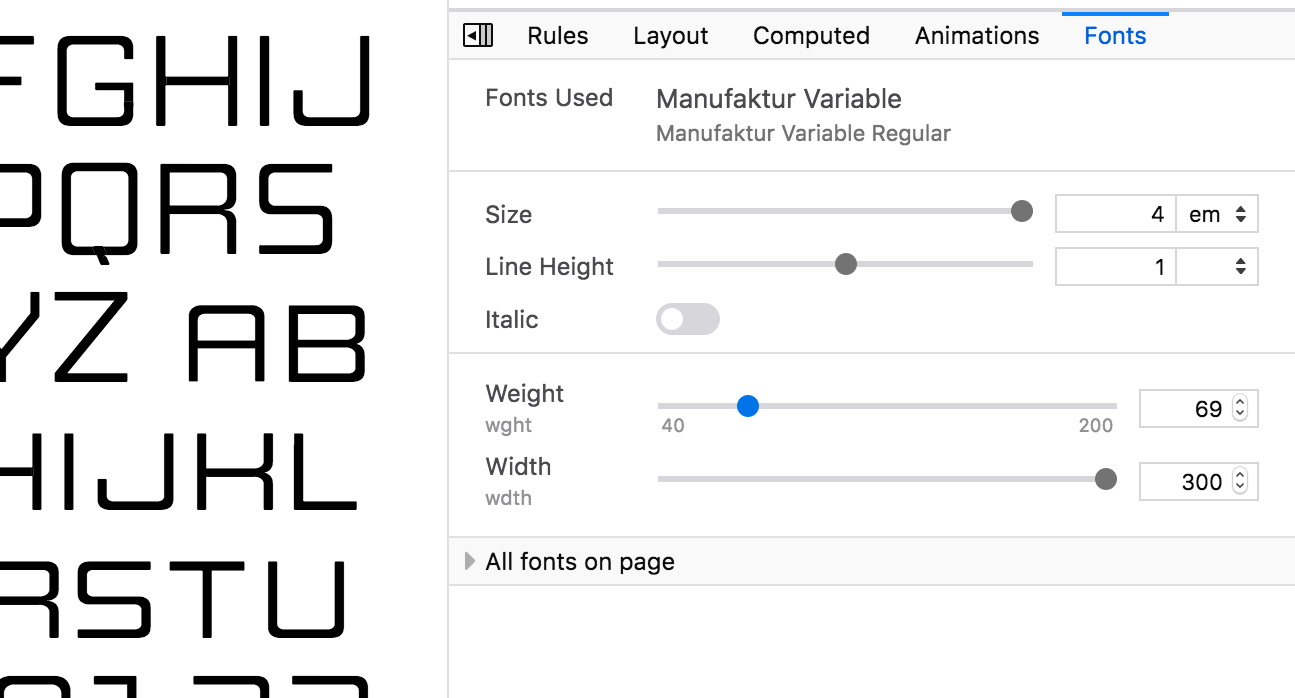
The Inspector’s Fonts panel is a handy way to see what local and web fonts are being used on a page. Already useful for debugging webfonts, in Firefox 63 the Fonts panel gains new powers! You can adjust the parameters of the font on the currently selected element, and if the current font supports Font Variations, you can view and fine-tune those paramaters as well. The syntax for adjusting variable fonts can be a little unfamiliar and it’s not otherwise possible to discover all the variations built into a font, so this tool can be a life
As a leader of Firefox’s product management team, I am often asked how Mozilla decides on which privacy features we will build and launch in Firefox. In this post I’d like to tell you about some key aspects of our process, using our recent Enhanced Tracking Protection functionality as an example.
What makes Mozilla and Firefox different than other browsers?
Mozilla is a mission-driven organization whose flagship product, Firefox, is meant to espouse the principles of our manifesto. Firefox is our expression of what it means to have someone on your side when you’re online. We are always standing up for your rights while pushing the web forward as a platform, open and accessible to all. As such, there are a number of careful considerations we need to weigh as part of our product development process in order to decide which features or functionality make it into the product; particularly as it relates to user privacy.
A focus on people and the health of the web
Foremost, we focus on people. They motivate us. They are the reason that Mozilla exists and how we have leverage in the industry to shape the future of the web. Through a variety of methods (surveys, in-product studies, A/B testing, qualitative user interviews, formative research) we try to better understand the unmet needs of the people who use Firefox. Another consideration we weigh is how changes we make in Firefox will affect the health of the web, longer term. Are we shifting incentives for websites in a positive or negative direction? What will the impact of these shifts be on people who rely on the internet in the short term? In the long run? In many ways, before deciding to include a privacy feature in Firefox, we need to apply basic game theory to play out the potential outcomes and changes ecosystem participants are likely to make in response, including developers, publishers and advertisers. The reality is that the answer isn’t always clear-cut.
How we arrived at Enhanced Tracking Protection
Recently we announced a change to our anti-tracking approach in Firefox in response to what we saw as shifting market conditions and an increase in user demand for more privacy protections. As an example of that demand, look no further than our Firefox Public Data Report and the rise in users manually enabling our original Tracking Protection feature to be Always On (by default, Tracking Protection is only enabled in Private Browsing):

Always On Tracking Protection shows the percentage of Firefox Desktop clients with Tracking Protection enabled for all browsing sessions (note: the setting was made available for users to change with the release of Firefox 57)
The desired outcomes are clear – people should not be tracked across websites by default and they shouldn’t be subjected to abusive practices or detrimental impacts to their online experience in the name of tracking. However, the challenge with many privacy features is that there are often trade-offs between stronger protections and negative impacts to user experience. Historically this trade-off has been handled by giving users privacy options that they can optionally enable. We know from our research that people want these protections but they don’t understand the threats or protection options enough to turn them on.
We have run multiple studies to better understand these trade-offs as they relate to tracking. In particular, since we introduced the original Tracking Protection in Firefox’s Private Browsing mode in 2015, many people have wondered why we don’t just enable the feature in all modes. The reality is that Firefox’s original Tracking Protection functionality can cause websites to break, which confuses users. Here is a quick sample of the website breakage bugs that have been filed:
Bugs filed related to broken website functionality due to our original Tracking Protection

As a leader of Firefox’s product management team, I am often asked how Mozilla decides on which privacy features we will build and launch in Firefox. In this post I’d like to tell you about some key aspects of our process, using our recent Enhanced Tracking Protection functionality as an example.
What makes Mozilla and Firefox different than other browsers?
Mozilla is a mission-driven organization whose flagship product, Firefox, is meant to espouse the principles of our manifesto. Firefox is our expression of what it means to have someone on your side when you’re online. We are always standing up for your rights while pushing the web forward as a platform, open and accessible to all. As such, there are a number of careful considerations we need to weigh as part of our product development process in order to decide which features or functionality make it into the product; particularly as it relates to user privacy.
A focus on people and the health of the web
Foremost, we focus on people. They motivate us. They are the reason that Mozilla exists and how we have leverage in the industry to shape the future of the web. Through a variety of methods (surveys, in-product studies, A/B testing, qualitative user interviews, formative research) we try to better understand the unmet needs of the people who use Firefox. Another consideration we weigh is how changes we make in Firefox will affect the health of the web, longer term. Are we shifting incentives for websites in a positive or negative direction? What will the impact of these shifts be on people who rely on the internet in the short term? In the long run? In many ways, before deciding to include a privacy feature in Firefox, we need to apply basic game theory to play out the potential outcomes and changes ecosystem participants are likely to make in response, including developers, publishers and advertisers. The reality is that the answer isn’t always clear-cut.
How we arrived at Enhanced Tracking Protection
Recently we announced a change to our anti-tracking approach in Firefox in response to what we saw as shifting market conditions and an increase in user demand for more privacy protections. As an example of that demand, look no further than our Firefox Public Data Report and the rise in users manually enabling our original Tracking Protection feature to be Always On (by default, Tracking Protection is only enabled in Private Browsing):
Always On Tracking Protection shows the percentage of Firefox Desktop clients with Tracking Protection enabled for all browsing sessions (note: the setting was made available for users to change with the release of Firefox 57)
The desired outcomes are clear – people should not be tracked across websites by default and they shouldn’t be subjected to abusive practices or detrimental impacts to their online experience in the name of tracking. However, the challenge with many privacy features is that there are often trade-offs between stronger protections and negative impacts to user experience. Historically this trade-off has been handled by giving users privacy options that they can optionally enable. We know from our research that people want these protections but they don’t understand the threats or protection options enough to turn them on.
We have run multiple studies to better understand these trade-offs as they relate to tracking. In particular, since we introduced the original Tracking Protection in Firefox’s Private Browsing mode in 2015, many people have wondered why we don’t just enable the feature in all modes. The reality is that Firefox’s original Tracking Protection functionality can cause websites to break, which confuses users. Here is a quick sample of the website breakage bugs that have been filed:
Bugs filed related to broken website functionality due to our original Tracking Protection
We live in an amazing time. When all the knowledge in the world is at our fingertips. Where having an edge doesn’t come from being able to remember information, but … Read more
The post Save a step when you’re searching with Firefox appeared first on The Firefox Frontier.
We live in an amazing time. When all the knowledge in the world is at our fingertips. Where having an edge doesn’t come from being able to remember information, but … Read more
The post Save a step when you’re searching with Firefox appeared first on The Firefox Frontier.
At Firefox, we’re always looking to build features that are true to the Mozillia mission of giving people control over their data and privacy whenever they go online. We recently announced our approach to Anti-tracking where we discussed three key feature areas we’re focusing on to help people feel safe while they’re on the web. With today’s release, we’re making progress against “removing cross-site tracking” with what we’re calling Enhanced Tracking Protection. To ensure we balance these new preferences with the experiences our uses want and expect, we’re rolling things out off-by-default and starting with third-party cookies. You can learn more details about our approach here.
What’s a tracking cookie and why do I need to block them?
Cookies have been around since almost the beginning of the web. They were created so that browsers could store small bits of information, like remembering that you’ve already logged into a site. Like any technology, cookies have many uses, including ones that aren’t so easy to understand. These include the use of cookies to help track your behavior across the internet, a technique known as cross-site tracking, mostly without your knowledge. We go more in-depth about this in our Firefox Frontier blog post.
We’ve all had the experience of seeing ads change based on browsing, even across multiple websites. These ads are often for things that you have no interest in purchasing, but the economics of the internet make it easy to cast a wide net cheaply. Maybe this seems like no big deal, but we think that you should have a say in how this data is used. After all, it’s more than just an annoying pair of shoes following you around, it’s data that can be used to subtly shape the content you consume or even influence your opinions.
At Firefox, we believe in giving control to the people, and hence giving users the choice to block third-party tracking cookies and the information collected in them.
Introducing Firefox’s Enhanced Tracking Protection
With today’s Firefox release, users will have the option to block cookies and storage access from third-party trackers. This is designed to effectively block the most common form of cross-site tracking.
To find this new option, go to your Firefox Options/Preferences. On the left-hand menu, click on Privacy & Security. Under Content Blocking click the checkbox next to “Third-Party Cookies” and select “Trackers (recommended)”:
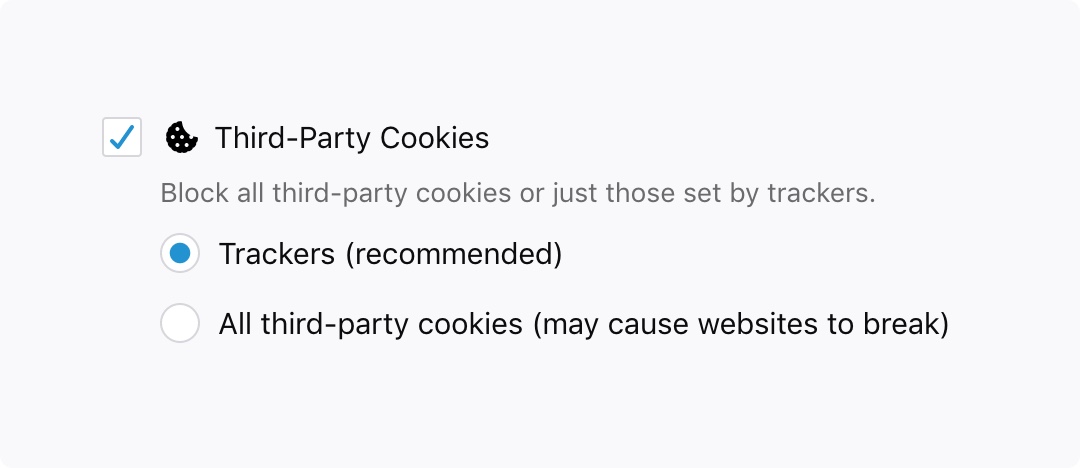
Block cookies and storage access from third-party trackers
You might see some odd behavior on websites, so if something doesn’t look or work right, you can always disable the protection on a per site basis by clicking on the Shield Icon in the address bar, and then clicking “Disable Blocking For This Site”.
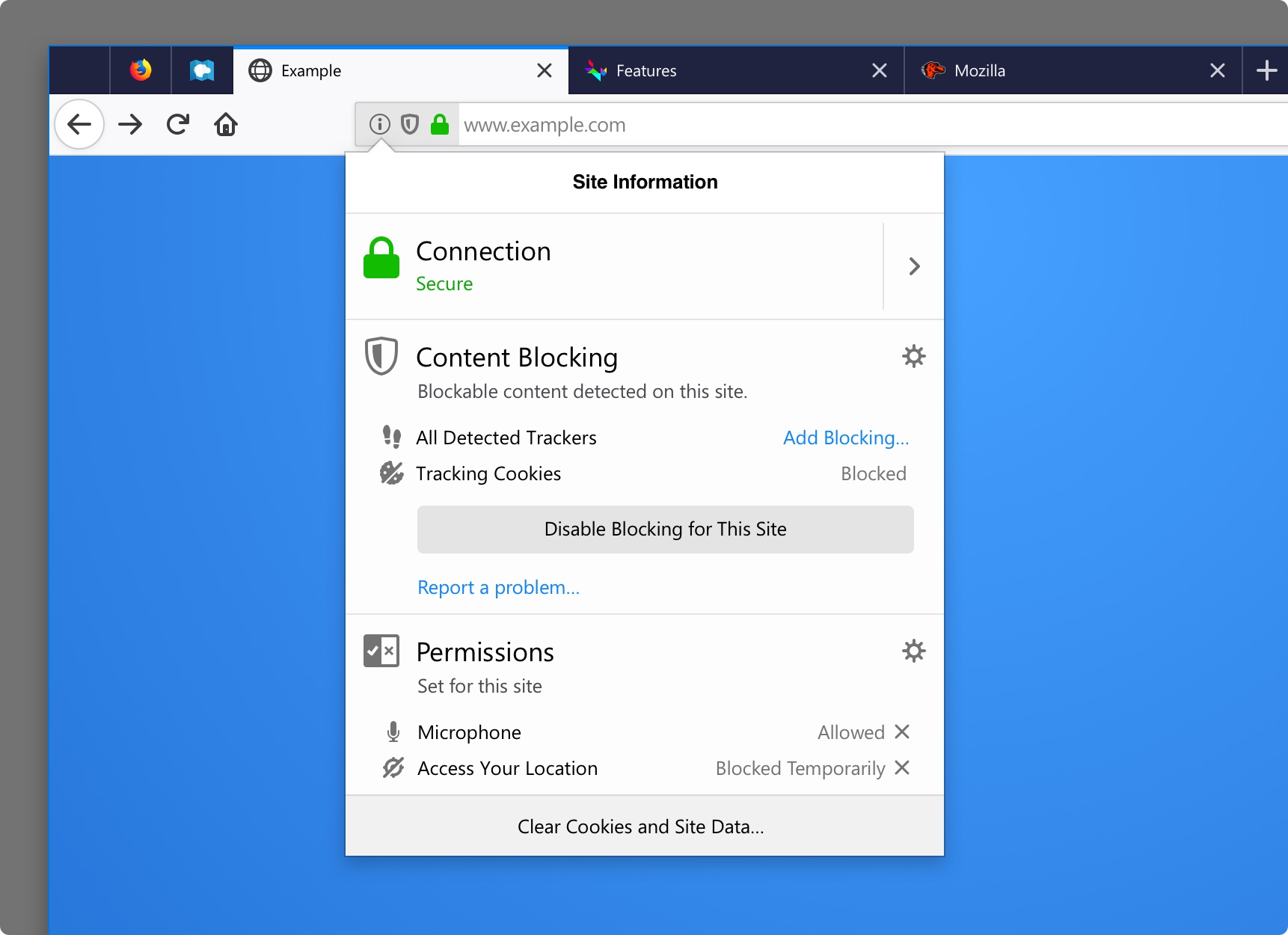
Disable the protection on a per site basis
We’ll continue to test this feature and hope to release it by default early 2019. Developers and site owners can read about the specifics of the functionality here.
Additional features we’re introducing in today’s Firefox release include:
- Search Shortcuts – First, we know people primarily use the web to search for information. Second, who doesn’t love saving time to get to the places they want to go, like taking city local streets instead of back-to-back freeway traffic? We combined these two to bring you Search Shortcuts. We pinned the top two sites people use to search, Amazon and Google, to the New Tab page. Currently, this will only be available in the US. To learn more about this feature visit our Firefox Frontier blog post.
- Adapting to your Windows Dark/Light Color Settings – Firefox will now match the dark or light theme you’ve chosen in your Windows settings to provide the perfect harmony in making you feel right at home.
- Siri Shortcuts for Firefox for iOS – Starting with today’s release, people can now open a new tab in Firefox using a voice command. This is the first of several shortcuts that will be added in the coming months.
- For developers, we’ve
At Firefox, we’re always looking to build features that are true to the Mozillia mission of giving people control over their data and privacy whenever they go online. We recently announced our approach to Anti-tracking where we discussed three key feature areas we’re focusing on to help people feel safe while they’re on the web. With today’s release, we’re making progress against “removing cross-site tracking” with what we’re calling Enhanced Tracking Protection. To ensure we balance these new preferences with the experiences our uses want and expect, we’re rolling things out off-by-default and starting with third-party cookies. You can learn more details about our approach here.
What’s a tracking cookie and why do I need to block them?
Cookies have been around since almost the beginning of the web. They were created so that browsers could store small bits of information, like remembering that you’ve already logged into a site. Like any technology, cookies have many uses, including ones that aren’t so easy to understand. These include the use of cookies to help track your behavior across the internet, a technique known as cross-site tracking, mostly without your knowledge. We go more in-depth about this in our Firefox Frontier blog post.
We’ve all had the experience of seeing ads change based on browsing, even across multiple websites. These ads are often for things that you have no interest in purchasing, but the economics of the internet make it easy to cast a wide net cheaply. Maybe this seems like no big deal, but we think that you should have a say in how this data is used. After all, it’s more than just an annoying pair of shoes following you around, it’s data that can be used to subtly shape the content you consume or even influence your opinions.
At Firefox, we believe in giving control to the people, and hence giving users the choice to block third-party tracking cookies and the information collected in them.
Introducing Firefox’s Enhanced Tracking Protection
With today’s Firefox release, users will have the option to block cookies and storage access from third-party trackers. This is designed to effectively block the most common form of cross-site tracking.
To find this new option, go to your Firefox Options/Preferences. On the left-hand menu, click on Privacy & Security. Under Content Blocking click the checkbox next to “Third-Party Cookies” and select “Trackers (recommended)”:
Block cookies and storage access from third-party trackers
You might see some odd behavior on websites, so if something doesn’t look or work right, you can always disable the protection on a per site basis by clicking on the Shield Icon in the address bar, and then clicking “Disable Blocking For This Site”.
Disable the protection on a per site basis
We’ll continue to test this feature and hope to release it by default early 2019. Developers and site owners can read about the specifics of the functionality here.
Additional features we’re introducing in today’s Firefox release include:
- Search Shortcuts – First, we know people primarily use the web to search for information. Second, who doesn’t love saving time to get to the places they want to go, like taking city local streets instead of back-to-back freeway traffic? We combined these two to bring you Search Shortcuts. We pinned the top two sites people use to search, Amazon and Google, to the New Tab page. Currently, this will only be available in the US. To learn more about this feature visit our Firefox Frontier blog post.
- Adapting to your Windows Dark/Light Color Settings – Firefox will now match the dark or light theme you’ve chosen in your Windows settings to provide the perfect harmony in making you feel right at home.
- Siri Shortcuts for Firefox for iOS – Starting with today’s release, people can now open a new tab in Firefox using a voice command. This is the first of several shortcuts that will be added in the coming months.
- For developers, we’ve
As announced in August, Firefox is changing its approach to addressing tracking on the web. As part of that plan, we signaled our intent to prevent cross-site tracking for all Firefox users and made our initial prototype available for testing.
Starting with Firefox 63, all desktop versions of Firefox include an experimental cookie policy that blocks cookies and other site data from third-party tracking resources. This new policy provides protection against cross-site tracking while minimizing site breakage associated with traditional cookie blocking.
This policy is part of Enhanced Tracking Protection, a new feature aimed at protecting users from cross-site tracking. More specifically, it prevents trackers from following users around from site to site and collecting information about their browsing habits.
We aim to bring these protections to all users by default in Firefox 65. Until then, you can opt-in to the policy by following the steps detailed at the end of this post.
What does this policy block?
The newly developed policy blocks storage access for domains that have been classified as trackers. For classification, Firefox relies on the Tracking Protection list maintained by Disconnect. Domains classified as trackers are not able to access or set cookies, local storage, and other site data when loaded in a third-party context. Additionally, trackers are blocked from accessing other APIs that allow them to communicate cross-site, such as the Broadcast Channel API. These measures prevent trackers from being able to use cross-site identifiers stored in Firefox to link browsing activity across different sites.
Our documentation on MDN provides significantly more technical detail on the policy, including: how domains are matched against the Tracking Protection list, how Firefox blocks storage access for tracking domains, and the types of third-party storage access that are currently blocked.
Does this policy break websites?
Third-party cookie blocking does have the potential to break websites, particularly those which integrate third-party content. For this reason, we’ve added heuristics to Firefox to automatically grant time-limited storage access under certain conditions. We are also working to support a more structured way for embedded cross-origin content to request storage access. In both cases, Firefox grants access on a site-by-site basis, and only provides access to embedded content that receives user interaction.
More structured access will be available through the Storage Access API, of which an initial implementation is available in Firefox Nightly (and soon Beta and Developer Edition) for testing. This API allows domains classified as trackers to explicitly request storage access when loaded in a third-party context. The Storage Access API is also implemented in Safari and is a proposed addition to the HTML specification. We welcome developer feedback, particularly around use cases that can not be addressed with this API.
How can I test my website?
We welcome testing by both users and site owners as we continue to develop new storage access restrictions. Take the following steps to enable this storage access policy in Firefox:
- Open Preferences
- On the left-hand menu, click on Privacy & Security
- Under Content Blocking, click the checkbox next to “Third-Party Cookies”
- Select “Trackers (recommended)”

As announced in August, Firefox is changing its approach to addressing tracking on the web. As part of that plan, we signaled our intent to prevent cross-site tracking for all Firefox users and made our initial prototype available for testing.
Starting with Firefox 63, all desktop versions of Firefox include an experimental cookie policy that blocks cookies and other site data from third-party tracking resources. This new policy provides protection against cross-site tracking while minimizing site breakage associated with traditional cookie blocking.
This policy is part of Enhanced Tracking Protection, a new feature aimed at protecting users from cross-site tracking. More specifically, it prevents trackers from following users around from site to site and collecting information about their browsing habits.
We aim to bring these protections to all users by default in Firefox 65. Until then, you can opt-in to the policy by following the steps detailed at the end of this post.
What does this policy block?
The newly developed policy blocks storage access for domains that have been classified as trackers. For classification, Firefox relies on the Tracking Protection list maintained by Disconnect. Domains classified as trackers are not able to access or set cookies, local storage, and other site data when loaded in a third-party context. Additionally, trackers are blocked from accessing other APIs that allow them to communicate cross-site, such as the Broadcast Channel API. These measures prevent trackers from being able to use cross-site identifiers stored in Firefox to link browsing activity across different sites.
Our documentation on MDN provides significantly more technical detail on the policy, including: how domains are matched against the Tracking Protection list, how Firefox blocks storage access for tracking domains, and the types of third-party storage access that are currently blocked.
Does this policy break websites?
Third-party cookie blocking does have the potential to break websites, particularly those which integrate third-party content. For this reason, we’ve added heuristics to Firefox to automatically grant time-limited storage access under certain conditions. We are also working to support a more structured way for embedded cross-origin content to request storage access. In both cases, Firefox grants access on a site-by-site basis, and only provides access to embedded content that receives user interaction.
More structured access will be available through the Storage Access API, of which an initial implementation is available in Firefox Nightly (and soon Beta and Developer Edition) for testing. This API allows domains classified as trackers to explicitly request storage access when loaded in a third-party context. The Storage Access API is also implemented in Safari and is a proposed addition to the HTML specification. We welcome developer feedback, particularly around use cases that can not be addressed with this API.
How can I test my website?
We welcome testing by both users and site owners as we continue to develop new storage access restrictions. Take the following steps to enable this storage access policy in Firefox:
- Open Preferences
- On the left-hand menu, click on Privacy & Security
- Under Content Blocking, click the checkbox next to “Third-Party Cookies”
- Select “Trackers (recommended)”
Hello and welcome to another issue of This Week in Rust! Rust is a systems language pursuing the trifecta: safety, concurrency, and speed. This is a weekly summary of its progress and community. Want something mentioned? Tweet us at @ThisWeekInRust or send us a pull request. Want to get involved? We love contributions.
This Week in Rust is openly developed on GitHub. If you find any errors in this week's issue, please submit a PR.
Updates from Rust Community
News & Blog Posts
- Writing an OS in Rust: Hardware interrupts.
- Towards fearless SIMD.
- Shifgrethor I: Garbage collection as a Rust library.
- Update on the October 15, 2018 incident on crates.io.
- docs.rs is now part of the rust-lang-nursery organization.
- Is Rust functional?
- Multithreading Rust and WebAssembly.
- Rust has higher kinded types already... sort of.
- Auth web microservice with Rust using actix-web.
Crate of the Week
This week's crate is static-assertions, a crate that does what it says on the tin – allow you to write static assertions. Thanks to llogiq for the suggestion!
Submit your suggestions and votes for next week!
Call for Participation
Always wanted to contribute to open-source projects but didn't know where to start? Every week we highlight some tasks from the Rust community for you to pick and get started!
Some of these tasks may also have mentors available, visit the task page for more information.
If you are a Rust project owner and are looking for contributors, please submit tasks here.
Updates from Rust Core
115 pull requests were merged in the last week
- mir-inlining: don't inline virtual calls
- reject partial init and reinit of uninitialized data
- improve verify_llvm_ir config option
- add missing lifetime fragment specifier to error message
- rustc: fix (again) simd vectors by-val in ABI
- resolve: scale back hard-coded extern prelude additions on 2015 edition
- resolve: do not skip extern prelude during speculative resolution
- allow explicit matches on ! without warning
- deduplicate some code and compile-time values around vtables
- NLL: propagate bounds from generators
Hello and welcome to another issue of This Week in Rust! Rust is a systems language pursuing the trifecta: safety, concurrency, and speed. This is a weekly summary of its progress and community. Want something mentioned? Tweet us at @ThisWeekInRust or send us a pull request. Want to get involved? We love contributions.
This Week in Rust is openly developed on GitHub. If you find any errors in this week's issue, please submit a PR.
Updates from Rust Community
News & Blog Posts
- Writing an OS in Rust: Hardware interrupts.
- Towards fearless SIMD.
- Shifgrethor I: Garbage collection as a Rust library.
- Update on the October 15, 2018 incident on crates.io.
- docs.rs is now part of the rust-lang-nursery organization.
- Is Rust functional?
- Multithreading Rust and WebAssembly.
- Rust has higher kinded types already... sort of.
- Auth web microservice with Rust using actix-web.
Crate of the Week
This week's crate is static-assertions, a crate that does what it says on the tin – allow you to write static assertions. Thanks to llogiq for the suggestion!
Submit your suggestions and votes for next week!
Call for Participation
Always wanted to contribute to open-source projects but didn't know where to start? Every week we highlight some tasks from the Rust community for you to pick and get started!
Some of these tasks may also have mentors available, visit the task page for more information.
If you are a Rust project owner and are looking for contributors, please submit tasks here.
Updates from Rust Core
115 pull requests were merged in the last week
- mir-inlining: don't inline virtual calls
- reject partial init and reinit of uninitialized data
- improve verify_llvm_ir config option
- add missing lifetime fragment specifier to error message
- rustc: fix (again) simd vectors by-val in ABI
- resolve: scale back hard-coded extern prelude additions on 2015 edition
- resolve: do not skip extern prelude during speculative resolution
- allow explicit matches on ! without warning
- deduplicate some code and compile-time values around vtables
- NLL: propagate bounds from generators