 Your personal data is yours – and it should remain yours! Unfortunately data breaches that reveal your personal information on the internet are omnipresent these days. In fact, fraudulent use of stolen credentials is the 2nd-most common threat action (after phishing) in Verizon’s 2020 Data Breach Investigations report and highlights the problematic situation of data breaches.
In 2018, we launched Firefox Monitor which instantly notifies you in case your data was involved in a breach and further provides guidance on how to protect your personal information online. Expanding the scope of protecting our users across the world to stay in control of their data and privacy, we integrated alerts from Firefox Monitor into mainstream Firefox. We integrated this privacy enhancing feature into your daily browsing experience so Firefox can better protect your data by instantly notifying you when you visit a site that has been breached.
While sites continue to suffer password breaches, other leaks or lose other types of data. Even though we consider all personal data as important, notifying you for every one of these leaks generates noise that’s difficult to act on. The better alternative is to only alert you in case it’s critical for you to act to protect your data. Hence, the primary change is that Firefox will only show alerts for websites where passwords were exposed in the breach.
In detail, we are announcing an update to our initial Firefox breach alert policy for when Firefox alerts for breached sites:
“Firefox shows a breach alert when a user visits a site where passwords were exposed and added to Have I Been Pwned within the last 2 months.”
To receive the most comprehensive breach alerts we suggest to sign up for Firefox Monitor to check if your account was involved in a breach. We will keep you informed and will alert you with an email in case your personal data is affected by a data breach. Our continued commitment to protect your privacy and security from online threats is critical for us and aligns with our mission: Individuals’ security and privacy on the internet are fundamental and must not be treated as optional.
If you are a Firefox user, you don’t have to do anything to benefit from this new privacy protection. If you aren’t a Firefox user, download Firefox to start benefiting from all the ways that Firefox works to protect your privacy.
The post Updates to Firefox’s Breach Alert Policy appeared first on Mozilla Security Blog.
https://blog.mozilla.org/security/2021/05/25/updates-to-firefoxs-breach-alert-policy/

Hugh Molotsi
I was born and raised in Zambia and came to the United States for university. Even though growing up, I had almost no exposure to computers, I chose to study computer engineering. Fortunately for me, this leap of faith proved to be a great decision, as I’ve been very blessed with the career that came after.
When I started my tenure at Intuit, my first job was working as a developer on QuickBooks for DOS. In what would turn out to be a 22-year run, I got a front row seat in watching technology evolve by working on Windows, Mac, and eventually online and mobile offerings. I was fortunate to play a leading role in the development of new Intuit products, which further fueled my passion for innovation.
From this vantage point, there is no doubt that the internet has been the most transformational technology in my years working in the industry. The internet has not only expanded the possibilities of problems to solve and how to solve them, but it has also expanded the reach of who can benefit from the solutions.
From the beginning, Mozilla has had an important vision: for the internet to benefit everyone, it should remain a global resource that is open and accessible. With this vision in mind, Mozilla has played a prominent role in the advancement of open source and community collaboration. The impact of Mozilla has catalyzed the internet as a force for good, as it touches lives in some of the least developed parts of the world.
I believe Mozilla’s mission is today more important than ever. In these polarized times, the internet is blamed for the rise of monoliths and the rapid spread of disinformation. Mozilla is the trusted entity ensuring the internet-as-a-public-resource is effective and enriches the lives of not just the privileged few. The challenges of a polarized world may feel daunting, but with human ingenuity and collaboration, I’m convinced the internet will play a key part in a better future. For someone who grew up in Africa, I’m especially excited about how the internet is enabling “leapfrog” solutions in meeting the needs of emerging economies.
I’m excited to help the Mozilla Corporation drive new innovations that will benefit the global community. This is why I am truly honored to serve on the Mozilla Corporation Board.
(Photographer credit: Danny Ortega)
The post Why I’m joining Mozilla’s Board of Directors appeared first on The Mozilla Blog.
A new version (v0.5) of celery-batches is available which adds support for Celery 5.1 and fixes storing of results when using the RPC result backend.
As explored previously, the RPC result backend works by having a results queue per client, unfortunately celery-batches was attempting to store the results …
https://patrick.cloke.us/posts/2021/05/24/celery-batches-0.5-released/
For the eighth consecutive year we run the annual curl user survey again in 2021. The form just went up and I would love to have you spend 10 minutes of your busy life to tell us how you think curl works, what doesn’t work and what we should do next.
We have no tracking on the website and we have no metrics or usage measurements of the curl tool or the libcurl library. The only proper way we have left to learn how users and people in general think of us and how curl works, is to ask. So this is what we do, and we limit the asking to once per year.
You can also view this from your own “selfish” angle: this is a way for you to submit your input, your opinions and we will listen.
The survey will be up two weeks during which I hope to get as many people as possible to respond. If you have friends you know use curl or libcurl, please have them help us out too!
Yes really, please take the survey!
Bonus: see the extensive analysis of the 2020 user survey. There’s a lot of user feedback to learn from it.
https://daniel.haxx.se/blog/2021/05/24/the-curl-user-survey-2021/
A new Firefox is coming your way on June 1 with a fresh look designed for today’s modern life online. We pored over the browser’s user interface pixel by pixel, … Read more
The post Behind the design of the fresh new Firefox coming June 1 appeared first on The Firefox Frontier.
Introduction
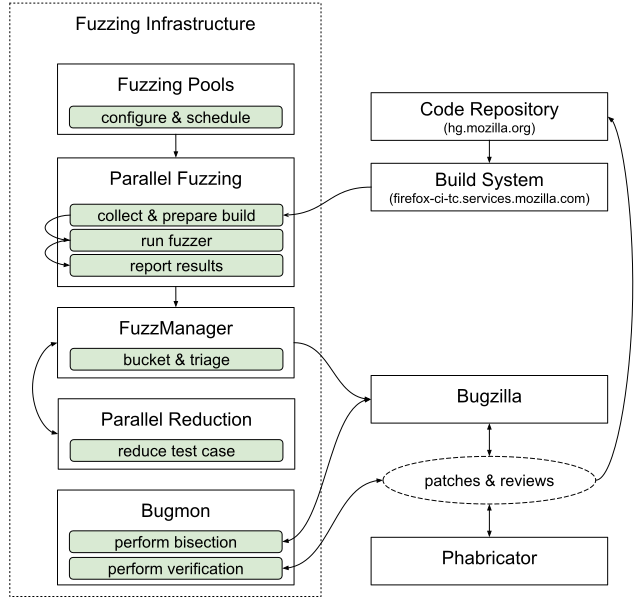
Mozilla has been fuzzing Firefox and its underlying components for a while. It has proven to be one of the most efficient ways to identify quality and security issues. In general, we apply fuzzing on different levels: there is fuzzing the browser as a whole, but a significant amount of time is also spent on fuzzing isolated code (e.g. with libFuzzer) or whole components such as the JS engine using separate shells. In this blog post, we will talk specifically about browser fuzzing only, and go into detail on the pipeline we’ve developed. This single pipeline is the result of years of work that the fuzzing team has put into aggregating our browser fuzzing efforts to provide consistently actionable issues to developers and to ease integration of internal and external fuzzing tools as they become available.
Build instrumentation
To be as effective as possible we make use of different methods of detecting errors. These include sanitizers such as AddressSanitizer (with LeakSanitizer), ThreadSanitizer, and UndefinedBehaviorSanitizer, as well as using debug builds that enable assertions and other runtime checks. We also make use of debuggers such as rr and Valgrind. Each of these tools provides a different lens to help uncover specific bug types, but many are incompatible with each other or require their own custom build to function or provide optimal results. Besides providing debugging and error detection, some tools cannot work without build instrumentation, such as code coverage and libFuzzer. Each operating system and architecture combination requires a unique build and may only support a subset of these tools.
Last, each variation has multiple active branches including Release, Beta, Nightly, and Extended Support Release (ESR). The Firefox CI Taskcluster instance builds each of these periodically.
Downloading builds
Taskcluster makes it easy to find and download the latest build to test. We discussed above the number of variants created by different instrumentation types, and we need to fuzz them in automation. Because of the large number of combinations of builds, artifacts, architectures, operating systems, and unpacking each, downloading is a non-trivial task.
To help reduce the complexity of build management, we developed a tool called fuzzfetch. Fuzzfetch makes it easy to specify the required build parameters and it will download and unpack the build. It also supports downloading specified revisions to make it useful with bisection tools.
How we generate the test cases
As the goal of this blog post is to explain the whole pipeline, we won’t spend much time explaining fuzzers. If you are interested, please read “Fuzzing Firefox with WebIDL” and the in-tree documentation. We use a combination of publicly available and custom-built fuzzers to generate test cases.
How we execute, report, and scale
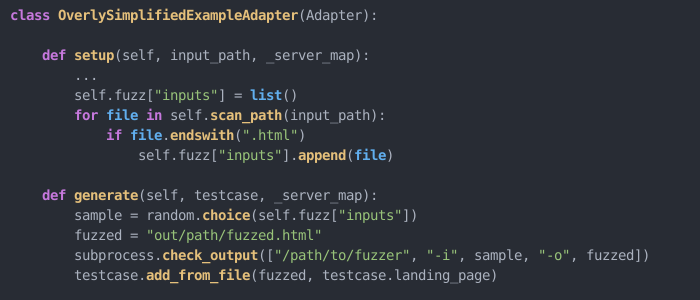
For fuzzers that target the browser, Grizzly manages and runs test cases and monitors for results. Creating an adapter allows us to easily run existing fuzzers in Grizzly.
To make full use of
Collected quotes and snippets from people publicly sneezing off or belittling what curl is, explaining how easy it would be to make a replacement in no time with no effort or generally not being very helpful.
These are statements made seriously. For all I know, they were not ironic. If you find others to add here, please let me know!
Listen. I’ve been young too once and I’ve probably thought similar things myself in the past. But there’s a huge difference between thinking and saying. Quotes included here are mentioned for our collective amusement.
I can do it in less than a 100 lines

[source]
I can do it in a three day weekend
(The yellow marking in the picture was added by me.)

[source]
No reason to be written in C
Maybe not exactly in the same category as the two ones above, but still a significant “I know this” vibe:

[source]
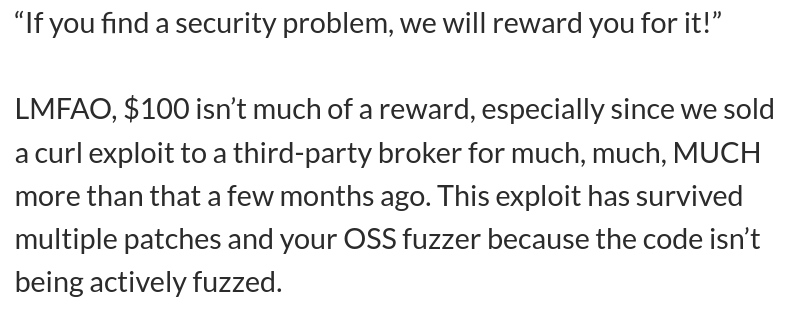
We sold a curl exploit
Some people deliberately decides to play for the other team.
[source]
This isn’t a big deal
It’s easy to say things on Twitter…

This tweet was removed by its author after I and others replied to it so I cannot link it. The name has been blurred on purpose because of this.
Discussions
https://daniel.haxx.se/blog/2021/05/20/i-could-rewrite-curl/
COVID-19 accelerated changes in our behaviors that drove our lives increasingly online. Screens became our almost exclusive discovery point to the world. There were some benefits to this rapid shift. … Read more
The post How to actually enjoy being online again appeared first on The Firefox Frontier.
https://blog.mozilla.org/firefox/how-to-enjoy-being-online-again/
Roughly a year ago at Mozilla we started an effort to improve Firefox stability on Linux. This effort quickly became an example of good synergies between FOSS projects.
Every time Firefox crashes, the user can send us a crash report which we use to analyze the problem and hopefully fix it:
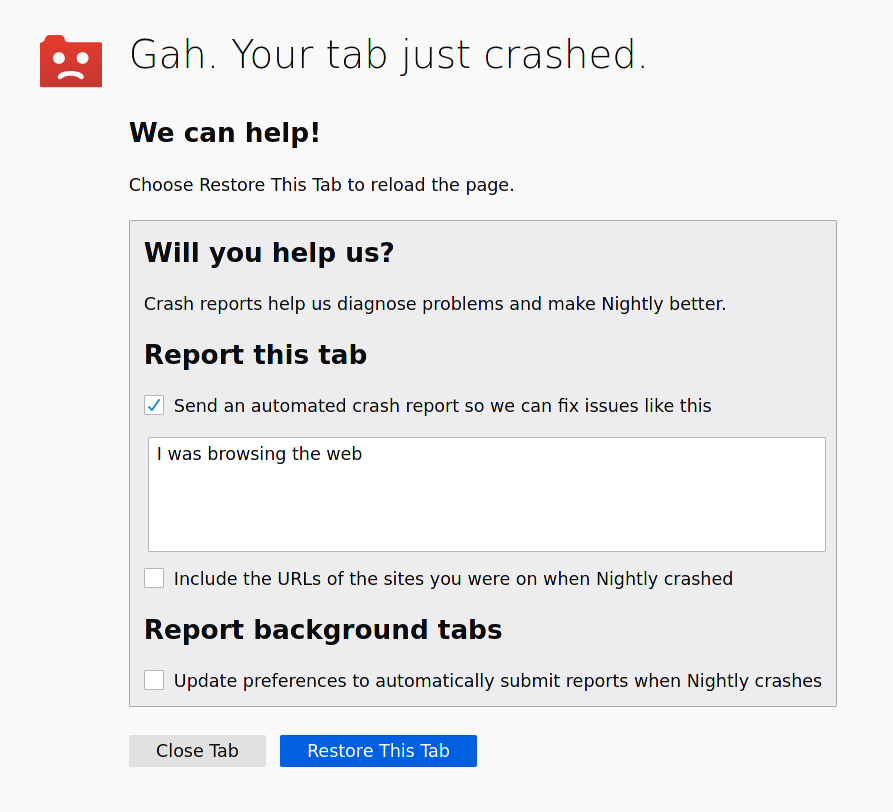
This report contains, among other things, a minidump: a small snapshot of the process memory at the time it crashed. This includes the contents of the processor’s registers as well as data from the stacks of every thread.
Here’s what this usually looks like:

If you’re familiar with core dumps, then minidumps are essentially a smaller version of them. The minidump format was originally designed at Microsoft and Windows has a native way of writing out minidumps. On Linux, we use Breakpad for this task. Breakpad originated at Google for their software (Picasa, Google Earth, etc…) but we have forked, heavily modified for our purposes and recently partly rewrote it in Rust.
Once the user submits a crash report, we have a server-side component – called Socorro – that processes it and extracts a stack trace from the minidump. The reports are then clustered based on the top method name of the stack trace of the crashing thread. When a new crash is spotted we assign it a bug and start working on it. See the picture below for an example of how crashes are grouped:

To extract a meaningful stack trace from a minidump two more things are needed: unwinding information and symbols. The unwinding information is a set of instructions that describe how to find the various frames in the stack given an instruction pointer. Symbol information contains the names of the functions corresponding to a given range of addresses as well as the source files they come from and the line numbers a given instruction corresponds to.
In regular Firefox releases, we extract this information from the build files and store it into symbol files in Breakpad standard format. Equipped with this information Socorro can produce a human-readable stack trace. The whole flow can be seen below:

Here’s an example of a proper stack trace:

If Socorro doesn’t have access to the appropriate symbol files for a crash the resulting trace contains only addresses and isn’t very helpful:

When it comes to Linux things work differently than on other platforms: most of our users do not install our builds, they install the Firefox version that comes packaged for their favourite distribution.
This posed a significant problem when dealing with stability issues on Linux: for the majority of our crash reports, we couldn’t produce high-quality stack traces because we didn’t have the required symbol information. The Firefox builds that submitted the reports weren’t done by us. To make matters worse, Firefox depends on a number of third-party packages (such as GTK, Mesa, FFmpeg, SQLite, etc.). We wouldn’t get good stack traces if a crash occurred in one of these packages instead of Firefox itself because we didn’t have symbols for them either.
To address this issue, we started scraping debug information for Firefox builds and their dependencies from the package repositories of multiple distributions: Arch, Debian, Fedora, OpenSUSE and Ubuntu. Since every distribution does things a little bit differently, we had to write distro-specific scripts that would go through the list of packages in their repositories and find the associated debug information (the scripts are available here). This data is then fed into a tool that extracts symbol files from the debug information and uploads it to our symbol server.
With that information now available, we were able to analyze >99% of the crash reports we received from Linux users, up from less than 20%. Here’s an example of a high-quality trace extracted from a distro-packaged version of Firefox. We haven’t built any of the libraries involved yet the function
In December 2020 the European Commission published the draft EU Digital Services Act. The law seeks to establish a new paradigm for tech sector regulation, and we see it as a crucial opportunity to address many of the challenges holding back the internet from what it should be. As EU lawmakers start to consider amendments and improvements to the draft law, today we’re publishing our substantive perspectives and recommendations to guide those deliberations.
We are encouraged that the draft DSA includes many of the policy recommendations that Mozilla and our allies had advocated for in recent years. For that we commend the European Commission. However, many elements of the DSA are novel and complex, and so there is a need for elaboration and clarification in the legislative mark-up phase. We believe that with targeted amendments the DSA has the potential to serve as the effective, balanced, and future-proof legal framework.
Given the sheer breath of the DSA, we’re choosing to focus on the elements where we believe we have a unique contribution to make, and where we believe the DSA can constitute a real paradigm shift. That is not to say we don’t have thoughts on the other elements of the proposal, and we look forward to supporting our allies in industry and civil society who are focusing their efforts elsewhere.
Broadly speaking, our position can be summarised as follows:
- Asymmetric obligations for the largest platforms
-
-
- We welcome the DSA’s approach of making very large platforms subject to enhanced regulation compared to the rest of the industry, but we suggest tweaks to the scope and definitions.
- The definition of these so-called Very Large Online Platforms (VLOPS) shouldn’t be based solely on quantitative criteria, but possibly qualitative (e.g. taking into account risk) as well, in anticipation of certain extraordinary edge cases where a service that meets that quantitative VLOP standard is in reality very low risk in nature.
-
- Systemic transparency
-
-
- We welcome the DSA’s inclusion of public-facing ad archive APIs and the provisions on access to data for public interest researchers.
- We call for the advertising transparency elements to take into account novel forms of paid influence, and for the definition of ‘public interest researchers’ to be broader than just university faculty.
-
- A risk-based approach to content responsibility
-
-
- We welcome this approach, but suggest more clarification on the types of risks to be assessed and how those assessments are undertaken.
-
- Auditing and oversight
-
- We welcome the DSA’s third-party auditing requirement but we provide recommendations on how it can be more than just a tick-box exercise (e.g. through standardisation; clarity on what is to be audited; etc).
- We reiterate the call for oversight bodies to be well-resourced and staffed with the appropriate technical expertise.
This position paper is the latest milestone in our long-standing engagement on issues of content regulation and platform responsibility in the EU. In the coming months we’ll be ramping up our efforts further, and look forward to supporting EU lawmakers in turning these recommendations into reality.
Ultimately, we firmly believe that if developed properly, the DSA can usher in a new global paradigm for tech regulation. At a time when lawmakers from Delhi to Washington DC are grappling with questions of platform accountability and content responsibility, the DSA is indeed a once-in-a-generation opportunity.
The post Mozilla publishes position paper on EU Digital Services Act appeared first on
When two major vulnerabilities known as Meltdown and Spectre were disclosed by security researchers in early 2018, Firefox promptly added security mitigations to keep you safe. Going forward, however, it was clear that with the evolving techniques of malicious actors on the web, we needed to redesign Firefox to mitigate future variations of such vulnerabilities and to keep you safe when browsing the web!
We are excited to announce that Firefox’s new Site Isolation architecture is coming together. This fundamental redesign of Firefox’s Security architecture extends current security mechanisms by creating operating system process-level boundaries for all sites loaded in Firefox for Desktop. Isolating each site into a separate operating system process makes it even harder for malicious sites to read another site’s secret or private data.
We are currently finalizing Firefox’s Site Isolation feature by allowing a subset of users to benefit from this new security architecture on our Nightly and Beta channels and plan a roll out to more of our users later this year. If you are as excited about it as we are and would like to try it out, follow these steps:
To enable Site Isolation on Firefox Nightly:
- Navigate to about:preferences#experimental
- Check the “Fission (Site Isolation)” checkbox to enable.
- Restart Firefox.
To enable Site Isolation on Firefox Beta or Release:
- Navigate to about:config.
- Set `fission.autostart` pref to `true`.
- Restart Firefox.
With this monumental change of secure browser design, users of Firefox Desktop benefit from protections against future variants of Spectre, resulting in an even safer browsing experience. If you aren’t a Firefox user yet, you can download the latest version here and if you want to know all the technical details about Firefox’s new security architecture, you can read it here.
The post Introducing Site Isolation in Firefox appeared first on Mozilla Security Blog.
https://blog.mozilla.org/security/2021/05/18/introducing-site-isolation-in-firefox/
Like any web browser, Firefox loads code from untrusted and potentially hostile websites and runs it on your computer. To protect you against new types of attacks from malicious sites and to meet the security principles of Mozilla, we set out to redesign Firefox on desktop.
Site Isolation builds upon a new security architecture that extends current protection mechanisms by separating (web) content and loading each site in its own operating system process.
This new security architecture allows Firefox to completely separate code originating from different sites and, in turn, defend against malicious sites trying to access sensitive information from other sites you are visiting.
In more detail, whenever you open a website and enter a password, a credit card number, or any other sensitive information, you want to be sure that this information is kept secure and inaccessible to malicious actors.
As a first line of defence Firefox enforces a variety of security mechanisms, e.g. the same-origin policy which prevents adversaries from accessing such information when loaded into the same application.
Unfortunately, the web evolves and so do the techniques of malicious actors. To fully protect your private information, a modern web browser not only needs to provide protections on the application layer but also needs to entirely separate the memory space of different sites – the new Site Isolation security architecture in Firefox provides those security guarantees.
Why separating memory space is crucial
In early 2018, security researchers disclosed two major vulnerabilities, known as Meltdown and Spectre. The researchers exploited fundamental assumptions about modern hardware execution, and were able to demonstrate how untrusted code can access and read memory anywhere within a process’ address space, even in a language as high level as JavaScript (which powers almost every single website).
While band-aid countermeasures deployed by OS, CPU and major web browser vendors quickly neutralized the attacks, they came with a performance cost and were designed to be temporary. Back when the attacks were announced publicly, Firefox teams promptly reduced the precision of high-precision timers and disabled APIs that allowed such timers to be implemented to keep our users safe.
Going forward, it was clear that we needed to fundamentally re-architecture the security design of Firefox to mitigate future variations of such vulnerabilities.
Let’s take a closer look at the following example which demonstrates how an attacker can access your private data when executing a Spectre-like attack.
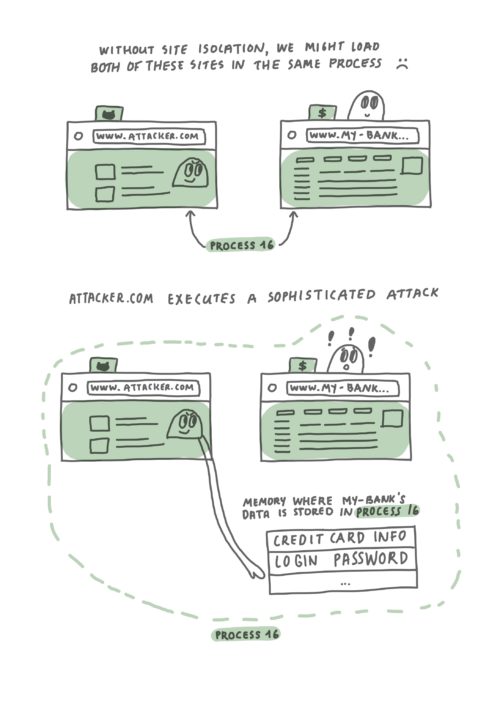
Without Site Isolation, Firefox might load a malicious site in the same process as a site that is handling sensitive information. In the worst case scenario, a malicious site might execute a Spectre-like attack to gain access to memory of the other site.
Suppose you have two websites open – www.my-bank.com and www.attacker.com. As illustrated in the diagram above, with current web browser architecture it’s possible that web content from both sites ends up being loaded into the same operating system process. To make things worse, using a Spectre-like attack would allow attacker.com
When programming with Private Fields and methods, it can sometimes be desirable to check
if an object has a given private field. While the semantics of private fields allow doing that
check by using try...catch, the Ergonomic Brand checks proposal provides a simpler syntax,
allowing one to simply write #field in o.
As an example, the following class uses ergonomic brand checks to provide a more helpful custom error.
class Scalar {
  #length = 0;

  add(s) {
    if (!(#length in s)) {
      throw new TypeError("Expected an instance of Scalar");
    }

    this.#length += s.#length;
  }
}
While the same effect could be accomplished with try...catch, it’s much uglier, and also doesn’t
work reliably in the presence of private getters which may possibly throw for different reasons.
This JavaScript language feature proposal is at Stage 3 of the TC39 process, and will ship in Firefox 90.
https://spidermonkey.dev/blog/2021/05/18/ergonomic-brand-checks.html
By Emily Gillespie Last spring, Norah W. took note of how former President Barack Obama, Beyonc'e and K-Pop band BTS broadcasted impassioned commencement speeches to the graduating class of 2020. … Read more
The post Class of Zoom: The reality of virtual graduation, prom & college orientation appeared first on The Firefox Frontier.
https://blog.mozilla.org/firefox/high-school-graduates-zoom-school-prom-graduation/
One day in March 1998 I released a little file transfer tool I called curl. The first ever curl release. That was good.

10
By the end of July the same year, I released the 10th curl release. I’ve always believed in release early release often as a service to users and developers alike.

20
In December 1998 I released the 20th curl release. I started to get a hang of this.

50
In January 2001, not even three years in, we shipped the 50th curl release (version 7.5.2). We were really cramming them out back then!

200
Next week. 23 years, two months and six days after the first release, we will ship the 200th curl release. We call it curl 7.77.0.

Yes, there are exactly 200 stickers used in the photo. But the visual comparison with 50 is also apt: it isn’t that big difference seen from a distance.
I’ve personally done every release to date, but there’s nothing in the curl release procedure that says it has to be me, as long as the uploader has access to put the new packages on the correct server.
The fact that 200 is an HTTP status code that is indicating success is an awesome combination.
Release cadence
In 2014 we formally switched to an eight week release cycle. It was more or less what we already used at the time, but from then on we’ve had it documented and we’ve tried harder to stick to it.
Assuming no alarmingly bad bugs are found, we let 56 days pass until we ship the next release. We occasionally slip up and fail on this goal, and then we usually do a patch release and cut the next cycle short. We never let the cycle go longer than those eight weeks. This makes us typically manage somewhere between 6 and 10 releases per year.
Lessons learned
- Make a release checklist, and stick to that when making releases
- Update the checklist when needed
- Script as much as possible of the procedure
- Verify the release tarballs/builds too in CI
- People never test your code properly until you actually release
- No matter how hard you try, some releases will need quick follow-up patch releases
- There is always another release
- Time-based release scheduling beats feature-based

Today marks Rust's sixth birthday since it went 1.0 in 2015. A lot has changed since then and especially over the past year, and Rust was no different. In 2020, there was no foundation yet, no const generics, and a lot organisations were still wondering whether Rust was production ready.
In the midst of the COVID-19 pandemic, hundreds of Rust's global distributed set of team members and volunteers shipped over nine new stable releases of Rust, in addition to various bugfix releases. Today, "Rust in production" isn't a question, but a statement. The newly founded Rust foundation has several members who value using Rust in production enough to help continue to support and contribute to its open development ecosystem.
We wanted to take today to look back at some of the major improvements over the past year, how the community has been using Rust in production, and finally look ahead at some of the work that is currently ongoing to improve and use Rust for small and large scale projects over the next year. Let's get started!
Recent Additions
The Rust language has improved tremendously in the past year, gaining a lot of quality of life features, that while they don't fundamentally change the language, they help make using and maintaining Rust in more places even easier.
-
As of Rust 1.52.0 and the upgrade to LLVM 12, one of few cases of unsoundness around forward progress (such as handling infinite loops) has finally been resolved. This has been a long running collaboration between the Rust teams and the LLVM project, and is a great example of improvements to Rust also benefitting the wider ecosystem of programming languages.
-
On supporting an even wider ecosystem, the introduction of Tier 1 support for 64 bit ARM Linux, and Tier 2 support for ARM macOS & ARM Windows, has made Rust an even better place to easily build your projects across new and different architectures.
-
The most notable exception to the theme of polish has been the major improvements to Rust's compile-time capabilities. The stabilisation of const generics for primitive types, the addition of control flow for
const fns, and allowing procedural macros to be used in more places, have allowed completely powerful new types of APIs and crates to be created.
Rustc wasn't the only tool that had significant improvements.
-
Cargo just recently stabilised its new feature resolver, that makes it easier to use your dependencies across different targets.
-
Rustdoc stabilised its "intra-doc links" feature, allowing you to easily and automatically cross reference Rust types and functions in your documentation.
-
Clippy with Cargo now uses a separate build cache that provides much more consistent behaviour.
Rust In Production
Each year Rust's growth and adoption in the community and industry has been unbelievable, and this past year has been no exception. Once again in 2020, Rust was voted StackOverflow's Most Loved Programming Language. Thank you to everyone in the community for your support, and help making Rust what it is today.
With the formation of the Rust foundation, Rust has been in a better position to build a sustainable open source ecosystem empowering everyone to build reliable and efficient software. A number of companies that use Rust have formed teams dedicated to maintaining and improving the Rust project, including AWS, Facebook, and Microsoft.
And it isn't just Rust that has been getting bigger. Larger and larger companies have been adopting Rust in their projects and offering officially supported Rust APIs.
- Both Microsoft and Amazon have just recently announced and released their new officially supported Rust libraries for interacting with Windows and AWS. Official first party support for these massive APIs helps make Rust people's first choice when deciding what to use for their project.
- The cURL project has released new versions that offer
(This is a repost of a stackoverflow answer I once wrote on this topic. Slightly edited. Copied here to make sure I own and store my own content properly.)
curl knows the HTTP method
You normally use curl without explicitly saying which request method to use.
If you just pass in a HTTP URL like curl http://example.com, curl will use GET. If you use -d or -F curl will use POST, -I will cause a HEAD and -T will make it a PUT.
If for whatever reason you’re not happy with these default choices that curl does for you, you can override those request methods by specifying -X [WHATEVER]. This way you can for example send a DELETE by doing curl -X DELETE [URL].
It is thus pointless to do curl -X GET [URL] as GET would be used anyway. In the same vein it is pointless to do curl -X POST -d data [URL]... But you can make a fun and somewhat rare request that sends a request-body in a GET request with something like curl -X GET -d data [URL].
Digging deeper
curl -GET (using a single dash) is just wrong for this purpose. That’s the equivalent of specifying the -G, -E and -T options and that will do something completely different.
There’s also a curl option called --get to not confuse matters with either. It is the long form of -G, which is used to convert data specified with -d into a GET request instead of a POST.
(I subsequently used this answer to populate the curl FAQ to cover this.)
Warnings
Modern versions of curl will inform users about this unnecessary and potentially harmful use of -X when verbose mode is enabled (-v) – to make users aware. Further explained and motivated here.
-G converts a POST + body to a GET + query
You can ask curl to convert a set of -d options and instead of sending them in the request body with POST, put them at the end of the URL’s query string and issue a GET, with the use of `-G. Like this:
curl -d name=daniel -d grumpy=yes -G https://example.com/
… which does the exact same thing as this command:
curl https://example.com/?name=daniel&grumpy=yes
https://daniel.haxx.se/blog/2021/05/14/curl-g-vs-curl-x-get/