This started its life as a pair of posts to the Mozilla governance forum, about the mismatch between private communication channels and our principles of open development. It’s a little long-winded, but I think it broadly applies not just to Mozilla but to open source in general. This version of it interleaves those two posts into something I hope is coherent, if kind of rambly. Ultimately the only point I want to make here is that the nature of openness has changed, and while it doesn’t mean we need to abandon the idea as a principle or as a practice, we can’t ignore how much has changed or stay mired in practices born of a world that no longer exists.
If you’re up for the longer argument, well, you can already see the wall of text under this line. Press on, I believe in you.
Even though open source software has essentially declared victory, I think that openness as a practice – not just code you can fork but the transparency and accessibility of the development process – matters more than ever, and is in a pretty precarious position. I worry that if we – the Royal We, I guess – aren’t willing to grow and change our understanding of openness and the practical realities of working in the open, and build tools to help people navigate those realities, that it won’t be long until we’re worse off than we were when this whole free-and-open-source-software idea got started.
To take that a step further: if some of the aspirational goals of openness and open development are the ideas of accessibility and empowerment – that reducing or removing barriers to participation in software development, and granting people more agency over their lives thereby, is self-evidently noble – then I think we need to pull apart the different meanings of the word “open” that we use as if the same word meant all the same things to all the same people. My sense is that a lot of our discussions about openness are anchored in the notion of code as speech, of people’s freedom to move bits around and about the limitations placed on those freedoms, and I don’t think that’s enough.
A lot of us got our start when an internet connection was a novelty, computation was scarce and state was fragile. If you – like me – are a product of this time, “open” as in “open source” is likely to be a core part of your sense of personal safety and agency; you got comfortable digging into code, standing up your own services and managing your own backups pretty early, because that was how you maintained some degree of control over your destiny, how you avoided the indignities of data loss, corporate exploitation and community collapse.
“Open” in this context inextricably ties source control to individual agency. The checks and balances of openness in this context are about standards, data formats, and the ability to export or migrate your data away from sites or services that threaten to go bad or go dark. This view has very little to say – and is often hostile to the idea of – granular access restrictions and the ability to impose them, those being the tools of this worldview’s bad actors.
The blind spots of this worldview are the products of a time where someone on the inside could comfortably pretend that all the other systems that had granted them the freedom to modify this software simply didn’t exist. Those access controls were handled, invisibly, elsewhere; university admission, corporate hiring practices or geography being just a few examples of the many, many barriers between the network and the average person.
And when we’re talking about blind spots and invisible social access controls, of course, what we’re really talking about is privilege. “Working in the open”, in a world where computation was scarce and expensive, meant working in front of an audience that was lucky enough to go to university or college, whose parents could afford a computer at home, who lived somewhere with broadband or had one of the few jobs whose company opened low-numbered ports to the outside world; what it didn’t mean was doxxing, cyberstalking, botnets, gamergaters, weaponized social media tooling, carrier-grade targeted-harassment-as-a-service and state-actor psy-op/disinformation campaigns rolling by like bad weather. The relentless, grinding day-to-day malfeasance that’s the background noise of this grudgefuck of a zeitgeist we’re all stewing in just didn’t inform that worldview, because it didn’t exist.
In contrast, a more recent turn on the notion of openness is one of organizational or community openness; that is, openness viewed through the lens of the accessibility and the experience of participation in the organization itself, rather than unrestricted access to the underlying mechanisms. Put another way, it puts the safety and transparency of the organization and the people in it first, and considers the openness of work products and data retention as secondary; sometimes (though not
When optimizing Rust code it’s sometimes useful to know how big a type is, i.e. how many bytes it takes up in memory. std::mem::size_of can tell you, but often you want to know the exact layout as well. For example, an enum might be surprisingly big, in which case you probably will want to know if, for example, there is one variant that is much bigger than the others.
The -Zprint-type-sizes option does exactly this. Just pass it to a nightly version of rustc — it isn’t enabled on release versions, unfortunately — and it’ll print out details of the size, layout, and alignment of all types in use. For example, for this type:
enum E {
    A,
    B(i32),
    C(u64, u8, u64, u8),
    D(Vec),
}
it prints the following, plus info about a few built-in types:
print-type-size type: `E`: 32 bytes, alignment: 8 bytes
print-type-size     discriminant: 1 bytes
print-type-size     variant `A`: 0 bytes
print-type-size     variant `B`: 7 bytes
print-type-size         padding: 3 bytes
print-type-size         field `.0`: 4 bytes, alignment: 4 bytes
print-type-size     variant `C`: 23 bytes
print-type-size         field `.1`: 1 bytes
print-type-size         field `.3`: 1 bytes
print-type-size         padding: 5 bytes
print-type-size         field `.0`: 8 bytes, alignment: 8 bytes
print-type-size         field `.2`: 8 bytes
print-type-size     variant `D`: 31 bytes
print-type-size         padding: 7 bytes
print-type-size         field `.0`: 24 bytes, alignment: 8 bytes
It shows:
- the size and alignment of the type;
- for enums, the size of the discriminant;
- for enums, the size of each variant;
- the size, alignment, and ordering of all fields (note that the compiler has reordered variant
C‘s fields to minimize the size ofE); - the size and location of all padding.
Every detail you could possibly want is there. Brilliant!
For rustc developers, there’s an extra-special trick for getting the size of a type within rustc itself. Put code like this into a file a.rs:
#![feature(rustc_private)]
extern crate syntax;
use syntax::ast::Expr;
fn main() {
    let _x = std::mem::size_of::();
}
and then compile it like this:
RUSTC_BOOTSTRAP=1 rustc -Zprint-type-sizes a.rs
I won’t pretend to understand how it works, but the use of rustc_private and RUSTC_BOOTSTRAP somehow let you see inside rustc while using it, rather than while compiling it. I have used this trick for PRs such as this one.
When optimizing Rust code it’s sometimes useful to know how big a type is, i.e. how many bytes it takes up in memory. std::mem::size_of can tell you, but often you want to know the exact layout as well. For example, an enum might be surprisingly big, in which case you probably will want to know if, for example, there is one variant that is much bigger than the others.
The -Zprint-type-sizes option does exactly this. Just pass it to a nightly version of rustc — it isn’t enabled on release versions, unfortunately — and it’ll print out details of the size, layout, and alignment of all types in use. For example, for this type:
enum E {
    A,
    B(i32),
    C(u64, u8, u64, u8),
    D(Vec),
}
it prints the following, plus info about a few built-in types:
print-type-size type: `E`: 32 bytes, alignment: 8 bytes
print-type-size     discriminant: 1 bytes
print-type-size     variant `A`: 0 bytes
print-type-size     variant `B`: 7 bytes
print-type-size         padding: 3 bytes
print-type-size         field `.0`: 4 bytes, alignment: 4 bytes
print-type-size     variant `C`: 23 bytes
print-type-size         field `.1`: 1 bytes
print-type-size         field `.3`: 1 bytes
print-type-size         padding: 5 bytes
print-type-size         field `.0`: 8 bytes, alignment: 8 bytes
print-type-size         field `.2`: 8 bytes
print-type-size     variant `D`: 31 bytes
print-type-size         padding: 7 bytes
print-type-size         field `.0`: 24 bytes, alignment: 8 bytes
It shows:
- the size and alignment of the type;
- for enums, the size of the discriminant;
- for enums, the size of each variant;
- the size, alignment, and ordering of all fields (note that the compiler has reordered variant
C‘s fields to minimize the size ofE); - the size and location of all padding.
Every detail you could possibly want is there. Brilliant!
For rustc developers, there’s an extra-special trick for getting the size of a type within rustc itself. Put code like this into a file a.rs:
#![feature(rustc_private)]
extern crate syntax;
use syntax::ast::Expr;
fn main() {
    let _x = std::mem::size_of::();
}
and then compile it like this:
RUSTC_BOOTSTRAP=1 rustc -Zprint-type-sizes a.rs
I won’t pretend to understand how it works, but the use of rustc_private and RUSTC_BOOTSTRAP somehow let you see inside rustc while using it, rather than while compiling it. I have used this trick for PRs such as this one.
TenFourFox is eight years old! And nearly as mature!

http://tenfourfox.blogspot.com/2018/11/happy-8th-birthday-to-us.html
TenFourFox is eight years old! And nearly as mature!
http://tenfourfox.blogspot.com/2018/11/happy-8th-birthday-to-us.html
https://github.com/mozilla-bteam/bmo/tree/release-20181108.1)
the following changes have been pushed to bugzilla.mozilla.org:
discuss these changes on mozilla.tools.bmo.
https://dlawrence.wordpress.com/2018/11/08/happy-bmo-push-day-49/
The Firefox Add-ons Team works to make sure people have all of the information they need to decide which browser extensions are right for them. Past research conducted by Bill Selman and the Add-ons Team taught us a lot about how people discover extensions, but there was more to learn. Our primary research question was: “How do people decide whether or not to get a specific browser extension?”
We recently conducted two complementary research studies to help answer that big question:
- An addons.mozilla.org (AMO) survey, with just under 7,500 respondents
- An in-person think-aloud study with nine recruited participants, conducted in Vancouver, BC
The survey ran from July 19, 2018 to July 26, 2018 on addons.mozilla.org (AMO). The survey prompt was displayed when visitors went to the site and was localized into ten languages. The survey asked questions about why people were visiting the site, if they were looking to get a specific extension (and/or theme), and if so what information they used to decide to get it.

The think-aloud study took place at our Mozilla office in Vancouver, BC from July 30, 2018 to August 1, 2018. The study consisted of 45-minute individual sessions with nine participants, in which they answered questions about the browsers they use, and completed tasks on a Windows laptop related to acquiring a theme and an extension. To get a variety of perspectives, participants included three Firefox users and six Chrome users. Five of them were extension users, and four were not.

What we learned about decision-making
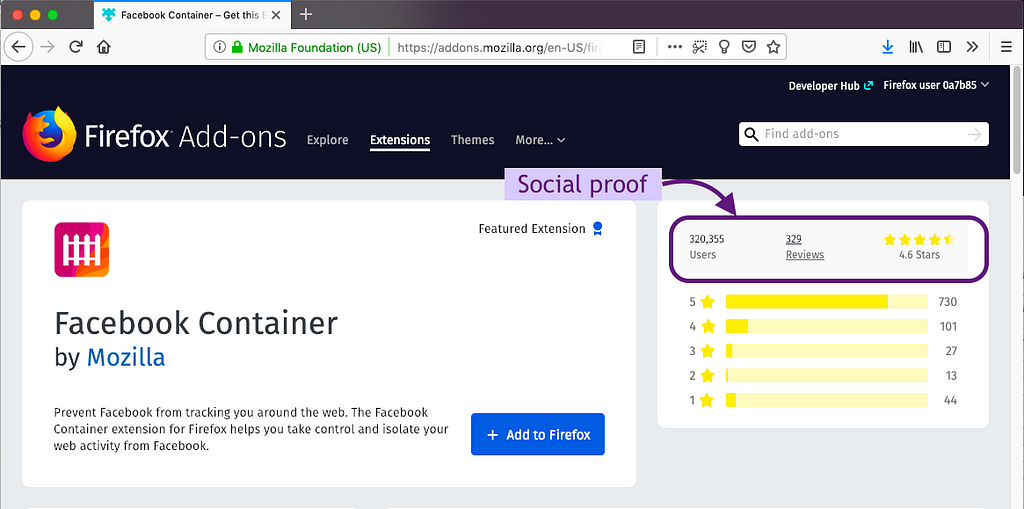
People use social proof on the extension’s product page
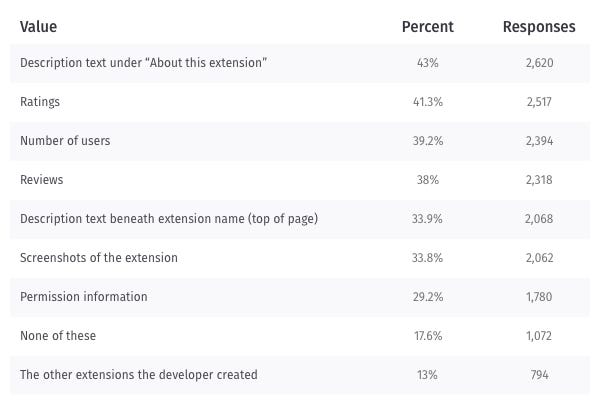
Ratings, reviews, and number of users proved important for making a decision to get the extension in both the survey and think-aloud study. Think-aloud participants used these metrics as a signal that an extension was good and safe. All except one think-aloud participant used this “social proof” before installing an extension. The importance of social proof was backed up by the survey responses where ratings, number of users, and reviews were among the top pieces of information used.
People use social proof outside of AMO
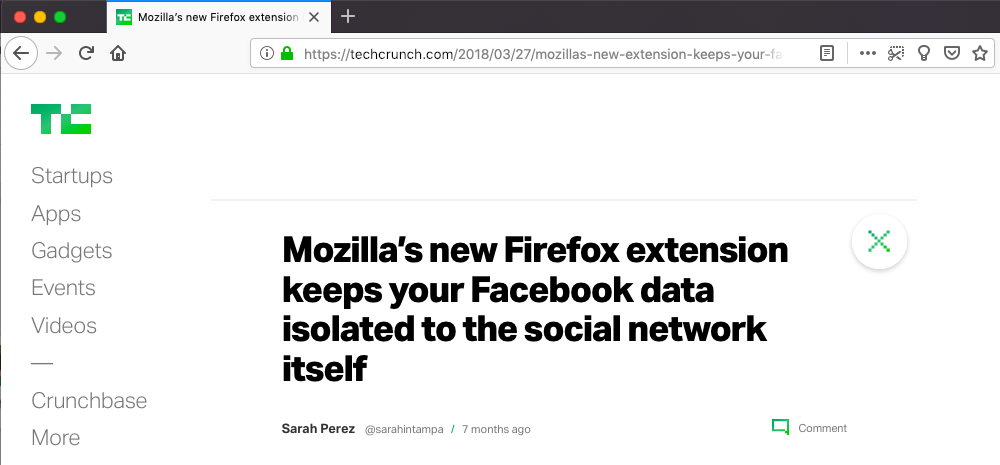
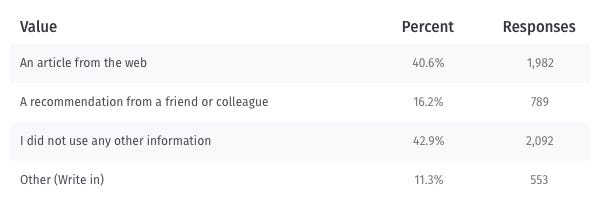
Think-aloud participants mentioned using outside sources to help them decide whether or not to get an extension. Outside sources included forums, advice from “high authority websites,” and recommendations from friends. The same result is seen among the survey respondents, where 40.6% of respondents used an article from the web and 16.2% relied on a recommendation from a friend or colleague. This is consistent with our previous user research, where participants used outside sources to build trust in an extension.
People use the description and extension name
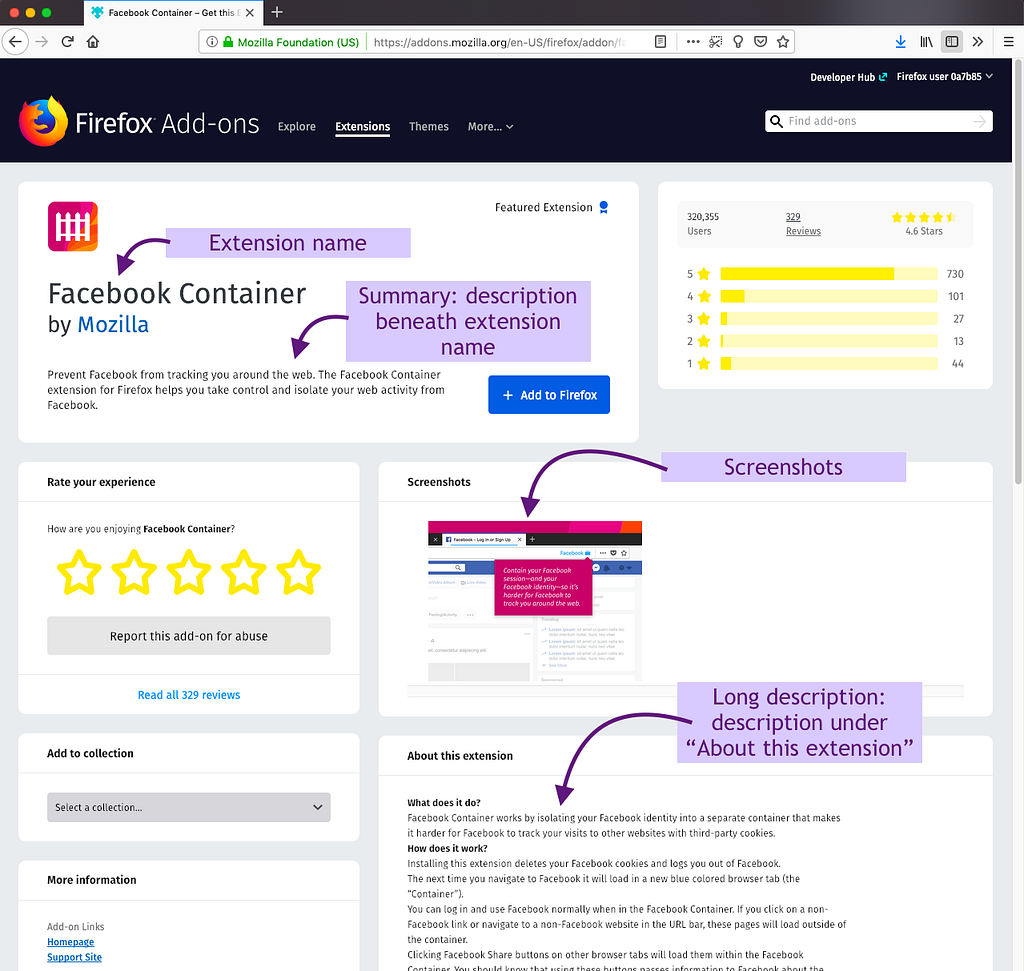
Almost half of the survey respondents use the description to make a decision about the extension. While the description was the top piece of content used, we also
Following the explosion of extension features in Firefox 63, Firefox 64 moved into Beta with a quieter set of capabilities spread across many different areas.
Extension Management
The most visible change to extensions comes on the user-facing side of Firefox where the add-ons management page (about:addons) received an upgrade.
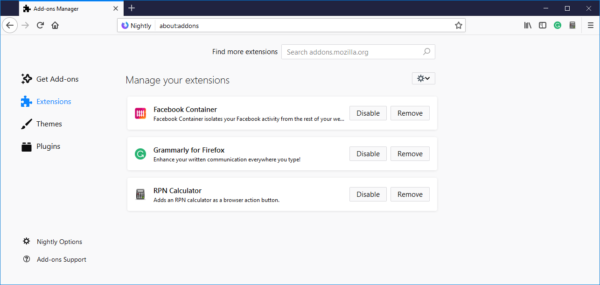 Changes on this page include:
- Each extension is shown as a card that can be clicked.
- Each card shows the description for the extension along with buttons for Options, Disable and Remove.
- The search area at the top is cleaned up.
- The page links to the Firefox Preferences page (about:preferences) and that page links back to about:addons, making navigation between the two very easy. These links appear in the bottom left corner of each page.
These changes are part of an ongoing redesign of about:addons that will make managing extensions and themes within Firefox simpler and more intuitive. You can expect to see additional changes in 2019.
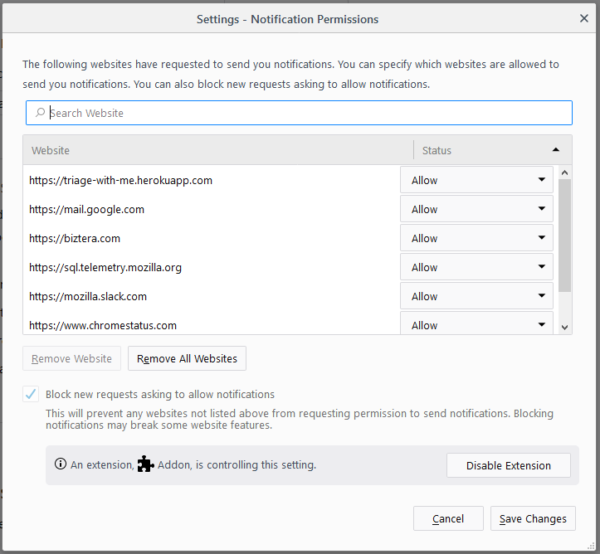
As part of our continuing effort to make sure users are aware of when an extension is controlling some aspect of Firefox, the Notification Permissions window now shows when an extension is controlling the browser’s ability to accept or reject web notification requests.
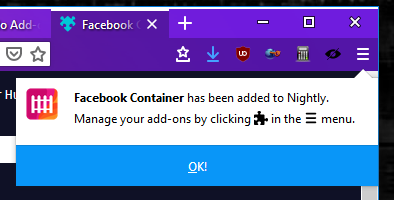
When an extension is installed, the notification popup is now persistently shown off of the main (hamburger) menu. This ensures that the notification is always acknowledged by the user and can’t be accidentally dismissed by switching tabs.
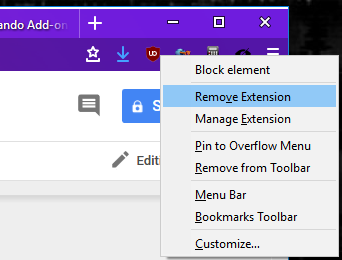
Finally, extensions can now be removed by right-clicking on an extension’s browser action icon and selecting “Remove Extension” from the resulting context menu.
Even More Context Menu Improvements
Firefox 63 saw a large number of improvements for extension context menus and, as promised, there are even more improvements in Firefox 64.
The biggest change is a new API that can be called from the contextmenu DOM event to set a custom context menu in extension pages. This API, browser.menus.overrideContext(), allows extensions to hide all default Firefox menu items in favor of providing a custom context menu UI. This context menu can consist of multiple top-level menu items from the extension, and may optionally include tab or bookmark context menu items from other extensions.
To use the new API, you must declare the menus and the brand new menus.overrideContext permission. Additionally, to include context menus from other extensions in the tab or bookmarks contexts, you must also declare the tabs or bookmarks permissions, respectively.
The API is still being documented on MDN at the time of this writing, but the API takes a contextOptions object as a parameter, which includes the following values:
showDefaults: boolean that indicates whether to include default Firefox menu items in the context menu (defaults to false)context: optional parameter that indicates theContextTypeto override to allow menu items from other extensions in this context menu. Currently, onlybookmarkandtabare supported.showDefaultscannot be used with this option.bookmarkId: required when context isbookmark. Requiresbookmarkspermission.tabId: required when context istab. Requirestabspermission.
While waiting for the MDN documentation to go live, I would highly encourage you to check out the terrific blog post by Yuki “Piro” Hiroshi that covers usage of the new API in great detail.
Other improvements to extension context menus include:
browser.menus.update()now allows extensions to update an icon without having to delete and recreate the menu item.menus.create()andmenus.update()now support a viewTypes property. This is
As I previously mentioned I am currently in the information gathering phase for improvements to desktop Firefox developer efficiency and velocity. While many view developer efficiency and velocity as the same thing–and indeed they are often correlated–it is useful to discuss how they are different.
I like to think of developer velocity as the rate at which a unit of work is completed. Developer efficiency is the amount of effort required to complete a unit of work.
If one were to think of the total development output as revenue, improvements to velocity would improve the top-line and improvements to efficiency would improve the bottom-line.
I like to visualize the differences by imagining a lone developer with the task to write a function to compute the Fibonacci series. If one were to magically increase the developer’s typing speed, that would be an increase to their velocity. If one created a library with an existing fibonacci implementation and the developer leveraged it instead, it would be an increase to their efficiency.
The trick I am here to help Mozilla with is identifying large improvements in both Firefox developer velocity and efficiency without requiring a lot of additional resources. I am focusing on some lower-hanging fruit that the organization has missed, hasn’t deployed for everyone, or needs a trusted outsider to help push through some red tape.
https://christian.legnitto.com/blog/2018/11/08/what-is-developer-efficiency-and-velocity/
This is a lightly edited response to a question we got on IRC about how to best apply to participate in Google’s “Summer Of Code” program. this isn’t company policy, but I’ve been the one turning the crank on our GSOC application process for the last while, so maybe it counts as helpful guidance.
We’re going to apply as an organization to participate in GSOC 2019, but that process hasn’t started yet. This year it kicked off in the first week of January, and I expect about the same in 2019.
You’re welcome to apply to multiple positions, but I strongly recommend that each application be a focused effort; if you send the same generic application to all of them it’s likely they’ll all be disregarded. I recognize that this seems unfair, but we get a tidal wave of redundant applications for any position we open, so we have to filter them aggressively.
Successful GSOC applicants generally come in two varieties – people who put forward a strong application to work on projects that we’ve proposed, and people that have put together their own GSOC proposal in collaboration with one or more of our engineers.
The latter group are relatively rare, comparatively – they generally are people we’ve worked through some bugs and had some useful conversations with, who’ve done the work of identifying the “good GSOC project” bugs and worked out with the responsible engineers if they’d be open to collaboration, what a good proposal would look like, etc.
None of those bugs or conversations are guarantees of anything, perhaps obviously – some engineers just don’t have time to mentor a GSOC student, some of the things you’re interested in doing won’t make good GSOC projects, and so forth.
One of the things I hope to do this year is get better at clarifying what a good GSOC project proposal looks like, but broadly speaking they are:
- Nice-to-have features, but non-blocking and non-critical-path. A struggling GSOC student can’t put a larger project at risk.
- Few (good) or no (better) dependencies, on external factors, whether they’re code, social context or other people’s work. A good GSOC project is well-contained.
- Clearly defined yes-or-no deliverables, both overall and as milestones throughout the summer. We need GSOC participants to be able to show progress consistently.
- Finally, broad alignment with Mozilla’s mission and goals, even if it’s in a supporting role. We’d like to be able to draw a straight line between the project you’re proposing and Mozilla being incrementally more effective or more successful. It doesn’t have to move any particular needle a lot, but it has to move the needle a bit, and it has to be a needle we care about moving.
It’s likely that your initial reaction to this “that is a lot, how do I find all this out, what do I do here, what the hell”, and that’s a reasonable reaction.
The reason that this group of applicants is comparatively rare is that people who choose to go that path have mostly been hanging around the project for a bit, soaking up the culture, priorities and so on, and have figured out how to navigate from “this is my thing that I’m interested in and want to do” to “this is my explanation of how my thing fits into Mozilla, both from product engineering and an organizational mission perspective, and this is who I should be making that pitch to”.
This is not to say that it’s impossible, just that there’s no formula for it. Curiosity and patience are your most important tools, if you’d like to go down that road, but if you do we’d definitely like to hear from you. There’s no better time to get started than now.
http://exple.tive.org/blarg/2018/11/08/summer-of-code-question/
100 years is a lot of time. It is longer than most lifetimes. It is long enough to build and erase cultures. It is long enough for the world to change.
100 years is not a lot of time. It is too short a time to forget. It isn’t long enough to understand our world. It isn’t long enough to understand each other.
This Sunday, November 11th marks the 100th anniversary of the end of hostilities of World War I. In Canada, plastic poppies have been blooming on lapels across the nation to show that we do remember the War to End All Wars. We also remember the wars that came after. And the conflicts we don’t call wars any more.
More importantly we remember those who fought them. They fought for us. They fight for us. They fight for others, too. They fight for good. We remember the fighters and their fights.
This will be the 99th Remembrance Day. This will be the 99th time we lay wreaths on cenotaphs. This will be the 99th day we add names to the list of the remembered. This will be the 99th time we mark the eleventh hour of the eleventh day of the eleventh month with our silence.
Silence so you can hear the rain. Silence so you can hear people nervously scuffing their feet. Silence so that even children know something is happening. Silence so loud you can’t hear a thing.
In Canada we will mark the occasion on Sunday. We will have Monday off. We will return on Tuesday.
It’ll only be a short while. We’ll be back before long.
:chutten
https://chuttenblog.wordpress.com/2018/11/08/holiday-inbound-remembrance-day-2018/
AV1, the next generation royalty-free video codec from the Alliance for Open Media, is making waves in the broadcasting industry.

Since AOMedia officially cemented the AV1 v1.0.0 specification earlier this year, we’ve seen increasing interest from the broadcasting industry. Starting with the NAB Show (National Association of Broadcasters) in Las Vegas earlier this year, and gaining momentum through IBC (International Broadcasting Convention) in Amsterdam, and more recently the NAB East Show in New York, AV1 keeps picking up steam. Each of these industry events attract over 100,000 media professionals. Mozilla attended these shows to demonstrate AV1 playback in Firefox, and showed that AV1 is well on its way to being broadly adopted in web browsers.
Continuing to advocate for AV1 in the broadcast space, Nathan Egge from Mozilla dives into the depths of AV1 at the Mile High Video Workshop in Denver, sponsored by Comcast.
AV1 leapfrogs the performance of VP9 and HEVC, making it a next-generation codec. The AV1 format is and will always be royalty-free with a permissive FOSS license.
The post Into the Depths: The Technical Details Behind AV1 appeared first on Mozilla Hacks - the Web developer blog.
https://hacks.mozilla.org/2018/11/into-the-depths-the-technical-details-behind-av1/
To introduce this week’s newsletter I’ll write about culling. Culling refers to discarding invisible content and is performed at several stages of the rendering pipeline. During frame building on the CPU we go through all primitives and discard the ones that are off-screen by computing simple rectangle intersections. As a result we avoid transferring a lot of data to the GPU and we can skip processing them as well.
Unfortunately this isn’t enough. Web page are typically built upon layers and layers of elements stacked on top of one another. The traditional way to render web pages is to draw each element in back-to-front order, which means that for a given pixel on the screen we may have rendered many primitives. This is frustrating because there are a lot of opaque primitives that completely cover the work we did on that pixel for element beneath it, so there is a lot of shading work and memory bandwidth that goes to waste, and memory bandwidth is a very common bottleneck, even on high end hardware.
Drawing on the same pixels multiple times is called overdraw, and overdraw is not our friend, so a lot effort goes into reducing it.
In its early days, to mitigate overdraw WebRender divided the screen in tiles and all primitives were assigned to the tiles they covered (primitives that overlap several tiles would be split into a primitive for each tile), and when an opaque primitive covered an entire tile we could simply discard everything that was below it. This tiling approach was good at reducing overdraw with large occluders and also made the batching blended primitives easier (I’ll talk about batching in another episode). It worked quite well for axis-aligned rectangles which is the vast majority of what web pages are made of, but it was hard to split transformed primitives.
Eventually we decided to try a different approach inspired by how video games tackle the same problem. GPUs have a special feature called the z-buffer (or depth-buffer) into which are stored the depth of each pixel during rendering. This allows rendering opaque objects in any order and still correctly have the ones closest to the camera visible.
A common way to render 3d games is to sort objects front-to-back to maximize the chance that front-most pixels are written first and maximize the amount of shading and memory writes that are discarded by the depth test. Transparent objects are then rendered back-to-front in a second pass since they can’t count as occluders.
This is exactly what WebRender does now, and moving from the tiling scheme to using the depth buffer to reduce overdraw brought great performance improvements (certainly more than I expected), and also made a number of other things simpler (I’ll come back to these another day).
This concludes today’s little piece of WebRender history. It is very unusual for 2D rendering engines to use the z-buffer this way so I think this implementation detail is worth the highlight.
Notable WebRender and Gecko changes
- Bobby implemented dynamically growing the shared texture cache, cutting by half the remaining regression compared to Firefox without WebRender on the AWSY test.
- Dan did some profiling of the talos test, and identified large data structures being copied a lot on the stack, which led to some of Glenn’s optimizations for this week.
- Dan fixed a crash with huge box shadows.
- Kats fixed an issue with scrollbar dragging on some sites.
- Matt landed his tiled blob image work yielding nice performance improvements on some of the talos tests (45% on tsvg_static and 31% on tsvgr_opacity).
- Matt investigated the telemetry results.
- Andrew fixed a crash.
- Andrew improved animated image frame recycling (will land soon, improves performance).
- Lee fixed related to missing font descriptors.
- Glenn optimized out segment builder no-ops.
- Glenn stored text run outside primitive instances to work around a recent performance regression.
- Glenn moved opacity from per primitive instance to a per template to reduce the size of primitive instances.
- Glenn moved the resolution of opacity bindings to the shaders in order to simplify primitive interning.
- Glenn
As an employer, Mozilla has a long-standing commitment to diversity, inclusion and fostering a supportive work environment. In keeping with that commitment, today we join the growing list of companies publicly opposed to efforts to erase transgender protections through reinterpretation of existing laws and regulations, as well as any policy or regulation that violates the privacy rights of those who identify as transgender, gender non-binary, or intersex.
The rights, identities and humanity of transgender, gender non-binary and intersex people deserve affirmation.
A workplace that is inclusive of a diversity of backgrounds and experiences is also good for business. We’re glad to see companies across the industry joining the Human Rights Campaign’s statement and sharing this perspective.
At Mozilla, we have clear community guidelines dictating our expectations of employees and volunteers and recently rolled out workplace guidelines for transitioning individuals and their managers. These actions are a part of our commitment to ensuring a welcoming, respectful and inclusive culture.
We urge the federal government to end its exploration of policies that would erase transgender protections and erode decades of hard work to create parity, respect, opportunity and understanding for transgender professionals.
The post Mozilla Reaffirms Commitment to Transgender Equality appeared first on The Mozilla Blog.
https://blog.mozilla.org/blog/2018/11/07/mozilla-reaffirms-commitment-to-transgender-equality/