My first ever video course is now live on Udemy, Safari Books and Packt. It really took me a long time and I’d love to share with you what I’ve prepared for you.
What’s this course about?
This course is about the Rust programming language, but it’s not those general introductory course on basic Rust syntax. This course focus on the code reuse aspect of the Rust language. So we won’t be touch every language feature, but we’ll help you understand how a selected set of features will help you achieve code reuse.
What’s so special about it?
Since these course is not a general introduction course, it is structured in a way that is bottom-up and help you learn how the features are actually used out in the wild.
A bottom up approach
We started from the most basic programming language construct: loops, iterators and functions. Then we see how we can further generalize functions and data structures (structs and enums) using generics. With these tools, we can avoid copy-pasting and stick to the DRY (Don’t Repeat Yourself) principle.
But simply avoiding repeated code snippet is not enough. What comes next naturally is to define a clear interface, or internal API between the modules (in a general sense, not the Rust mod). This is when traits comes in handy. Traits help you define and enforce interfaces. We’ll also discuss the performance impact on static dispatch vs. dynamic dispatch by using generics and trait object.
Finally we talk about more advanced (i.e. you shouldn’t use it unless necessary) tool like macros, which will help do crazier things by tapping directly into the compiler. You can write function-like macros that can help you reuse code that needs lower level access. You can also create custom derive with macros.
Finally, with these tools at hand, we can package our code into modules (Rust mod), which can help you define a hierarchical namespace. We can then organize these modules into Crates, which are software packages or libraries that can contain multiple files. When you reach this level, you can already consume and produce libraries and frameworks and work with a team of Rust developers.
A guided tour though the std
It’s very easy to learn a lot of syntax, but never understand how they are used in real life. In each section, we’ll guide you through how these programming tools are used in std, or the Rust standard library. Standard libraries are the extreme form of code reuse, you are reusing code that is produced by the core language team. You’ll be able to see how these features are put to real use in std to solve their code reuse needs.
We’ll also show you how you can publish your code onto crates.io, Rust’s package registry. Therefore you’ll not only be comfortable reusing other people’s crate, but be a valuable contributor to the wider Rust community.
Conclusion
So this summarized the highlights of this course. If you’ve already learned the basics of Rust and would like to take your Rust skill to the next level, please check this course out. You can find this course on the following platforms: Udemy, Safari Books and Packt.
https://shinglyu.github.io/web/2018/11/16/new-rust-course-building-reuseable-code-with-rust.html
My first ever video course is now live on Udemy, Safari Books and Packt. It really took me a long time and I’d love to share with you what I’ve prepared for you.
What’s this course about?
This course is about the Rust programming language, but it’s not those general introductory course on basic Rust syntax. This course focus on the code reuse aspect of the Rust language. So we won’t be touch every language feature, but we’ll help you understand how a selected set of features will help you achieve code reuse.
What’s so special about it?
Since these course is not a general introduction course, it is structured in a way that is bottom-up and help you learn how the features are actually used out in the wild.
A bottom up approach
We started from the most basic programming language construct: loops, iterators and functions. Then we see how we can further generalize functions and data structures (structs and enums) using generics. With these tools, we can avoid copy-pasting and stick to the DRY (Don’t Repeat Yourself) principle.
But simply avoiding repeated code snippet is not enough. What comes next naturally is to define a clear interface, or internal API between the modules (in a general sense, not the Rust mod). This is when traits comes in handy. Traits help you define and enforce interfaces. We’ll also discuss the performance impact on static dispatch vs. dynamic dispatch by using generics and trait object.
Finally we talk about more advanced (i.e. you shouldn’t use it unless necessary) tool like macros, which will help do crazier things by tapping directly into the compiler. You can write function-like macros that can help you reuse code that needs lower level access. You can also create custom derive with macros.
Finally, with these tools at hand, we can package our code into modules (Rust mod), which can help you define a hierarchical namespace. We can then organize these modules into Crates, which are software packages or libraries that can contain multiple files. When you reach this level, you can already consume and produce libraries and frameworks and work with a team of Rust developers.
A guided tour though the std
It’s very easy to learn a lot of syntax, but never understand how they are used in real life. In each section, we’ll guide you through how these programming tools are used in std, or the Rust standard library. Standard libraries are the extreme form of code reuse, you are reusing code that is produced by the core language team. You’ll be able to see how these features are put to real use in std to solve their code reuse needs.
We’ll also show you how you can publish your code onto crates.io, Rust’s package registry. Therefore you’ll not only be comfortable reusing other people’s crate, but be a valuable contributor to the wider Rust community.
Conclusion
So this summarized the highlights of this course. If you’ve already learned the basics of Rust and would like to take your Rust skill to the next level, please check this course out. You can find this course on the following platforms: Udemy, Safari Books and Packt.
https://shinglyu.github.io/web/2018/11/16/new-rust-course-building-reuseable-code-with-rust.html
My first ever video course is now live on Udemy, Safari Books and Packt. It really took me a long time and I’d love to share with you what I’ve prepared for you.
What’s this course about?
This course is about the Rust programming language, but it’s not those general introductory course on basic Rust syntax. This course focus on the code reuse aspect of the Rust language. So we won’t be touch every language feature, but we’ll help you understand how a selected set of features will help you achieve code reuse.
What’s so special about it?
Since these course is not a general introduction course, it is structured in a way that is bottom-up and help you learn how the features are actually used out in the wild.
A bottom up approach
We started from the most basic programming language construct: loops, iterators and functions. Then we see how we can further generalize functions and data structures (structs and enums) using generics. With these tools, we can avoid copy-pasting and stick to the DRY (Don’t Repeat Yourself) principle.
But simply avoiding repeated code snippet is not enough. What comes next naturally is to define a clear interface, or internal API between the modules (in a general sense, not the Rust mod). This is when traits comes in handy. Traits help you define and enforce interfaces. We’ll also discuss the performance impact on static dispatch vs. dynamic dispatch by using generics and trait object.
Finally we talk about more advanced (i.e. you shouldn’t use it unless necessary) tool like macros, which will help do crazier things by tapping directly into the compiler. You can write function-like macros that can help you reuse code that needs lower level access. You can also create custom derive with macros.
Finally, with these tools at hand, we can package our code into modules (Rust mod), which can help you define a hierarchical namespace. We can then organize these modules into Crates, which are software packages or libraries that can contain multiple files. When you reach this level, you can already consume and produce libraries and frameworks and work with a team of Rust developers.
A guided tour though the std
It’s very easy to learn a lot of syntax, but never understand how they are used in real life. In each section, we’ll guide you through how these programming tools are used in std, or the Rust standard library. Standard libraries are the extreme form of code reuse, you are reusing code that is produced by the core language team. You’ll be able to see how these features are put to real use in std to solve their code reuse needs.
We’ll also show you how you can publish your code onto crates.io, Rust’s package registry. Therefore you’ll not only be comfortable reusing other people’s crate, but be a valuable contributor to the wider Rust community.
Conclusion
So this summarized the highlights of this course. If you’ve already learned the basics of Rust and would like to take your Rust skill to the next level, please check this course out. You can find this course on the following platforms: Udemy, Safari Books and Packt.
https://shinglyu.github.io/web/2018/11/16/new-rust-course-building-reuseable-code-with-rust.html
Mozilla took the next step today in the fight to defend the web and consumers from the FCC’s attack on an open internet. Together with other petitioners, Mozilla filed our reply brief in our case challenging the FCC’s elimination of critical net neutrality protections that require internet providers to treat all online traffic equally.
The fight for net neutrality, while not a new one, is an important one. We filed this case because we believe that the internet works best when people control for themselves what they see and do online.
The FCC’s removal of net neutrality rules is not only bad for consumers, it is also unlawful. The protections in place were the product of years of deliberation and careful fact-finding that proved the need to protect consumers, who often have little or no choice of internet provider. The FCC is simply not permitted to arbitrarily change its mind about those protections based on little or no evidence. It is also not permitted to ignore its duty to promote competition and protect the public interest. And yet, the FCC’s dismantling of the net neutrality rules unlawfully removes long standing rules that have ensured the internet provides a voice for everyone.
Meanwhile, the FCC’s defenses of its actions and the supporting arguments of large cable and telco company ISPs, who have come to the FCC’s aid, are misguided at best. They mischaracterize the internet’s technical structure as well as the FCC’s mandate to advance internet access, and they ignore clear evidence that there is little competition among ISPs. They repeatedly contradict themselves and have even introduced new justifications not outlined in the FCC’s original decision to repeal net neutrality protections.
Nothing we have seen from the FCC since this case began has changed our mind. Our belief in this action remains as strong as it was when its plan to undo net neutrality protections last year was first met with outcry from consumers, small businesses and advocates across the country.
We will continue to do all that we can to support an open and vibrant internet that is a resource accessible to all. We look forward to making our arguments directly before the D.C. Court of Appeals and the public. FCC, we’ll see you in court on February 1.
Mozilla v FCC – Joint Reply Brief
The post Mozilla Fights On For Net Neutrality appeared first on The Mozilla Blog.
https://blog.mozilla.org/blog/2018/11/16/mozilla-fights-on-for-net-neutrality/
Mozilla took the next step today in the fight to defend the web and consumers from the FCC’s attack on an open internet. Together with other petitioners, Mozilla filed our reply brief in our case challenging the FCC’s elimination of critical net neutrality protections that require internet providers to treat all online traffic equally.
The fight for net neutrality, while not a new one, is an important one. We filed this case because we believe that the internet works best when people control for themselves what they see and do online.
The FCC’s removal of net neutrality rules is not only bad for consumers, it is also unlawful. The protections in place were the product of years of deliberation and careful fact-finding that proved the need to protect consumers, who often have little or no choice of internet provider. The FCC is simply not permitted to arbitrarily change its mind about those protections based on little or no evidence. It is also not permitted to ignore its duty to promote competition and protect the public interest. And yet, the FCC’s dismantling of the net neutrality rules unlawfully removes long standing rules that have ensured the internet provides a voice for everyone.
Meanwhile, the FCC’s defenses of its actions and the supporting arguments of large cable and telco company ISPs, who have come to the FCC’s aid, are misguided at best. They mischaracterize the internet’s technical structure as well as the FCC’s mandate to advance internet access, and they ignore clear evidence that there is little competition among ISPs. They repeatedly contradict themselves and have even introduced new justifications not outlined in the FCC’s original decision to repeal net neutrality protections.
Nothing we have seen from the FCC since this case began has changed our mind. Our belief in this action remains as strong as it was when its plan to undo net neutrality protections last year was first met with outcry from consumers, small businesses and advocates across the country.
We will continue to do all that we can to support an open and vibrant internet that is a resource accessible to all. We look forward to making our arguments directly before the D.C. Court of Appeals and the public. FCC, we’ll see you in court on February 1.
Mozilla v FCC – Joint Reply Brief
The post Mozilla Fights On For Net Neutrality appeared first on The Mozilla Blog.
https://blog.mozilla.org/blog/2018/11/16/mozilla-fights-on-for-net-neutrality/
Mozilla took the next step today in the fight to defend the web and consumers from the FCC’s attack on an open internet. Together with other petitioners, Mozilla filed our reply brief in our case challenging the FCC’s elimination of critical net neutrality protections that require internet providers to treat all online traffic equally.
The fight for net neutrality, while not a new one, is an important one. We filed this case because we believe that the internet works best when people control for themselves what they see and do online.
The FCC’s removal of net neutrality rules is not only bad for consumers, it is also unlawful. The protections in place were the product of years of deliberation and careful fact-finding that proved the need to protect consumers, who often have little or no choice of internet provider. The FCC is simply not permitted to arbitrarily change its mind about those protections based on little or no evidence. It is also not permitted to ignore its duty to promote competition and protect the public interest. And yet, the FCC’s dismantling of the net neutrality rules unlawfully removes long standing rules that have ensured the internet provides a voice for everyone.
Meanwhile, the FCC’s defenses of its actions and the supporting arguments of large cable and telco company ISPs, who have come to the FCC’s aid, are misguided at best. They mischaracterize the internet’s technical structure as well as the FCC’s mandate to advance internet access, and they ignore clear evidence that there is little competition among ISPs. They repeatedly contradict themselves and have even introduced new justifications not outlined in the FCC’s original decision to repeal net neutrality protections.
Nothing we have seen from the FCC since this case began has changed our mind. Our belief in this action remains as strong as it was when its plan to undo net neutrality protections last year was first met with outcry from consumers, small businesses and advocates across the country.
We will continue to do all that we can to support an open and vibrant internet that is a resource accessible to all. We look forward to making our arguments directly before the D.C. Court of Appeals and the public. FCC, we’ll see you in court on February 1.
Mozilla v FCC – Joint Reply Brief
The post Mozilla Fights On For Net Neutrality appeared first on The Mozilla Blog.
https://blog.mozilla.org/blog/2018/11/16/mozilla-fights-on-for-net-neutrality/
We are excited to announce the launch of the VR Design Challenge: Mozilla Hubs Clubhouse, a competition co-sponsored by Mozilla and Sketchfab, the world’s largest 3D-content platform. The goal of the competition is to create stunning 3D assets for Hubs by Mozilla.

What’s Hubs by Mozilla?
Mozilla’s mission is to make the Internet a global public resource, open and accessible to all, including innovators, content creators, and builders on the web. VR is changing the very future of web interaction, so advancing it is crucial to Mozilla’s mission. That was the initial idea behind Hubs by Mozilla, a VR interaction platform launched in April 2018 that lets you meet and talk to your friends, colleagues, partners, and customers in a shared 360-environment using just a browser, on any device from head-mounted displays like HTC Vive to 2D devices like laptops and mobile phones.
Since then, the Mozilla VR team has kept integrating new and exciting features to the Hubs experience: the ability bring videos, images, documents, and even 3D models into Hubs by simply pasting a link. In early October, two more useful features were added: drawing and photo uploads.
A challenge for Sketchfab’s content-creating community
The work to make the Hubs more comfortable to its denizens has only begun, and to spur creativity in this new area of Mozilla’s Mixed Reality program, Mozilla is partnering (again) with Sketchfab, a one-million-strong community of creators of 3D content, for a new VR Design Challenge: Mozilla Hubs Clubhouse.
We chose “Clubhouse” as the competition theme, because we want you to imagine and build the places you like to hang out and meet with your pals, family or colleagues. This can be any VR space from a treehouse to a luxury penthouse suite, a hobbit hole, the garage you used to jam back in the days or a super-secret gathering space at the bottom of the ocean. But it doesn’t stop with just the rooms. We challenge you to design all the props to be placed in these: decorations on the wall, furniture, artwork, machinery, or even objects that users could move around, such as coffee cups, and food bins. You totally own the place!
How to participate
The competition will run until Tuesday, November 27th (23:59 New York time — EDT), and the submitted assets will be evaluated by a four-judge panel composed of the members of Mozilla Hub and Sketchfab Community teams. Prizes will include Amazon Gift Cards, Oculus Go headsets, and Sketchfab PRO.
In order to participate in the competition you should have a Sketchfab account. If you don’t already have a Sketchfab account, you can sign up for free here.
Dreaming of hosting a virtual holiday party with your buddies in your own Clubhouse? Thinking of having a poster of your favorite band on the wall? An entire aquarium wall? Create them!
Virtual meeting rooms don’t have to be boring. We challenge you to design better ones! was originally published in
We recently released Email Tabs in Firefox Test Pilot. This was a project I championed, and I wanted to offer some context on it.
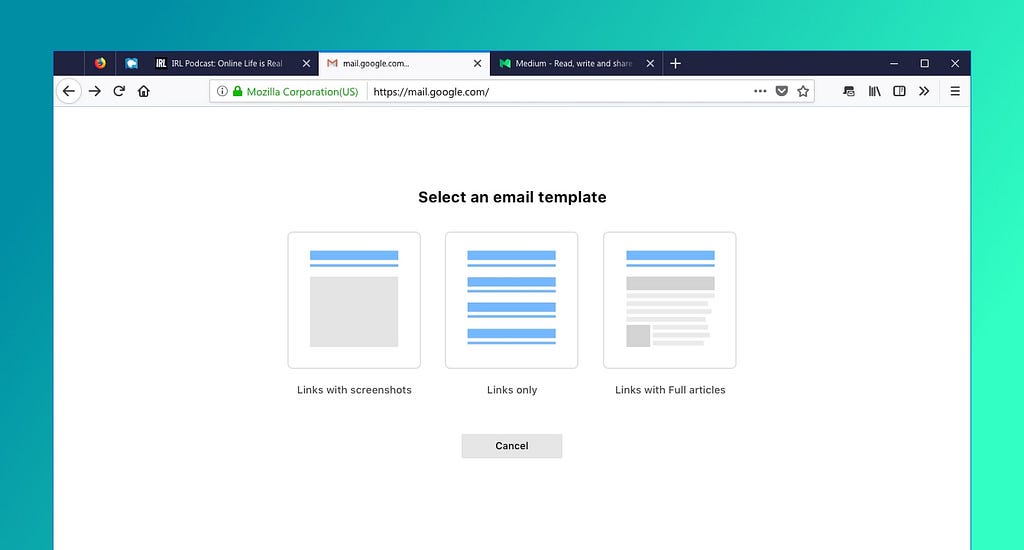
Email Tabs is a browser add-on that makes it easier to compose an email message from your tabs/pages. The experiment page describes how it works, but to summarize it from a technical point of view:
- You choose some tabs
- The add-on gets the best title and URL from the tab(s), makes a screenshot, and uses reader view to get simplified content from the tab
- It opens a email compose page
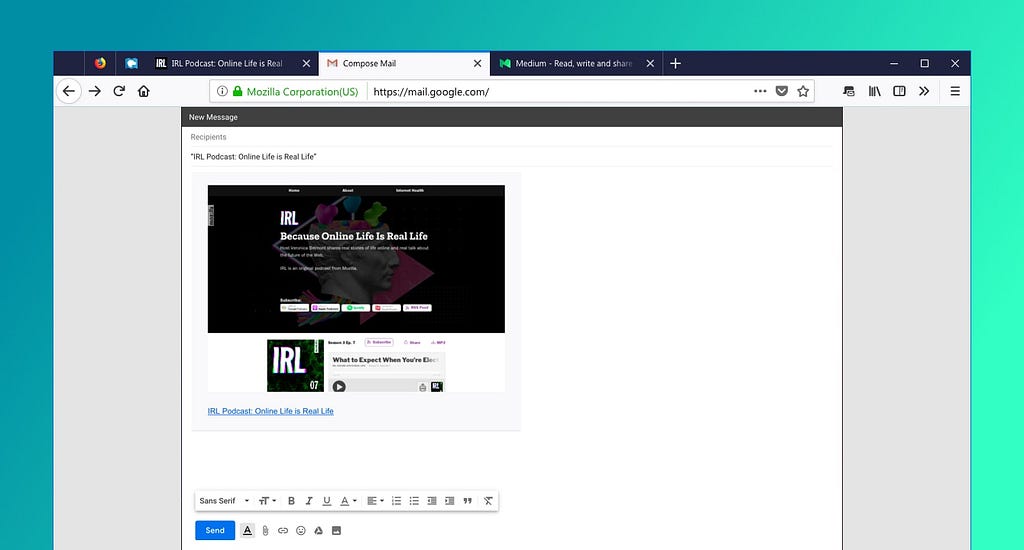
- It asks you what you want your email to look like (links, entire articles, screenshots)
- It injects the HTML (somewhat brutally) into the email composition window
- When the email is sent, if offers to close the compose window or all the tabs you’ve sent
It’s not fancy engineering. It’s just-make-it-work engineering. It does not propose a new standard for composing HTML emails. It doesn’t pay attention to your existing mail settings. It does not push forward the state of the art. It has no mobile component. Notably, no one in Mozilla ever asked us to make this thing. And yet I really like this add-on, and so I feel a need to explain why.
User Research origins
A long time ago Mozilla did research into Save/Share/Revisit. The research was based on interviews, journals, and directly watching people do work on their computers.
The results should not be surprising, but it was important to actually have them documented and backed up by research:
- People use simple techniques
- Everyone claims to be happy with their current processes
- Everyone used multiple tools that typically fed into each other
- Those processes might seem complicated and inefficient to me, but didn’t to them
- People said they might be open to improvements in specific steps
- People were not interested in revamping their overall processes
- Some techniques were particularly popular:
- Screenshots
- URLs
- Texting
- Bookmarks
Not everyone used all of these, but they were all popular.
The research made me change a page-freezing/saving tool (Page Shot) into what is now Firefox Screenshots (I didn’t intend to lose the freezing functionality along the way, but things happen when you ship).
Even if the research was fairly clear, it wasn’t prescriptive, and life moved on. But it sat in the back of my head, both email and the general question of workflows. And once I was doing less work on Screenshots I felt compelled to come back to it. Email stuck out, both because of how ubiquitous it was, and how little anyone cared about it. It seemed easy to improve on.
Email is also multipurpose. People will apologetically talk about emailing themselves something in order to save it, even though everyone does it. It can be a note for the future, something to archive for later, a message, a question, an FYI. One of the features of Email Tabs that I’m fond of is the ability to send a set of tabs, and then close those same tabs. Have a set of tabs that represent something you don’t want to forget, but don’t want to use right now? Send it to yourself. And unlike structured storage (like a bookmark folder), you can describe as much as you want about your next steps in the email itself.
Choosing to integrate with webmail
The obvious solution is to make something that emails out a page. A little web service perhaps, and you give it a URL and it fetches it, and then something that forwards the current URL to that service…
What seems simple becomes hard pretty quickly. Of course you have to fetch the page, and render it, and worry about JavaScript, and so on. But even if you skip that, then what email address will it come from? Do you integrate with a contact list? Make your own? How do you let people add a little note? A note per tab? Do you save a record?
Prepopulating an email composition answers a ton of questions:
- All the mail infrastructure
- From addresses, email verification, selecting your address, etc
- To field, CC, address book
- The editable body
As of last nightly (20181115100051), Firefox now supports Wayland on Linux, thanks to the work from Martin Stransky and Jan Horak, mostly.
Before that, it was possible to build your own Firefox with Wayland support (and Fedora does it), but now the downloads from mozilla.org come with Wayland support out of the box for the first time.
However, being experimental and all, the Wayland support is not enabled by default, meaning by default, you’ll still be using XWayland. To enable wayland support, first set the GDK_BACKEND environment variable to wayland.
To verify whether Wayland support is enabled, go to about:support, and check “WebGL 1 Driver WSI Info” and/or “WebGL 2 Driver WSI Info”. If they say something about GLX, Wayland support is not enabled. If they say something about EGL, it is. I filed a bug to make it more obvious what is being used.
It’s probably still a long way before Firefox enables Wayland support on Wayland by default, but we reached a major milestone here. Please test and report any bug you encounter.
Update: I should mention that should you build your own Firefox, as long as your Gtk+ headers come with Wayland support, you’ll end up with the same Wayland support as the one shipped by Mozilla.
When well-meaning but underinformed folks hear you keep old Macs alive, without fail they tell you to replace the capacitors, and install a SCSI2SD.
The first bit of "advice" drives me up the wall because while it's true for many Macs, it's now uttered in almost a knee-jerk fashion anywhere almost any vintage computer is mentioned (this kind of mindlessness infests pinball machine restoration as well). To be sure, in my experience 68030-based Macs and some of the surrounding years will almost invariably need a recap. All of my Color Classics, IIcis, IIsis and SE/30s eventually suffered capacitor failures and had to be refurbished, and if you have one of these machines that has not been recapped yet it's only a matter of time.
But this is probably not true for many other systems. Many capacitors have finite lifetimes but good quality components can function for rather long periods especially with regular periodic use; in particular, early microcomputers from the pre-surface mount era (including early Macs) only infrequently need capacitor replacement. My 1985-vintage Mac Plus and my Commodore microcomputers, for example, including my blue foil PET 2001 and a Revision A KIM-1 older than I am, function well and have never needed their capacitors to be serviced. Similarly, newer Macs, even many beige Power Macs, still have long enough residual capacitor lifespan that caps are (at least presently) very unlikely to be the problem, and trying to replace them runs you a greater risk of damaging the logic board than actually fixing anything (the capacitor plague of the early 2000s notwithstanding).
That brings us to the second invariant suggestion, a solid state disk replacement, of which at least for SCSI-based systems the SCSI2SD is probably the best known. Unlike capacitors, this suggestion has much better evidence to support it as a general recommendation as indicated by the SCSI2SD's rather long list of reported working hardware (V5 device compatibility, V6 device compatibility). However, one thing that isn't listed (much) on those pages is whether the functionality is still the same for other OSes these computers might run. That will become relevant in a moment.
My own history with SCSI2SD devices has been generally positive, but there have been issues. My very uncommon IBM ThinkPad "800" (the predecessor of the ThinkPad 850, one of the famous PowerPC IBM ThinkPads) opened its SCSI controller fuse after a SCSI2SD was installed, and so far has refused to boot from any device since then. The jury is still out on whether the ThinkPad's components were iffy to begin with or the SCSI2SD was defective, but the card went to the recycler regardless since I wasn't willing to test it on anything else. On the other hand, my beautiful bright orange plasma screen Solbourne S3000 has used a V5 SCSI2SD since the day I got it without any issues whatsoever, and I installed a 2.5" version in a Blackbird PowerBook 540c which runs OS 7.6.1 more or less stably.
You have already met thule, the long-suffering Macintosh IIci which runs the internal DNS and DHCP and speaks old-school EtherTalk, i.e., AppleTalk over DDP, to my antediluvian Mac (and one MS-DOS PC) clients for file and print services on the internal non-routable network. AFAIK NetBSD is the only maintained OS left that still supports DDP. Although current versions of the OS apparently continue to support it, I had problems even as early as 1.6 with some of my clients, so I keep it running NetBSD 1.5.2 with my custom kernel. However, none of the essential additional software packages such as netatalk are available anywhere obvious for this version, so rebuilding from scratch would be impossible; instead, a full-system network backup runs at regular intervals to archive the entire contents of the OS, which I can restore to the system from one of the other machines (see below). It has a Farallon EtherWave NuBus Ethernet card, 128MB of RAM (the maximum for the IIci) and the IIci 32K L1 cache card. It has run nearly non-stop since 1999. Here it is in the server room:
When well-meaning but underinformed folks hear you keep old Macs alive, without fail they tell you to replace the capacitors, and install a SCSI2SD.
The first bit of "advice" drives me up the wall because while it's true for many Macs, it's now uttered in almost a knee-jerk fashion anywhere almost any vintage computer is mentioned (this kind of mindlessness infests pinball machine restoration as well). To be sure, in my experience 68030-based Macs and some of the surrounding years will almost invariably need a recap. All of my Color Classics, IIcis, IIsis and SE/30s eventually suffered capacitor failures and had to be refurbished, and if you have one of these machines that has not been recapped yet it's only a matter of time.
But this is probably not true for many other systems. Many capacitors have finite lifetimes but good quality components can function for rather long periods especially with regular periodic use; in particular, early microcomputers from the pre-surface mount era (including early Macs) only infrequently need capacitor replacement. My 1987-vintage Mac Plus and my Commodore microcomputers, for example, including my blue foil PET 2001 and a Revision A KIM-1 older than I am, function well and have never needed their capacitors to be serviced. Similarly, newer Macs, even many beige Power Macs, still have long enough residual capacitor lifespan that caps are (at least presently) very unlikely to be the problem, and trying to replace them runs you a greater risk of damaging the logic board than actually fixing anything (the capacitor plague of the early 2000s notwithstanding).
That brings us to the second invariant suggestion, a solid state disk replacement, of which at least for SCSI-based systems the SCSI2SD is probably the best known. Unlike capacitors, this suggestion has much better evidence to support it as a general recommendation as indicated by the SCSI2SD's rather long list of reported working hardware (V5 device compatibility, V6 device compatibility). However, one thing that isn't listed (much) on those pages is whether the functionality is still the same for other OSes these computers might run. That will become relevant in a moment.
My own history with SCSI2SD devices has been generally positive, but there have been issues. My very uncommon IBM ThinkPad "800" (the predecessor of the ThinkPad 850, one of the famous PowerPC IBM ThinkPads) opened its SCSI controller fuse after a SCSI2SD was installed, and so far has refused to boot from any device since then. The jury is still out on whether the ThinkPad's components were iffy to begin with or the SCSI2SD was defective, but the card went to the recycler regardless since I wasn't willing to test it on anything else. On the other hand, my beautiful bright orange plasma screen Solbourne S3000 has used a V5 SCSI2SD since the day I got it without any issues whatsoever, and I installed a 2.5" version in a Blackbird PowerBook 540c which runs OS 7.6.1 more or less stably.
You have already met thule, the long-suffering Macintosh IIci which runs the internal DNS and DHCP and speaks old-school EtherTalk, i.e., AppleTalk over DDP, to my antediluvian Mac (and one MS-DOS PC) clients for file and print services on the internal non-routable network. AFAIK NetBSD is the only maintained OS left that still supports DDP. Although current versions of the OS apparently continue to support it, I had problems even as early as 1.6 with some of my clients, so I keep it running NetBSD 1.5.2 with my custom kernel. However, none of the essential additional software packages such as netatalk are available anywhere obvious for this version, so rebuilding from scratch would be impossible; instead, a full-system network backup runs at regular intervals to archive the entire contents of the OS, which I can restore to the system from one of the other machines (see below). It has a Farallon EtherWave NuBus Ethernet card, 128MB of RAM (the maximum for the IIci) and the IIci 32K L2 cache card. It has run nearly non-stop since 1999. Here it is in the server room:
Background
Ever since the first animated DHTML cursor trails and “Site of the Week” badges graced the web, re-usable code has been a temptation for web developers. And ever since those heady days, integrating third-party UI into your site has been, well, a semi-brittle headache.
Using other people’s clever code has required buckets of boilerplate JavaScript or CSS conflicts involving the dreaded !important. Things are a bit better in the world of React and other modern frameworks, but it’s a bit of a tall order to require the overhead of a full framework just to re-use a widget. HTML5 introduced a few new elements like and , which added some much-needed common UI widgets to the web platform. But adding new standard elements for every sufficiently common web UI pattern isn’t a sustainable option.
In response, a handful of web standards were drafted. Each standard has some independent utility, but when used together, they enable something that was previously impossible to do natively, and tremendously difficult to fake: the capability to create user-defined HTML elements that can go in all the same places as traditional HTML. These elements can even hide their inner complexity from the site where they are used, much like a rich form control or video player.
The standards evolve
As a group, the standards are known as Web Components. In the year 2018 it’s easy to think of Web Components as old news. Indeed, early versions of the standards have been around in one form or another in Chrome since 2014, and polyfills have been clumsily filling the gaps in other browsers.
After some quality time in the standards committees, the Web Components standards were refined from their early form, now called version 0, to a more mature version 1 that is seeing implementation across all the major browsers. Firefox 63 added support for two of the tent pole standards, Custom Elements and Shadow DOM, so I figured it’s time to take a closer look at how you can play HTML inventor!
Given that Web Components have been around for a while, there are lots of other resources available. This article is meant as a primer, introducing a range of new capabilities and resources. If you’d like to go deeper (and you definitely should), you’d do well to read more about Web Components on MDN Web Docs and the Google Developers site.
Defining your own working HTML elements requires new powers the browser didn’t previously give developers. I’ll be calling out these previously-impossible bits in each section, as well as what other newer web technologies they draw upon.
The
This first element isn’t quite as new as the others, as the need it addresses predates the Web Components effort. Sometimes you just need to store some HTML. Maybe it’s some markup you’ll need to duplicate multiple times, maybe it’s some UI you don’t need to create quite yet. The element takes HTML and parses it without adding the parsed DOM to the current document.
This won't display!
Where does that parsed HTML go, if not to the document? It’s added to a “document fragment”, which is best understood as a thin wrapper that contains a portion of an HTML document. Document fragments dissolve when appended to other DOM, so they’re useful for holding a bunch of elements you want later, in a container you don’t need to keep.
“Well okay, now I have some DOM in a dissolving container, how do I use it when I need it?”
You could simply insert the template’s document fragment into the current document:
let template = document.querySelector('template');
document.body.appendChild(template.content);
This works just fine, except you just dissolved the document fragment! If you run the above code twice you’ll get an error, as the second time
Hi! This is the 30th issue of WebRender’s most famous newsletter. At the top of each newsletter I try to dedicate a few paragraphs to some historical/technical details of the project. Today I’ll write about blob images.
WebRender currently doesn’t support the full set of graphics primitives required to render all web pages. The focus so far has been on doing a good job of rendering the most common elements and providing a fall-back for the rest. We call this fall-back mechanism “blob images”.
The general idea is that when we encounter unsupported primitives during displaylist building we create an image object and instead of backing it with pixel data or a texture handle, we assign it a serialized list of drawing commands (the blob). For WebRender, blobs are just opaque buffers of bytes and a handler object is provided by the embedder (Gecko in our case) to turn this opaque buffer into actual pixels that can be used as regular images by the rest of the rendering pipeline.
This opaque blob representation and an external handler lets us implement these missing features using Skia without adding large and messy dependencies to WebRender itself. While a big part of this mechanism operates as a black box, WebRender remains responsible for scheduling the blob rasterization work at the appropriate time and synchronizing it with other updates. Our long term goal is to incrementally implement missing primitives directly in WebRender.
Notable WebRender and Gecko changes
- Bobby keeps improving the texture cache heuristics to reduce peak GPU memory usage.
- Bobby improved the texture cache’s debug display.
- Jeff fixed a pair of blob image related crashes.
- Jeff investigated content frame time telemetry data.
- Dan improved our score on the dl_mutate talos benchmark by 20%.
- Kats landed the async zooming changes for WebRender on Android.
- Kats fixed a crash.
- Kvark simplified some of the displaylist building code.
- Matt Fixed a crash with tiled blob images.
- Lee fixed a bug causing fonts to use the wrong DirectWrite render mode on Windows.
- Emilio fixed a box-shadow regression.
- Emilio switched the CI to an osmesa version that works with clang 7.
- Glenn landed the picture caching work for text shadows.
- Glenn refactored some of the plane splitting code to move it into the picture traversal pass.
- Glenn removed some dead code.
- Glenn separated brush segment descriptors form clip mask instance.
- Glenn refactored the none-patch segment generation code.
- Glenn removed the local_rect from PictureState.
- Sotaro improved the frame synchronization yielding a nice performance improvement on the glterrain talos benchmark.
- Sotaro recycled the D3D11 Query object, which improved the glterrain, tart and tscrollx talos scores on Windows.
- Sotaro simplified some of the image sharing code.
- The gfx team has a new manager, welcome Jessie!
Ongoing work
- Matt and Dan are investigating performance.
- Doug is investigating the effects of document splitting on talos scores.
- Lee is fixing font rendering issues.
- Kvark is making progress on the clip/scroll API refactoring.
- Kats keeps investigating WebRender on Android.
- Glenn is incrementally working towards picture caching for scrolled surfaces.
Enabling WebRender in Firefox Nightly
In about:config
- set “gfx.webrender.all” to true,
- restart Firefox.
Since the launch of Firefox Monitor, a free service that notifies you when your email has been part of a breach, hundreds of thousands of people have signed up.
In response to the excitement from our global audience, Firefox Monitor is now being made available in more than 26 languages. We’re excited to bring Firefox Monitor to users in their native languages and make it easier for people to learn about data breaches and take action to protect themselves.
When your personal information is possibly at risk in a data breach, reading news and information in the language you understand best helps you to feel more in control. Now, Firefox Monitor will be available in Albanian, Traditional and Simplified Chinese, Czech, Dutch, English (Canadian), French, Frisian, German, Hungarian, Indonesian, Italian, Japanese, Malay, Portuguese (Brazil), Portuguese (Portugal), Russian, Slovak, Slovenian, Spanish (Argentina, Mexico, and Spain), Swedish, Turkish, Ukranian and Welsh.
We couldn’t have accomplished this feat without our awesome Mozilla community of volunteers who worked together to make this happen. We’re so grateful for their support in making Firefox Monitor available to more than 2.5 billion non-English speakers.
Introducing Firefox Monitor Notifications
Along with making Monitor available in multiple languages, today we’re also releasing a new feature exclusively for Firefox users. Specifically, we are adding a notification to our Firefox Quantum browser that alerts desktop users when they visit a site that has had a recently reported data breach. We’re bringing this functionality to Firefox users in recognition of the growing interest in these types of privacy- and security-centric features. This new functionality will gradually roll out to Firefox users over the coming weeks.
While using the Firefox Quantum browser, when you land on a site that’s been breached, you’ll get a notification. You can click on the alert to visit Firefox Monitor and scan your email to see whether or not you were involved in that data breach. This alert will appear at most once per site and only for data breaches reported in the previous twelve months. Website owners can learn about our data breach disclosure policy here. If you do not wish to see these alerts on any site, you can simply choose to “never show Firefox Monitor alerts” by clicking the dropdown arrow on the notification.
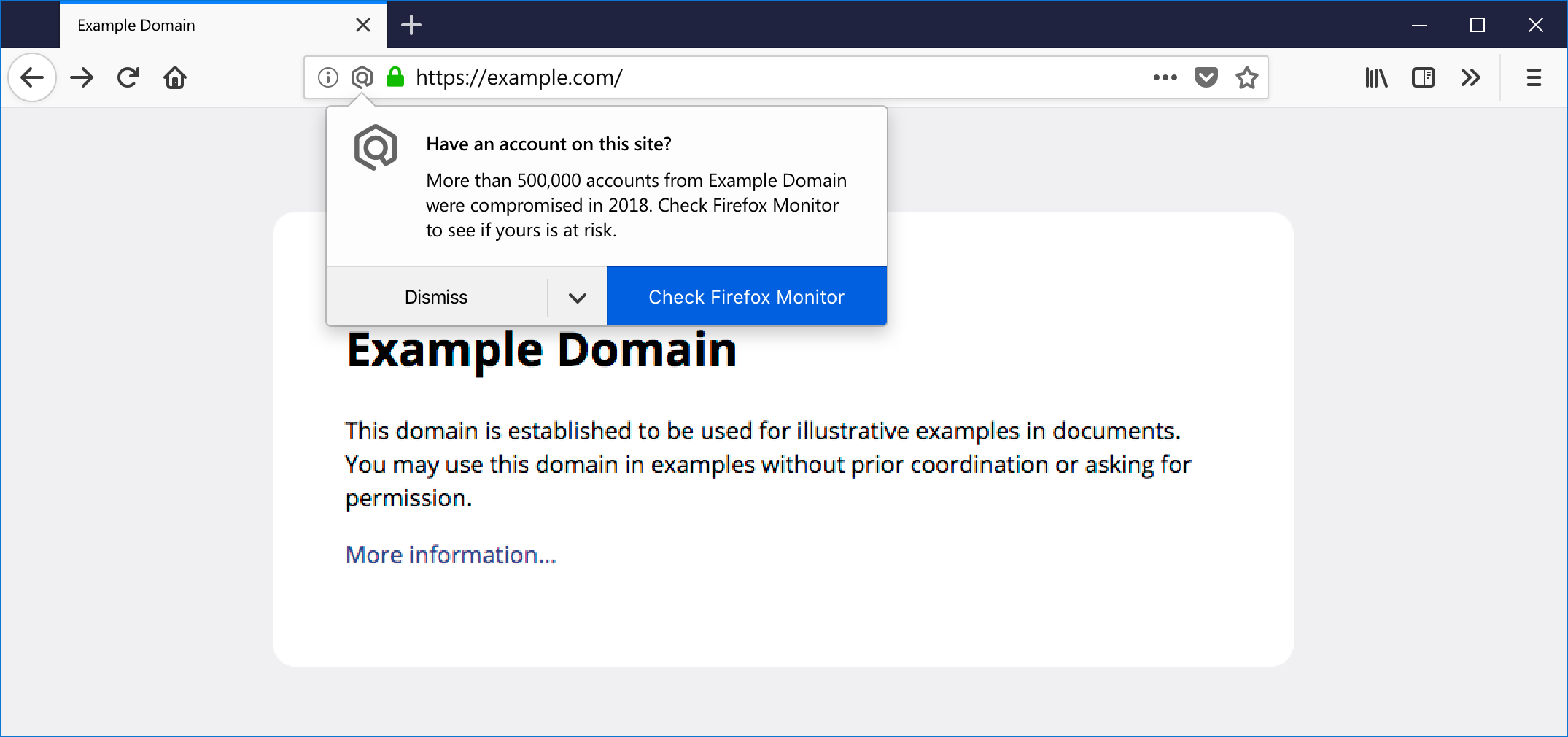
You’ll be notified of a data breach when you visit a site in Firefox
For those new to Firefox Monitor, here’s a brief step-by-step guide on how Firefox Monitor works:
Step 1 – Visit monitor.firefox.com to see if your email has been part of a known data breach
Simply type in your email address, and it will be scanned against a database that serves as a library of known data breaches.
Step 2 – Learn about future data breaches
Sign up for Firefox Monitor using your email address and we will notify you about data breaches when we learn about them.
Step 3 – Use Firefox to learn about the sites you visit that have been breached
While using the Firefox browser, when you land on a site that’s been breached, you’ll get a notification to scan with Firefox Monitor whether or not you’ve been involved in that data breach.
Being part of a data breach is not fun, and we have tips and remedies in our project, Data Leeks. Through recipes and personal stories of those who’ve been affected by a data breach, we’re raising awareness about online privacy.
We invite you to take a look at Firefox Monitor to see if you’ve been part of a data breach, and sign up to be prepared for the next data breach that happens.
The post Firefox Monitor Launches in 26 Languages and Adds New Desktop Browser Feature appeared first on The Mozilla Blog.
Mozilla’s Position on Data Breaches
Data breaches are common for online services. Humans make mistakes, and humans make the Internet. Some online services discover, mitigate, and disclose breaches quickly. Others go undetected for years. Recent breaches include “fresh” data, which means victims have less time to change their credentials before they are in the hands of attackers. While old breaches have had more time to make their way into scripted credential stuffing attacks. All breaches are dangerous to users.
As stated in the Mozilla Manifesto: “Individuals’ security and privacy on the internet are fundamental and must not be treated as optional.” Most people simply don’t know that a data breach has affected them. Which makes it difficult to take the first step to secure their online accounts because they don’t know they’re insecure in the first place. This is why we launched Firefox Monitor.
Informing Firefox Users
Today we are continuing to improve our Firefox Monitor service. To help users who might have otherwise missed breach news or email alerts, we are integrating alerts into Firefox that will notify users when they visit a site that has been breached in the past. This feature integrates notifications into the user’s browsing experience.
To power this feature, we use a list of breached sites provided by our partner, Have I Been Pwned (HIBP). Neither HIBP nor Mozilla can confirm that a user has changed their password after a breach, or whether they have reused a breached password elsewhere. So we do not know whether an individual user is still at risk, and cannot trigger user-specific alerts.
For our initial launch we’ve developed a simple, straightforward methodology:
- If the user has never seen a breach alert before, Firefox shows an alert when they visit any breached site added to HIBP within the last 12 months.
- After the user has seen their first alert, Firefox only shows an alert when they visit a breached site added to HIBP within the last 2 months.
We believe this 12-month and 2-month policy are reasonable timeframes to alert users to both the password-reuse and unchanged-password risks. A longer alert timeframe would help us ensure we make even more users aware of the password-reuse risk. However, we don’t want to alarm users or to create noise by triggering alerts for sites that have long since taken significant steps to protect their users. That noise could decrease the value and usability of an important security feature.
Towards a more Sophisticated Approach
This is an interim approach to bring attention, awareness, and information to our users now, and to start getting their feedback. When we launched our Monitor service, we received tremendous feedback from our early users that we’re using to improve our efforts to directly address users’ top concerns for their online service accounts. For service operators, our partner, Troy Hunt, already has some great articles on how to prevent data breaches from happening, and how to quickly and effectively disclose and recover from them. Over the longer term, we want to work with our users, partners, and all service operators to develop a more sophisticated alert policy. We will base such a policy on stronger signals of individual user risk, and website mitigations.
The post When does Firefox alert for breached sites? appeared first on Mozilla Security Blog.
https://blog.mozilla.org/security/2018/11/14/when-does-firefox-alert-for-breached-sites/
We’re Hiring Again!
You read that right, we are hiring “Software Engineers”, plural. We have some big plans for the next year and you can be a part of it!
You can find the job post below. If you are interested Email your CV/Resume and cover letter to: apply@mozillafoundation.org.
About Thunderbird
Thunderbird is an email client depended on daily by 25 million people on three platforms: Windows, Mac and Linux (and other *nix). It was developed under the Mozilla Corporation until 2014 when the project was handed over to the community.
The Thunderbird project is lead by the Thunderbird Council, a group of volunteers from the community who has a strong interest in moving Thunderbird forward. With the help of the Mozilla Foundation, Thunderbird employs about a handful of staff, and is now hiring additional developers to support the volunteer community in making Thunderbird shine.
You will join the team that is leading Thunderbird into a bright future. We are working on increasing the use of web technologies and decreasing dependencies on the internals of the Mozilla platform, to ensure independence and easier maintenance.
The Thunderbird team works openly using public bug trackers and repositories, providing you with a premier chance to show your work to the world.
About the Contract
We need your help to improve and maintain Thunderbird. Moving Thunderbird forward includes replacing/rewriting components to be based primarily on web technologies, reducing the reliance on Mozilla-internal interfaces. It also includes boosting the user experience of the product.
Maintenance involves fixing bugs and regressions, as well as addressing technical debt and enhancing performance. Most tasks have a component of both maintenance and improvement, and any new component needs careful integration with the existing system.
We have compiled a high level list of tasks here; the work assigned to you will include a subset of these items. Let us know in your cover letter where you believe you can make most impact and how.
You will work with community volunteers and other employees around the globe to advance the Thunderbird product and mission of open and secure communications.
This is a remote, hourly 6-month contract with a possibility to extend. Hours will be up to 40 per week.
Your Professional Profile
Since we are looking to fill a few positions, we are interested to hear from both junior and senior candidates who can offer the following:
- Familiarity with open source development.
- Solid knowledge and experience developing a large software system.
- Strong knowledge of JavaScript, HTML and CSS, as well as at least some basic C++ skills.
- Good debugging skills.
- Ideally exposure to the Mozilla platform as a voluntary contributor or add-on author with knowledge of XPCOM, XUL, etc.
- Experience using distributed version control systems (preferably Mercurial).
- Experience developing software cross-platform applications is a plus.
- Ability to work with a geographically distributed team and community.
- A degree in Computer Science would be lovely; real-world experience is essential.
You should be a self-starter. In a large code-base it’s inevitable that you conduct your own research, investigation and debugging, although others in the project will of course share their knowledge.
We expect you to have excellent communication skills and coordinate your work over email, IRC, and Bugzilla as well as video conferencing.
Next Steps
If this position sounds like a good fit for you, please send us your resume and cover letter to apply@mozillafoundation.org.
A cover letter is essential to your application, as we want to know how you’d envision your contributions to the team. Tell us about why you’re passionate about Thunderbird and this position. Also include samples of your work as a programmer, either directly or a link. If you contribute to any open source software, or maintain a blog we’d love to hear about it.
You will be hired as an independent contractor through the Upwork service as a client to the Mozilla Foundation. The Thunderbird Project is separate from the Mozilla Foundation, but the Foundation acts as the project’s fiscal and legal home.
By applying for this job, you are agreeing to have your applications reviewed by Thunderbird contractors and volunteers who are a part of the hiring committee as well as by staff members of the Mozilla Foundation.
Mozilla is an equal
The state of design tools in Firefox
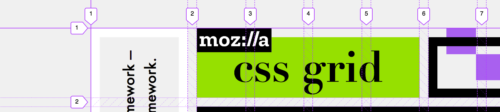
A year ago, the Firefox DevTools team formed a subgroup to focus on new tools for working in web design, CSS, and HTML. Motivated by the success of the Grid Inspector, and with help from the Developer Outreach, Gecko Platform, and Accessibility teams, we launched the Variable Fonts Editor and the Shape Path Editor, added an Accessibility Inspector, and revamped our Responsive Design Mode.
Our goal: To build empowering new tools that integrate smartly with your modern web design workflow.
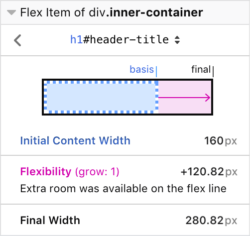
We’re currently hard at work on a comprehensive Flexbox Inspector as well as CSS change-tracking. Early versions of each of these can be tried out in Firefox Nightly. (The Changes panel is hidden behind a flag in about:config: devtools.inspector.changes.enabled)
Please share your input
We’re just getting started, and now we want to learn more about you. Tell us about your biggest CSS and web design issues in the first-ever Design Tools survey! We want to hear from both web developers and designers, and not just Firefox users—Chrome, Safari, Edge, and IE users are greatly encouraged to submit your thoughts!

In early 2019, we’ll post an update with the results in order to share our data with the greater community and continue our experiment in open design.
Get in touch
Feel free to chat with the Firefox DevTools team at any time via @FirefoxDevTools on Twitter or Discourse. You can also learn more about getting involved.
The post New & Experimental Web Design Tools: Feedback Requested appeared first on Mozilla Hacks - the Web developer blog.
https://hacks.mozilla.org/2018/11/new-experimental-web-design-tools-feedback-requested/
Hello Mozillians,
We are happy to let you know that Friday, November 23th, we are organizing Firefox 64 Beta 12 Testday. We’ll be focusing our testing on: Multi-Select Tabs and Widevine CDM.
Check out the detailed instructions via this etherpad.
No previous testing experience is required, so feel free to join us on #qa IRC channel where our moderators will offer you guidance and answer your questions.
Join us and help us make Firefox better!
See you on Friday!
https://quality.mozilla.org/2018/11/firefox-64-beta-12-testday-november-23th/