The big bug bounty platforms are structured like icebergs: the public bug bounty programs that you can see are only a tiny portion of everything that is going on there. As you earn your reputation on these platforms, they will be inviting you to private bug bounty programs. The catch: you generally aren’t allowed to discuss issues reported via private bug bounty programs. In fact, you are not even allowed to discuss the very existence of that bug bounty program.
I’ve been playing along for a while on Bugcrowd and Hackerone and submitted a number of vulnerability reports to private bug bounty programs. As a result, I became convinced that these private bug bounty programs are good for the bottom line of the bug bounty platforms, but otherwise their impact is harmful. I’ll try to explain here.
What is a bug bounty?
When you collect a bug bounty, that’s not because you work for a vendor. There is no written contract that states your rights and obligations. In its original form, you simply stumble upon a security vulnerability in a product and you decide to do the right thing: you inform the vendor. In turn, the vendor gives you the bug bounty as a token of their appreciation. It could be a monetary value but also some swag or an entry in the Hall of Fame.
Why pay you when the vendor has no obligation to do so? Primarily to keep you doing the right thing. Some vulnerabilities could be turned into money on the black market. Some could be used to steal data or extort the vendor. Everybody prefers people to earn their compensation in a legal way. Hence bug bounties.
What the bug bounty isn’t
There are so many bug bounty programs around today that many people made them their main source of income. While there are various reasons for that, one thing should not be forgotten: there is no law guaranteeing that you will be paid fairly. No contract means that your reward is completely dependent on the vendor. And it is hard to know in advance, sometimes the vendor will claim that they cannot reproduce, or downplay severity, or mark your report as a duplicate of a barely related report. In at least some cases there appears to be intent behind this behavior, the vendor trying to fit the bug bounty program into a certain budget regardless of the volume of the reports. So any security researcher trying to make a living from bug bounties has to calculate pessimistically, e.g. expecting that only one out of five reports will get a decent reward.
On the vendor’s side, there is a clear desire for the bug bounty program to replace penetration tests. Bugcrowd noticed this trend and is tooting their bug bounty programs as the “next gen pen test.” The trouble is, bug bounty hunters are only paid for bugs where they can demonstrate impact. They have no incentives to report minor issues, not only will the effort of demonstrating the issue be too high for the expected reward, it also reduces their rating on the bug bounty platform. They have no incentives to point out structural weaknesses, because these reports will be closed as “informational” without demonstrated impact. They often have no incentives to go for the more obscure parts of the product, these require more time to get familiar with but won’t necessarily result in critical bugs being discovered. In short, a “penetration test” performed by bug bounty hunters will be everything but thorough.
How are private bug bounties different for researchers?
If you feel that you are treated unfairly by the vendor, you have essentially two options. You can just accept it and vote with your feet: move on to another bug bounty program and learn how to recognize programs that are better avoided. The vendor won’t care as there will be plenty of others coming their way. Or you can make a fuzz about it. You could try to argue and probably escalate to the bug bounty platform vendor, but IMHO this rarely changes anything. Or you could publicly shame the vendor for their behavior and warn others.
The latter is made impossible by the conditions to participate in private bug bounty programs. Both Bugcrowd and Hackerone disallow you from talking about your experience with the program. Bug bounty hunters are always dependent on the good will of the vendor, but with private bug bounties it is considerably worse.
But it’s not only that. Usually, security researchers want recognition for their findings. Hackerone even has a process for disclosing vulnerability reports once the issue has been fixed. Public Bugcrowd programs also usually provision for coordinated disclosure. This gives the reporters the deserved recognition and allows everybody else to learn. But guess what: with private bug bounty programs, disclosure is always forbidden.
Why will people participate in private bug bounties at all? Main reason seems to be the reduced competition, finding unique issues is easier. In
The time has come to reveal the answer to my next BugBountyNotes challenge called Try out my Screenshotter.PRO browser extension. This challenge is a browser extension supposedly written by a naive developer for the purpose of taking webpage screenshots. While the extension is functional, the developer discovered that some websites are able to take a peek into their Gmail account. How does that work?
If you haven’t looked at this challenge yet, feel free to stop reading at this point and go try it out. Mind you, this one is hard and only two people managed to solve it so far. Note also that I won’t look at any answers submitted at this point any more. Of course, you can also participate in any of the ongoing challenges as well.
Still here? Ok, I’m going to explain this challenge then.
Taking control of the extension UI
This challenge has been inspired by the vulnerabilities I discovered around the Firefox Screenshots feature. Firefox Screenshots is essentially a built-in browser extension in Firefox, and while it takes care to isolate its user interface in a frame protected by the same-origin policy, I discovered a race condition that allowed websites to change that frame into something they can access.
This race condition could not be reproduced in the challenge because the approach used works in Firefox only. So the challenge uses a different approach to protect its frame from unwanted access: it creates a frame pointing to https://example.com/ (the website cannot access it due to same-origin policy), then injects its user interface into this frame via a separate content script. And since a content script can only be injected into all frames of a tab, the content script uses the (random) frame name to distinguish the “correct” frame.
And here lies the issue of course. While the webpage cannot predict what the frame name will be, it can see the frame being injected and change the src attribute into something else. It can load a page from the same server, then it will be able to access the injected extension UI. A submission I received for this challenge solved this even more elegantly: by assigning window.name = frame.name it made sure that the extension UI was injected directly into their webpage!
Now the only issue is bringing up the extension UI. With Firefox Screenshots I had to rely on the user clicking “Take a screenshot.” The extension in the challenge allowed triggering its functionality via a hotkey however. And, like so often, it failed checking for event.isTrusted, so it would accept events generated by the webpage. Since the extension handles events synchronously, the following code is sufficient here:
window.dispatchEvent(new KeyboardEvent("keydown", {
  key: "S",
  ctrlKey: true,
  shiftKey: true
}));
let frame = document.getElementsByTagName("iframe")[0];
frame.src = "blank.html";
Recommendation for developers: Any content which you inject into websites should always be contained inside a frame that is part of your extension. This at least makes sure that the website cannot access the frame contents, but you still have to worry about clickjacking and spoofing attacks.
Also, if you ever attach event listeners to website content, always make sure that event.isTrusted is true, so it’s a real event rather than the website playing tricks on you.
What to screenshot?
Once the webpage can access the extension UI, clicking the “Screenshot to clipboard” button programmatically is trivial. Again Event.isTrusted is not being checked here. However, even though Firefox Screenshots only accepted trusted events, it didn’t help it much. At this point the webpage can make the button transparent and huge, so when the user clicks somewhere the button is always triggered.
The webpage can create a screenshot, but what’s the deal? With Firefox Screenshots I only realized it after creating the bug report, the big issue here is that the webpage can screenshot third-party pages. Just load some page in a frame and it will be part of the screenshot even though you normally cannot access its contents. Only trouble: really critical sites such as Gmail don’t allow being loaded in a frame these days.
Luckily, this challenge had to be compatible with Chrome. And while Firefox extensions can use tabs.captureTab method to capture a
The time has come to reveal the answer to my next BugBountyNotes challenge called Try out my Screenshotter.PRO browser extension. This challenge is a browser extension supposedly written by a naive developer for the purpose of taking webpage screenshots. While the extension is functional, the developer discovered that some websites are able to take a peek into their Gmail account. How does that work?
If you haven’t looked at this challenge yet, feel free to stop reading at this point and go try it out. Mind you, this one is hard and only two people managed to solve it so far. Note also that I won’t look at any answers submitted at this point any more. Of course, you can also participate in any of the ongoing challenges as well.
Still here? Ok, I’m going to explain this challenge then.
Taking control of the extension UI
This challenge has been inspired by the vulnerabilities I discovered around the Firefox Screenshots feature. Firefox Screenshots is essentially a built-in browser extension in Firefox, and while it takes care to isolate its user interface in a frame protected by the same-origin policy, I discovered a race condition that allowed websites to change that frame into something they can access.
This race condition could not be reproduced in the challenge because the approach used works in Firefox only. So the challenge uses a different approach to protect its frame from unwanted access: it creates a frame pointing to https://example.com/ (the website cannot access it due to same-origin policy), then injects its user interface into this frame via a separate content script. And since a content script can only be injected into all frames of a tab, the content script uses the (random) frame name to distinguish the “correct” frame.
And here lies the issue of course. While the webpage cannot predict what the frame name will be, it can see the frame being injected and change the src attribute into something else. It can load a page from the same server, then it will be able to access the injected extension UI. A submission I received for this challenge solved this even more elegantly: by assigning window.name = frame.name it made sure that the extension UI was injected directly into their webpage!
Now the only issue is bringing up the extension UI. With Firefox Screenshots I had to rely on the user clicking “Take a screenshot.” The extension in the challenge allowed triggering its functionality via a hotkey however. And, like so often, it failed checking for event.isTrusted, so it would accept events generated by the webpage. Since the extension handles events synchronously, the following code is sufficient here:
window.dispatchEvent(new KeyboardEvent("keydown", {
  key: "S",
  ctrlKey: true,
  shiftKey: true
}));
let frame = document.getElementsByTagName("iframe")[0];
frame.src = "blank.html";
Recommendation for developers: Any content which you inject into websites should always be contained inside a frame that is part of your extension. This at least makes sure that the website cannot access the frame contents, but you still have to worry about clickjacking and spoofing attacks.
Also, if you ever attach event listeners to website content, always make sure that event.isTrusted is true, so it’s a real event rather than the website playing tricks on you.
What to screenshot?
Once the webpage can access the extension UI, clicking the “Screenshot to clipboard” button programmatically is trivial. Again Event.isTrusted is not being checked here. However, even though Firefox Screenshots only accepted trusted events, it didn’t help it much. At this point the webpage can make the button transparent and huge, so when the user clicks somewhere the button is always triggered.
The webpage can create a screenshot, but what’s the deal? With Firefox Screenshots I only realized it after creating the bug report, the big issue here is that the webpage can screenshot third-party pages. Just load some page in a frame and it will be part of the screenshot even though you normally cannot access its contents. Only trouble: really critical sites such as Gmail don’t allow being loaded in a frame these days.
Luckily, this challenge had to be compatible with Chrome. And while Firefox extensions can use tabs.captureTab method to capture a
TenFourFox Feature Parity Release 11 final is now available for testing (downloads, hashes, release notes). Issue 525 has stuck, so that's being shipped and we'll watch for site or add-on compatibility fallout (though if you're reporting a site or add-on that doesn't work with FPR11, or for that matter any release, please verify that it still worked with prior versions: particularly for websites, it's more likely the site changed than we did). There are no other changes other than bringing security fixes up to date. Assuming no problems, it will go live tomorrow evening as usual.
FPR12 will be a smaller-scope release but there will still be some minor performance improvements and bugfixes, and with any luck we will also be shipping Rapha"el's enhanced AltiVec string matcher in this release as well. Because of the holidays, family visits, etc., however, don't expect a beta until around the second week of January.
http://tenfourfox.blogspot.com/2018/12/tenfourfox-fpr11-available.html
Microsoft is officially giving up on an independent shared platform for the internet. By adopting Chromium, Microsoft hands over control of even more of online life to Google.
This may sound melodramatic, but it’s not. The “browser engines” — Chromium from Google and Gecko Quantum from Mozilla — are “inside baseball” pieces of software that actually determine a great deal of what each of us can do online. They determine core capabilities such as which content we as consumers can see, how secure we are when we watch content, and how much control we have over what websites and services can do to us. Microsoft’s decision gives Google more ability to single-handedly decide what possibilities are available to each one of us.
From a business point of view Microsoft’s decision may well make sense. Google is so close to almost complete control of the infrastructure of our online lives that it may not be profitable to continue to fight this. The interests of Microsoft’s shareholders may well be served by giving up on the freedom and choice that the internet once offered us. Google is a fierce competitor with highly talented employees and a monopolistic hold on unique assets. Google’s dominance across search, advertising, smartphones, and data capture creates a vastly tilted playing field that works against the rest of us.
From a social, civic and individual empowerment perspective ceding control of fundamental online infrastructure to a single company is terrible. This is why Mozilla exists. We compete with Google not because it’s a good business opportunity. We compete with Google because the health of the internet and online life depend on competition and choice. They depend on consumers being able to decide we want something better and to take action.
Will Microsoft’s decision make it harder for Firefox to prosper? It could. Making Google more powerful is risky on many fronts. And a big part of the answer depends on what the web developers and businesses who create services and websites do. If one product like Chromium has enough market share, then it becomes easier for web developers and businesses to decide not to worry if their services and sites work with anything other than Chromium. That’s what happened when Microsoft had a monopoly on browsers in the early 2000s before Firefox was released. And it could happen again.
If you care about what’s happening with online life today, take another look at Firefox. It’s radically better than it was 18 months ago — Firefox once again holds its own when it comes to speed and performance. Try Firefox as your default browser for a week and then decide. Making Firefox stronger won’t solve all the problems of online life — browsers are only one part of the equation. But if you find Firefox is a good product for you, then your use makes Firefox stronger. Your use helps web developers and businesses think beyond Chrome. And this helps Firefox and Mozilla make overall life on the internet better — more choice, more security options, more competition.
The post Goodbye, EdgeHTML appeared first on The Mozilla Blog.
At Mozilla, we’ve been building browsers for 20 years and we’ve learned a thing or two over those decades. One of the most important lessons is putting people at the center of the web experience. We pioneered user-centric features like tabbed browsing, automatic pop-up blocking, integrated web search, and browser extensions for the ultimate in personalization. All of these innovations support real users’ needs first, putting business demands in the back seat.
Mozilla is uniquely positioned to build browsers that act as the user’s agent on the web and not simply as the top of an advertising funnel. Our mission not only allows us to put privacy and security at the forefront of our product strategy, it demands that we do so. You can see examples of this with Firefox’s Facebook Container extension, Firefox Monitor, and its private by design browser data syncing features. This will become even more apparent in upcoming releases of Firefox that will block certain cross-site and third-party tracking by default while delivering a fast, personal, and highly mobile experience.
When we set out several years ago to build a new version of Firefox called Quantum, one that utilized multiple computer processes the way an operating system does, we didn’t simply break the browser into as many processes as possible. We investigated what kinds of hardware people had and built a solution that took best advantage of processors with multiple cores, which also makes Firefox a great browser for Snapdragon. We also offloaded significant page loading tasks to the increasingly powerful GPUs shipping with modern PCs and we re-designed the browser front-end to bring more efficiency to everyday tasks.
Today, Mozilla is excited to be collaborating with Qualcomm and optimizing Firefox for the Snapdragon compute platform with a native ARM64 version of Firefox that takes full advantage of the capabilities of the Snapdragon compute platform and gives users the most performant out of the box experience possible. We can’t wait to see Firefox delivering blazing fast experiences for the always on, always connected, multi-core Snapdragon compute platform with Windows 10.
Stay tuned. It’s going to be great!
The post Firefox Coming to the Windows 10 on Qualcomm Snapdragon Devices Ecosystem appeared first on Future Releases.
This post was written in collaboration with the Rust Team (the “we” in this article). You can also read their announcement on the Rust blog.
Starting today, the Rust 2018 edition is in its first release. With this edition, we’ve focused on productivity… on making Rust developers as productive as they can be.

But beyond that, it can be hard to explain exactly what Rust 2018 is.
Some people think of it as a new version of the language, which it is… kind of, but not really. I say “not really” because if this is a new version, it doesn’t work like versioning does in other languages.
In most other languages, when a new version of the language comes out, any new features are added to that new version. The previous version doesn’t get new features.
Rust editions are different. This is because of the way the language is evolving. Almost all of the new features are 100% compatible with Rust as it is. They don’t require any breaking changes. That means there’s no reason to limit them to Rust 2018 code. New versions of the compiler will continue to support “Rust 2015 mode”, which is what you get by default.
But sometimes to advance the language, you need to add things like new syntax. And this new syntax can break things in existing code bases.
An example of this is the async/await feature. Rust initially didn’t have the concepts of async and await. But it turns out that these primitives are really helpful. They make it easier to write code that is asynchronous without the code getting unwieldy.
To make it possible to add this feature, we need to add both async and await as keywords. But we also have to be careful that we’re not making old code invalid… code that might’ve used the words async or await as variable names.
So we’re adding the keywords as part of Rust 2018. Even though the feature hasn’t landed yet, the keywords are now reserved. All of the breaking changes needed for the next three years of development (like adding new keywords) are being made in one go, in Rust 1.31.

Even though there are breaking changes in Rust 2018, that doesn’t mean your code will break. Your code will continue compiling even if it has async or await as a variable name. Unless you tell it otherwise, the compiler assumes you want it to compile your code the same way that it has been up to this point.
But as soon as you want to use one of these new, breaking features, you can opt in to Rust 2018 mode. You just run cargo fix, which will tell you if you need to update your code to use the new features. It will also mostly automate the process of making the changes. Then you can add edition=2018 to your Cargo.toml to opt in and use the new features.
This edition specifier in Cargo.toml doesn’t apply to your whole project… it doesn’t apply to your dependencies. It’s scoped to just the one crate. This means you’ll be able to have crate graphs that have Rust 2015 and Rust 2018 interspersed.

Because of this, even once Rust 2018 is out there, it’s mostly going to look the same as Rust 2015. Most changes will land in both Rust 2018 and Rust 2015. Only the handful of features that require breaking changes won’t pass through. 
Rust 2018 isn’t just about changes to the core language, though. In fact, far from it.
Rust 2018 is a push to make Rust developers more productive. Many productivity wins come from things outside of the
Introduction
We now have nightly releases of Servo for the Magic Leap One augmented reality headset. You can head over to https://download.servo.org/, install the application, and browse the web in a virtual browser.

This is a developer preview release, designed for as a testbed for future products, and as a venue for experimenting with UI design. What should the web look like in augmented reality? We hope to use Servo to find out!
We are providing these nightly snapshots to encourage other developers to experiment with AR web experiences. There are still many missing features, such as immersive or 3D content, many types of user input, media, or a stable embedding API. We hope you forgive the rough edges.
This blog post will describe the experience of porting Servo to a new architecture, and is intended for system developers.
Magic Leap under the hood
The Magic Leap software development kit (SDK) is based on commonly-used open-source
technologies. In particular, it uses the clang compiler and the gcc toolchain
for support tools such as ld, objcopy, ranlib and friends.
The architecture is 64-bit ARM, using the same application binary interface as Android.
Together these give the target as being aarch64-linux-android, the same as for many
64-bit Android devices. Unlike Android, Magic Leap applications are
native programs, and do not require a Java Native Interface (JNI) to the OS.
Magic Leap provides a lot of support for developing AR applications, in the form of the Lumin Runtime APIs, which include 3D scene descriptions, UI elements, input events including device placement and orientation in 3D space, and rendering to displays which provide users with 3D virtual visual and audio environments that interact with the world around them.
The Magic Leap and Lumin Runtime SDKs are available from https://creator.magicleap.com/ for Mac and Windows platforms.
Building the Servo library
The Magic Leap library is built using ./mach build --magicleap,
which under the hood calls cargo build
--target=aarch64-linux-android. For most of the Servo library and its
dependencies, this just works, but there are a couple of corner cases:
C/C++ libraries and crates with special treatment for Android.
Some of Servo’s dependencies are crates which link against C/C++
libraries, notably openssl-sys and mozjs-sys. Each of these
libraries uses slightly different build environments (such as Make,
CMake or Autoconf, often with custom build scripts). The challenge for
software like Servo that uses many such libraries is to find a
configuration which will work for all the dependencies. This comes
down to finding the right settings for environment variables such as
$CFLAGS, and is complicated by cross-compiling the libraries which
often means ensuring that the Magic Leap libraries are included, not
the host libraries.
The other main source of issues with the build is that since Magic
Leap uses the same ABI as Android, its target is
aarch64-linux-android, which is the same as for 64-bit ARM Android
devices. As a result, many crates which need special treatment for
Android (for example for JNI or to use libandroid) will treat the
Magic Leap build as an Android build rather than a Linux build. Some
care is needed to undo all of this special treatment. For example,
the build scripts of Servo, SpiderMonkey and OpenSSL all contain code
to guess the directory layout of the Android SDK, which needs to be
undone when building for Magic Leap.

One thing that just worked turned out to be debugging Rust code on the Magic Leap device. Magic Leap supports the Visual Studio Code IDE, and remote debugging of code running natively. It was great to see the debugging working out of the box for Rust code as well as it did for C++.
Building the Magic Leap application
The first release of Servo for Magic Leap comes with a rudimentary application for browsing 2D web content. This is missing many features, such as immersive 3D content, audio or video media, or user input by anything other than the controller.
Magic Leap applications come in two flavors: universe applications, which are immersive experiences that have complete control over the device, and landscape applications, which co-exist and present the user with a blended experience where each application presents part of a virtual scene. Currently, Servo is a
I used to think that WebKit would eat the world, but later on I realized it was Blink. In retrospect this should have been obvious when the mobile version of Microsoft Edge was announced to use Chromium (and not Microsoft's own rendering engine EdgeHTML), but now rumour has it that Edge on its own home turf -- Windows 10 -- will be Chromium too. Microsoft engineers have already been spotted committing to the Chromium codebase, apparently for the ARM version. No word on whether this next browser, codenamed Anaheim, will still be called Edge.
In the sense that Anaheim won't (at least in name) be Google, just Chromium, there's reason to believe that it won't have the repeated privacy erosions that have characterized Google's recent moves with Chrome itself. But given how much DNA WebKit and Blink share, that means there are effectively two current major rendering engines left: Chromium and Gecko (Firefox). The little ones like NetSurf, bless its heart, don't have enough marketshare (or currently features) to rate, Trident in Internet Explorer 11 is intentionally obsolete, and the rest are too deficient to be anywhere near usable (Dillo, etc.). So this means Chromium arrogates more browsershare to itself and Firefox will continue to be the second class citizen until it, too, has too small a marketshare to be relevant. Then Google has eaten the Web. And we are worse off for it.
Bet Mozilla's reconsidering that stupid embedding decision now.
http://tenfourfox.blogspot.com/2018/12/edge-gets-chrome-plated-and-were-all.html
In a few days the 2018 edition is going to roll out, and that will include some new framing around Rust's tooling. We've got a core set of developer tools which are stable and ready for widespread use. We're going to have a blog post all about that, but for now I wanted to address the status of the RLS, since when I last blogged about a 1.0 pre-release there was a significant sentiment that it was not ready (and given the expectations that a lot of people have, we agree).
The RLS has been in 0.x-stage development. We think it has reached a certain level of stability and usefulness. While it is not at the level of quality you might expect from a mature IDE, it is likely to be useful for a majority of users.
The RLS is tightly coupled with the compiler, and as far as backwards compatibility is concerned, that is the important thing. So from the next release, the RLS will share a version number with the Rust distribution. We are not claiming this as a '1.0' release, work is certainly not finished, but we think it is worth taking the opportunity of the 2018 edition to highlight the RLS as a usable and useful tool.
In the rest of this blog post I'll go over how the RLS works in order to give you an idea of what works well and what does not, and where we are going (or might go) in the future.
Background
The RLS is a language server for Rust - it is meant to handle the 'language knowledge' part of an IDE (c.f., editing, user interaction, etc.). The concept is that rather than having to develop Rust support from scratch in each editor or IDE, you can do it once in the language server and each editor can be a client. This is a recent approach to IDE development, in contrast to the approach of IntelliJ, Eclipse, and others, where the IDE is designed to make language support pluggable, but language support is closely tied to a specific IDE framework.
The RLS integrates with the Rust compiler, Cargo, and Racer to provide data. Cargo is used as a source of data for orchestrating builds. The compiler provides data for connecting references to definitions, and about types and docs (which is used for 'go to def', 'find all references', 'show type', etc.). Racer is used for code completion (and also to supply some docs). Racer can be thought of as a mini compiler which does as little as possible to provide code completion information as fast as possible.
The traditional approach to IDEs, and how Rust support in IntelliJ works, is to build a completely new compiler frontend, optimised for speed and incremental compilation. This compiler provides enough information to provide the IDE functionality, but usually doesn't do any code generation. This approach is much easier in fairly simple languages like Java, compared to Rust (macros, modules, and the trait system all make this a lot more complex).
There are trade-offs to the two approaches: using a separate compiler is fast and functionality can be limited to ensure it is fast enough. However, there is a risk that the two compilers do not agree on how to compiler a program, in particular, covering the whole of a language like Rust is difficult and so completeness can be an issue. Maintaining a separate compiler also takes a lot of work.
In the future, we hope to further optimise the Rust compiler for IDE cases so that it is fast enough that the user never has to wait, and to use the compiler for code completion. We also want to work with Cargo a bit differently so that there is less duplication of logic between Cargo and the RLS.
Current status
For each feature of the RLS, I measure its success along two axes: is it fast enough and is it complete (that is, does it work for all code). There are also non-functional issues of resource usage (how much battery and CPU the RLS is using), how often the RLS crashes, etc.
Go to definition
This is usually fast enough: if the RLS is ready, then it is pretty much instant. For large crates, it can take too long for the RLS to be ready, and thus we are not fast enough. However, usually using slightly stale data for 'go to def' is not a problem, so we're ok.
It is fairly complete. There are some issues around macros - if a definition is created by a macro, then we often have trouble. 'Go to def' is not implemented for lifetimes, and there are some places we don't have coverage (inside where clauses was recently fixed).
Show type
Showing types and documentation on hover has almost the same characteristics as 'go to definition'.
Rename
Renaming is similar to 'find all references' (and 'go to def'), but since we are modifying the user's code, there are some more things that can go wrong, and we want to be extra conservative. It is therefore a bit less complete than 'go to def', but similarly fast.
Code completion
Code completion is generally pretty fast, but often

Today, we’re making available an early developer preview of a browser for the Magic Leap One device. This browser is built on top of our Servo engine technology and shows off high quality 2D graphics and font rendering through our WebRender web rendering library, and more new features will soon follow.
While we only support basic 2D pages today and have not yet built the full Firefox Reality browser experience and published this into the Magic Leap store, we look forward to working alongside our partners and community to do that early in 2019! Please try out the builds, provide feedback, and get involved if you’re interested in the future of mixed reality on the web in a cutting-edge standalone headset. And for those looking at Magic Leap for the first time, we also have an article on how the work was done.
encoding_rs is a high-decode-performance, low-legacy-encode-footprint and high-correctness implementation of the WHATWG Encoding Standard written in Rust. In Firefox 56, encoding_rs replaced uconv as the character encoding library used in Firefox. This wasn’t an addition of a component but an actual replacement: uconv was removed when encoding_rs landed. This writeup covers the motivation and design of encoding_rs, as well as some benchmark results.
Additionally, encoding_rs contains a submodule called encoding_rs::mem that’s meant for efficient encoding-related operations on UTF-16, UTF-8, and Latin1 in-memory strings—i.e., the kind of strings that are used in Gecko C++ code. This module is discussed separately after describing encoding_rs proper.
The C++ integration of encoding_rs is not covered here and is covered in another write-up instead.
TL;DR
Rust’s borrow checker is used with on-stack structs that get optimized away to enforce an “at most once” property that matches reads and writes to buffer space availability checks in legacy CJK converters. Legacy CJK converters are the most risky area in terms of memory-safety bugs in a C or C++ implementation.
Decode is very fast relative to other libraries with the exception of some single-byte encodings on ARMv7. Particular effort has gone into validating UTF-8 and converting UTF-8 to UTF-16 efficiently. ASCII runs are handled using SIMD when it makes sense. There is tension between making ASCII even faster vs. making transitions between ASCII and non-ASCII more expensive. This tension is the clearest when encoding from UTF-16, but it’s there when decoding, too.
By default, there is no encode-specific data other than 32 bits per single-byte encoding. This makes legacy CJK encode extremely slow by default relative to other libraries but still fast enough in for the browser use cases. That is, the amount of text one could reasonably submit at a time in a form submission encodes so fast even on a Raspberry Pi 3 (standing in for a low-end phone) that the user will not notice. Even with only 32 bits of encode-oriented data, multiple single-byte encoders are competitive with ICU though only the windows-1252 applied to ASCII or almost ASCII input is competitive with Windows system encoders. Faster CJK legacy encode is available as a compile-time option. But ideally, you should only be using UTF-8 for output anyway.
(If you just want to see the benchmarks and don’t have time for the discussion of the API and implementation internals, you can skip to the benchmarking section.)
Scope
Excluding the encoding_rs::mem submodule, which is discussed after encoding_rs proper, encoding_rs implements the character encoding conversions defined in the Encoding Standard as well as the mapping from labels (i.e. strings in protocol text that identify encodings) to encodings.
Specifically, encoding_rs does the following:
- Decodes a stream of bytes in an Encoding Standard-defined character encoding
into valid aligned native-endian in-RAM UTF-16 (units of
u16). - Encodes a stream of potentially-invalid aligned native-endian in-RAM UTF-16
(units of
u16) into a sequence of bytes in an Encoding Standard-defined character encoding as if the lone surrogates had been replaced with the REPLACEMENT CHARACTER before performing the encode. (Gecko’s UTF-16 is potentially invalid.) - Decodes a stream of bytes in an Encoding Standard-defined character encoding into valid UTF-8.
- Encodes a stream of valid UTF-8 into a sequence of bytes in an Encoding Standard-defined character encoding. (Rust’s UTF-8 is guaranteed-valid.)
- Does the above in streaming (input and output split across multiple buffers) and non-streaming (whole input in a single buffer and whole output in a single buffer) variants.
- Avoids copying (borrows) when possible in the non-streaming cases when decoding to or encoding from UTF-8.
- Resolves textual labels that identify character encodings in protocol text into type-safe objects representing the those encodings conceptually.
- Maps the type-safe encoding objects onto strings suitable for
returning from
document.characterSet. - Validates UTF-8 (in common instruction set scenarios a bit faster for Web workloads than the Rust standard library; hopefully will get upstreamed some day) and ASCII.
Notably, the JavaScript APIs defined in the Encoding Standard are not implemented by encoding_rs directly. Instead, they are implemented in Gecko as a thin C++
encoding_rs::mem is a Rust module for performing conversions between different in-RAM text representations that are relevant to Gecko. Specifically, it converts between potentially invalid UTF-16, Latin1 (in the sense that unsigned byte value equals the Unicode scalar value), potentially invalid UTF-8, and guaranteed-valid UTF-8, and provides some operations on buffers in these encodings, such as checking if a UTF-16 or UTF-8 buffer only has code points in the ASCII range or only has code points in the Latin1 range. (You can read more about encoding_rs::mem in a write-up about encoding_rs as a whole.)
The whole point of this module is to make things very fast using Rust’s (not-yet-stable) portable SIMD features. The code was written before slices in the standard library had the align_to method or the chunks_exact method. Moreover, to get speed competitive with the instruction set-specific and manually loop-unrolled C++ code that the Rust code replaced, some loop unrolling is necessary, but Rust does not yet support directives for the compiler that would allow the programmer to request specific loop unrolling from the compiler.
As a result, the code is a relatively unreviewable combination of manual alignment calculations, manual loop unrolling and manual raw pointer handling. This indeed achieves high speed, but by looking at the code, it isn’t at all clear whether the code is actually safe or otherwise correct.
To validate the correctness of the rather unreviewable code, I used model-based testing with cargo-fuzz. cargo-fuzz provides Rust integration for LLVM’s libFuzzer coverage-guided fuzzer. That is, the fuzzer varies the inputs it tries based on observing how the inputs affect the branches taken inside the code being fuzzed. The fuzzer runs with one of LLVM’s sanitizers enabled. By default, the Address Sanitizer (ASAN) is used. (Even though the sanitizers should never find bugs in safe Rust code, the sanitizers are relevant to bugs in Rust code that uses unsafe.)
I wrote a second implementation (the “model”) of the same API in the most obvious way possible using Rust standard-library facilities and without unsafe, except where required to be able to write into an &mut str. I also used the second implementation to validate the speed of the complex implementation. Obviously, there’d be no point in having a complex implementation if it wasn’t faster than the simple and obvious one. (The complex implementation is, indeed, faster.)
For example, the function for checking if a buffer of potentially invalid UTF-16 only contains characters in the Latin1 range is 8 lines (including the function name and the closing brace) in the safe version. In the fast version, it’s 3 lines that just call to another function expanded from a macro, where the expansion is either generated using either a 76-line SIMD-using macro or a 71-line ALU-using macro depending on whether the code was compiled with SIMD enabled. Of these macros, the SIMD calls another (tiny) function that has a specialized implementation for aarch64 and a portable
My home automation plans have been progressing and I'd like to share some observations I've made about planning a project like this, especially for those with larger houses.
With so many products and technologies, it can be hard to know where to start. Some things have become straightforward, for example, Domoticz can soon be installed from a package on some distributions. Yet this simply leaves people contemplating what to do next.
The quickstart
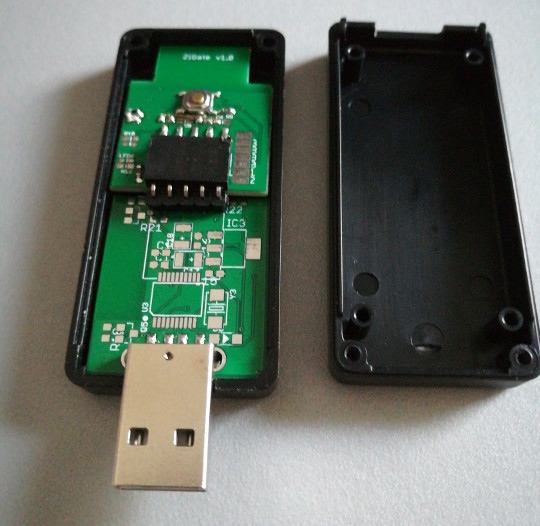
For a small home, like an apartment, you can simply buy something like the Zigate, a single motion and temperature sensor, a couple of smart bulbs and expand from there.
For a large home, you can also get your feet wet with exactly the same approach in a single room. Once you are familiar with the products, use a more structured approach to plan a complete solution for every other space.
The Debian wiki has started gathering some notes on things that work easily on GNU/Linux systems like Debian as well as Fedora and others.
Prioritize
What is your first goal? For example, are you excited about having smart lights or are you more concerned with improving your heating system efficiency with zoned logic?
Trying to do everything at once may be overwhelming. Make each of these things into a separate sub-project or milestone.
Technology choices
There are many technology choices:
- Zigbee, Z-Wave or another protocol? I'm starting out with a preference for Zigbee but may try some Z-Wave devices along the way.
- E27 or B22 (Bayonet) light bulbs? People in the UK and former colonies may have B22 light sockets and lamps. For new deployments, you may want to standardize on E27. Amongst other things, E27 is used by all the Ikea lamp stands and if you want to be able to move your expensive new smart bulbs between different holders in your house at will, you may want to standardize on E27 for all of them and avoid buying any Bayonet / B22 products in future.
- Wired or wireless? Whenever you take up floorboards, it is a good idea to add some new wiring. For example, CAT6 can carry both power and data for a diverse range of devices.
- Battery or mains power? In an apartment with two rooms and less than five devices, batteries may be fine but in a house, you may end up with more than a hundred sensors, radiator valves, buttons, and switches and you may find yourself changing a battery in one of them every week. If you have lodgers or tenants and you are not there to change the batteries then this may cause further complications. Some of the sensors have a socket for an optional power supply, battery eliminators may also be an option.
Making an inventory
Creating a spreadsheet table is extremely useful.
This helps estimate the correct quantity of sensors, bulbs, radiator valves and switches and it also helps to budget. Simply print it out, leave it under the Christmas tree and hope Santa will do the rest for you.
Looking at my own house, these are the things I counted in a first pass:
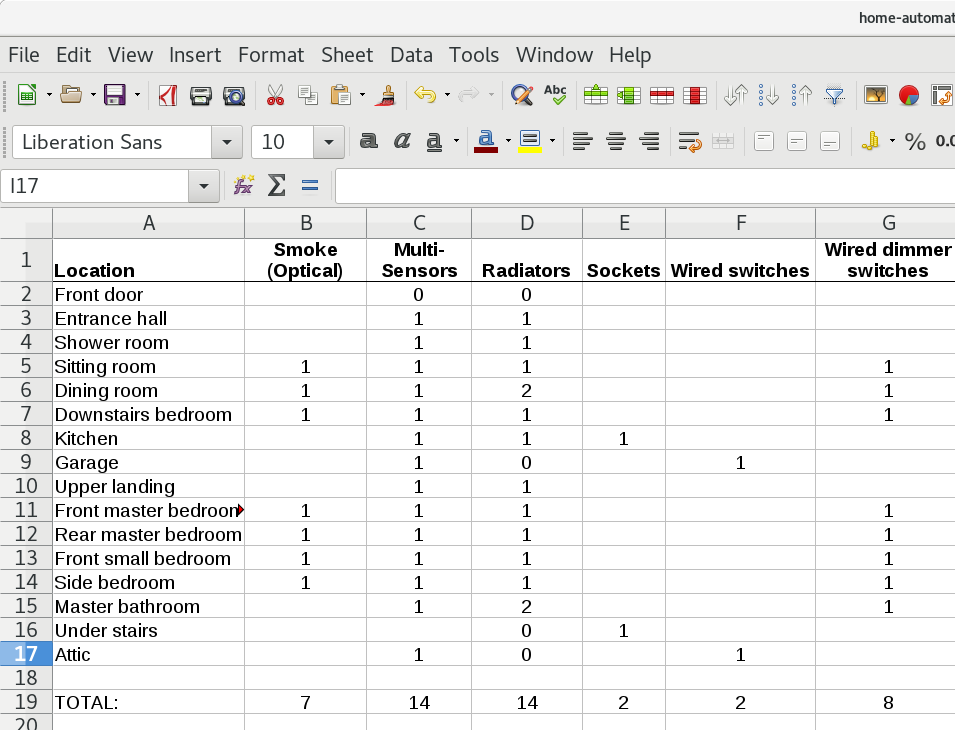
Don't forget to include all those unusual spaces like walk-in pantries, a large cupboard under the stairs, cellar, en-suite or enclosed porch. Each deserves a row in the table.
Sensors help make good decisions
Whatever the aim of the project, sensors are likely to help obtain useful data about the space and this can help to choose and use other products more effectively.
Therefore, it is often a good idea to choose and deploy sensors through the home before choosing other products like radiator valves and smart bulbs.
The smartest place to put those smart sensors
When placing motion sensors, it is important to avoid putting them too close to doorways where they might detect motion in adjacent rooms or hallways. It is also a good idea to avoid putting the sensor too close to any light bulb: if the bulb attracts an insect, it will trigger the motion sensor repeatedly. Temperature sensors shouldn't be too close to heaters or potential draughts around doorways and windows.
There are a range of all-in-one sensors available, some have up to six features in one device smaller than an apple. In some
Yesterday Pomax DM'ed me on Twitter to let me know he'd archived the Processing.js GitHub repo. He's been maintaining it mostly on his own for quite a while, and now with the amazing p5js project, there isn't really a need to keep it going.
I spent the rest of the day thinking back over the project, and reflecting on what it meant to me. Like everyone else in May 2008, I was in awe when John Resig wrote his famous reverse birthday present blog post, showing the world what he'd been hacking together:
I've decided to release one of my largest projects, in recent memory. Processing.js is the project that I've been alluding to for quite some time now. I've ported the Processing visualization language to JavaScript, using the Canvas element. I've been working on this project, off-and-on now, for the past 7 months.
It was nothing short of epic. I had followed the development of Processing since I was an undergrad. I remember stumbling into the aesthetics + computation group website at MIT in my first year, and becoming aware of the work of Ben Fry, John Maeda, Casey Reas and others. I was smitten. As a student studying both humanities and CS, I didn't know anyone else who loved computers and art, and here was an entire lab devoted to it. For many years thereafter, I followed along from afar, always amazed at the work people there were doing.
Then, in the fall of 2009, as part of my work with Mozilla, Chris Blizzard approached me about helping Al MacDonald (f1lt3r) to work on getting Processing.js to 1.0, and adding the missing 3D API via WebGL. In the lead-up to Firefox 3.7, Mozilla was interested in getting more canvas based tech on the web, and in finding performance and other bugs in canvas and WebGL. Processing.js, they thought, would help to bring a community of artists, designers, educators, and other visual coders to the web.
Was I interested!? Here was a chance to finally work alongside some of my technical heroes, and to get to contribute to a space I'd only ever looked at from the other side of the glass. "Yes, I'm interested." I remember getting my first email from Ben, who started to explain what Processing was--I didn't need any introductions.
That term I used Processing.js as the main open source project in my open source class. As Al and I worked on the code, I taught the students how things worked, and got them fixing small bugs. The code was not the easiest first web project for students: take a hybrid of Java and make it work, unmodified, in the browser, using DOM and canvas APIs. This was before transpilers, node, and the current JS ecosystem. If you want to learn the web though, there was no better way than to come at it from underneath like this.
I had an energetic group of students with a nice set of complimentary skills. A few had been working with Vlad on 3D in the browser for a while, as he developed what would become WebGL. Andor Salga, Anna Sobiepanek, Daniel Hodgin, Scott Downe, Jon Buckley, and others would go on to continue working on it with me in our open source lab, CDOT.
Through 2009-11 we worked using the methods I'd learned from Mozilla: open bug tracker, irc, blogs, wikis, weekly community calls, regular dot-releases.
Because we were working in the open, and because the project had such an outsized reputation thanks to the intersections of "Ben & Casey" and Resig, all kinds of random (and amazing) people showed up in our irc channel. Every day someone new from the who's who of design, graphics, gaming, and the digital art worlds would pop in to show us a demo that had a bug, or to ask a question about how to make something work. I spent most of my time helping people debug things, and writing tests to put back into the project for performance issues, parser bugs, and API weirdness.
One day a musician and digital artist named Corban Brook showed up. He used Processing in his work, and was interested to help us fix some things he'd found while porting an old project. He never left. Over the months he'd help us rewrite huge amounts of the code,
A month or so ago I gave a presentation on the inner workings of
wasm-bindgen to the WebAssembly Community Group. A
particular focus was the way that wasm-bindgen is forward-compatible with, and
acts as a sort of polyfill for, the host bindings proposal. A lot of this
material was originally supposed to appear in my SFHTML5 presentation, but
time constraints forced me to cut it out.
Unfortunately, the presentation was not recorded, but you can view the slide deck below, or open it in a new window. Navigate between slides with arrow keys or space bar.
http://fitzgeraldnick.com/2018/12/02/wasm-bindgen-how-does-it-work.html
Summary
Socorro is the crash ingestion pipeline for Mozilla's products like Firefox. When Firefox crashes, the Breakpad crash reporter asks the user if the user would like to send a crash report. If the user answers "yes!", then the Breakpad crash reporter collects data related to the crash, generates a crash report, and submits that crash report as an HTTP POST to Socorro. Socorro saves the crash report, processes it, and provides an interface for aggregating, searching, and looking at crash reports.
November was another busy month! This blog post covers what happened.
Read more… (5 mins to read)
http://bluesock.org/~willkg/blog/mozilla/socorro_2018_11.html
First, a TenFourFox FPR11 update: the release is delayed until December 10-ish to coincide with the updated release date of Firefox 66/60.4 ESR. Unfortunately due to my absence over the holidays this leaves very little development time for FPR12 in December, so the beta is not likely to emerge until mid-January. Issue 533 ("this is undefined") is still my biggest priority because of the large number of sites still using the tainted version of Uglify-ES, but I still have no solution figured out yet, and the 15-minutes-or-longer build time to reconstruct test changes in JavaScript if I touch any headers seriously slows debugging. If you've had issues with making new shipments in United Parcel Service's on-line shipping application, or getting into your Citibank account, this is that bug.
So in the meantime, since we're all classic Mac users here, try out MacLua, a new port of the Lua programming language to classic MacOS. I'm rather fond of Lua, which is an incredibly portable scripting language, ever since I learned it to write PalmOS applications in Plua (I maintained the Mac OS X cross-compiler for it). In fact, I still use Plua for my PalmOS-powered Hue light controller.
MacLua gives you a REPL which you can type Lua into and will run your Lua scripts, but it has two interesting features: first, you can use it as an MPW tool, and second, it allows plugins that could potentially connect it to the rest of the classic Mac Toolbox. The only included component is a simple one for querying Gestalt as an educational example, but a component for TCP sockets through MacTCP or OpenTransport or being able to display dialogue boxes and other kinds of system resources would seem like a logical next step. This was something really nice about Plua that it included GUI and network primitives built-in as included modules. The author of this port clearly has a similar idea in mind.
You can still compile Lua natively on 10.4, and that would probably be more useful if you wanted to write Lua scripts on an OS X Power Mac, but if you have a 68K or beige Power Mac around this Lua port can run on systems as early as 7.1.2 (probably any 68020 System 7 Mac if you install the CFM-68K Runtime Enabler). I look forward to seeing how it evolves, and the fact that it was built with QEMU as a Mac emulator not only is good evidence of how functional QEMU's classic Mac emulation is getting but also means there may be a chance at some other ports to the classic Mac OS in the future.
http://tenfourfox.blogspot.com/2018/11/something-for-weekend-classic-macos-lua.html

Pick of the Month: Full Screen for Firefox
by Stefan vd
Go full screen with a single click.
“This is what I was searching for and now I have it!”
Featured: Context Search
by Olivier de Broqueville
Search highlighted text on any web page using your preferred search engine. Just right-click (or Shift-click) on the text to launch the context menu. You can also perform searches using keywords in the URL address bar.
“Great add-on and very helpful! Thank you for the good work.”
Featured: Behind the Overlay Revival
by Iv'an Ruvalcaba
Simply click a button to close annoying pop-up overlays.
“I don’t think I’ve ever reviewed an extension, but man, what a find. I get very sick of closing overlays and finding the little ‘x’ in some corner of it or some light colored ‘close’ link. They get sneakier and sneakier about making you actually read the overlay to find a way to close it. Now when I see one, I know right away I can click on the X in the toolbar and it will disappear. So satisfying.”
If you’d like to nominate an extension for featuring, please send it to amo-featured [at] mozilla [dot] org for the board’s consideration. We welcome you to submit your own add-on!
The post December’s Featured Extensions appeared first on Mozilla Add-ons Blog.
https://blog.mozilla.org/addons/2018/11/30/decembers-featured-extensions-2/