Here are the OKRs for the first half of the year:
Objective 1: Reps are the bridge between their local communities (Mozilla or other local open source communities) and the Mozilla contribution opportunities
- Key Result 1.1: 60% of Reps have a connection with another open source community (as a result of our community connection training)
- Key Result 1.2: 70% of Reps have gathered data about the interests of their community
Objective 2: Mozilla projects reach out to Reps as gateway to community engagement
- Key Result 2.1: 200 employees say they know about the Reps program’s purpose (Implementation hint: We aim for an All Hands Lightning Talk and being featured in the tl:dr newsletter with an update about the program)
- Key Result 2.2: Reps collaborate with two new functional teams
Objective 3: Reps feel more involved in the program
- Key Result 3.1: As a result of the mobilizing activities of the Reps we are able to connect 50% of campaign outcomes to their mobilizing efforts
Objective 4: External, non-Mozilla entities identify the Reps program as a connector to the broader Mozilla community
- Key Result 4.1: External open source communities are informed about 2019 Reps plans with two publications
- Key Result 4.2: By updating the Reps description in all resources to reflect the current purpose of the program more people could explain the purpose of the Reps program
Objective 5: Existing Reps and new applicants understand the resources we provide —
- Key Result 5.1: we have less questions by new Reps on understanding the community coordinator role (Implementation hint: Document resources on what we provide)
Objective 6: We understand what is missing for the Reps Program to enable personal growth
- Key Result 6.1: 50% of Reps have reported what the Reps program helped them to do in terms of community building and personal growth
- Key Result 6.2: We identified 3 new personal growth area opportunities we want to provide
https://blog.mozilla.org/mozillareps/2019/01/29/reps-okrs-first-half-of-the-year-2019/
Well now, there’s no better way to usher out the first month of the year than with a great new Firefox release. It’s winter for many of us, but that means more at-home time to install Firefox version 65, and check out some of the great new browser and web platform features we’ve included within. Unless you’d rather be donning your heavy coat and heading outside to grit the driveway, that is (or going to the beach, in the case of some of our Australian chums).
A good day for DevTools
Firefox 65 features several notable DevTools improvements. The highlights are as follows:
CSS Flexbox Inspector
At Mozilla, we believe that new features of the web platform are often best understood with the help of intuitive, visual tools. That’s why our DevTools team has spent the last few years getting feedback from the field, and prioritizing innovative new tooling to allow web devs and designers to inspect, edit, understand, and tinker with UI features. This drive led to the release of the CSS Grid Inspector, Font Editor, and Shape Path Editor.
Firefox 65 sees these features joined by a new friend — the CSS Flexbox Inspector — which allows you to easily visualize where your flex containers and items are sitting on the page and how much free space is available between them, what each flex item’s default and final size is, how much they are being shrunk or grown, and more.

Changes panel
When you’re done tweaking your site’s interface using these tools, our new Changes panel tracks and summarizes all of the CSS modifications you’ve made during the current session, so you can work out what you did to fix a particular issue, and can copy and paste your fixes back out to your code editor.

Advanced color contrast ratio
We have also added an advanced color contrast ratio display. When using the Accessibility Inspector’s accessibility picker, hovering over the text content of an element displays its color contrast ratio, even if its background is complex (for example a gradient or detailed image), in which case it shows a range of color contrast values, along with a WCAG rating.

JavaScript debugging improvements
Firefox 65 also features some nifty JavaScript debugging improvements:
- When displaying stack traces (e.g. in console logs or with the JavaScript debugger), calls to framework methods are identified and collapsed by default, making it easier to home in on your code.
- In the same fashion as native terminals, you can now use reverse search to find entries in your JavaScript console history (F9 (Windows/Linux) or Ctrl + R (macOS) and type a search term, followed by Ctrl + R/Ctrl + S to toggle through results).
- The JavaScript console’s
$0shortcut (references the currently inspected element on the page) now has autocomplete available, so for example you could type$0.teto get a suggestion of$0.textContentto reference text content.
Find out more
- You can find about these features in more detail and read about other incremental improvements in the
It’s 2019 and we’re all tired of that uneasy feeling we get when we see an ad online that seems to know too much about us. You may feel like … Read more
The post Control trackers your own way with Enhanced Tracking Protection from Firefox appeared first on The Firefox Frontier.
https://blog.mozilla.org/firefox/control-trackers-with-firefox/
Privacy. While it’s the buzzword for 2019, it has always been a core part of the Mozilla mission, and continues to be a driving force in how we create features for Firefox right from the start. For example, last year at this time we had just announced Firefox Quantum with Opt-in Tracking Protection.
We’ve always made privacy for our users a priority and we saw the appetite for more privacy-focused features that protect our users’ data and put them in control. So, we knew it was a no-brainer for us to meet this need. It’s one of the reasons we broadened our approach to anti-tracking.
One of the features we outlined in our approach to anti-tracking was Enhanced Tracking Protection, otherwise known as “removing cross-site tracking”. We initially announced in October that we would roll out Enhanced Tracking Protection off-by-default. This was just one of the many steps we took to help prepare users when we turn this on by default this year. We continue to experiment and share our journey to ensure we balance these new preferences with the experiences our users want and expect. Before we roll this feature out by default, we plan to run a few more experiments and users can expect to hear more from us about it.
As a result of some of our previous testing, we’re happy to announce a new set of redesigned controls for the Content Blocking section in today’s Firefox release where users can choose their desired level of privacy protection. Here’s a video that shows you how it works:
Firefox Enhanced Tracking Protection lets you see and control how websites track you on the web
Your Choice in How to Control your Privacy
When it comes to user privacy, choice and control are first and foremost. To see the new redesigned Content Blocking section, you can view it in two ways. Click on the small “i” icon in the address bar and under Content Blocking, click on the gear on the right side. The other way is to go to your Preferences. Click on Privacy & Security on the left hand side. From there, users will see Content Blocking listed at the top. There will be three distinct choices. They include:
- Standard: For anyone who wants to “set it and forget it,” this is currently the default where we block known trackers in Private Browsing Mode. In the future, this setting will also block Third Party tracking cookies.
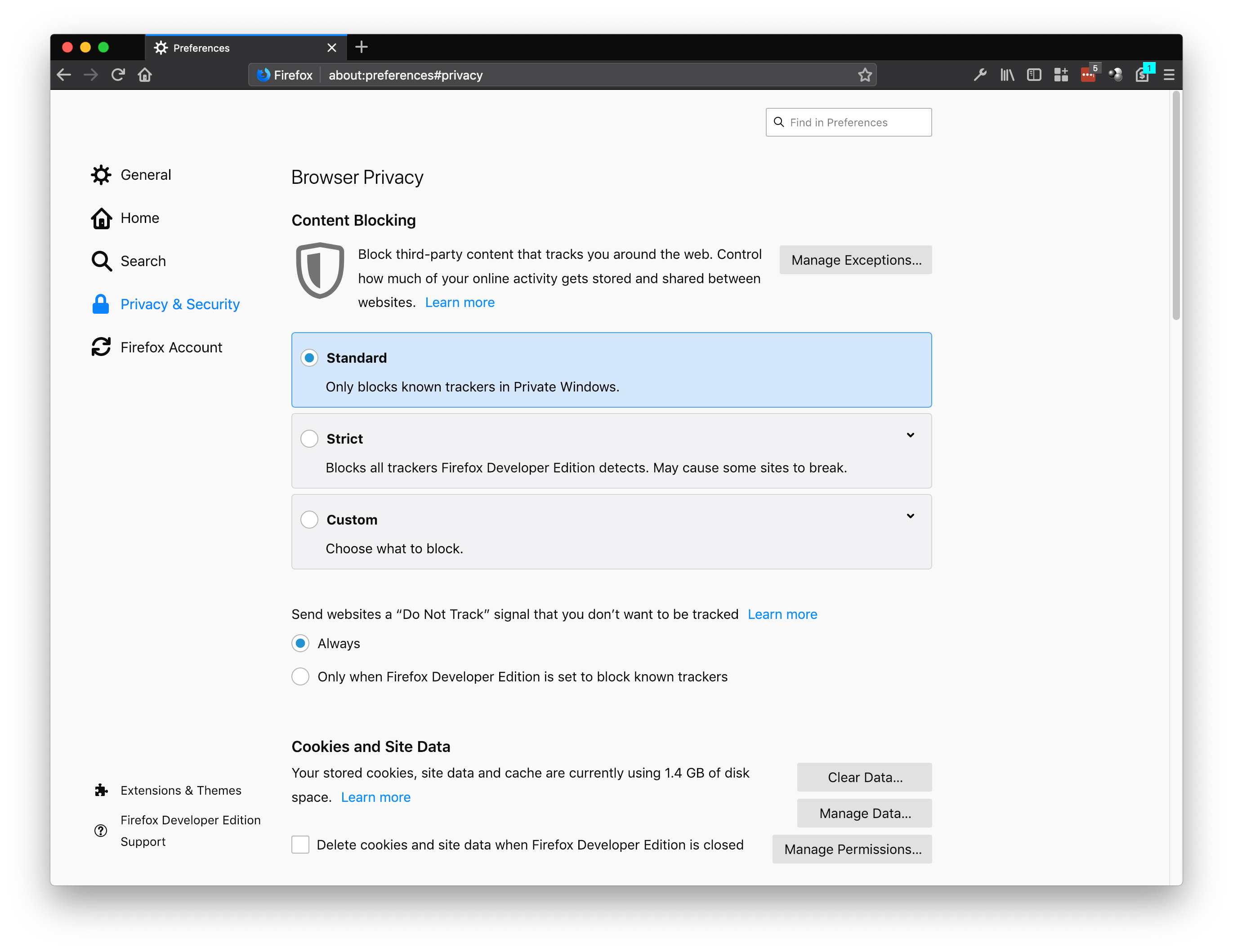
Block known trackers in Private Browsing Mode
- Strict: For people who want a bit more protection and don’t mind if some sites break. This setting blocks known trackers by Firefox in all windows.
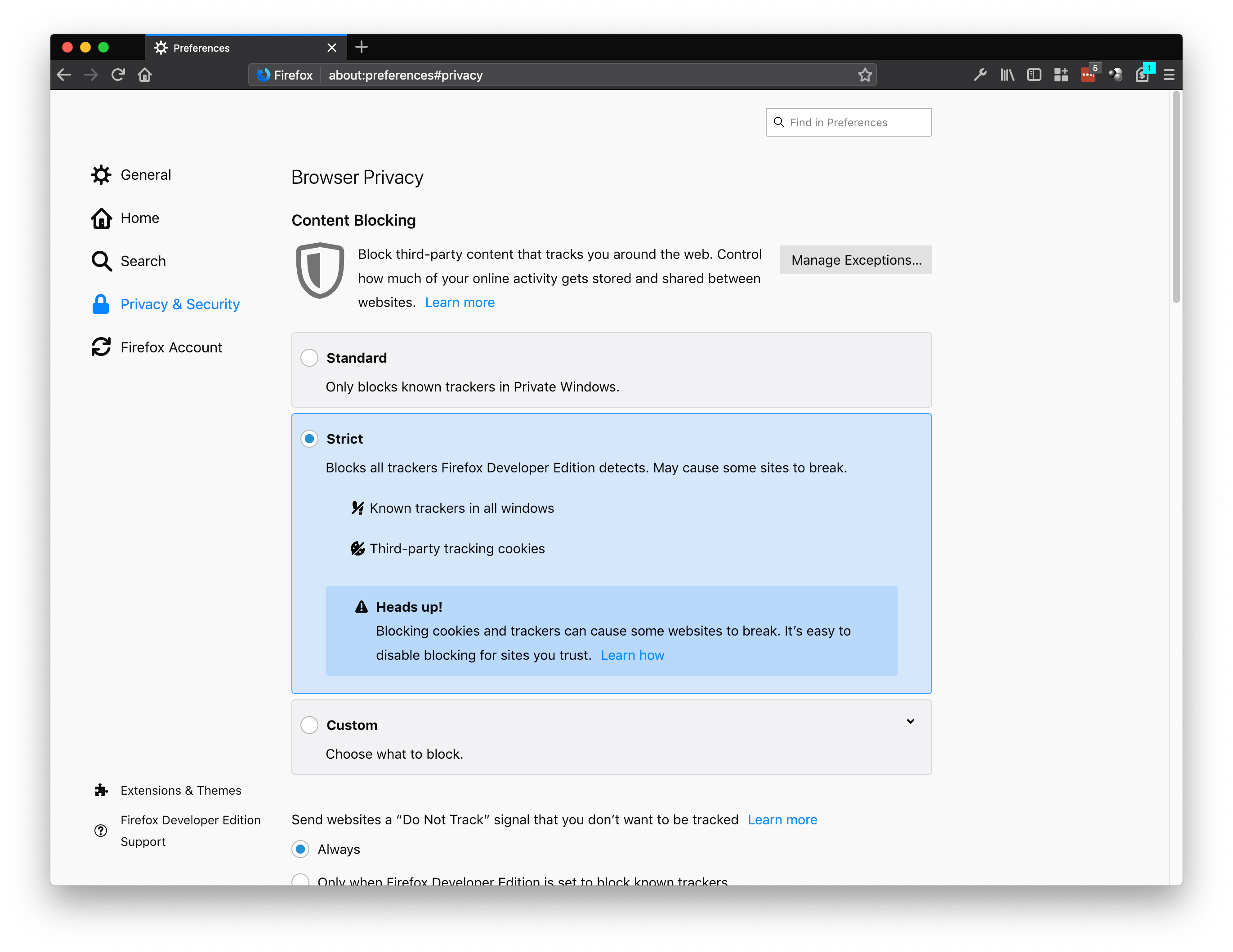
Block known trackers by Firefox in all windows
- Custom: For those who want complete control to pick and choose what trackers and cookies they want to block. We talk more about tracking cookies here and about cross-site tracking on our Firefox Frontier blog post.
- Trackers: You can choose to block in Private Windows or All Windows. You can also change your block list from two Disconnect lists: basic (recommended) or strict (blocks all known trackers).
- Cookies: You have the following four choices to block – Third-party trackers; Cookies from unvisited websites; All third-party cookies (may cause websites to
Blame cord cutters. Or cell phones. Or the rise of great original content. Whatever the reason, people now have an obvious and insatiable hunger for streaming online video and that demand is only increasing.
Whether it’s their favorite Netflix shows or must-see live sports, people want to watch more video. They want it now, on all their devices — computer, laptop, tablet and mobile — and they want it to be high quality. But what you might not know is that there’s been a battle going on behind the scenes over who is allowed to use the technology needed to bring video to the people.
For the past several years companies and creators have had to pay millions of dollars in licensing fees to use the technology that helps deliver videos to consumers. This makes it difficult or even impossible for creators to innovate on new platforms that deliver high-quality video.
We’ve been working hard to change all that, and today’s release of Firefox 65 marks another important milestone in that revolution. The Alliance for Open Media (AOMedia), a consortium featuring some of the biggest names in content creation, software, hardware, video conferencing and web technologies including Amazon, Apple, ARM, Cisco, Facebook, Google, IBM, Intel, Microsoft, Netflix and NVIDIA, has developed and standardized a next-generation royalty-free video compression technology called AV1. In short, this will allow producers and consumers of content to access the best in video compression technology that was, until now, prohibitively expensive. Firefox 65 includes support for AV1 so any of that content can be freely enjoyed by all.
We think someone’s ability to participate in online video shouldn’t be dependent on the size of their checkbook.
It’s something we’re passionate about at Mozilla. Our engineers working on the Daala project spent years studying how we could create a better way to compress videos, and in the spirit of Mozilla that better way had to be open source so anyone could have access. To succeed however, we would also need all parties to ensure there would be no royalty fees. In 2015 we helped launch AOMedia to ensure that video compression technology becomes a public resource, open and accessible to all.
For this to work, it wasn’t good enough for the technology to be royalty-free. It also had to be superior to today’s royalty-encumbered alternatives and offer better quality for a large number of use cases. We worked with our partners to make sure that what we settled on creating could stand up against and surpass the existing alternatives.
AOM and AV1 were able to get to this point because this initiative isn’t just about software makers. We’ve also had hardware manufacturers on board, which means you’ll see the technology in cell phones, computers and TVs. The diversity of interests assures we have a wide enough market representation to push for this adoption and the follow through to actually implement it.
An open source and royalty free video codec is needed for video to thrive on the internet. If licensing fees become a relic of the past then the expensive barrier to entry for new content creators and streaming platforms will be eliminated. They’ll no longer have to fear the threat of patent lawsuits, and can move forward unleashed.
If this barrier to entry for online video services is removed, that’s a victory for consumers. Consumers get more choices as more start-ups will enter the marketplace with an ability to compete with the big companies who, until now, were the only ones with pockets deep enough to afford the fees to deliver high quality video online.
The AV1 format is already 30% percent better than competing formats such as HEVC and VP9, and we’re not done yet. We’ve only just scratched the surface of what is possible. The fact that this technology is free will push open the doors of innovation and supports our mission of building an Internet that is open and accessible to all.
So creators, grab your cameras and consumers, get ready to take your binge-watching to the next level, because streaming video on the Internet is about to get a whole lot better.
Mozilla Celebrates Release of Free, High-Quality Video Compression Technology AV1 in Firefox 65 was originally published in Mozilla Tech on Medium, where people are continuing the conversation by highlighting and responding to this story.
Hello and welcome to another issue of This Week in Rust! Rust is a systems language pursuing the trifecta: safety, concurrency, and speed. This is a weekly summary of its progress and community. Want something mentioned? Tweet us at @ThisWeekInRust or send us a pull request. Want to get involved? We love contributions.
This Week in Rust is openly developed on GitHub. If you find any errors in this week's issue, please submit a PR.
Updates from Rust Community
News & Blog Posts
- Writing an OS in Rust: Advanced paging.
- Embedding WebAssembly in your Rust application.
- Lock-free Rust: Crossbeam in 2019.
- Performance of Rust's match vs. lookup tables.
- Librsvg's GObject boilerplate is in Rust now.
- Enjoy a slice of QUIC, and Rust. Quiche is an implementation of the QUIC transport protocol, by Cloudflare.
- Exporting Serde types to TypeScript.
Crate of the Week
This week's crate is typetag, a small crate to allow for serde trait objects. Thanks to Christopher Durham for the suggestion!
Submit your suggestions and votes for next week!
Call for Participation
Always wanted to contribute to open-source projects but didn't know where to start? Every week we highlight some tasks from the Rust community for you to pick and get started!
Some of these tasks may also have mentors available, visit the task page for more information.
If you are a Rust project owner and are looking for contributors, please submit tasks here.
Updates from Rust Core
186 pull requests were merged in the last week
- enable RISC-V atomic compare and swap
- recover from parse errors in literal struct fields and incorrect float literals
- merge visitors in AST validation
- resolve: Fix span arithmetics in the import conflict error
- fix race condition when emitting stored diagnostics
- don't ICE when logging unusual types
- combine all builtin early lints
- add suggestion for moving type declaration before associated type bindings in generic arguments
- add suggestion for incorrect field syntax
- suggest removing leading left angle brackets
- add error for trailing angle brackets
- print visible name for types as well as
For years, web users have endured major privacy violations. Their browsing continues to be routinely and silently tracked across the web. Tracking techniques have advanced to the point where users cannot meaningfully control how their personal data is used.
At Mozilla, we believe that privacy is fundamental, and that pervasive online tracking is unacceptable. Simply put: users need more protection from tracking. In late 2018, Mozilla announced that we are changing our approach to anti-tracking, with a focus on providing tracking protection by default, for the benefit of everyone using Firefox.
In support of this effort, today we are releasing an anti-tracking policy that outlines the tracking practices that Firefox will block by default. At a high level, this new policy will curtail tracking techniques that are used to build profiles of users’ browsing activity. In the policy, we outline the types of tracking practices that users cannot meaningfully control. Firefox may apply technical restrictions to the parties found using each of these techniques.
With the release of our new policy, we’ve defined the set of tracking practices that we think users need to be protected against. As a first step in enforcing this policy, Firefox includes a feature that prevents domains classified as trackers from using cookies and other browser storage features (e.g., DOM storage) when loaded as third parties. While this feature is currently off by default, we are working towards turning it on for all of our users in a future release of Firefox.
Furthermore, the policy also covers query string tracking, browser fingerprinting, and supercookies. We intend to apply protections that block these tracking practices in Firefox in the future.
Parties not wishing to be blocked by this policy should stop tracking Firefox users across websites. To classify trackers, we rely on Disconnect’s Tracking Protection list, which is curated in alignment with this policy. If a party changes their tracking practices and updates their public documentation to reflect these changes, they should work with Disconnect to update the classification of their domains.
This initial release of the anti-tracking policy is not meant to be the final version. Instead, the policy is a living document that we will update in response to the discovery and use of new tracking techniques. We believe that all web browsers have a fundamental obligation to protect users from tracking and we hope the launch of our policy advances the conversation about what privacy protections should be the default for all web users.
Clarification (2019-01-28): Added a sentence to clarify the current status of the cookie blocking feature.
The post Defining the tracking practices that will be blocked in Firefox appeared first on Mozilla Security Blog.
(I work for Mozilla. Not speaking for Mozilla here.)
Male impotence, substance abuse, right-wing politics, left-wing politics, sexually transmitted diseases, cancer, mental health....Intimate and highly sensitive inferences such as these are then systematically broadcast and shared with what can be thousands of third party companies, via the real-time ad auction broadcast process which powers the modern programmatic online advertising system. So essentially you’re looking at the rear-end reality of how creepy ads work.
Simply put: users need more protection from tracking....In support of this effort, today we are releasing an anti-tracking policy that outlines the tracking practices that Firefox will block by default. At a high level, this new policy will curtail tracking techniques that are used to build profiles of users’ browsing activity. In the policy, we outline the types of tracking practices that users cannot meaningfully control.
—Steven Englehardt and Marshall Erwin, on the Mozilla Security Blog
I recently listened to a discussion of knowledge work in the browser. Along the way people imagined idealized workflows and the tools that could enable them. This result felt familiar from concept videos since forever (such as this old Mozilla concept video):
The result featured lots of jet-setting highly engaged people deep in collaboration. For instance: Joe sends his friend a mortgage refinancing proposal to get feedback.
None of my friends have ever just blasted a mortgage refinancing proposal to me for a quick review. Thank god. But I’ve gotten similar requests, we all have, and nobody wants to receive these things. Usually the request sits guiltily in my inbox, mocking me and my purported friendship. If it’s job-related I will eventually get to even the work I loathe, but there’s always a particular pile of work that haunts me. This is not engagement.
This is the reality of knowledge work that none of these conceptualizations address: it’s hard (in very specific ways), some of it we don’t want to do, and the work we don’t want to do piles up and becomes dominant simply because it remains undone.
Our real work looks different than how we idealize our work: work items are smaller, less impactful, higher-touch, and collaboration spreads work out over time, decreasing personal engagement. We also imagine situations where people are much more actively engaged as a total percentage of their interactions, while we spend a lot of time passively receiving information, or simply deciding: what, if anything, should I react to?
So then what?
So how might we approach idea generation around knowledge work without idealizing the knowledge worker?
We could still go too far into acceptance. We’d build solitaire into the browser, the ultimate knowledge worker tool. It’s what people want! People shouldn’t have to pick up their phones to be distracted, we should keep the web as the universal distraction platform it was always meant to be. Oops, I make the mistake of thinking phone-vs-web, rather we should focus on providing distraction continuity across all your platforms. Sorry, this sarcasm is becoming uncomfortable…
I’m not sure a distraction tool is wrong. Giving people a mental break when they want it, but without trying to capture those people, could be positive. The web is full of mental breaks, but they aren’t “breaks”, they are manufactured to hold onto attention long after the needed break has finished.
But if we don’t build engagement tools (because people aren’t looking to be more engaged) and we don’t build distraction tools (because a web browser is already a sufficiently good distraction tool), what do we build?
I think there’s more opportunity in accepting the mentally fatigued and distracted state of knowledge workers, and working from that instead of against it. With that in mind I’d break down the problem into a few categories:
- Reduce the drain of knowledge work, so that distractions are less necessary.
- Support positive mental relaxation.
- Support continuity of mental effort; make it easier to get back on track.
And I’d leave out:
- Efficiency: usually efficiency means speed, number of steps, integrations, and so it calls for higher engagement. We care about efficiency, but only the efficient use of mental resources.
- Blocking distractions: people want something out of distractions, and while we might aspire to replace distractions it’s probably unsustainable to block those distractions. Blocking is like starting an exercise plan by getting rid of all your chairs.
- Communication and collaboration: even if distractions don’t break your continuity, collaboration will! Collaboration is obviously an interesting space, but you can’t do anything without pulling your collaborators into yet another tool. Trying to convert other people to a new way of working is not mentally relaxing.
Here’s where I throw my hands up and admit that I don’t have solutions to these problems, just a new problem statement.
But it does point in some different directions: how do we support a continuity of intention across a long task? In the context of the browser, how do we contextualize pages and interactions inside some abstract task? How do we clarify context? If the human is forced to multitask, can the multitasking tools be grounding instead of stretching us out?
The resulting exploration is not one that constructs an enviable user. It’s a user with virtual piles of papers on their desk with a PB&J forgetten a third of the way down, with a People Magazine placed sneakily inside an important report, with
TenFourFox Feature Parity Release 12 final is now available for testing (downloads, hashes, release notes). There are no additional changes except for one outstanding security update and to refresh the certificate and TLD stores. As usual it will go live Monday evening Pacific time assuming no difficulties.
For "lucky" FPR13 I want to take a whack at solving issue 541, since my ability to work on Github from the G5 is seriously impaired at the moment (I have to resort to various workarounds or do tasks from the Talos II with regular Firefox). Since this has some substantial regression risk it will probably be the only JavaScript change I do for that release pending further feasibility tests on the whole enchilada. However, a couple people have asked again about AppleScript support and there is an old patch around that I think could be dusted off and made to work. That release is scheduled for March 19.
Speaking of the Talos II, I should be getting my second POWER9 system in soon, a 4-core Raptor Blackbird we'll be using as a media system. I've already got the mATX case picked out and some decent peripherals and it will probably run Fedora also, since I'm pretty accustomed to it by now. If these systems are starting to interest you but the sticker shock of a full T2 loadout is too much, the Blackbird can give you a taste of next-generation Power ISA without too much pain to your pocketbook.
Meanwhile, over on our sister Talospace blog, if you've been thinking about the Linux plunge (either with a POWER9 or on your own system) but your Mac habits die hard, here's a better way to get the Command key to work properly than faffing about with AutoKey and you can still run Mac OS X apps in virtualization or emulation.
http://tenfourfox.blogspot.com/2019/01/tenfourfox-fpr12-available.html
At Mozilla, we want to empower people to create technology that reflects the diversity of the world we live in. Today we’re excited to announce the release of the Inclusive Development Space toolkit. This is a way for anyone around the world to set up their own pop-up studio to support diverse creators.
The XR Studio was a first-of-its-kind pop-up at Mozilla’s San Francisco office in the Summer of 2018. It provided a deeply needed space for women and gender non-binary people to collaborate, learn and create projects using virtual reality, augmented reality, and artificial intelligence..
The XR Studio program was founded to offer a jump-start for women creators, providing access to mentors, equipment, ideas, and a community with others like them. Including a wide range of ages, technical abilities, and backgrounds was essential to the program experience.
Inclusive spaces are needed in the tech industry. In technology maker-spaces, eighty percent of makers are men. As technologies like VR and AI become more widespread, it’s crucial that a variety of viewpoints are represented to eliminate biases from lack of diversity.
The XR Studio cohort had round-the-clock access to high quality VR, AR, and mixed reality hardware, as well as mentorship from experts in the field. The group came together weekly to share experiences and connect with leading industry experts like Unity’s Timoni West, Fast.ai’s Rachel Thomas, and VR pioneer Brenda Laurel.
We received more than 100 applications in little over two weeks and accepted 32 participants. Many who applied cited a chance to experiment with futuristic tools as the most important reason for applying to the program, with career development a close second.
“I couldn’t imagine XR Studio being with any other organization. Don’t know if it would have had as much success if it wasn’t with Mozilla. That really accentuated the program.” – Tyler Musgrave, recently named Futurist in residence at ARVR Women.
Projects spanned from efforts to improve bias awareness in education, self defense training, criminal justice system education, identifying police surveillance and more. Participants felt the safe and supportive environment gave them a unique advantage in technology creation. “With Mozilla’s XR Studio, I am surrounded by women just as passionate and supportive about creating XR products as I am,” said Neilda Pacquing, Founder and CEO MindGlow, Inc., a company that focuses on safety training using immersive experiences. “There’s no other place like it and I feel I’ve gone further in creating my products than I would have without it.”
So what’s next?
The Mozilla XR Studio program offered an opportunity to learn and build confidence, overcome imposter syndrome, and make amazing projects. We learned lessons about architecting an inclusive space that we plan to use to create future Mozilla spaces that will support underrepresented groups in creating with emerging technologies.
Mozilla is also sponsoring the women in VR brunch at the Sundance Film Festival this Sunday. It will be a great opportunity to learn, collaborate, and fellowship with women from around the world. If you will be in the area, please reach out and say hello.
Want to create your own inclusive development space in your community, city or company? Check out our toolkit.
The post Mozilla Fosters the Next Generation of Women in Emerging Technologies appeared first on The Mozilla Blog.
Two years ago there weren’t many options when it came to a fast vs private browser. If you wanted fast internet, you had to give up privacy. If you went … Read more
The post Fast vs private? Have it all with Firefox. appeared first on The Firefox Frontier.
https://blog.mozilla.org/firefox/fast-vs-private-have-it-all-with-firefox/
Screenshots has been a popular part of Firefox since its launch in Firefox 56 in September 2017. Last year alone it was used by more than 20 million people to take nearly 180 million screenshots! The feature grew in popularity each month as new users discovered it in Firefox.
So it’s not surprising that any hints of changes coming to how we administer this popular feature generated interest from developers, press and everyday Firefox users. We want to take this opportunity to clarify exactly what the the future holds for Screenshots.
What is happening to Screenshots?
The Screenshots feature is not being removed from Firefox.
Screenshots users will still be able to crop shots, capture visible parts of pages and even capture full web pages. Users will continue to be able to download these images and copy them to their clipboard.
What is changing is that in 2019 users will no longer have the option to save screenshots to a standalone server hosted by Firefox. Previously, shots could be saved to our server, expiring after two weeks unless a user expressly chose to save them for longer.
Why are we making this change?
While some users made use of the save-to-server feature, downloading and copying shots to clipboard have become far more popular options for our users. We’ve decided to simplify the Screenshots service by focusing on these two options and sunsetting the Screenshots server in 2019.
Where did the confusion come from?
We’re an open source organization so sometimes when we’re contemplating changes that will enhance the experience of our users, information is shared while we’re still noodling the right path forward. That was the case here. In response to user feedback, we had planned to change the “Save” button on Screenshots to “Upload” to better indicate that shots would be saved to a server. When we decided that we’d no longer be offering the save-to-server option for screenshots, we shelved the button copy change.
User feedback about the button copy had nothing to do with the removal of the server. We are choosing to take the latter step simply because the copy to clipboard and download options are considerably more popular and we want to offer a simpler user experience.
OK, so when do I have to clear out the “attic”?
Starting in Firefox 67 which is released in May, users will no longer be able to upload shots to the Screenshots server. Pre-release users will see these changes starting in February as Firefox 67 enters Nightly.
We will be alerting users who have shots saved to the server by showing messaging about how to export their saved shots starting in February as well.
Users will have until late summer to export any permanently saved shots they have on the Screenshots server. You can visit our support site for additional information on how to manage this transition.
How are you gonna make it up me? What’s coming next?
Screenshots quickly became a popular tool in Firefox. Look for new features like keyboard shortcuts and improved shot preview UI coming soon. We’re also interested in finding new ways to let Firefox users know the feature is there, and are planning experiments to highlight Screenshots as one of many tools that make Firefox unique.
The post Clarifying the Future of Firefox Screenshots appeared first on Future Releases.
https://blog.mozilla.org/futurereleases/2019/01/24/clarifying-the-future-of-firefox-screenshots/
TL;DR
- Social Community Manager changes: Konstantina and Kiki will be taking over Social Community Management. As of today, Rachel has left Mozilla as an employee.
- L10n/KB Community Manager changes: Ruben will be taking over Community Management for KB translations. As of today, Michal has left Mozilla as an employee.
- SUMO community call to introduce Konstantina, Kiki and Ruben on the 24th of January at 9 am PST.
- If you have questions or concerns please join the conversation on the SUMO forums or the SUMO discourse
Today we’d like to announce some changes to the SUMO staff team. Rachel McGuigan and Michal Dziewo'nski will be leaving Mozilla.
Rachel and Michal have been crucial to our efforts of creating and running SUMO for many years. Rachel first showed great talent with her work on FxOS support. Her drive with our social support team have been crucial to the support of Firefox releases. Michal’s drive and passion for languages have ensured SUMO KB has a fantastic coverage of languages and that support to use the free, open browser that is Firefox, is available for more people. We wish Rachel and Michal all the best on their next adventure and thank them for their contributions to Mozilla.
With these changes, we will be thinking about how best to organize the SUMO team. Rest assured, we will continue investing in community management and will be growing the overall size of the SUMO team throughout 2019.
In the meantime Konstantina, Kiki and Ruben will be stepping in temporarily while we seek to backfill these roles to help us ensure we still have full focus on our work and continue working on our projects with you all.
We are confident in the positive future of SUMO in Mozilla, and we remain excited about the many new products and platforms we will introduce support for. We have an incredible opportunity in front of us to continue delivering huge impact for Mozilla in 2019 and are looking forward to making this real with all of you.
Keep rocking the helpful web!
https://blog.mozilla.org/sumo/2019/01/24/important-changes-to-the-sumo-staff-team/
Hi! Last week I mentioned picture caching landing in nightly and I am happy to report that it didn’t get backed out (never to take for granted with a change of that importance) and it’s here to stay.
Another rather hot topic but which didn’t appear in the newsletter was Jeff and Matt’s long investigation of content frame time telemetry numbers. It turned into a real saga, featuring performance improvements but also a lot of adjustments to the way we do the measurements to make sure that we get apple to apple comparisons of Firefox running with and without WebRender. The content frame time metric is important because it correlates with user perception of stuttering, and we now have solid measurements backing that WebRender improves this metric.
Notable WebRender and Gecko changes
- Bobby did various code cleanups and improvements.
- Chris wrote a prototype Windows app to test resizing a child HWND in a child process and figure out how to do that without glitches.
- Matt fixed an SVG filter clipping issue.
- Matt Enabled SVG filters to be processed on the GPU in more cases.
- Andrew fixed a pixel snapping issue with transforms.
- Andrew fixed a blob image crash.
- Emilio fixed a bug with perspective transforms.
- Glenn included root content clip rect in picture caching world bounds.
- Glenn added support for multiple dirty rects in picture caching.
- Glenn fixed adding extremely large primitives to picture caching tile dependencies.
- Glenn skipped some redundant work during picture caching updates.
- Glenn removed unused clear color mode.
- Glenn reduced invalidation caused by world clip rects.
- Glenn fixed an invalidation issue with picture caching when encountering a blur filter.
- Glenn avoided interning text run primitives due to scrolled offset field.
- Sotaro improved the performance of large animated SVGs in some cases.
Ongoing work
The team keeps going through the remaining blockers (7 P2 bugs and 20 P3 bugs at the time of writing).
Enabling WebRender in Firefox Nightly
In about:config, set the pref “gfx.webrender.all” to true and restart the browser.
Reporting bugs
The best place to report bugs related to WebRender in Firefox is the Graphics :: WebRender component in bugzilla.
Note that it is possible to log in with a github account.
https://mozillagfx.wordpress.com/2019/01/24/webrender-newsletter-37/
Today the Mozilla IoT team is happy to announce the 0.7 release of the Things Gateway. This latest release brings experimental support for IP cameras, as well as support for a wider range of sensors. We’ve also got some exciting news on where the project is heading next.
Camera Support
With 0.7, you can now view video streams and get snapshots from IP cameras which follow the ONVIF standard such as the Foscam R2.
 To enable ONVIF support, install the ONVIF add-on via Settings > Add-ons in the gateway’s web interface.
 Set up your camera as per the manufacturer’s instructions, including a username and password if it’s required. (Always remember to change from the default if there is one!) Then, you can click the “Configure” button on the ONVIF add-on (see above) to enter your login details in the form shown below:
 Once the adapter is configured you should be able to add your device in the usual way, by clicking on the + button on the Things screen. When your camera appears you can give it a name before saving it:
 When you click on the video camera you will see icons for an image snapshot and/or video stream:
 Click on the icons and the image or video stream will pop up on the screen. When viewing an image property, you can click the reload button in the bottom left to reload the latest snapshot:
 Video camera support is still experimental at this point as we look to optimise video performance, refine the UI and support a wider range of hardware. If running on the Raspberry Pi you can expect to see a noticeable delay on video streams as it transcodes video into a web friendly format. We’d appreciate your help testing with different cameras and giving us feedback to help improve this feature.
Sensors
Things Gateway 0.7 also comes with support for a wider range of sensors.
 We have added support for temperature sensors (e.g. Eve Degree, Eve Room and the SmartThings Multipurpose sensor).
 And we have added support for leak sensors (e.g. the SmartThings Water Leak Sensor and the Fibaro Flood Sensor).

This means you can also now create new types of rules in the rules engine, for example to turn on a fan when temperature reaches a certain level, or be notified if a leak is
This is the second post in my “2018 Roundup” series. For an index of all entries, please see my blog entry for Q1.
Refactoring the DLL Interceptor
As I have alluded to previously, Gecko includes a Detours-style API hooking mechanism for Windows. In Gecko, this code is referred to as the “DLL Interceptor.” We use the DLL interceptor to instrument various functions within our own processes. As a prerequisite for future DLL injection mitigations, I needed to spend a good chunk of Q2 refactoring this code. While I was in there, I took the opportunity to improve the interceptor’s memory efficiency, thus benefitting the Fission MemShrink project. [When these changes landed, we were not yet tracking the memory savings, but I will include a rough estimate later in this post.]
A Brief Overview of Detours-style API Hooking
While many distinct function hooking techniques are used in the Windows ecosystem, the Detours-style hook is one of the most effective and most popular. While I am not going to go into too many specifics here, I’d like to offer a quick overview. In this description, “target” is the function being hooked.
Here is what happens when a function is detoured:
Allocate a chunk of memory to serve as a “trampoline.” We must be able to adjust the protection attributes on that memory.
Disassemble enough of the target to make room for a
jmpinstruction. On 32-bit x86 processors, this requires 5 bytes. x86-64 is more complicated, but generally, tojmpto an absolute address, we try to make room for 13 bytes.Copy the instructions from step 2 over to the trampoline.
At the beginning of the target function, write a
jmpto the hook function.Append additional instructions to the trampoline that, when executed, will cause the processor to jump back to the first valid instruction after the
jmpwritten in step 4.If the hook function wants to pass control on to the original target function, it calls the trampoline.
Note that these steps don’t occur exactly in the order specified above; I selected the above ordering in an effort to simplify my description.
Here is my attempt at visualizing the control flow of a detoured function on x86-64:
http://dblohm7.ca/images/detours_hook.svg”>
Refactoring
Previously, the DLL interceptor relied on directly manipulating pointers in order to read and write the various instructions involved in the hook. In bug 1432653 I changed things so that the memory operations are parameterized based on two orthogonal concepts:
- In-process vs out-of-process memory access: I wanted to be able to abstract reads and writes such that we could optionally set a hook in another process from our own.
- Virtual memory allocation scheme: I wanted to be able to change how trampoline memory was allocated.
Previously, each instance of
WindowsDllInterceptorallocated its own page of memory for trampolines, but each instance also typically only sets one or two hooks. This means that most of the 4KiB page was unused. Furthermore, since Windows allocates blocks of pages on a 64KiB boundary, this wasted a lot of precious virtual address space in our 32-bit builds.
By refactoring and parameterizing these operations, we ended up with the following combinations:
- In-process memory access, each
WindowsDllInterceptorinstance receives its own trampoline space; - In-process memory access, all
WindowsDllInterceptorinstances within a module share trampoline space; - Out-of-process memory access, each
WindowsDllInterceptorinstance receives its own trampoline space; - Out-of-process memory access, all
WindowsDllInterceptorinstances within a module share trampoline space (currently not implemented as this option is not particularly useful at the moment).
Instead of directly manipulating pointers, we now use instances of ReadOnlyTargetFunction,
WritableTargetFunction, and Trampoline to manipulate our code/data. Those classes in turn use the
memory management and virtual memory allocation policies to perform the actual reading and writing.
Memory Management Policies
The
With the release of Firefox 65, we are pleased to welcome the 32 developers who contributed their first code change to Firefox in this release, 27 of whom were brand new volunteers! Please join us in thanking each of these diligent and enthusiastic individuals, and take a look at their contributions:
- andrewc.goupil: 1511850
- chandranvishwaak: 1507574
- hereissophie: 1501234
- r2hkri: 1501931, 1504522
- rishabhjairath: 1494045, 1504523, 1509449
- Adam: 1508989
- Adam Holm: 1451591, 1493931
- Adrian Kaczmarek: 1292878
- Barret Rennie: 1457546
- Cheng-You Bai UTC+8: 1506454
- Dragos Crisan: 1501250
- Emily Toop: 1395217, 1485718, 1500560, 1500566
- Fabian Henneke: 1509493
- Ferenc Nagy: 1508631
- Gavin Suntop: 1476458, 1501459
- Hrushikesh Bodas: 1509469
- Isabel Rios: 1502109, 1502113
- James Lee: 1423839, 1507809
- Jay Zuo: 1506604
- Kristin Taylor: 1502999
- Lenka Pelechova: 1499042, 1500018
- Marc Fisher: 1483996
- Maxiwell Luo: 1506338
- Nicklas Boman: 1370224, 1451813
- Ola Gasidlo: 1508651
- Paul Vitale: 1194010, 1477592
- Rehan Dalal: 1504038
- Shubham Kumaram: 1509664
- Tim B: 1500439
- Toby Ward: 1496082
- Vincent:
the following changes have been pushed to bugzilla.mozilla.org:
- [1511261] request queue page shows ‘Bugzilla::User=HASH(…)’ instead of username
- [1520856] “Opt out of these emails” at bottom of overdue request nagging emails doesn’t open desired page
- [1520011] Phabbugz panel short description missing
- [1518886] Remove outdated build plan code from PhabBugz extension used to move…