Mozilla and GIZ co-host ideation hackathon in Kigali to create a speech corpus for Kinyarwanda and to lay the foundation for local voice-recognition applications.
Developers, researchers and startups around the globe working on voice-recognition technology face one problem alike: A lack of freely available voice data in their respective language to train AI-powered Speech-to-Text engines.
Although machine-learning algorithms like Mozilla’s Deep Speech are in the public domain, training data is limited. Most of the voice data used by large corporations is not available to the majority of people, expensive to obtain or simply non-existent for languages not globally spread. The innovative potential of this technology is widely untapped. In providing open datasets, we aim to take away the onerous tasks of collecting and annotating data, which eventually reduces one of the main barriers to voice-based technologies and makes front-runner innovations accessible to more entrepreneurs. This is one of the major drivers behind our project Common Voice.
Common Voice is our crowdsourcing initiative and platform to collect and verify voice data and to make it publicly available. But to get more people involved from around the world and to speed up the process of getting to data sets large enough for training purposes, we rely on partners — like-minded commercial and non-commercial organizations with an interest to make technology available and useful to all.
Complementary expertise and shared innovation goals
In GIZ (Deutsche Gesellschaft f"ur Internationale Zusammenarbeit) we are fortunate to have found an ally who, like us, believes that having access to voice data opens up a space for an infinite number of new applications. Voice recognition is well suited to reach people living in oral cultures and those who do not master a widespread language such as English or French. With voice interaction available in their own language we may provide millions of people access to information and ultimately make technology more inclusive.
When we learned about GIZ’s “Team V” currently exploring voice interaction and mechanisms to collect voice data in local languages — an effort supported by GIZ’s internal innovation fund — the opportunity to leverage complementary strengths became just too obvious.

Eventually we started working on a concrete collaboration that would combine Mozilla’s expertise in voice-enabled technology and data collection with GIZ’s immense regional experience and reach working with local organizations, public authorities and private businesses across various sectors. This resulted in an initial hackathon in Kigali, Rwanda, with the goal of unleashing the participants creativity to unlock novel means of collecting speech corpora for Kinyarwanda, a language spoken by at least 12 million people in Rwanda and surrounding regions.
Sustainable technology development needs local solutions
The hackathon took place on 12–13 February at kLab, a local innovation hub supported by the Rwandan government. 40 teams had applied with their novel incentive mechanisms for voice data collection, proving that AI and machine learning are of great interest to the Rwandan tech community. We invited 5 teams with the most promising approaches that took into account local opportunities not foreseen by the Common Voice team.
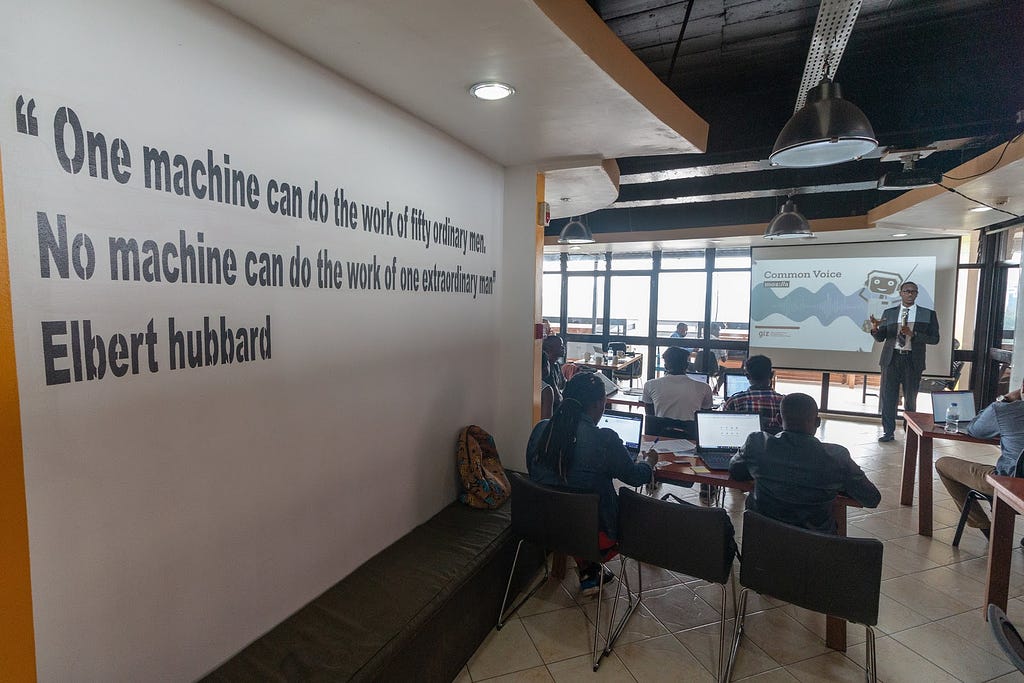
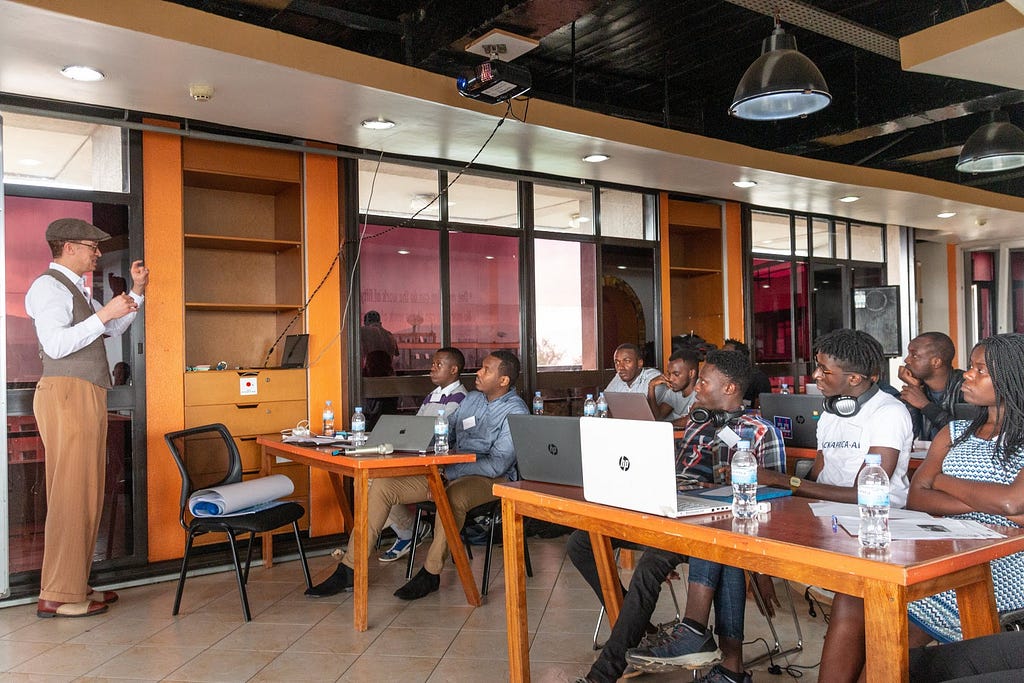
The event began with a rousing call to action for the participants by Antoine Sebera, Chief Government Innovation Officer of the Rwanda Information Society Association, a governmental agency responsible for putting Rwanda’s ambitious digital strategy into practice. GIZ then outlined the goals and evaluation criteria* of the hackathon, which was critical in setting the direction of the entire process. (*The developed solutions were evaluated against the following criteria: user centricity, incentive mechanism, feasibility, ease-of-use, potential to scale and sustainability.)
Welcome!
New localizers
The following contributors came to us through the Common Voice project.
- Paramashivam of Tamil, also very active on the Firefox project
- Roi of Hebrew on a variety of projects
- Th'eo of Kinyarwanda has made a lot of progress in a short period of time!
- Danielius of Lithuanian joins us last week
- Nienke of Frisian leading a group of colleagues focuses their effort on sentence collection at the moment
Are you a locale leader and want us to include new members in our upcoming reports? Contact us!
New community/locales added
New content and projects
What’s new or coming up in Firefox desktop
This week we’re going to reach an important milestone for Fluent in Firefox, having more Fluent strings than DTDs in mozilla-central (currently 2466 vs 2489). There are already 5 patches in review to migrate more elements to Fluent, thanks to the work of the MSU Capstone students: Page Info window, contextual menu for tabs, print dialogs, about:privatebrowsing, Password Manager dialog.
Here are a few important dates for the current release cycles:
- Firefox 67 is in Nightly, and will move to Beta on March 18.
- Firefox 66 is in Beta. The deadline for localization is March 5.
- Firefox 66 will be released on March 19.
In terms of content, the priority currently remains on the profile-per-install feature already mentioned in the previous l10n report, and on the dev-l10n mailing list.
What’s new or coming up in mobile
This has been a rather quiet month in regards to mobile localization updates.
Teams are mostly heads-down working on kicking off the Fenix browser project.
In the meantime, other mobile apps are following their usual timelines and schedule – so there is nothing much to call out this month.
Stay tuned for the next report, as we’ll have a few things in the pipeline to call out for sure!
What’s new or coming up in web projects
Mozilla.org
We’ve added a new page ahead of the Firefox 66 release. Check in Pontoon and look for firefox/whatsnew_66.lang. To be part of the release, make sure to complete it by March 6. The demo URL is not ready at the moment. We will update you as soon as it becomes available.
A small but an important update is in the privacy/index.lang file. The change is urgent so please localize the string as soon as possible.
Have you taken a look of the newly designed navigation bar? It was recently rolled out with quite a bit of content to localize. Make it a high priority if it is not localized yet.
Common Voice
The team is super excited to launch the sentence collection tool! Though in Beta, it is fully functional. Moving forward, the site will be the place to submit, review and validate sentences in a more organized way and it is a lot easier for everyone, especially those who are not technical. Be sure to read the How To guide to make full use of the features. We want to thank all the key contributors who helped make the tool a reality.
Legal documents
Common Voice: The Privacy Notice and the
This is part 4 of my series on how I built Jingle Smash, a block smashing WebVR game
Jingle Smash is a WebVR game where you shoot ornaments at blocks to knock them over. It has multiple levels, each which is custom designed with blocks to form the puzzle. Since you play in a first person perspective 3D, the levels must carefully designed for this unique view point. To make the design proess easier I created a simple in-game 3D editor.
While Jingle Smash is similar in concept to Angry Birds there is a big difference. The player sees the level head on from a 3D perspective instead of a side view. This means the player can’t see the whole level at once, requiring completely custom designed levels. Rovio is facing this challenge as well with their upcoming VR version of Angry Birds. The difficult part of editing a 3D game on a desktop is that you don’t really experience the levels the same way they will actually be played.
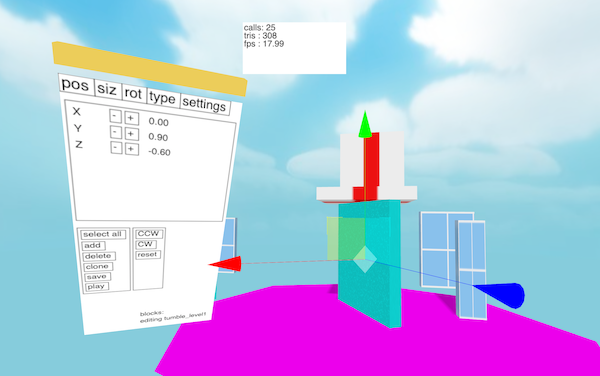
At first I went back and forth from 2D view to my VR headset every time I made a change to a level, even just sliding a few blocks around. As you can imagine this grew very tedious. The ideal tool would let me move objects around in the same mode where I play with them. I needed an in-game editor. So that’s what I built, and I created a minimal UI toolkit in the process.
Basic editing
Levels are stored as JSON files, loaded and saved from a server I had already created for another purpose. For moving objects around I used the TransformControls example code from ThreeJS. Doing transform controls right is hard, so I didn’t want to reinvent that wheel.
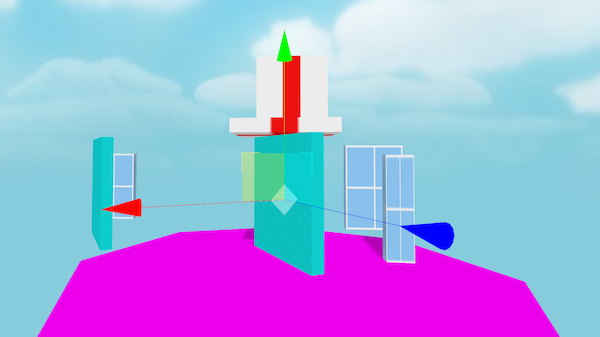
In addition to moving blocks around I needed a way to create and delete them and set their properties like size, type, and weight. This called for a property sheet. The problem is when we go into immersive mode we no longer have access to the DOM. We can’t just reuse HTML buttons and labels like we would in a 2D editor.
One solution would be Dom2Texture, an API for rendering a chunk of the DOM to a texture, which we could then map into 3D space. Unfortunately that is disabled until we can find a way to address the security issues (though there are ways to hack around it). However, we do have HTML Canvas, which lets us draw anything we want in 2D then copy that bitmap to a texture in 3D space.
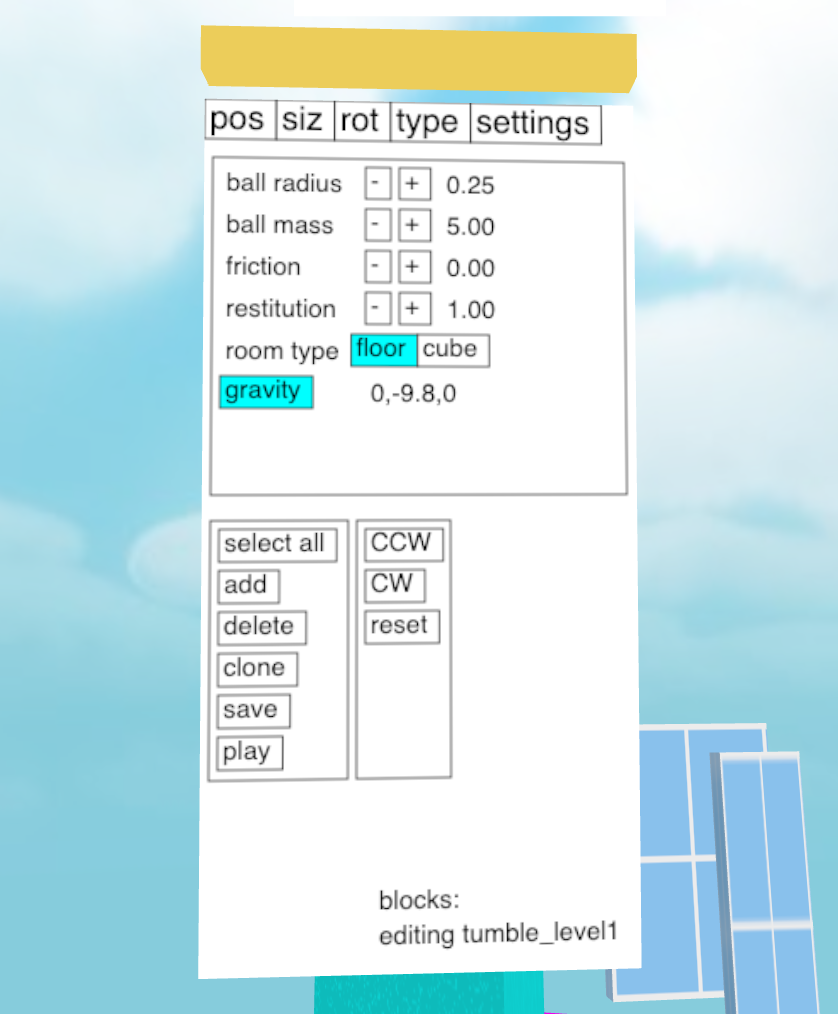
To link the 2D Canvas and 3D ThreeJS APIs I created an adapter class called Panel2D. What you see below is an abbreviated copy of the class. For the full code you can read it on Github.
export default class Panel2D extends THREE.Object3D {
    this.canvas = document.createElement('canvas')
    this.canvas.width = 256
    this.canvas.height = 512
    this.canvasTexture = new THREE.CanvasTexture(this.canvas)
    this.mesh = new THREE.Mesh(
        new THREE.PlaneGeometry(1,2),
        new THREE.MeshBasicMaterial({color:'white',map:this.canvasTexture})
    )
    this.add(this.mesh)
    this.comps = []
The code above creates an HTML Canvas element, a ThreeJS CanvasTexture to turn the canvas into a texture, and then a PlaneGeometry mesh to draw the texture in 3D space. This class holds a reference to all components internally in the this.comps variable.
To draw the 2D components the code calls them recursively with a reference to the canvas drawing context, then updates the texture.
redraw() {
    const ctx = this.canvas.getContext('2d')

    // fill background width white
    ctx.fillStyle = 'white'
    ctx.fillRect(0,0,this.canvas.width,this.canvas.height)

    // draw each component
    this.comps.forEach(comp => comp.draw(ctx))

    // update the texture
    this.canvasTexture.needsUpdate = true
}
Handling Input
In 3D we have pointer events which are fired whenever the user’s pointer moves around in 3D space at different angles. 2D UI toolkits really expect something like a mouse event measured in pixels. To bridge this gap we
So on January 7, 2019, I wrote the first edition of "They Fixed It!"
This is a new chapter. I'll try to move forward in a semi-regular basis.
Let's see what are the cool things which have been fixed since that last report and helps webcompat to be better on the Web.
- Henri Sivonen solved on January 12, a 15 years old bug! When parsing an HTML document (string), the browser creates a DOM tree with nodes nested into each others. As you can imagine, all browsers have a limit on the depth of the tree to avoid bad memory overflows and crashes. On webcompat.com, we got some reports that some sites were missing content compared to Chrome for example. These sites were reaching the nesting limits of Firefox. The limit has been increased.
- Another funny issue. Create a
buttonassociate aclickevent to it and then create a pseudo-element which comes on top of thebuttonelement through a position absolute. Thebuttonis not clickable anymore. Or at least, it was untilevent.targeton interactive content inside button was fixed by Olly Petay. This fixed plenty of other issues which were making content in Firefox not clickable. - On Firefox Android, it was impossible to reach content which was overflowing the viewport when
overflow-x: hiddenwas specified, while you could do it on Chrome and Safari. Not anymore because Hiroyuki Ikezoe fixed it! And it's a pretty big win for usability. - A button with "filter:opacity(0)" supposed to receive click events was not working anymore because of an optimization in Firefox 63. This was a regression, now fixed by Markus Stange.
- In a website, there were 24 videos playing at the same time. Yes… but only one at a time was made visible. The others were off-screen. Firefox was trying to decode everything at the same time. So the CPU was burning fossil fuels, but that was fixed by Alastor Wu!
- On DropBox UI, there was improperly sized icons. Firefox was sizing the img tag down to its flexbox parent's intrinsic height, while Chrome is stretching the flexbox to match the img's height. This difference created the flexbox layout compatibility issue which was fixed by Daniel Holbert.
- A flex container with
overflowother thanvisiblewould make an incorrectbaselinealignment. This created issues on twitter layout. This was fixed again by Daniel Holbert. - Firefox and Chrome treat
vertical-align:topdifferently forandtags with a tallline-height. Not anymore since Thomas Wisniewki fixed it! - The implementation of scroll anchoring on Firefox created some website issues by making the scroll sometimes sluggish. Not anymore since it was
Over the past couple of months since we announced that we would broaden our approach to anti-tracking we’ve been experimenting and testing Enhanced Tracking Protection, a feature that blocks cookies and storage access from third-party trackers. Recently, we published a set of policies that define which tracking practices will be blocked in Firefox, and a new set of redesigned controls for the Content Blocking section where users can choose their desired level of privacy protection. As the next step in our path to enable Enhanced Tracking Protection by default, this week we launched a study to observe how enabling this functionality for a group of Firefox users in our Release Channel would impact the online experience.
As part of the study, selected users will receive an onboarding experience which explains how to disable Content Blocking functionality like Enhanced Tracking Protection on specific websites. The onboarding looks like this:
 With Enhanced Tracking Protection, you just browse and Firefox helps to prevent you from being tracked from website to website. Most web pages will load just fine, and your privacy will be better protected.
If you do happen to discover a web page not functioning as expected, you can report the issue by clicking on the shield icon in the address bar. Under “Content Blocking”, click on the “Report a problem” link. Your feedback will help us make the Enhanced Tracking Protection experience better for everyone.
 From the same menu, you can also click on the button that says “Turn off Blocking for This Site”. Firefox will reload the page with Enhanced Tracking Protection turned off.
If you haven’t been selected for the study, but you would like to test the feature ahead of our rollout to more users, you can do so with the following steps:
- Click the menu button
 .
. - Click Content Blocking. This takes you to the Content Blocking section in your Firefox Preferences Privacy & Security panel.
- Under Content Blocking, click on the “Custom” option and check the “Cookies” checkbox, and make sure that “Third-party trackers” is selected in the drop-down menu:


What’s Next?
We will monitor the results of this experiment so as to ensure that we are able to turn on these default protections for users with few disruptions.
The post Enhanced Tracking Protection Testing Update appeared first on Future Releases.
https://blog.mozilla.org/futurereleases/2019/02/20/enhanced-tracking-protection-testing-update/
In November, I wrote about my team’s work on experimental new web design tools. We also ran a survey to rank the challenges of web design and development. A big thank you to everyone who participated in our open design process! We received over 900 responses in one month, and discovered major findings which continue to inform the Firefox DevTools’ 2019 roadmap.
The Methods
With guidance from Mozilla’s data scientists, I chose the MaxDiff method for the challenge-ranking portion of the survey. MaxDiff requires the survey taker to make trade-offs within subsets of the pool of options. This works well for ranking a large number of options, which would be too overwhelming for a regular card sort. It also produces a more accurate overall ranking by emphasizing relative differences in priority.
In practice, this produced 10 survey pages that each showed a set of 4 random options from a pool of 23 total web design challenges. Participants had to choose the “least“ and “most” impactful options in each set. The ranking was then determined by scores computed using the following formula:
—————————————————
# times item appeared
The second portion of the survey focused on specific frustrations with browser developer tools. For this section we only offered 7 options, so we used a simple drag-and-drop card sort.
The Takeaways

The highest-ranked issues by far were related to CSS layout debugging—learning the root cause of mysteries like unwanted scrollbars and unexpected size and position. Accordingly, my highest priority right now is digging deeper into CSS debugging issues with further research and experiments. (You can help by taking my brief new CSS Debugging follow-up survey! More info below.)
Unsurprisingly, cross-browser compatibility was also a top choice. We’re investigating ways to ease the pain of debugging browser differences, including auditing, hints, and a more robust responsive design tool.
Mid-ranked issues included Flexbox, Grid, and Accessibility. We plan to continue improving our Accessibility Panel; however, for now we’ll step back a bit from our successfully launched Flexbox and Grid tools. Letting them breathe and collecting more real-world feedback will allow us to swing back with fresh new ideas later.
Lowest-ranked issues included Lack of Visual/WYSIWYG Tools, Animations, WebGL, and SVG. The visual tools part was surprising—we’ve seen a lot of love for click-and-drag visual tools like the beautifully designed Visbug and Webflow. I suspect my old-school wording here—WYSIWYG (“what you see is what you get”)—brought to mind less-delightful experiences of the past. There are clearly ways to improve developers’ lives with modern tools in this space.
As for the browser issues card sort, we hear you loud and clear on the issue of “Moving CSS changes back to my editor.” We’re currently in the process of adding export options to our Changes panel, and would love your input on our designs! DOM breakpoints are also in the plans for this year.
You can view the full MaxDiff and card sort rankings in this report.
Follow-up Survey: CSS Layout Debugging

Now we need your help again! The main
TenFourFox Feature Parity Release 13 beta 1 is now available (downloads, hashes, release notes). I took a different tack on this release because I still don't have good solutions for the missing JavaScript features currently affecting Citibank, Github and a few other sites, so I've chosen to push out some side projects I've been working on in order not to make this a wasted release. Those features are support for WebP images and support for AppleScript automation.
WebP images are an up-and-coming format based on the WebM VP8 codec, another way Google will consume the Web from the inside out, but they do have image size advantages and Firefox now supports them in Firefox 65. Google has two demonstration WebP galleries you can use to view some samples, and there are colour-managed examples in the Skia test suite. TenFourFox's WebP support currently can display lossy, lossless, transparent and colour-managed images, and will properly use any embedded colour profile. However, it is not currently AltiVec-accelerated (we do have some AltiVec VP8 code, so this should be possible at some point), and it does not yet support animated WebP images, which will appear blank. For this reason we don't pass an Accept: header indicating we accept WebP images like mainline Firefox and certain other browsers, though we will naturally try to display it if we get one. If you encounter issues related to WebP, you can try setting image.webp.enabled to false, but I'm planning to ship this support in FPR13 final, so it defaults to true.
The other support is for AppleScript. One of the few advantages of being at feature parity instead of source parity is that we can feel free to implement features mainline Firefox doesn't want or consider a current priority, and one long-standing request going back to the pre-Firefox days is AppleScript support. In fairness, this is hard to achieve in Firefox, and getting harder because of its cross-platform asynchronous nature. Many of the assumptions AppleScript makes about an application and its internal object model are routinely violated for performance reasons in Firefox, and Firefox is not primarily written in Objective-C, so there need to be bridges written to regular C++ and JavaScript, proxy objects designed, etc. Since there was never any agreement on how this internal plumbing should look, only some speculative work was ever completed, and Firefox to this day only supports the basic AppleScript suite and some limited automation through GUI scripting methods.
However, one thing that would certainly be handy for those non-daily drivers who might have a Power Mac sitting around doing nothing is to automate some tasks with it, like a kiosk or a display, or to assist with certain rote tasks. For that, AppleScript would certainly be the most painless way of doing so, so here is a first cut of AppleScript support for TenFourFox. Essentially I took that 8-year-old speculative patch, modified it to work with Firefox 45 and 10.4 (some of the dictionary actually comes from the dearly departed Camino, which had rich AppleScript support of its own), and greatly expanded its feature set to yield TenFourFox's AppleScript module. With FPR13 beta, open the AppleScript Script Editor.app, switch to the Event Log tab, and try this script (substitute your TenFourFox application name for TenFourFoxG5):
tell application "TenFourFoxG5"
repeat with w in every browser window
repeat with t in every tab of w
repeat while (t is busy)
delay 1
end repeat
get name of t
get URL of t
end repeat
end repeat
end tell
This will iterate through every open browser window and every tab within that window, check an important synchronization property to make sure that the tab is not busy (being opened or being manipulated), and then report the name (title) and URL (location) of what's loaded in the Event Log. If you're an AppleScript jockey, you can well imagine what you can do with that information.
Tabs also have other useful
Using Docker’s multi-stage build feature and Python’s virtualenv tool, we can make smaller and more secure docker images for production.
https://pmac.io/2019/02/multi-stage-dockerfile-and-python-virtualenv/
Firefox 66 is currently in beta and, for extension developers, the changes to the WebExtensions API center primarily around improving performance, stability, and the development experience. A total of 30 issues were resolved in Firefox 66, including contributions from several volunteer community members.
Major Performance Improvements for Storage
I want to start by highlighting an important change that has a major, positive impact for Firefox users. Starting in release 66, extensions use IndexedDB as the backend for local storage instead of a JSON file. This results in a significant performance improvement for many extensions, while simultaneously reducing the amount of memory that Firefox uses.
This change is completely transparent to extension developers – you do not need to do anything to take advantage of this improvement. When users upgrade to Firefox 66, the local storage JSON file is silently migrated to IndexedDB. All extensions using the storage.local() API immediately realize the benefits, especially if they store small changes to large structures, as is true for ad-blockers, the most common and popular type of extension used in Firefox.
The video below, using Adblock Plus as an example, shows the significant performance improvements that extension users could see.
Other Improvements
The remaining bug fixes and feature enhancements won’t be as noticeable as the change to local storage, but they nevertheless raise the overall quality of the WebExtensions API and make the development experience better. Some of the highlights include:
- Another improvement was landed in Firefox so that it uses less memory when extensions load objects from storage into memory.
- The “Manage Extension Shortcuts” page now uses a default icon if no icon was included in the manifest file.
- Fixed a case where the window.close() API was not properly closing browser extension popups.
- Extension ports are no longer disconnected when switching tabs in Responsive Design Mode.
- By-passing tracking protection now works for domains listed as host permissions when those domains are used as iframes within an extension page.
- The permissions prompt no longer appears when newly added host permissions are a subset of host permissions that have already been granted.
- The webRequest API will now throw an error if you try to use it in blocking mode without declaring the webRequestBlocking permission
- Bookmarks context menu items, added in Firefox 59, now also appear in the bookmarks sidebar and library window.
- Manifest files with no specified default icon now throw an error.
- Firefox no longer emits a warning when the manifest property `background.persistent` is set to `true`.
Thank you to everyone who contributed to the Firefox 66 release, but a special thank you to our volunteer community contributors, including: tossj, Varun Dey, and Edward Wu.
The post Extensions in Firefox 66 appeared first on Mozilla Add-ons Blog.
https://blog.mozilla.org/addons/2019/02/15/extensions-in-firefox-66/

This is part 3 of my series on how I built Jingle Smash, a block smashing WebVR game
I’m not a designer or artist. In previous demos and games I’ve used GLTFs, which are existing 3D models created by someone else that I downloaded into my game. However, for Jingle Smash I decided to use procedural generation, meaning I combined primitives in interesting ways using code. I also generated all of the textures with code. I don’t know how to draw pretty textures by hand in a painting tool, but 20 years of 2D coding means I can code up a texture pretty easily.
Jingle Smash has three sets of graphics: the blocks, the balls, and the background imagery. Each set uses its own graphics technique.
Block Textures
The blocks all use the same texture placed on every side, depending on the block type. For blocks that you can knock over I called these ‘presents’ and gave them red ribbon stripes over a white background. I drew this into an HTML Canvas with standard 2D canvas code, then turned it into a texture using the THREE.CanvasTexture class.
const canvas = document.createElement('canvas')
canvas.width = 128
canvas.height = 128
const c = canvas.getContext('2d')

//white background
c.fillStyle = 'white'
c.fillRect(0,0,canvas.width, canvas.height)

//lower left for the sides
c.save()
c.translate(0,canvas.height/2)
c.fillStyle = 'red'
c.fillRect(canvas.width/8*1.5, 0, canvas.width/8, canvas.height/2)
c.restore()

//upper left for the bottom and top
c.save()
c.translate(0,0)
c.fillStyle = 'red'
c.fillRect(canvas.width/8*1.5, 0, canvas.width/8, canvas.height/2)
c.fillStyle = 'red'
c.fillRect(0,canvas.height/8*1.5, canvas.width/2, canvas.height/8)
c.restore()

c.fillStyle = 'black'

const tex = new THREE.CanvasTexture(canvas)
this.textures.present1 = tex

this.materials[BLOCK_TYPES.BLOCK] = new THREE.MeshStandardMaterial({
    color: 'white',
    metalness: 0.0,
    roughness: 1.0,
    map:this.textures.present1,
})
Once the texture is made I can create a ThreeJS material with it. I tried to use PBR (physically based rendering) materials in this project. Since the presents are supposed to be made of paper I used a metalness of 0.0 and roughness of 1.0. All textures and materials are saved in global variables for reuse.
Here is the finished texture. The lower left part is used for the sides and the upper left for the top and bottom.

The other two box textures are similar, a square and cross for the crystal boxes and simple random noise for the walls.


Skinning the Box
By default a BoxGeometry will put the same texture on all six sides of the box. However, we want to use different portions of the texture above for different sides. This is controlled with the UV values of each face. Fortunately ThreeJS has a face abstraction to make this easy. You can loop over the faces and manipulate the UVs however you wish. I scaled and moved them around to capture just the parts of the texture I wanted.
geo.faceVertexUvs[0].forEach((f,i)=>{
    if(i === 4 || i===5 || i===6 || i===7 ) {
        f.forEach(uv=>{
            uv.x *= 0.5 //scale down
            uv.y *= 0.5 //scale down
            uv.y += 0.5 //move from lower left quadrant to upper left quadrant
        })
    } else {
        //rest of the sides. scale it in
        f.forEach(uv=>{
            uv.x *= 0.5 // scale down
            uv.y *= 0.5 // scale down
        })
    }
})
Striped Ornaments
There are two different balls you can shoot. A spherical ornament with a stem and an oblong textured one. For the textures I just generated stripes with canvas.
{
    const canvas = document.createElement('canvas')
    canvas.width = 64
    canvas.height = 16
    const c = canvas.getContext('2d')

    c.fillStyle = 'black'
    c.fillRect(0, 0, canvas.width, canvas.height)
    c.fillStyle = 'red'
    c.fillRect(0, 0, 30, canvas.height)
    c.fillStyle = 'white'
    c.fillRect(30, 0, 4, canvas.height)
    c.fillStyle = 'green'
    c.fillRect(34, 0, 30, canvas.height)

    this.textures.ornament1 = new THREE.CanvasTexture(canvas)
Mozilla maintains a database containing a set of “root” certificates that we use as “trust anchors”. This database, commonly referred to as a “root store”, allows us to determine which Certificate Authorities (CAs) can issue SSL/TLS certificates that are trusted by Firefox, and email certificates that are trusted by Thunderbird. Properly maintaining a root store is a significant undertaking – it requires constant effort to evaluate new trust anchors, monitor existing ones, and react to incidents that threaten our users. Despite the effort involved, Mozilla is committed to maintaining our own root store because doing so is vital to the security of our products and the web in general. It gives us the ability to set policies, determine which CAs meet them, and to take action when a CA fails to do so.
A major advantage to controlling our own root store is that we can do so in a way that reflects our values. We manage our CA Certificate Program in the open, and by encouraging public participation we give individuals a voice in these trust decisions. Our root inclusion process is one example. We process lots of data and perform significant due diligence, then publish our findings and hold a public discussion before accepting each new root. Managing our own root store also allows us to have a public incident reporting process that emphasizes disclosure and learning from experts in the field. Our mailing list includes participants from many CAs, CA auditors, and other root store operators and is the most widely recognized forum for open, public discussion of policy issues.
The value delivered by our root program extends far beyond Mozilla. Everyone who relies on publicly-trusted certificates benefits from our work, regardless of their choice of browser. And because our root store, which is part of the NSS cryptographic library, is open source, it has become a de-facto standard for many Linux distributions and other products that need a root store but don’t have the resources to curate their own. Providing one root store that many different products can rely on, regardless of platform, reduces compatibility problems that would result from each product having a unique set of root certificates.
Finally, operating a root store allows Mozilla to lead and influence the entire web Public Key Infrastructure (PKI) ecosystem. We created the Common Certificate Authority Database (CCADB) to help us manage our own program, and have since opened it up to other root store operators, resulting in better information and less redundant work for all involved. With full membership in the CA/Browser Forum, we collaborate with other root store operators, CAs, and auditors to create standards that continue to increase the trustworthiness of CAs and the SSL/TLS certificates they issue. Our most recent effort was aimed at improving the standards for validating IP Addresses.
The primary alternative to running our own root store is to rely on the one that is built in to most operating systems (OSs). However, relying on our own root store allows us to provide a consistent experience across OS platforms because we can guarantee that the exact same set of trust anchors is available to Firefox. In addition, OS vendors often serve customers in government and industry in addition to their end users, putting them in a position to sometimes make root store decisions that Mozilla would not consider to be in the best interest of individuals.
Sometimes we experience problems that wouldn’t have occurred if Firefox relied on the OS root store. Companies often want to add their own private trust anchors to systems that they control, and it is easier for them if they can modify the OS root store and assume that all applications will rely on it. The same is true for products that intercept traffic on a computer. For example, many antivirus programs unfortunately include a web filtering feature that intercepts HTTPS requests by adding a special trust anchor to the OS root store. This will trigger security errors in Firefox unless the vendor supports Firefox by turning on the setting we provide to address these situations.
In Part 2 of my three-part Fearless Security series, I’ll explore thread safety.
Today’s applications are multi-threaded—instead of sequentially completing tasks, a program uses threads to perform multiple tasks simultaneously. We all use concurrency and parallelism every day:
- Web sites serve multiple simultaneous users.
- User interfaces perform background work that doesn’t interrupt the user. (Imagine if your application froze each time you typed a character because it was spell-checking).
- Multiple applications can run at the same time on a computer.
While this allows programs to do more faster, it comes with a set of synchronization problems, namely deadlocks and data races. From a security standpoint, why do we care about thread safety? Memory safety bugs and thread safety bugs have the same core problem: invalid resource use. Concurrency attacks can lead to similar consequences as memory attacks, including privilege escalation, arbitrary code execution (ACE), and bypassing security checks.
Concurrency bugs, like implementation bugs, are closely related to program correctness. While memory vulnerabilities are nearly always dangerous, implementation/logic bugs don’t always indicate a security concern, unless they occur in the part of the code that deals with ensuring security contracts are upheld (e.g. allowing a security check bypass). However, while security problems stemming from logic errors often occur near the error in sequential code, concurrency bugs often happen in different functions from their corresponding vulnerability, making them difficult to trace and resolve. Another complication is the overlap between mishandling memory and concurrency flaws, which we see in data races.
Programming languages have evolved different concurrency strategies to help developers manage both the performance and security challenges of multi-threaded applications.
Problems with concurrency
It’s a common axiom that parallel programming is hard—our brains are better at sequential reasoning. Concurrent code can have unexpected and unwanted interactions between threads, including deadlocks, race conditions, and data races.
A deadlock occurs when multiple threads are each waiting on the other to take some action in order to proceed, leading to the threads becoming permanently blocked. While this is undesirable behavior and could cause a denial of service attack, it wouldn’t cause vulnerabilities like ACE.
A race condition is a situation in which the timing or ordering of tasks can affect the correctness of a program, while a data race happens when multiple threads attempt to concurrently access the same location in memory and at least one of those accesses is a write. There’s a lot of overlap between data races and race conditions, but they can also occur independently. There are no benign data races.
Potential consequences of concurrency bugs:
- Deadlock
- Information loss: another thread overwrites information
- Integrity loss: information from multiple threads is interlaced
- Loss of liveness: performance problems resulting from uneven access to shared resources
The best-known type of concurrency attack is called a TOCTOU (time of check to time of use) attack, which is a race condition between checking a condition (like a security credential) and using the results. TOCTOU attacks are examples of integrity loss.
Deadlocks and loss of liveness are considered performance problems, not security issues, while information and integrity loss are both more likely to be security-related. This paper from Red Balloon Security examines some exploitable concurrency errors. One example is a pointer corruption that allows privilege escalation or remote execution—a function that loads a shared ELF (Executable and Linkable Format) library holds a semaphore correctly the first time it’s called, but the second time it doesn’t, enabling kernel memory corruption. This attack is an example of information loss.
The trickiest part of concurrent programming is testing and debugging—concurrency bugs have poor reproducibility. Event timings, operating system decisions, network traffic, etc. can all cause different behavior each time you run a
Today we’re rolling out updated features for iPhone and iPad users, including a new layout for menu and settings, persistent Private Browsing tabs and new organization options within the New Tabs feature. This round of updates is the result of requests we received straight from our users, and we’re taking your feedback to make this version of iOS work harder and smarter for you.
With this in mind, in the latest update of Firefox for iOS we overhauled both the Settings and Menu options to more closely mirror the desktop application. Now you can access bookmarks, history, Reading List and downloads in the “Library” menu item.
Private Browsing – Keep browsing like nobody’s watching
Private browsing tabs can now live across sessions, meaning, if you open a private browsing tab and then exit the app, Firefox will automatically launch in private browsing the next time you open the app. Keeping your private browsing preferences seamless is just another way we’re making it simple and easy to give you back control of the privacy of your online experience.
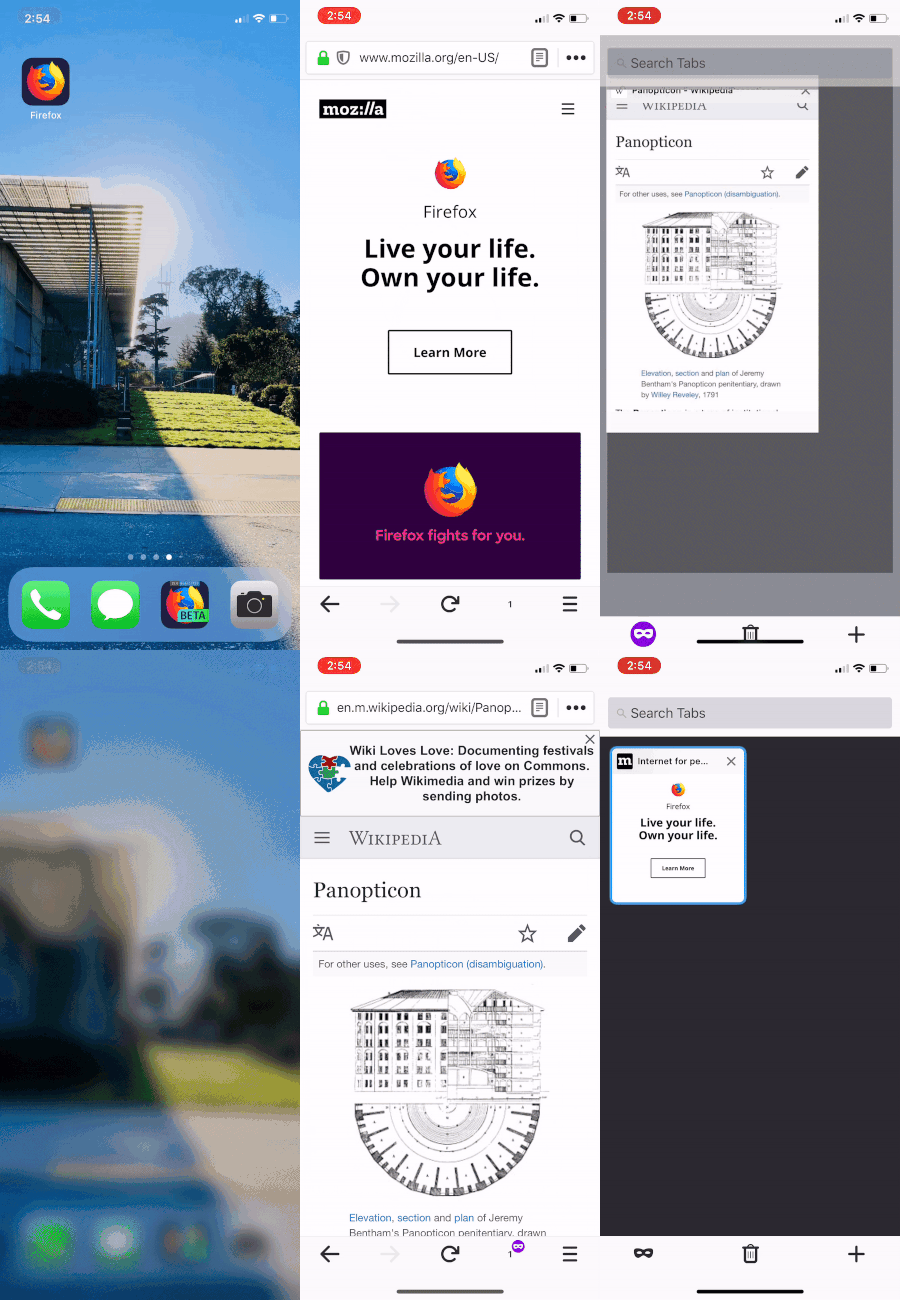
Private browsing tabs can now live across sessions
Organize your New Tabs (like a pro)
Today’s release also includes a few different options for New Tabs organization. You can now choose to have new tabs open with your bookmark list, in Firefox Home (with top sites and Pocket stories), with a list of recent history, a custom URL or in a blank page.
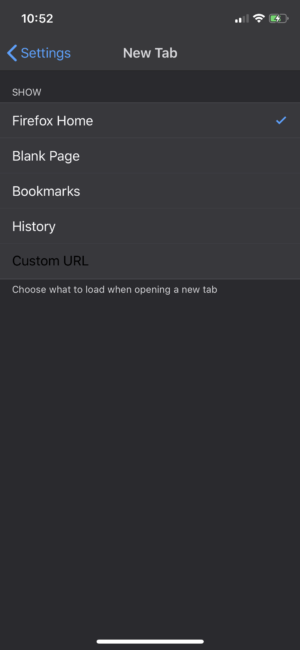
More options for New Tabs organization
We’re also making it easier to customize Firefox Home with top sites and Pocket content. All tabs can now be rearranged by dragging a tab into the tab bar or tab tray.
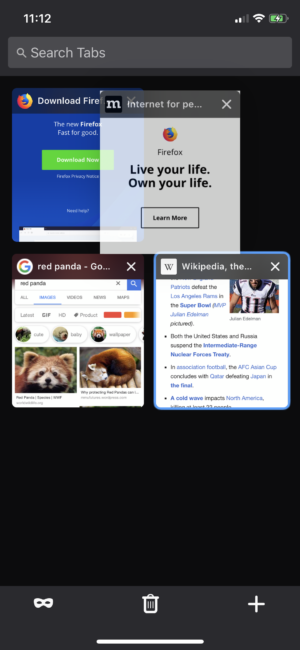
Customize Firefox Home with top sites and Pocket content
Whether it’s your personal data or how you organize your online experience, Firefox continues to bring more privacy and control to you.
To get the latest version of Firefox for iOS, visit the App Store.
The post Firefox for iOS Amps Up Private Browsing and More appeared first on The Mozilla Blog.
https://blog.mozilla.org/blog/2019/02/14/firefox-for-ios-amps-up-private-browsing-and-more/
WebRender is a GPU based 2D rendering engine for web written in Rust, currently powering Mozilla’s research web browser Servo and on its way to becoming Firefox‘s rendering engine.
Notable WebRender and Gecko changes
- Kats made improvements to the continuous integration on Mac.
- Kvark fixed a crash.
- Kvark added a way to dump the state of the frame builder for debugging.
- kvark made transform flattening operate at preserve-3d context boundaries.
- kvark enabled non-screen-space rasterization of plane-splits.
- kvark fixed seams between image tiles.
- Glenn fixed a bug with border-style: double where the border widths are exactly 1 pixel.
- Glenn made some improvements to pixel snapping.
- Glenn added some debugging infrastructure for pixel snapping.
- Glenn tidied up some code and added a few optimizations.
- Nical fixed a rendering bug with shadows and blurs causing them to flicker in some cases.
- Nical simplified the code that manages the lifetime of image and blob image handles on the content process.
- Nical added a test.
- Sotaro enabled mochitest-chrome with WebRender in the CI.
- Sotaro improved scrolling smoothness when using direct composition.
- Sotaro fixed a window creation failure when using WebRender with Wayland.
- Emilio improved background-clip: text invalidation.
Blocker bugs countdown
Only 0 P2 bugs and 4 P3 bugs left (two of which have fixes up for review)!
Enabling WebRender in Firefox Nightly
The best place to report bugs related to WebRender in Firefox is the Graphics :: WebRender component in bugzilla.
Note that it is possible to log in with a github account.
https://mozillagfx.wordpress.com/2019/02/14/webrender-newsletter-40/
Yesterday the EU institutions concluded ‘trialogue’ negotiations on the EU Copyright directive, a procedural step that makes the final adoption of the directive a near certainty.
Here’s a statement from Raegan MacDonald, Mozilla’s Head of EU Public Policy –
The Copyright agreement gives the green light to new rules that will compel online services to implement blanket upload filters, with an overly complex and limited SME carve out that will be unworkable in practice. At the same time, lawmakers have forced through a new ancillary copyright for press publishers, a regressive and disproven measure that will undermine access to knowledge and the sharing of information online.
The legal uncertainty that will be generated by these complex rules means that only the largest, most established platforms will be able to fully comply and thrive in such a restricted online environment.
With this development, the EU institutions have squandered the opportunity of a generation to bring European copyright law into the 21st century. At a time of such concern about web centralisation and the ability of small European companies to compete in the digital marketplace, these new rules will serve to entrench the incumbents.
We recognise the efforts of many Member States and MEPs who laboured to find workable solutions that would have rectified some of the gravest shortcomings in the proposal. Unfortunately the majority of their progressive compromises were rejected.
The file is expected to be adopted officially in a final European Parliament vote in the coming weeks. We’re continuously working with our allies in the Parliament and the broader community to explore any and every opportunity to limit the potential damage of this outcome.
The post Mozilla statement on the conclusion of EU copyright directive ‘trialogue’ negotiations appeared first on Open Policy & Advocacy.
It's time to say goodbye to another PowerPC in space, this time the Opportunity rover, also known as the Mars Exploration Rover B (or MER-1). Finally declared at end of mission today after 5,352 Mars solar days when NASA couldn't re-establish contact, it had been apparently knocked off-line by a dust storm and was unable to restart. Originally intended for a 90 Mars solar day mission, its mission became almost 60 times longer than anticipated and it traveled nearly 30 miles on the surface in total. Spirit, or MER-2, its sister unit, had previously reached end of mission in 2010.
Both Opportunity and Spirit were powered by the 20MHz BAE RAD6000, a radiation-hardened version of the original IBM POWER1 RISC Single Chip CPU and the indirect ancestor of the PowerPC 601. Many PowerPC-based spacecraft are still in operation, both with the original RAD6000 and its successor the RAD750, a radiation-hardened version of the G3.
Meanwhile, the Curiosity rover, which is running a pair of RAD750s (one main and one backup, plus two SPARC accessory CPUs), is still in operation at 2,319 Mars solar days and ticking. There is also the 2001 Mars Odyssey orbiter, which is still circling the planet with its own RAD6000 and is expected to continue operations until 2025. Curiosity's design is likely to be reused for the Mars 2020 rover, meaning possibly even more PowerPC design will be exploring the cosmos in the very near future.
http://tenfourfox.blogspot.com/2019/02/so-long-opportunity-rover.html
Please join me in welcoming Bianca Danforth to the set of peers blessed with reviewing patches to Firefox and Toolkit. She’s been doing great work making testing experiment extensions easy and so it’s time for her to level-up.
https://www.oxymoronical.com/blog/2019/02/Welcoming-a-new-FirefoxToolkit-peer