On March 11, 2020 the World Health Organization declared COVID-19 a global pandemic. Within days, practically the entire planet was on lockdown. We went indoors and online.
So how did the sudden mass migration online impact browser extension usage? Pretty dramatically, it turns out. On this two-year mark of the start of the pandemic we looked back at Firefox extension installs and usage data to discover several compelling trends.
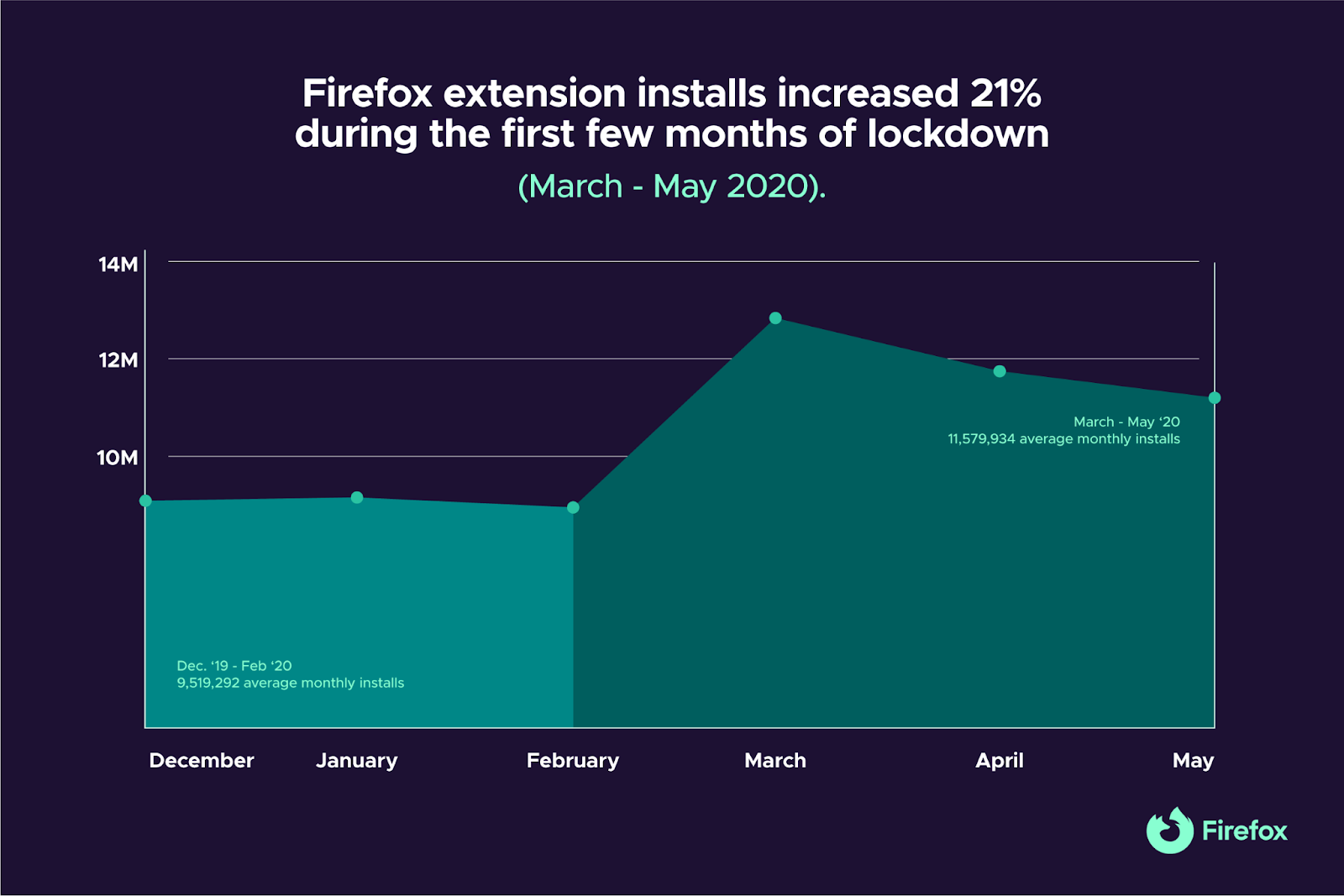
We wanted to see the types of extensions Firefox users were drawn to during the early days of the lockdown, so we compared average monthly installs for three months at the start of the lockdown (March – May ‘20) to average monthly installs for the three months prior (Dec. ‘19 – Feb. ‘20). For this exercise we only looked at Firefox extensions with a minimum of 10,000 users. Here are some things we found…
We need all the help we can get working and educating from home
As much of the world suddenly transitioned their work and schooling to home computers in March 2020, Firefox users flocked to a handful of notable extensions to make life a little easier.
Which extension got the biggest install boost during the first few months of lockdown?
Zoom Scheduler
Of course it’s a Zoom extension. Zoom Scheduler installs increased 1,522%.
Created by Zoom, their extension integrates Google Calendar with the Zoom app so you can conveniently schedule or start Zoom meetings directly from your Google Calendar on Firefox.
Dark Background and Light Text
When you’re suddenly doing everything on a computer, you need to take care of those precious peepers. Dark Background and Light Text installs jumped an eye-popping 351%.
By default the extension flips the colors of every web page you visit, so your common light colored backgrounds become text colors and vice versa. But all color combinations are customizable, freeing you to adjust everything to taste. You can also set exceptions for certain websites that have a native look you prefer.
Tree Style Tab
Apparently we suffered from too many open tabs at the start of the pandemic (work tabs! school tabs! breaking news!). Tree Style Tab (+126%) gives Firefox users a great way to cope with tab overload.
The extension helps you organize all of your open tabs into a cascading “tree” format, so you can group tabs by topic and get a clean visual layout of everything.
To Google Translate
This translation tool was already very popular when the lockdown started, so it’s curious its install rate still climbed a whopping 126%, going from 222,000 installs/month to more than 504,000.
To Google Translate provides easy right-click mouse access to the Google Translate service, eliminating the nuisance of copying text and navigating away from the page you’re on just to translate.
We can only speculate why Firefox users wanted translation extensions when the pandemic started (To Google Translate wasn’t an aberration; all of the top translation extensions had install increases), but it’s worth wondering if a big factor wasn’t a common desire to get broader perspectives, news and information about the emerging virus. Perhaps Firefox users who sought out international news coverage would explain the increased appetite for translation extensions?
To Google Translate had particularly impressive install gains in China (+164%), the U.S. (+134%), France (+101%), Russia (+76%), and Germany (+75%).
We started taking our digital privacy more seriously
Privacy extensions are consistently the most popular type of Firefox add-on. Even so, the pandemic pushed a few notable extensions to new heights.
Cookie AutoDelete
Already averaging an impressive 42,000 monthly installs before the lockdown, Cookie AutoDelete skyrocketed 386% to averaging more than 206,000 installs/month
Since the public launch of Firefox Relay, thousands of users have signed up for our smart, easy solution that hides your real email address to help protect your identity. Thank you all for your tremendous support for our Firefox Relay product. This signals a demand for people who want to preserve their privacy by limiting the places their personal email address is used.
We are always looking for ways to improve Firefox Relay and your comments shape our products. Today, we’re adding user-requested features that deliver the emails that you care about which includes tickets to catch the train or watching your favorite band in concert, or getting the emails you want whether it’s getting shipping information or confirmation on the products you buy or updates to service and privacy policies.
New features for today’s Firefox Relay
- Go BIG with emails and attachments: We heard from our users who said they were using email aliases to receive emails that had attachments, like train or concert tickets. Those were over our initial limit, so we increased the limit to 10 MB. Now emails with or without attachments will make it to your inbox.
- Whether you want to receive promotional emails or not, now you can have it your way: Sometimes you’ll assign an email alias to an ecommerce site you visit frequently enough to make purchases whether it’s presents during the holidays or travel gear for the summer. There might be times when you want to take a break from that e-commerce site from sending you emails about weekly or monthly sales, or you might want to only receive emails when your product ships. Now, you can choose between receiving or blocking some or all promotional emails from a site. This feature will only be available to premium subscribers.
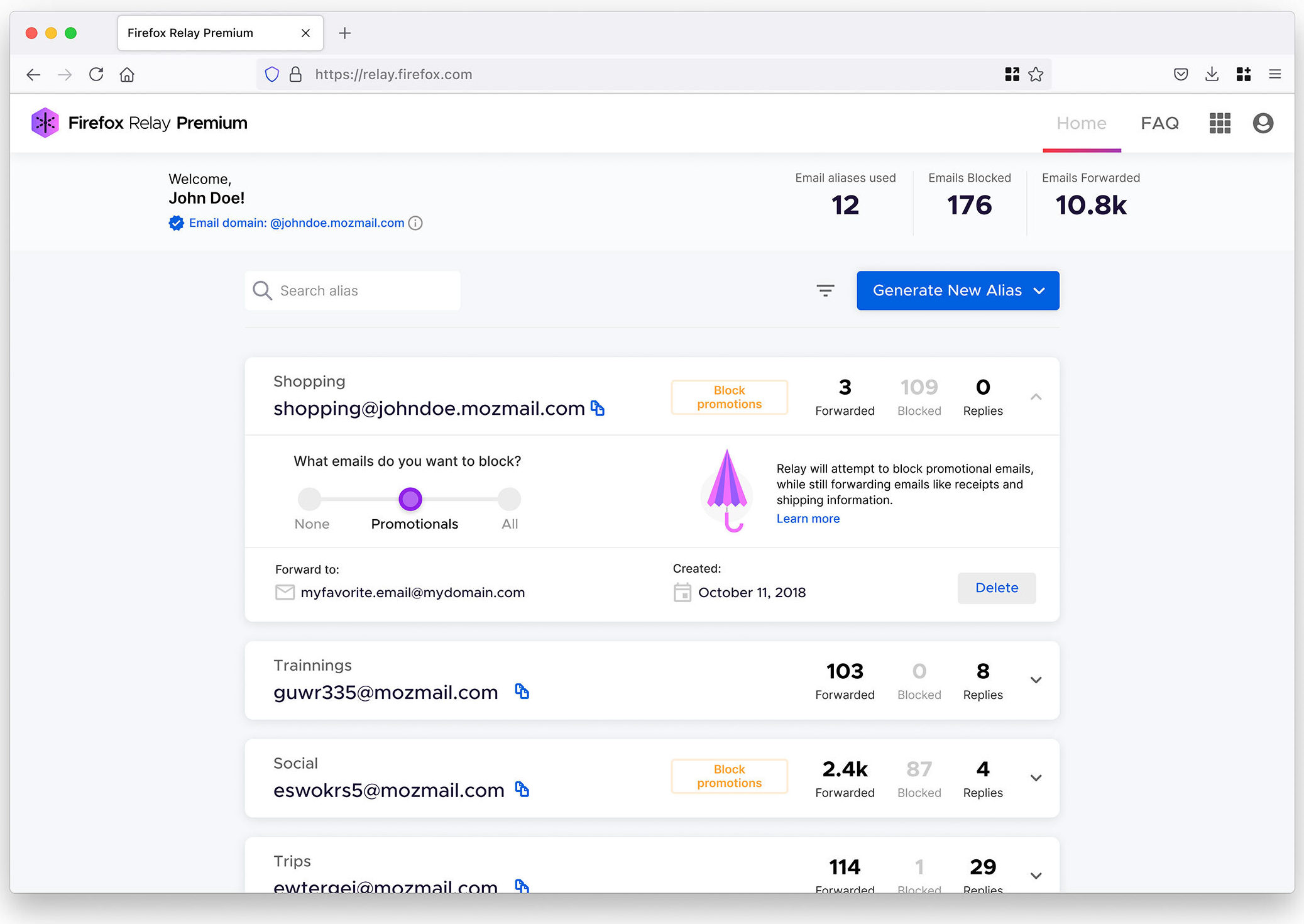
- Now available as a Chrome extension: Initially, Firefox Relay was only available through our site and an add-on you could download exclusively in Firefox. Privacy is important to us and we want to meet our users where they are whether that’s in Firefox or in another browser. So, we’re making Firefox Relay available as an extension in Chrome with a majority of the same features you’d see with the Firefox add-on.

Start protecting your email inbox today.
Sign up for Firefox RelayTo learn more about Firefox Relay and our other Mozilla products, check out these:
- Introducing Firefox Relay Premium, allowing more aliases to protect your identity from spammers
- Do you need a VPN at home? Here are 5 reasons you might.
- Resolve data breaches with Firefox Monitor
The post Latest Firefox Relay includes bigger attachment size and filters for promotional emails appeared first on The Mozilla Blog.
On March 11, 2020 the World Health Organization declared COVID-19 a global pandemic. Within days, practically the entire planet was on lockdown. We went indoors and online.
So how did the sudden mass migration online impact browser extension usage? Pretty dramatically, it turns out. On this two-year mark of the start of the pandemic we looked back at Firefox extension installs and usage data to discover several compelling trends.
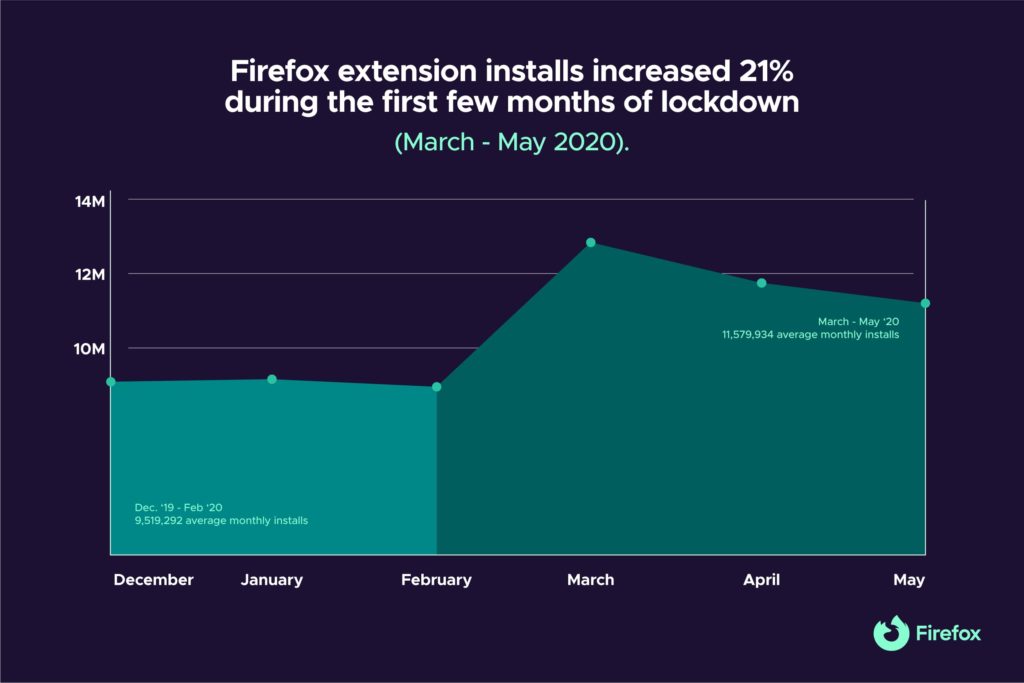
We wanted to see the types of extensions Firefox users were drawn to during the early days of the lockdown, so we compared average monthly installs for three months at the start of the lockdown (March – May ‘20) to average monthly installs for the three months prior (Dec. ‘19 – Feb. ‘20). For this exercise we only looked at Firefox extensions with a minimum of 10,000 users. Here are some things we found…
We need all the help we can get working and educating from home
As much of the world suddenly transitioned their work and schooling to home computers in March 2020, Firefox users flocked to a handful of notable extensions to make life a little easier.
Which extension got the biggest install boost during the first few months of lockdown?
Zoom Scheduler
Of course it’s a Zoom extension. Zoom Scheduler installs increased 1,522%.
Created by Zoom, their extension integrates Google Calendar with the Zoom app so you can conveniently schedule or start Zoom meetings directly from your Google Calendar on Firefox.
Dark Background and Light Text
When you’re suddenly doing everything on a computer, you need to take care of those precious peepers. Dark Background and Light Text installs jumped an eye-popping 351%.
By default the extension flips the colors of every web page you visit, so your common light colored backgrounds become text colors and vice versa. But all color combinations are customizable, freeing you to adjust everything to taste. You can also set exceptions for certain websites that have a native look you prefer.
Tree Style Tab
Apparently we suffered from too many open tabs at the start of the pandemic (work tabs! school tabs! breaking news!). Tree Style Tab (+126%) gives Firefox users a great way to cope with tab overload.
The extension helps you organize all of your open tabs into a cascading “tree” format, so you can group tabs by topic and get a clean visual layout of everything.
To Google Translate
This translation tool was already very popular when the lockdown started, so it’s curious its install rate still climbed a whopping 126%, going from 222,000 installs/month to more than 504,000.
To Google Translate provides easy right-click mouse access to the Google Translate service, eliminating the nuisance of copying text and navigating away from the page you’re on just to translate.
We can only speculate why Firefox users wanted translation extensions when the pandemic started (To Google Translate wasn’t an aberration; all of the top translation extensions had install increases), but it’s worth wondering if a big factor wasn’t a common desire to get broader perspectives, news and information about the emerging virus. Perhaps Firefox users who sought out international news coverage would explain the increased appetite for translation extensions?
To Google Translate had particularly impressive install gains in China (+164%), the U.S. (+134%), France (+101%), Russia (+76%), and Germany (+75%).
We started taking our digital privacy more seriously
Privacy extensions are consistently the most popular type of Firefox add-on. Even so, the pandemic pushed a few notable extensions to new heights.
Cookie AutoDelete
Already averaging an impressive 42,000 monthly installs before the lockdown,
Mozilla Opens Access to Dataset on Network Outages
The internet doesn’t just have a simple on/off switch — rather, there are endless ways connectivity can be ruptured or impaired, both intentionally (cyber attacks) and unintentionally (weather events). While a difficult task, knowing more about how connectivity is affected and where can help us better understand the outages of today, as well as who (or what) is behind them to prevent them in the future.
Today, Mozilla is opening access to an anonymous telemetry dataset that will enable researchers to explore signals of network outages around the world. The aim of the release is to create more transparency around outages, a key step towards achieving accountability for a more open and resilient internet for all. We believe this data, which is anonymized and aggregated to ensure user privacy, will be valuable to a range of actors, from technical communities working on network resilience to digital rights advocates documenting internet outages.
While a number of outage measurements rely on hardware installations or require people experiencing outages to initiate their own measurements, Mozilla’s data originates from everyday use of Firefox browsers around the world, essentially creating a timeline of both regular and irregular connectivity patterns across large populations of internet users. In practice, this means that when significant numbers of Firefox clients experience connection failures for any reason, this registers in Mozilla’s telemetry once a connection is restored. At a country or city level, this can provide indications of whether an outage occurred.
In addition to being able to see city-specific outages, Mozilla’s dataset also offers a comparatively high degree of technical granularity which allows researchers to isolate different types of connectivity issues in a given time frame. Because outages are often shrouded in secrecy, researchers can sometimes only estimate the exact nature of a local outage. Combined with other data sources, for instance from companies like Google and Cloudflare, Mozilla’s dataset will be a valuable source to corroborate reports of outages.
Whenever internet connections are cut, the safety, security and health of millions of people may be at stake. Documenting outages is an important step in seeking transparency and accountability, particularly in contexts of uncertainty or insecurity around recent events.
“Mozilla is excited to make our relevant telemetry data available to researchers around the world to aid efforts toward transparency and accountability. Internet outages can be hard to measure and it is very fortunate that there is a dedicated international community that is focused on this crucial task. We look forward to interesting ways in which the community will use this anonymous dataset to help keep the internet an open, global public resource,” says Daniel McKinley, VP, Data Science and Analytics at Mozilla.
Over the course of 2020 and 2021, researchers from Internet Outage Detection and Analysis (IODA) of the Center for Applied Internet Data Analysis (CAIDA), Open Observatory of Network Interference (OONI), RIPE Network Coordination Center (RIPE NCC), Measurement Lab (M-Lab), Internews and Access Now joined a collaborative effort to compare existing data on outages with Mozilla’s dataset. Their feedback has uniformly stated that this data would be helpful to the internet outage measurement community in critical work across the world.
“We are thrilled that Mozilla’s dataset on outages is being published. Our own analysis of the data demonstrated that it is a valuable resource for investigating Internet outages worldwide, complimenting other public datasets. Unlike other datasets, it provides geographical granularity with novel insights and new research opportunities. We are confident that it will serve as an extremely valuable resource for researchers, human rights advocates, and the broader Internet freedom community,” says Maria Xynou, the Research and Partnerships Director of OONI.
In order to gain access to the dataset, which is licensed under the Creative Common Public Domain license (CC0),
Last month we created new Firefox desktop colorways celebrating Disney and Pixar’s “Turning Red” streaming only on Disney+ March 11 (subscription required. 18+ to subscribe). It’s a fun way to show your personality by changing the way your Firefox browser looks, with colors and moods inspired by some of the main characters in the film. Today, we’ve got mobile wallpapers inspired by the all-new movie, based on the coming-of-age story of Mei Lee, a teen who when she gets too excited, transforms into a giant red panda (fun fact: a red panda is also known as a fire fox!). We’ve also created a destination for all things 2002 nostalgia and will be having conversations with people about their journeys to embrace their true colors online.
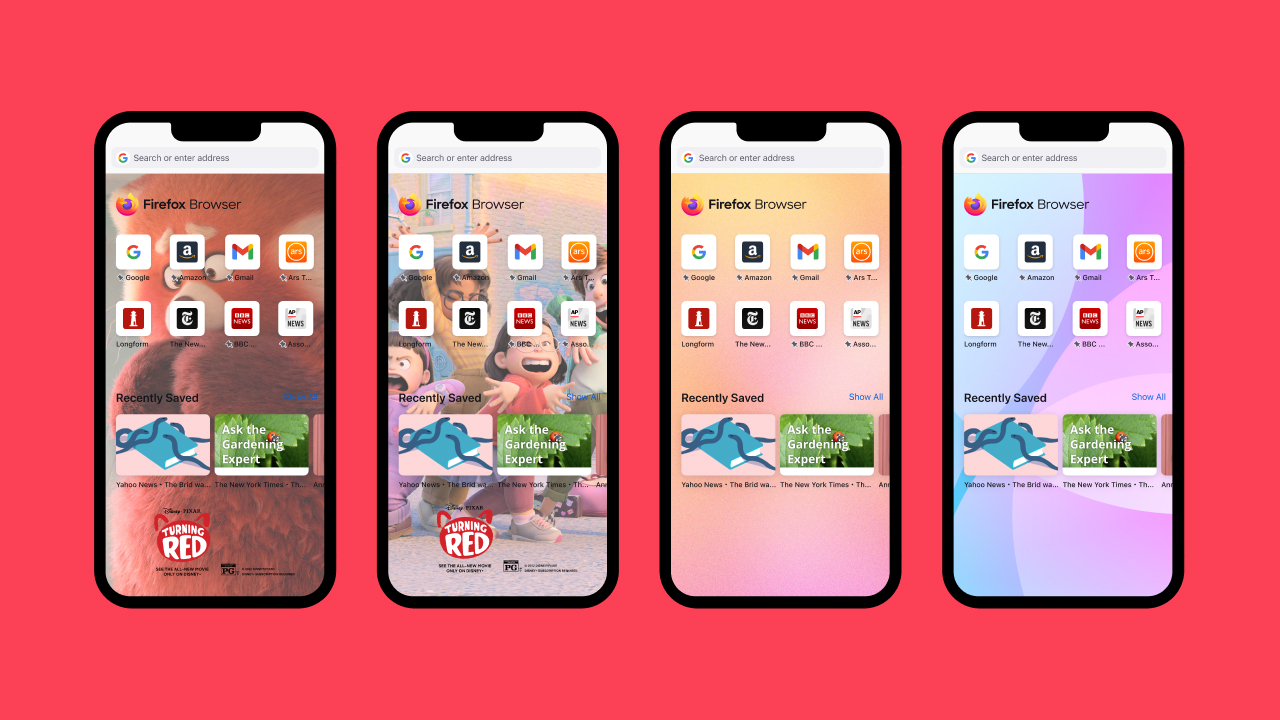
You can find the wallpapers feature by opening your Firefox Mobile app and double clicking the Firefox logo on the homepage or in your Customization Settings. We will have a variety of wallpapers for you to choose and pick one that suits your style. The wallpapers will be only available to US users. We will have new wallpaper options to share globally in the coming months.

Mobile wallpapers now available
Download Firefox for Android or Firefox for iOSPlus, new features for Firefox on mobile:
- Firefox on iOS: Search Bar – Bottom or Top? Your choice – Now available on the latest Firefox for iOS is a new adjustable search bar so you can set it at the bottom or top of the screen. This slight change makes all the difference in quickly getting you to the places you want to visit online.
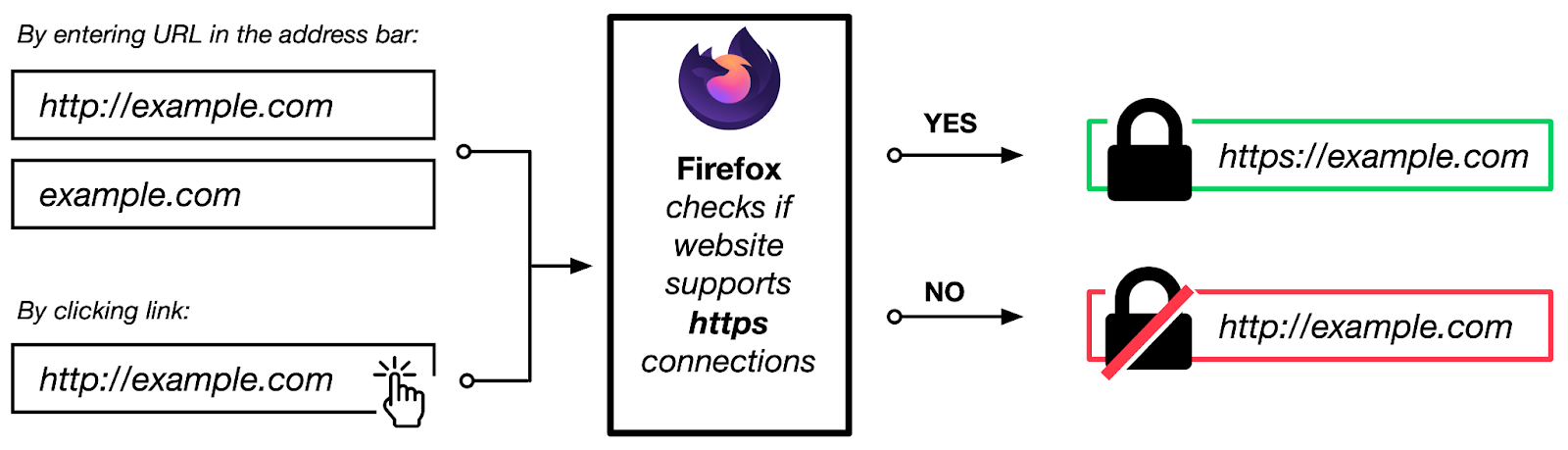
- Firefox Focus on Android: Get more private with HTTPS-only mode – In January, we added one of our strongest privacy protections, Total Cookie Protection to Firefox Focus on Android. As our simple, privacy by default companion app, we wondered what more we can do in making Firefox Focus more secure for our users and thought of our HTTPS-only mode. It felt like a natural fit for Firefox Focus. HTTPS is a technical concept and we break it down here. TL;DR: Firefox Focus for Android now automatically opts into HTTPS for the best available security and privacy – supporting life’s get in and out of moments where you may want to do quick searches with no distractions or worries.

Check out HTTPS-only mode today
Download Firefox FocusFor more on Firefox:
Digital Checklist: How to Start 2022 Right
New Year, New Privacy Protection for Firefox Focus on Android
Firefox’s mobile homepage makes it
This is a cross-post of the official security advisory. The official advisory contains a signed version with our PGP key, as well.
The Rust Security Response WG was notified that the regex crate did not
properly limit the complexity of the regular expressions (regex) it parses. An
attacker could use this security issue to perform a denial of service, by
sending a specially crafted regex to a service accepting untrusted regexes. No
known vulnerability is present when parsing untrusted input with trusted
regexes.
This issue has been assigned CVE-2022-24713. The severity of this vulnerability
is "high" when the regex crate is used to parse untrusted regexes. Other uses
of the regex crate are not affected by this vulnerability.
Overview
The regex crate features built-in mitigations to prevent denial of service
attacks caused by untrusted regexes, or untrusted input matched by trusted
regexes. Those (tunable) mitigations already provide sane defaults to prevent
attacks. This guarantee is documented and it's considered part of the crate's
API.
Unfortunately a bug was discovered in the mitigations designed to prevent untrusted regexes to take an arbitrary amount of time during parsing, and it's possible to craft regexes that bypass such mitigations. This makes it possible to perform denial of service attacks by sending specially crafted regexes to services accepting user-controlled, untrusted regexes.
Affected versions
All versions of the regex crate before or equal to 1.5.4 are affected by this
issue. The fix is include starting from regex 1.5.5.
Mitigations
We recommend everyone accepting user-controlled regexes to upgrade immediately
to the latest version of the regex crate.
Unfortunately there is no fixed set of problematic regexes, as there are practically infinite regexes that could be crafted to exploit this vulnerability. Because of this, we do not recommend denying known problematic regexes.
Acknowledgements
We want to thank Addison Crump for responsibly disclosing this to us according to the Rust security policy, and for helping review the fix.
We also want to thank Andrew Gallant for developing the fix, and Pietro Albini for coordinating the disclosure and writing this advisory.
It's my fourth Moziversary. It's been 4 years (and three days) now since I joined Mozilla as a Telemetry engineer. I joined Mozilla as a Firefox Telemetry Engineer in March 2018, I blogged three times already: 2019, 2020, 2021.
The past year continued to be challenging. Except for a brief 3-week period the Berlin office stayed close, so we all continue to work from home. I haven't met (most of) my team mates in person since 2020. I hope that in 2022 I will have the chance to meet some of them again, maybe even all at once.
I already spent some time on looking back on most of the work that happened on the Glean project last year in a This Week in Glean post, so no need to reiterate that.
For 2022 Glean will be about stabilizing, some new features and more widespread adoption across our products. I'm still excited to continue that work. We will see what else I pick up along the way.
Thank you
Thanks to my team mates Alessio, Bea, Chris, Travis, and Mike, and also thanks to the bigger data engineering team within Mozilla. And thanks to all the other people at Mozilla I work with.
Principle four of the Mozilla Manifesto states that “Individuals’ security and privacy on the internet are fundamental and must not be treated as optional.” We’ve made real progress on improving security on the Internet, but unfortunately, a draft law under discussion in the EU – the eIDAS Regulation – threatens to reverse that progress. Mozilla and many others have been raising the alarm in the last few months. Today, leading cybersecurity experts are weighing in too, in an open letter to EU lawmakers that warns of the risks that eIDAS represents to web security.
Website certificates sit at the heart of web security. When you make a connection to a web site, say “mozilla.org”, that connection is protected with TLS, but TLS only protects the connection itself; each server has a certificate which ensures that the server on the other end is “mozilla.org” and not an attacker impersonating Mozilla. Certificates are issued by Certificate Authorities (CAs), who are responsible for verifying that a given entity controls the site in question.
A malicious CA — or just one which did not have secure practices — could issue incorrect certificates which could then be used by attackers to attack people’s connections and steal their data. In order to ensure that CAs are held to high standards, each major browser and operating system maintains their own “Root Program,” which is responsible for vetting CAs to ensure that they have acceptable issuance practices, and, where necessary, removing CAs who do not adhere to those practices. For 18 years, Mozilla has operated its Root Program in the open, with published practices and where each proposed CA is considered on a public mailing list, ensuring that any stakeholder can be heard.
Proposed EU legislation threatens to disrupt this balance. Article 45.2 of the eIDAS Regulation mandates support for a new kind of certificate called a Qualified Website Authentication Certificate (QWAC). Under this regulation, QWACs would be issued by Trust Service Providers (another name for CAs), with those TSPs being approved not by the browsers but rather by the governments of individual EU member states. Browsers would be required to trust certificates issued by those TSPs regardless of whether they would meet Root Program security requirements, and without any way to remove misbehaving CAs.
This change would weaken the security of the web by preventing browsers from protecting their users from the security risks – such as identity theft and financial fraud – that a misbehaving CA can expose them too. Worse, compelled inclusion of CAs in our root program would set a precedent for action by repressive regimes. We have already seen state actors (such as Kazakhstan) try to ramp up their surveillance capacities by forcing browsers to automatically trust their CAs — a dangerous practice that browsers and civil society organizations have successfully resisted so far, but if we set the precedent that web browser can’t hold CAs to appropriate security standards that could change quickly.
Technical experts at Mozilla, the Internet Society, the Electronic Frontier Foundation, as well as European civil society organisations have all spoken out about how these requirements would be bad for the web. Today, Mozilla and the EFF are publishing a letter signed by 38 cybersecurity experts about the danger of Article 45.2 to web security and recommendations for how
A key benefit of the web platform is that it’s defined by standards, rather than by the code of a single implementation. This creates a shared platform that isn’t tied to specific hardware, a company, or a business model.
Writing high quality standards is a necessary first step to an interoperable web platform, but ensuring that browsers are consistent in their behavior requires an ongoing process. Browsers must work to ensure that they have a shared understanding of web standards, and that their implementation matches that understanding.
Interop 2022
Interop 2022 is a cross-browser initiative to find and address the most important interoperability pain points on the web platform. The end result is a public metric that will assess progress toward fixing these interoperability issues.

In order to identify the areas to include, we looked at two primary sources of data:
- Web developer feedback (e.g., through developer facing surveys including MDN’s Web DNA Report) on the most common pain points they experience.
- End user bug reports (e.g., via webcompat.com) that could be traced back to implementation differences between browsers.
During the process of collecting this data, it became clear there are two principal kinds of interoperability problems which affect end users and developers:
- Problems where there’s a relatively clear and widely accepted standard, but where implementations are incomplete or buggy.
- Problems where the standard is missing, unclear, or doesn’t match the behavior sites depend on.
Problems of the first kind have been termed “focus areas”. For these we use web-platform-tests: a large, shared testsuite that aims to ensure web standards are implemented consistently across browsers. It accepts contributions from anyone, and browsers, including Firefox, contribute tests as part of their process for fixing bugs and shipping new features.
The path to improvement for these areas is clear: identify or write tests in web-platform-tests that measure conformance to the relevant standard, and update implementations so that they pass those tests.
Problems of the second kind have been termed “investigate areas”. For these it’s not possible to simply write tests as we’re not really sure what’s necessary to reach interoperability. Such unknown unknowns turn out to be extremely common sources of developer and user frustration!
We’ll make progress here through investigation. And we’ll measure progress with more qualitative goals, e.g., working out what exact behavior sites depend on, and what can be implemented in practice without breaking the web.
In all cases, the hope is that we can move toward a future in which we know how to make these areas interoperable, update the relevant web standards for them, and measure them with tests as we do with focus areas.
Focus areas
Interop 2022 has ten new focus areas:
- Cascade Layers
- Color Spaces and Functions
- Containment
- Dialog Element
- Forms
- Scrolling
- Subgrid
- Typography and Encodings
- Viewport Units
- Web Compat
Unlike the others the Web Compat area doesn’t represent a specific technology, but is a group of specific known problems with already shipped features, where we see bugs and deviations from standards cause frequent site breakage for end users.
There are also five additional areas that have been adopted from Google and Microsoft’s “Compat 2021” effort:
- Aspect Ratio
- Flexbox
- Grid
- Sticky Positioning
- Transforms
A browser’s test pass rate in each area contributes 6% — totaling at 90% for fifteen areas — of their score of Interop 2022.
We believe these are areas where the standards are in good shape for implementation, and where improving interoperability will directly improve the lives of developers and end users.
Investigate areas
Interop 2022 has three investigate areas:
- Editing, contentEditable, and execCommand
- Pointer and Mouse Events
- Viewport Measurement
These are areas in which we often see complaints from end users, or reports of site breakage, but where the path toward solving the issues isn’t clear. Collaboration between vendors is essential to working out how to fix these problem areas, and we believe that Interop 2022 is a unique opportunity to make
Facts can be empowering during uncertain times, and perhaps there’s no fact-finding tool more accessible than the internet. But as past years have taught us, the internet can also mislead — to dangerous lengths. We know when world events are scary, the internet gets loud and overwhelming. So here are three best practices to spot misinformation online.
Always check the source, then check your source’s sources
Understanding events happening halfway around the world is tricky. Heck, understanding events happening in our own communities can be hard. After all, if we can’t see events unfold before our own eyes, then how can we really know what’s real or not?
That’s why we need to pick trustworthy news organizations that are able to send people on the ground, speak to vetted experts and produce stories that undergo a thorough fact-checking process. Another thing to consider, as journalist and fact-checking expert Kaitlyn Jakola told Mozilla: the money. Who’s funding the organization? Why do they publish certain stories?
Once you’ve decided that an organization is trustworthy, verify the web address to make sure that it’s not impersonating a real news website.
Now onto the stories themselves: Consider the sources. “See where else these experts have been quoted before,” Jakola said. “Though keep in mind this can go both ways. There are some people who make their whole career out of making media appearances and not doing any of the work. On the other hand, you have folks like Dr. Anthony Fauci who does the work and has been trusted by journalists for decades.”
Verify videos and images
From out-of-context media to Photoshopped images to deepfakes, unreliable photos and videos proliferate across social media. BBC journalist Shayan Sardarizadeh, who reports on disinformation, has this important advice: Look closer. In videos, zoom into billboards, street signs, license plates and other clues that could hint at whether a certain event really took place at the time and location as stated by the social media account that shared the footage. If anything looks off, take it as a sign to investigate further into the source of the video. Did the person take the video themselves? If not, where did this person get the footage?
The same goes for images. You can use reverse image lookup tools like the Search by Image or the TinEye Reverse Image add-on for Firefox. Even if it’s a real photo, make sure if it’s an image taken at the right time and location.
Remember: If it’s not from a trusted news source, don’t take anything at face value.
Go past the headline or caption
This may be obvious but bears repeating: Read more than the headline. An article’s title doesn’t tell the whole story. Even trusted news sources write headlines meant to capture attention in crowded social media feeds, so they emphasize the most emotional or outrageous part of a story. This can be misleading, especially if you don’t read the full article.
Going past the headline and social media caption lets you think critically about the information presented by the story. You should also check the date and the author. When was the story written? Does it have updated information? Is the author a reporter, an opinion writer or a satirist? What other stories or sources are linked to in the piece that provide more context and information?
An internet free of misinformation may be impossible, but taking a few extra steps before hitting that share button can help us get closer.
Additional resources:
If you’ve accessed the MDN website today, you probably noticed that it looks quite different. We hope it’s a good different. Let us explain!
MDN has undergone many changes in its sixteen-year history from its early beginning as a wiki to the recent migration of a static site backed by GitHub. During that time MDN grew organically, with over 45,000 contributors and numerous developers and designers. It’s no surprise that the user experience became somewhat inconsistent throughout the website.
In mid-2021 we started to think about modernizing MDN’s design, to create a clean and inviting website that makes navigating our 44,000 articles as easy as possible. We wanted to create a more holistic experience for our users, with an emphasis on improved navigability and a universal look and feel across all our pages.
A new Homepage, focused on community
The MDN community is the reason our content can be counted on to be both high quality and trustworthy. MDN content is scrutinized, discussed, and yes, in some cases argued about. Anyone can contribute to MDN, either by writing content, suggesting changes or fixing bugs.
We wanted to acknowledge and celebrate our awesome community and our homepage is the perfect place to do so.
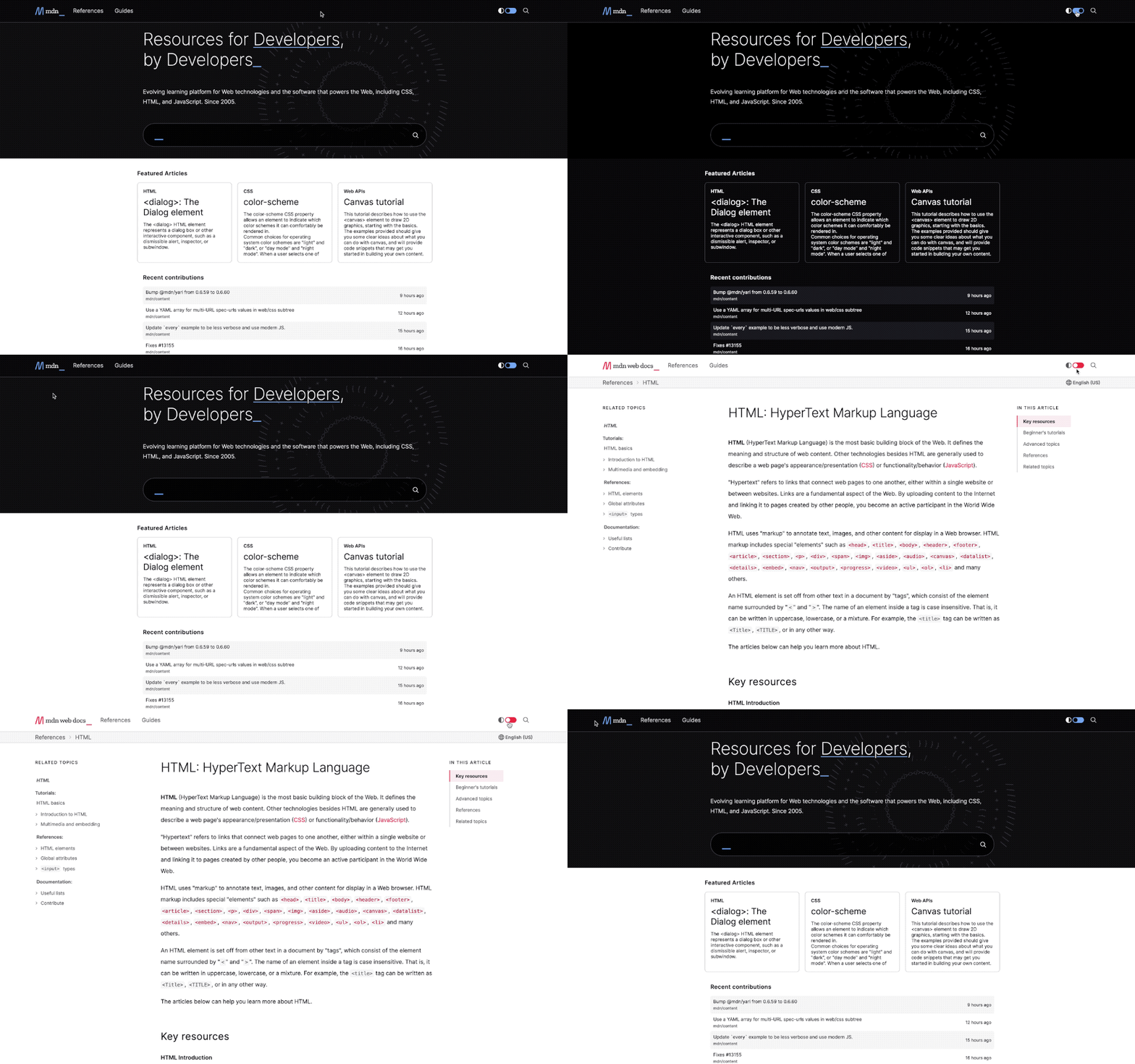
The new homepage was built with a focus on the core concepts of community and simplicity. We made an improved search a central element on the page, while also showing users a selection of the newest and most-read articles.
We will also show the most recent contributions to our GitHub content repo and added a contributor spotlight where we will highlight MDN contributors.
Redesigned article pages for improved navigation
It’s been years—five of them, in fact—since MDN’s core content presentation has received a comprehensive design review. In those years, MDN’s content has evolved and changed, with new ways of structuring content, new ways to build and write docs, and new contributors. Over time, the documentation’s look and feel had become increasingly disconnected from the way it’s read and written.
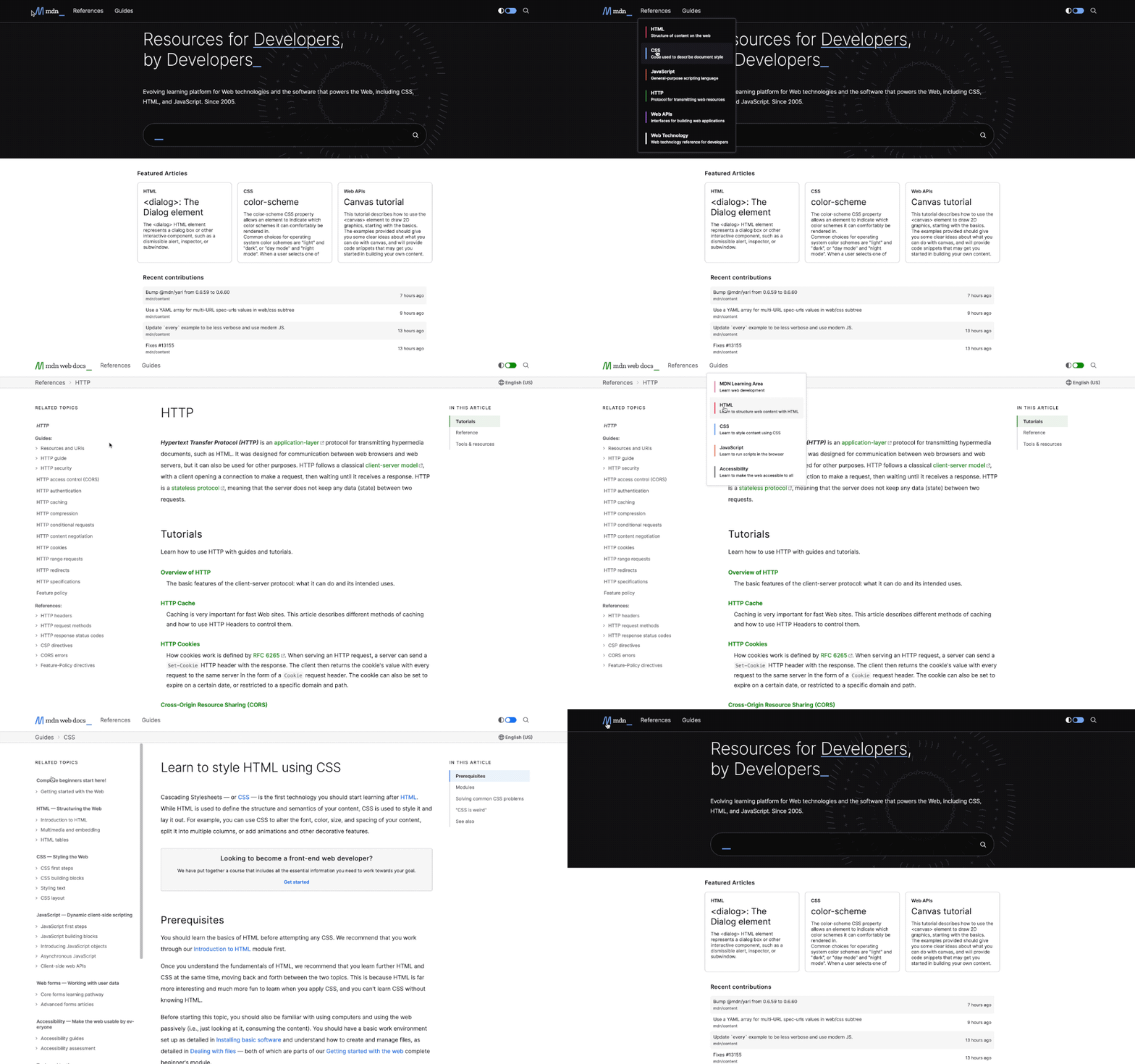
While you won’t see a dizzying reinvention of what documentation is, you’ll find that most visual elements on MDN did get love and attention, creating a more coherent view of our docs. This redesign gives MDN content its due, featuring:
- More consistent colors and theming
- Better signposting of major sections, such as HTML, CSS, and JavaScript
- Improved accessibility, such as increased contrast
- Added dark mode toggle for easy switching between modes
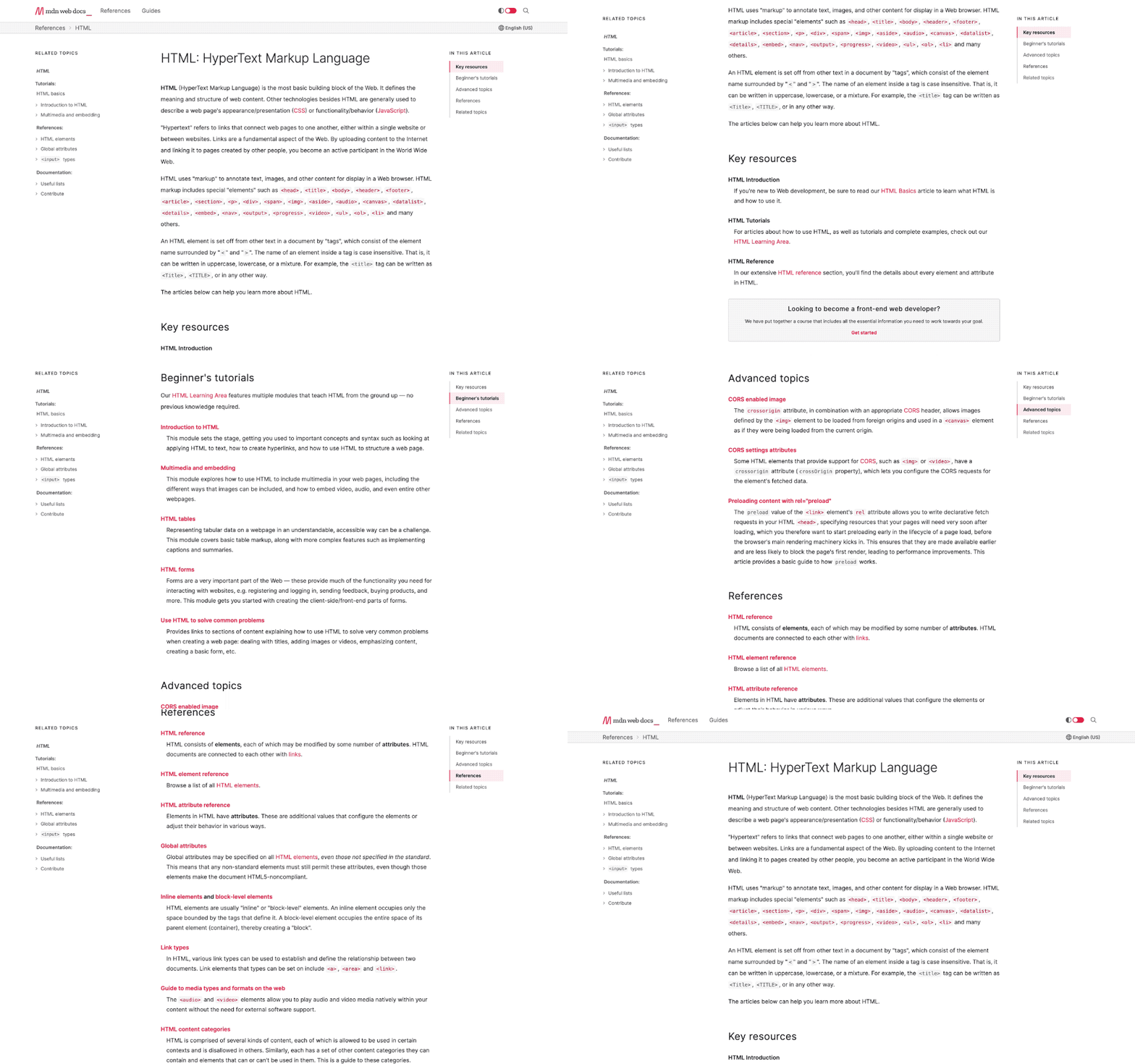
We’re especially proud of some subtle improvements and conveniences. For example, in-page navigation is always in view to show you where you are in the page as you scroll:
We’re also revisiting the way browser compatibility data appears, with better at-a-glance browser support. So you don’t have to keep version numbers in your head, we’ve put more emphasis on yes
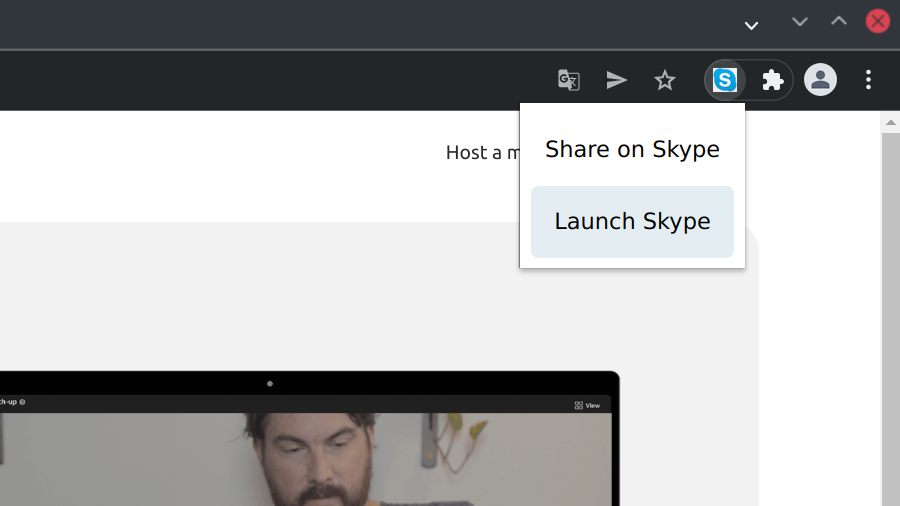
One of the most popular Chrome extensions is Skype, a browser extension designed as a helper for the Skype application. Back when I reported the issues discussed here it was listed in Chrome Web Store with more than 10 million users, at the time of writing more than 9 million users still remain. What these users apparently didn’t realize: the extension was unmaintained, with the latest release being more than four years old. All of its functionality was broken, it being reduced to a bookmark for Skype for Web.
Yet despite being essentially useless, the Skype extension remained a security and privacy risk. One particularly problematic issue allowed every website to trivially learn your identity if you were logged into your Microsoft account, affecting not merely Skype users but also users of Office 365 for example.
Last week Microsoft, after a lengthy period of communication silence, finally published an update to resolve the issues. In fact, the new release shares no functionality with the old extension and is essentially a completely new product. Hopefully this one will no longer be abandoned.
Contents
Leaking your identity
One piece of functionality still working in the Skype extension was keeping track of your identity. The extension would notice if you logged into a Microsoft account, be it on skype.com, outlook.com or any other Microsoft website. It would recognize your identity and call the following function:
setUserId: function(userId)
{
  this.currentUserId(userId);
  if (!userId)
    sessionStorage.removeItem("sxt-user");
  else
    sessionStorage.setItem("sxt-user", userId);
}
So the user identifier is stored in the extension’s session storage where the extension can look it up later. Except that, from the look of it, the extension never bothered to use this value later. And that the code above executed in the extension’s content scripts as well.
In content script context sessionStorage is no longer extension’s storage, it’s the website’s. So the website can read it out trivially:
console.log(sessionStorage["sxt-user"]);
This will produce an output like “8:live:.cid.0123456789abcdef.” And the part after “8:” is your Skype ID. That anybody can put into the Skype search to see your name and avatar. Available to each and every website you visit, because the Skype extension would run its content scripts everywhere despite only integrating with a selected few sites.
Letting anyone create conversations with you
Speaking of website integration, the Skype extension integrated with Gmail, Google Calendar, Google Inbox (yes, the service shut down in 2019), Outlook and Twitter. The idea was to add a button that, when clicked, would create a Skype conversation and add the corresponding link to your message. Except that these websites evolved, and these days the extension could only somewhat add its button on Gmail.
The configuration used for Gmail looks as following:
{
  id: "gmail",
  host: "mail.google.*",
allowGuests: After some behind-the-scenes discussions with Michael Kohler on what I could contribute at this year's FOSDEM, I ended up doing a presentation about my personal Suggestions for a Stronger Mozilla Community (video is available on the linked page). While figuring out the points I wanted to talk about and assembling my slides for that talk, I realized that one of the largest issues I'm seeing is that the Mozilla community nowadays feels very disconnected to me, like several islands, within each there is good stuff being done, but most people not knowing much about what's happening elsewhere. That has been helped a lot by a lot of interesting projects being split off Mozilla into separate projects in recent years (see e.g. Coqui, WebThings, and others) - which is often taking them off the radar of many people even though I still consider them as being part of this wider community around the Mozilla Manifesto and the Open Web.
Following the talk, I brought that topic to the Reps Weekly Call this last week (see linked video), esp. focusing on one slide from my FOSDEM talk that talks about finding some kind of communication channel to cross-connect the community. As Reps are already a somewhat cross-function community group, my hope is that a push from that direction can help getting such a channel in place - and figuring out what exactly is a good idea and doable with the resources we have available (I for example like the idea of a podcast as I like how those can be listened to while traveling, cooking, doing house work, and others things - but it would be a ton of work to organize and produce that).
Some ideas that came up in the Reps Call were for example a regular newsletter on Mozilla Discourse in the style of the MoCo-internal "tl;dr" (which Reps have access to via NDA), but as something that is public, as well as from and for the community - or maybe morphing some Reps Calls regularly into some sort of "Community News" calls that would highlight activities around the wider community, even bringing in people from those various projects/efforts there. But there may be more, maybe even better ideas out there.
To get this effort to the next level, we agreed that we'll first get the discussion rolling on a Discourse thread that I started after the meeting and then probably do a brainstorming video call. Then we'll take all that input and actually start experimenting with the formats that sound good and are practically achievable, to find what works for us the best way.
If you have ideas or other input on this, please join the conversation on Discourse - and also let us know if you can help in some form!
https://home.kairo.at/blog/2022-02/connecting_the_mozilla_community
(“This Week in Glean” is a series of blog posts that the Glean Team at Mozilla is using to try to communicate better about our work. They could be release notes, documentation, hopes, dreams, or whatever: so long as it is inspired by Glean.) All "This Week in Glean" blog posts are listed in the TWiG index (and on the Mozilla Data blog). This article is cross-posted on the Mozilla Data blog.
On February 11th, 2022 we hosted a Data Club Lightning Talk session. There I presented my small side project of setting up a minimal data pipeline & data storage for Glean.
The premise:
Can I build and run a small pipeline & data server to collect telemetry data from my own usage of tools?
To which I can now answer: Yes, it's possible. The complete ingestion server is a couple hundred lines of Rust code. It's able to receive pings conforming to the Glean ping schema, transform them and store it into an SQLite database. It's very robust, not crashing once on me (except when I created an infinite loop within it).
You can watch the lightning talk here:
Instead of creating some slides for the talk I created an interactive report. The full report can be read online.
Besides actually writing a small pipeline server this was also an experiment in trying out Irydium and Datasette to produce an interactive & live-updated data report.
Irydium is a set of tooling designed to allow people to create interactive documents using web technologies, started by wlach a while back. Datasette is an open source multi-tool for exploring and publishing data, created and maintained by simonw. Combining both makes for a nice experience, even though there's still some things that could be simplified.
My pipeline server is currently not open source. I might publish it as an example at a later point.
https://fnordig.de/2022/02/25/your-personal-glean-data-pipeline
(“This Week in Glean” is a series of blog posts that the Glean Team at Mozilla is using to try to communicate better about our work. They could be release notes, documentation, hopes, dreams, or whatever: so long as it is inspired by Glean.) All “This Week in Glean” blog posts are listed in the TWiG index (and on the Mozilla Data blog).
On February 11th, 2022 we hosted a Data Club Lightning Talk session. There I presented my small side project of setting up a minimal data pipeline & data storage for Glean.
The premise:
Can I build and run a small pipeline & data server to collect telemetry data from my own usage of tools?
To which I can now answer: Yes, it’s possible. The complete ingestion server is a couple hundred lines of Rust code. It’s able to receive pings conforming to the Glean ping schema, transform them and store it into an SQLite database. It’s very robust, not crashing once on me (except when I created an infinite loop within it).
You can watch the lightning talk here:
Instead of creating some slides for the talk I created an interactive report. The full report can be read online.
Besides actually writing a small pipeline server this was also an experiment in trying out Irydium and Datasette to produce an interactive & live-updated data report.
Irydium is a set of tooling designed to allow people to create interactive documents using web technologies, started by wlach a while back. Datasette is an open source multi-tool for exploring and publishing data, created and maintained by simonw. Combining both makes for a nice experience, even though there’s still some things that could be simplified.
My pipeline server is currently not open source. I might publish it as an example at a later point.
https://blog.mozilla.org/data/2022/02/25/this-week-in-glean-your-personal-glean-data-pipeline/
Security patches and a couple tweaks have been landed on the TenFourFox Github, so warm up your computers and prepare to rebuild. The security patches mostly cover DOM and media, but the tweaks add a UA exception for YouTube to prevent it forcing you onto the really slow main page from its "unsupported browser" page, as well as a workaround for sites using lazy-loaded images with lozad.js. (I said I scratch my own itches, and these annoyed me personally, so I fixed them.) If you have a custom UA for YouTube in your own settings, it should remain unaffected. There are also the usual updates for the HSTS and TLD lists, and a more complete fix for non-SHA-1 OCSP stapled responses.
The workaround is needed because TenFourFox doesn't support IntersectionObserver. I'm pondering whether this is the point to add a global polyfill to the browser that could potentially cover this and other deficiencies, but although it would be nice to not play whack-a-mole so much, that would have some consequences for performance and memory use over a targetted fix like this. I don't want to get too complex with having a "black list" for sites that need the polyfill you can add to, but maybe that's the least bad option. I'll do some thinking.
In case you missed it, I've always maintained that the most logical upgrade path from a PowerPC-based computer is to ... another PowerPC-based computer. SheepShaver, the well-known classic Mac OS emulator (which many of you use to run Classic apps in Leopard), is now ported to OpenPOWER, so you can run it on a POWER9-based workstation like the Raptor Talos II or Blackbird. Myself, with this port working, I've migrated almost entirely from QEMU to SheepShaver except for a few apps that still have compatibility issues. Come on in: Power ISA isn't dead, not by a long shot.
http://tenfourfox.blogspot.com/2022/02/next-update-set-for-tenfourfox.html
The Rust team has published a new version of Rust, 1.59.0. Rust is a programming language that is empowering everyone to build reliable and efficient software.
Today's release falls on the day in which the world's attention is captured by the sudden invasion of Ukraine by Putin's forces. Before going into the details of the new Rust release, we'd like to state that we stand in solidarity with the people of Ukraine and express our support for all people affected by this conflict.
If you have a previous version of Rust installed via rustup, you can get 1.59.0 with:
rustup update stable
If you don't have it already, you can get rustup
from the appropriate page on our website, and check out the
detailed release notes for 1.59.0 on GitHub.
What's in 1.59.0 stable
Inline assembly
The Rust language now supports inline assembly. This enables many applications that need very low-level control over their execution, or access to specialized machine instructions.
When compiling for x86-64 targets, for instance, you can now write:
use std::arch::asm;

// Multiply x by 6 using shifts and adds
let mut x: u64 = 4;
unsafe {
    asm!(
        "mov {tmp}, {x}",
        "shl {tmp}, 1",
        "shl {x}, 2",
        "add {x}, {tmp}",
        x = inout(reg) x,
        tmp = out(reg) _,
    );
}
assert_eq!(x, 4 * 6);
The format string syntax used to name registers in the asm! and global_asm!
macros is the same used in Rust format strings, so it should feel quite familiar
to Rust programmers.
The assembly language and instructions available with inline assembly vary according to the target architecture. Today, the stable Rust compiler supports inline assembly on the following architectures:
- x86 and x86-64
- ARM
- AArch64
- RISC-V
You can see more examples of inline assembly in Rust By Example, and find more detailed documentation in the reference.
Destructuring assignments
You can now use tuple, slice, and struct patterns as the left-hand side of an assignment.
let (a, b, c, d, e);

(a, b) = (1, 2);
[c, .., d, _] = [1, 2, 3, 4, 5];
Struct { e, .. } = Struct { e: 5, f: 3 };

assert_eq!([1, 2, 1, 4, 5], [a, b, c, d, e]);
This makes assignment more consistent with let bindings, which have long
supported the same thing. Note that destructuring assignments with operators
such as += are not allowed.
Const generics defaults and interleaving
Generic types can now specify default values for their const generics. For example, you can now write the following:
struct ArrayStorage {
    arr: [T; N],
}

impl ArrayStorage {
    fn new(a: T, b: T) -> ArrayStorage {
        ArrayStorage {
            arr: [a, b],
        }
    }
}
Previously, type parameters were required to come before all const parameters. That restriction has been relaxed and you can now interleave them.
fn cartesian_product<
    T, const N: usize,
    U, const M: usize,
    V, F
>(a: [T; N], b: [U; M], f: F) -> [[V; N]; M]
where
    F: FnMut(&T, &U) -> V
{
    // ...
}
Future incompatibility warnings
Sometimes bugs in the Rust compiler cause it to accept code that should not have been accepted. An example of this was borrows of packed struct fields being allowed in safe code.
While this happens very rarely, it can be quite disruptive when a crate used by your project has code that will no longer be allowed. In fact, you might not notice until your