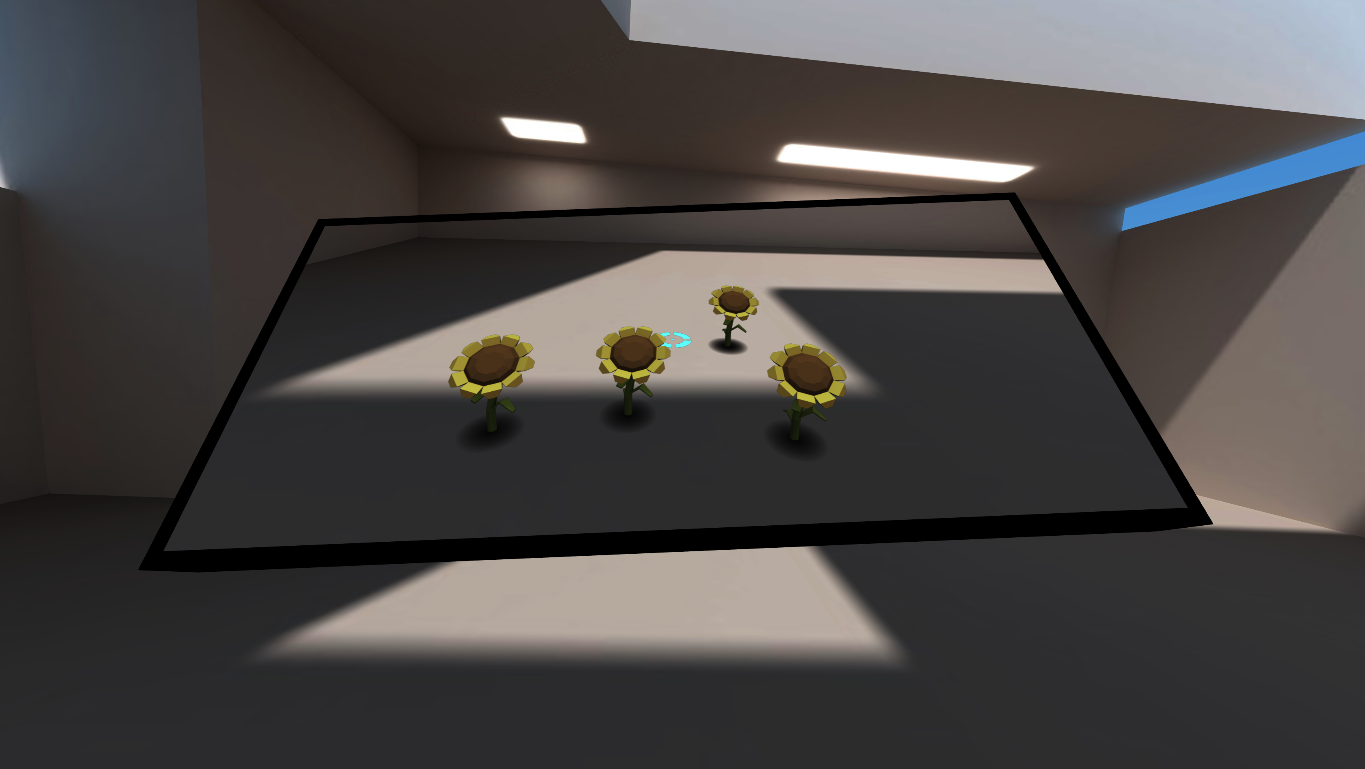
In September we released the WebXR Emulator Extension which enables testing WebXR VR applications in your desktop browser. Today we are happy to announce a new feature: AR support.
WebXR AR API
The WebXR Device API is an API which provides the interface to create immersive (VR and AR) applications on the web across a wide variety of XR devices. The WebXR 1.0 API for VR has shipped.
AR (Augmented Reality) is becoming popular thanks to the new platforms, ARCore and ARKit. You may have seen online shops which let you view their items in your room. The AR market has the potential to be huge.
The Immersive Web Working Group has been working on the WebXR API for AR to introduce a more open AR platform on the web. Chrome 81 (which was going to release March 17th but is now postponed) enables WebXR API for AR and Hit Test by default. Support in other browsers is coming soon, too.
Once it lands you will be able to play around with AR applications on compatible devices without installing anything. These are some WebXR AR examples you can try.
If you want to try on your android device now, you can use Chrome Android Beta. Install ARCore and Chrome Beta, and then access the examples above.
What the extension enables
You need AR compatible devices to play WebXR AR applications. Unfortunately you can’t run them on your desktop, even though the API is enabled, because your desktop doesn’t have the required hardware.
The WebXR Emulator Extension enables running WebXR AR applications on your desktop browser by emulating AR devices. As the following animation shows, you can test the application as if you run it on an emulated AR device in a virtual room. It includes the WebXR API polyfill so that it even works on browsers which do not natively support WebXR API for AR yet.

How to use it
- Install the WebXR Emulator Extension from extension store for your browser (Firefox, Chrome)
- Open the WebXR tab in devtool panel and select “AR” device from the device list on top of the panel
- Visit WebXR application, for example Three.js WebXR AR examples
- You will notice that the application detects you have an AR device (emulated). Click a button or other UI to enter immersive mode
- You are now in a virtual room and the application runs on the emulated device. You can move around and control the device as you want.
No change is needed on the WebXR AR application side.
Benefits
The extension resolves the difficulties of AR content creation. Similar to VR content creation, currently there are some difficulties to create AR content.
- You first need to get an AR device. You can’t start to create an application until you get one.
- Writing code on a desktop while testing and debugging on a device is annoying. And debugging on a device is harder than on desktop. Desktop browsers provide remote debugger but still hard.
- You need a place where you want to test. You need to arrange the room if you want to test placing an AR object on the floor. You need to bring a desk if you want to test placing an AR object on it.
This extension resolves these problems.
- Even if you don’t have an AR device you can start to create a WebXR AR application.
- You can do all code, test and debug on desktop. You can test and debug more easily and faster.
- You don’t need to arrange your room because you can test in a virtual room. Currently the room is empty but we plan to enable placing objects.
Although of course we strongly recommend testing on physical devices before product release, you will have a simpler workflow using the extension. You can test from the beginning to the end on desktop with the original application flow (open an application page, press button to enter immersive mode, and play AR) without any change in the application. Also you can keep using powerful desktop tools, for example screenshot capture, desktop video capture, and browser JavaScript debugger.
Virtual room advantage
Using a virtual room has another advantage in addition to the benefits I mentioned above. One of the difficulties in AR is recognizing objects in the world. For example Hit Test feature requires plane recognition in the world. Upcoming Lighting estimation feature requires lighting detection in the world. Generally AR devices have special cameras, chips, or software to smoothly solve this complex problem. But the extension doesn’t need them because it knows everything in a virtual room. So that we can easily add new AR features support when they are ready.
What’s next for WebXR AR?
- There are upcoming AR APIs, e.g. Anchor API and DOM Overlay API. We keep adding new APIs when they are ready
- Currently we emulate only one phone type AR device. We plan to incorporate more AR devices.
- Currently the virtual room is empty. We plan to enable placing objects.
- We keep improving the usability.
We would love your feedback, feature requests, and bug reports. We are happy if you join us at the GitHub project.
And thanks to our Hello WebXR project and the asset author Diego. The very nice room asset is based on it.