In Firefox 70 we changed how pixels get to the screen on macOS. This allows us to do less work per frame when only small parts of the screen change. As a result, Firefox 70 drastically reduces the power usage during browsing.
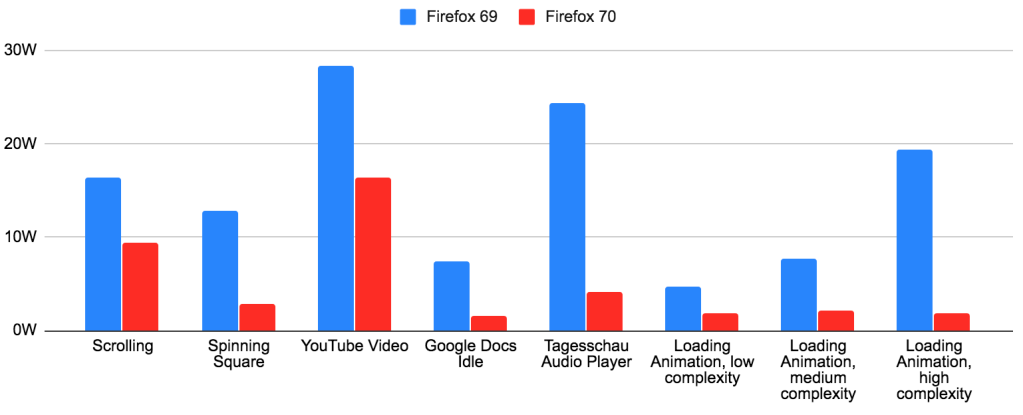
In short, Firefox 70 improves power usage by 3x or more for many use cases. The larger the Firefox window and the smaller the animation, the bigger the difference. Users have reported much longer battery life, cooler machines and less fan spinning.
I’m seeing a huge improvement over here too (2015 13'' MacBook Pro with scaled resolutions on internal display as well as external 4K display). Prior to this update I literally couldn’t use Firefox because it would spin my fans way up and slow down my whole computer. Thank you, I’m very happy to finally see Core Animation being implemented.
Charlie Siegel
After so many years, I have been able to use Firefox on my Mac – I used to test every Firefox release, and nothing had worked in the past.
Vivek Kapoor
I usually try nightly builds every few weeks but end up going back to Edge Chromium or Chrome for speed and lack of heat. This makes my 2015 mbp without a dedicated dGPU become a power sipper compared to earlier builds.
atiensivu
Read on for the technical details behind these changes.
Technical Details
Let’s take a brief look at how the Firefox compositing pipeline works. There are three major steps to getting pixels on the screen:
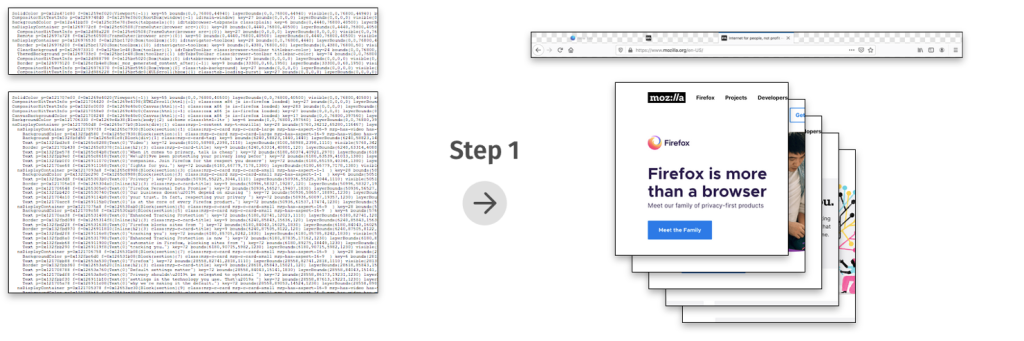


The improvements in Firefox 70 were the result of reducing the work in steps 2 and 3: In both steps, we were doing work for the entire window, even if only a small part of the window was updating.
Why was our compositor always redrawing the entire window? The main reason was the lack of convenient APIs on macOS for partial compositing.
The Firefox compositor on macOS makes use of hardware acceleration via OpenGL. Apple’s OpenGL documentation recommends the following method of getting OpenGL content to the screen: You create an NSOpenGLContext, you attach it to an NSView (using -[NSOpenGLContext setView:]), and then you render to the context’s default framebuffer, filling the entire framebuffer with fresh content. At the end of each frame, you call -[NSOpenGLContext flushBuffer]. This updates the screen with your rendered content.
The crucial limitation here is that flushBuffer gives you no way to indicate which parts of the OpenGL context have changed. This is a limitation which does not exist on Windows: On Windows, the corresponding API has full support for partial redraws.
Every Firefox window contains one OpenGL context, which covers the entire window. Firefox 69 was using the API described above. So we were always redrawing the whole window on every change, and the window manager was always copying our entire window to the screen on every change. This turned out to be a problem despite the fact that these draws were fully hardware accelerated.
Enter Core Animation
Core Animation is the name of an Apple framework which lets you create a tree of layers (CALayer). These layers usually contain textures with some pixel content. The layer tree defines the positions, sizes, and order of the layers within the window. Starting with macOS 10.14, all windows use Core Animation by default, as a way to share their rendering with the window manager.
So, does Core Animation have an API which lets us indicate which areas inside an OpenGL context have changed? No, unfortunately it does not. However, it provides a number of other useful capabilities, which are almost as good and in some cases even better.
First and foremost, Core Animation lets us share a GPU buffer with the window manager in a way that minimizes copies: We can create an IOSurface and render to it directly using OpenGL by treating it as an offscreen framebuffer, and we can assign that IOSurface to a CALayer. Then, when the window manager composites that CALayer onto the screen surface, it will read directly from our GPU buffer with no additional copies. (IOSurface is the macOS API which provides a handle to a GPU buffer that can be shared between processes. It’s worth noting that the ability to assign an IOSurface to the CALayer contents property is not properly documented. Nevertheless, all major browsers on macOS now make use of this API.)
Secondly, Core Animation lets us display OpenGL rendering in multiple places within the window at the same time and update it in a synchronized fashion. This was not possible with the old API we were using: Without Core Animation, we would have needed to create multiple NSViews, each with their own NSOpenGLContext, and then call flushBuffer on each context on every frame. There would have been no guarantee that the rendering from the different contexts would end up on the screen at the same time. But with Core Animation, we can just group updates from multiple layers into the same CATransaction, and the screen will be updated atomically.
Having multiple layers allows us to update just parts of the window: Whenever a layer is mutated in any way, the window manager will redraw an area that includes the bounds of that layer, rather than the bounds of the entire window. And we can mark individual layers as opaque or transparent. This cuts down the window manager’s work some more for areas of the window that only contain opaque layers. With the old API, if any part of our OpenGL context’s default framebuffer was transparent, we needed to make the entire OpenGL context transparent.
Lastly, Core Animation allows us to move rendered content around in the window cheaply. This is great for efficient scrolling. (Our current compositor does not yet make use of this capability, but future work in WebRender will take advantage of it.)
The Firefox Core Animation compositor
How do we make use of those capabilities in Firefox now?
The most important change is that Firefox is now in full control of its swap chain. In the past, we were asking for a double-buffered OpenGL context, and our rendering to the default framebuffer was relying on the built-in swap chain. So on every frame, we could guess that the existing framebuffer content was probably two frames old, but we could never know for sure. Because of this, we just ignored the framebuffer content and re-rendered the entire buffer. In the new world, Firefox renders to offscreen buffers of its own creation and it knows exactly which pixels of each buffer need to be updated and which pixels still contain valid content. This allows us to reduce the work in step 2 drastically: Our compositor can now finally do partial redraws. This change on its own is responsible for most of the power savings.
In addition, each Firefox window is now “tiled” into multiple square Core Animation layers whose contents are rendered separately. This cuts down on work in step 3.
And finally, Firefox windows are additionally split into transparent and opaque parts: Transparent CALayers cover the “vibrant” portions of the window, and opaque layers cover the rest of the window. This saves some more work in step 3. It also means that the window manager does not need to redraw the vibrancy blur effect unless something in the vibrant part of the window changes.
The rendering pipeline in Firefox on macOS now looks as follows:
Step 1: Firefox draws pixels into “Gecko layers”.
Step 2: For each square CALayer tile in the window, the Firefox compositor combines the relevant Gecko layers to redraw the changed parts of that CALayer.
Step 3: The operating system’s window manager assembles all updated windows and CALayers on the screen to produce the screen content.
You can use the Quartz Debug app to visualize the improvements in step 3. Using the “Flash screen updates” setting, you can see that the window manager’s repaint area in Firefox 70 (on the right) is a lot smaller when a tab is loading in the background:
And in this screenshot with the “Show opaque regions” feature, you can see that Firefox now marks most of the window as opaque (green):

Future Work
We are planning to build onto this work to improve other browsing use cases: Scrolling and full screen video can be made even more efficient by using Core Animation in smarter ways. We are targeting WebRender for these further optimizations. This will allow us to ship WebRender on macOS without a power regression.
Acknowledgements
We implemented these changes with over 100 patches distributed among 28 bugzilla bugs. Matt Woodrow reviewed the vast majority of these patches. I would like to thank everybody involved for their hard work. Thanks to Firefox contributor Mark, who identified the severity of this problem early on, provided sound evidence, and was very helpful with testing. And thanks to all the other testers that made sure this change didn’t introduce any bugs, and to everyone who followed along on Bugzilla.
During the research phase of this project, the Chrome source code and the public Chrome development notes turned out to be an invaluable resource. Chrome developers (mostly Chris Cameron) had already done the hard work of comparing the power usage of various rendering methods on macOS. Their findings accelerated our research and allowed us to implement the most efficient approach right from the start.
Questions and Answers
- Are there similar problems on other platforms?
- Firefox uses partial compositing on some platforms and GPU combinations, but not on all of them. Notably, partial compositing is enabled in Firefox on Windows for non-WebRender, non-Nvidia systems on reasonably recent versions of Windows, and on all systems where hardware acceleration is off. Firefox currently does not use partial compositing on Linux or Android.
- OpenGL on macOS is deprecated. Would Metal have posed similar problems?
- In some ways yes, in other ways no. Fundamentally, in order to get Metal content to the screen, you have to use Core Animation: you need a CAMetalLayer. However, there are no APIs for partial updates of CAMetalLayers either, so you’d need to implement a solution with smaller layers similarly to what was done here. As for Firefox, we are planning to add a Metal back-end to WebRender in the future, and stop using OpenGL on machines that support Metal.
- Why was this only a problem now? Did power usage get worse in Firefox 57?
- As far as we are aware, the power problem did not start with Firefox Quantum. The OpenGL compositor has always been drawing the entire window ever since Firefox 4, which was the first version of Firefox that came with hardware acceleration. We believe this problem became more serious over time simply because screen resolutions increased. Especially the switch to retina resolutions was a big jump in the number of pixels per window.
- What do other browsers do?
- Chrome’s compositor tries to use Core Animation as much as it can and has a fallback path for some rare unhandled cases. And Safari’s compositor is entirely Core Animation based; Safari basically skips step 2.
- Why does hardware accelerated rendering have such a high power cost per pixel?
- The huge degree to which these changes affected power usage surprised us. We have come up with some explanations, but this question probably deserves its own blog post. Here’s a summary: At a low level, the compositing work in step 2 and step 3 is just copying of memory using the GPU. Integrated GPUs share their L3 cache and main memory with the CPU. So they also share the memory bandwidth. Compositing is mostly memory bandwidth limited: The destination pixels have to be read, the source texture pixels have to be read, and then the destination pixel writes have to be pushed back into memory. A screen worth of pixels takes up around 28MB at the default scaled retina resolution (1680x1050@2x). This is usually too big for the L3 cache, for example the L3 cache in my machine is 8MB big. So each screenful of one layer of compositing takes up 3 * 28MB of memory bandwidth. My machine has a memory bandwidth of ~28GB/s, so each screenful of compositing takes about 3 milliseconds. We believe that the GPU runs at full frequency while it waits for memory. So you can estimate the power usage by checking how long the GPU runs each frame.
- How does this affect WebRender’s architecture? Wasn’t the point of WebRender to redraw the entire window every frame?
- These findings have informed substantial changes to WebRender’s architecture. WebRender is now adding support for native layers and caching, so that unnecessary redraws can be avoided. WebRender still aims to be able to redraw the entire window at full frame rate, but it now takes advantage of caching in order to reduce power usage. Being able to paint quickly allows more flexibility and fewer performance cliffs when making layerization decisions.
- Details about the measurements in the chart:
- These numbers were collected from test runs on a Macbook Pro (Retina, 15-inch, Early 2013) with an Intel HD Graphics 4000, on macOS 10.14.6, with the default Firefox window size of a new Firefox profile, at a resolution of 1680x1050@2x, at medium display brightness. The numbers come from the PKG measurement as displayed by the Intel Power Gadget app. The power usage in the idle state on this machine is 3.6W, so we subtracted the 3.6W baseline from the displayed values for the numbers in the chart in order to get a sense of Firefox’s contribution. Here are the numbers used in the chart (after the subtraction of the 3.6W idle baseline):
- Scrolling: before: 16.4W, after: 9.4W
- Spinning Square: before: 12.8W, after: 2.9W
- YouTube Video: before: 28.4W, after: 16.4W
- Google Docs Idle: before: 7.4W, after: 1.6W
- Tagesschau Audio Player: before: 24.4W, after: 4.1W
- Loading Animation, low complexity: before: 4.7W, after: 1.8W
- Loading Animation, medium complexity: before: 7.7W, after: 2.1W
- Loading Animation, high complexity: before: 19.4W, after: 1.8W
- Details on the scenarios:
- Scrolling: Scrolling up and down on mozilla.org
- Spinning Square: A simple test page
- YouTube Video: A 720p60Hz YouTube video, in window mode
- Google Docs Idle: Blinking caret in a text document on Google Docs
- Tagesschau Audio player: Playing audio on tagesschau.de (unblock audio autoplay when testing)
- Loading Animation: The throbber animation in the Firefox tab bar, running with different foreground tabs:
- Low complexity: mozilla.org
- Medium complexity: tagesschau.de
- High complexity: Google Docs
- Some users have reported even higher impacts from these changes than what our test machine showed. There seem to be large variations in power usage from compositing on different Mac models.
- These numbers were collected from test runs on a Macbook Pro (Retina, 15-inch, Early 2013) with an Intel HD Graphics 4000, on macOS 10.14.6, with the default Firefox window size of a new Firefox profile, at a resolution of 1680x1050@2x, at medium display brightness. The numbers come from the PKG measurement as displayed by the Intel Power Gadget app. The power usage in the idle state on this machine is 3.6W, so we subtracted the 3.6W baseline from the displayed values for the numbers in the chart in order to get a sense of Firefox’s contribution. Here are the numbers used in the chart (after the subtraction of the 3.6W idle baseline):