Well now, there’s no better way to usher out the first month of the year than with a great new Firefox release. It’s winter for many of us, but that means more at-home time to install Firefox version 65, and check out some of the great new browser and web platform features we’ve included within. Unless you’d rather be donning your heavy coat and heading outside to grit the driveway, that is (or going to the beach, in the case of some of our Australian chums).
A good day for DevTools
Firefox 65 features several notable DevTools improvements. The highlights are as follows:
CSS Flexbox Inspector
At Mozilla, we believe that new features of the web platform are often best understood with the help of intuitive, visual tools. That’s why our DevTools team has spent the last few years getting feedback from the field, and prioritizing innovative new tooling to allow web devs and designers to inspect, edit, understand, and tinker with UI features. This drive led to the release of the CSS Grid Inspector, Font Editor, and Shape Path Editor.
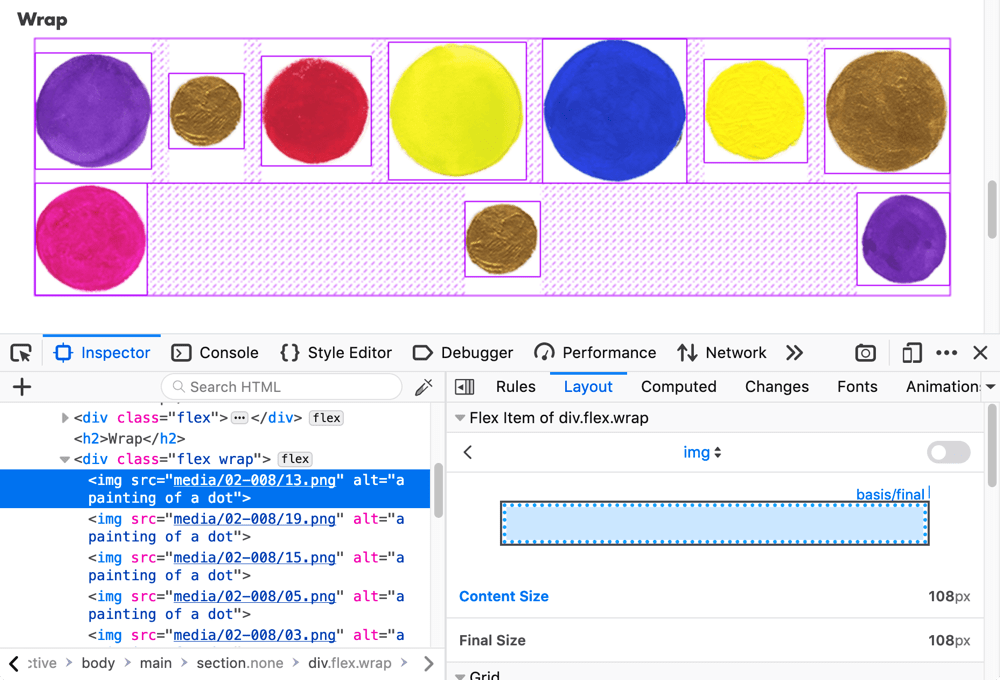
Firefox 65 sees these features joined by a new friend — the CSS Flexbox Inspector — which allows you to easily visualize where your flex containers and items are sitting on the page and how much free space is available between them, what each flex item’s default and final size is, how much they are being shrunk or grown, and more.
Changes panel
When you’re done tweaking your site’s interface using these tools, our new Changes panel tracks and summarizes all of the CSS modifications you’ve made during the current session, so you can work out what you did to fix a particular issue, and can copy and paste your fixes back out to your code editor.

Advanced color contrast ratio
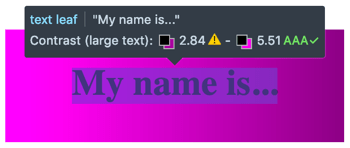
We have also added an advanced color contrast ratio display. When using the Accessibility Inspector’s accessibility picker, hovering over the text content of an element displays its color contrast ratio, even if its background is complex (for example a gradient or detailed image), in which case it shows a range of color contrast values, along with a WCAG rating.
JavaScript debugging improvements
Firefox 65 also features some nifty JavaScript debugging improvements:
- When displaying stack traces (e.g. in console logs or with the JavaScript debugger), calls to framework methods are identified and collapsed by default, making it easier to home in on your code.
- In the same fashion as native terminals, you can now use reverse search to find entries in your JavaScript console history (F9 (Windows/Linux) or Ctrl + R (macOS) and type a search term, followed by Ctrl + R/Ctrl + S to toggle through results).
- The JavaScript console’s
$0shortcut (references the currently inspected element on the page) now has autocomplete available, so for example you could type$0.teto get a suggestion of$0.textContentto reference text content.
Find out more
- You can find about these features in more detail and read about other incremental improvements in the DevTools section of Firefox 65 for developers.
- If you’d like to know more about how the Firefox DevTools are created, check out Victoria Wang’s Designing the Flexbox Inspector post.
CSS platform improvements
A number of CSS features have been added to Gecko in 65. The highlights are described below.
CSS environment variables
CSS environment variables are now supported, accessed via env() in stylesheets. These variables are usable in any part of a property value or descriptor, and are scoped globally to a particular document, whereas custom properties are scoped to the element(s) they are declared on. These were initially provided by the iOS browser to allow developers to place their content in a safe area of the viewport, i.e., away from the area covered by the notch.
body {
  padding:
    env(safe-area-inset-top, 20px)
    env(safe-area-inset-right, 20px)
    env(safe-area-inset-bottom, 20px)
    env(safe-area-inset-left, 20px);
}
steps() animation timing function
We’ve added the steps() CSS animation timing function, along with the related jump-* keywords. This allows you to easily create animations that jump in a series of equidistant steps, rather than a smooth animation.
As an example, we might previously have added a smooth animation to a DOM node like this:
.smooth {
  animation: move-across 2s infinite alternate linear;
}
Now we can make the animation jump in 5 equal steps, like this:
.stepped {
  animation: move-across 2s infinite alternate steps(5, jump-end);
}Note: The steps() function was previously called frames(), but some details changed, and the CSS Working Group decided to rename it to something less confusing.
break-* properties
New break-before, break-after, and break-inside CSS properties have been added, and the now-legacy page-break-* properties have been aliased to them. These properties are part of the CSS Fragmentation spec, and set how page, column, or region breaks should behave before, after, or inside a generated box.
For example, to stop a page break occurring inside a list or paragraph:
ol, ul, p {
  break-inside: avoid;
}
JavaScript/APIs
Firefox 65 brings many updates to JavaScript/APIs.
Readable streams
Readable streams are now enabled by default, allowing developers to process data chunk by chunk as it arrives over the network, e.g. from a fetch() request.
You can find a number of ReadableStream demos on GitHub.
Relative time formats
The Intl.RelativeTimeFormat constructor allows you to output strings describing localized relative times, for easier human-readable time references in web apps.
A couple of examples, to sate your appetite:
let rtf1 = new Intl.RelativeTimeFormat('en', { style: 'narrow' });
console.log(rtf1.format(2, 'day')); // expected output: "in 2 days"

let rtf2 = new Intl.RelativeTimeFormat('es', { style: 'narrow' });
console.log(rtf2.format(2, 'day')); // expected output: "dentro de 2 d'ias"
Storage Access API
The Storage Access API has been enabled by default, providing a mechanism for embedded, cross-origin content to request access to client-side storage mechanisms it would normally only have access to in a first-party context. This API features a couple of simple methods, hasStorageAccess() and requestStorageAccess(), which respectively check and request storage access. For example:
document.requestStorageAccess().then(
  () => { console.log('access granted') },
  () => { console.log('access denied') }
);
Other honorable mentions
- The
globalThiskeyword has been added, for accessing the global object in whatever context you are in. This avoids needing to use a mix ofwindow,self,global, orthis, depending on where a script is executing (e.g. a webpage, a worker, or Node.js). - The
FetchEventobject’sreplacesClientIdandresultingClientIdproperties are now implemented — allowing you to monitor the origin and destination of a navigation. - You can now set a referrer policy on scripts applied to your documents (e.g. via a
referrerpolicyattribute on
https://hacks.mozilla.org/2019/01/firefox-65-webp-flexbox-inspector-new-tooling/