We all want to build the next (or perhaps the first) great Augmented Reality app. But there be dragons! The space is new and not well defined. There aren’t any AR apps that people use every day to serve as starting points or examples. Your new ideas have to compete against an already very high quality bar of traditional 2d apps. And building a new app can be expensive, especially for native app environments. This makes AR apps still somewhat uncharted territory, requiring a higher initial investment of time, talent and treasure.
But this also creates a sense of opportunity; a chance to participate early before the space is fully saturated.
From our point of view the questions are: What kinds of tools do artists, developers, designers, entrepreneurs and creatives of all flavors need to be able to easily make augmented reality experiences? What kinds of apps can people build with tools we provide?
For example: Can I watch Trevor Noah on the Daily Show this evening, and then release an app tomorrow that is a riff on a joke he made the previous night? A measure of success is being able to speak in rich media quickly and easily, to be a timely part of a global conversation.
With Blair MacIntyre‘s help I wrote an experiment to play-test a variety of ideas exploring these questions. In this comprehensive post-mortem I’ll review the app we made, what we learned and where we’re going next.
Finding “good” use cases
To answer some of the above questions, we started out surveying AR and VR developers, asking them their thoughts and observations. We had some rules of thumb. What we looked for were AR use cases that people value, that are meaningful enough, useful enough, make enough of a difference, that they might possibly become a part of people’s lives.
Existing AR apps also provided inspiration. One simple AR app I like for example is AirMeasure, which is part of a family of similar apps such as the Augmented Reality Measuring Tape. I use it once or twice a month and while not often, it’s incredibly handy. It’s an app with real utility and has 6500 reviews on the App Store – so there’s clearly some appetite already.

Sean White, Mozilla’s Chief R&D Officer, has a very specific definition for an MVP (minimum viable product). He asks: What would 100 people use every day?
When I hear this, I hear something like: What kind of experience is complete, compelling, and useful enough, that even in an earliest incarnation it captures a core essential quality that makes it actually useful for 100 real world people, with real world concerns, to use daily even with current limitations? Shipping can be hard, and finding those first users harder.
Browser-based AR
New Pixel phones, iPhones and other emerging devices such as the Magic Leap already support Augmented Reality. They report where the ground is, where walls are, and other kinds of environment sensing questions critical for AR. They support pass-through vision and 3d tracking and registration. Emerging standards, notably WebXR, will soon expose these powers to the browser in a standards- based way, much like the way other hardware features are built and made available in the browser.
Native app development toolchains are excellent but there is friction. It can be challenging to jump through the hoops required to release a product across several different app stores or platforms. Costs that are reasonable for a AAA title may not be reasonable for a smaller project. If you want to knock out an app tonight for a client tomorrow, or post an app as a response to an article in the press or a current event— it can take too long.
With AR support coming to the browser there’s an option now to focus on telling the story rather than worrying about the technology, costs and distribution. Browsers historically offer lower barriers to entry, and instant deployment to millions of users, unrestricted distribution and a sharing culture. Being able to distribute an app at the click of a link, with no install, lowers the activation costs and enables virality. This complements other development approaches, and can be used for rapid prototyping of ideas as well.
ARPersist – the idea
In our experiment we explored what it would be like to decorate the world with virtual post-it notes. These notes can be posted from within the app, and they stick around between play sessions. Players can in fact see each other, and can see each other moving the notes in real time. The notes are geographically pinned and persist forever.
Using our experiment, a company could decorate their office with hints about how the printers work, or show navigation breadcrumbs to route a bewildered new employee to a meeting. Alternatively, a vacationing couple could walk into an AirBNB, open an “ARBNB” app (pardon the pun) and view post-it notes illuminating where the extra blankets are or how to use the washer.
We had these kinds of aspirational use case goals for our experiment:
- Office interior navigation: Imagine an office decorated with virtual hints and possibly also with navigation support. Often a visitor or corporate employee shows up in an unfamiliar place — such as a regional Mozilla office or a conference hotel or even a hospital – and they want to be able to navigate that space quickly. Meeting rooms are on different floors — often with quirky names that are unrelated to location. A specific hospital bed with a convalescing friend or relative could be right next door or up three flights and across a walkway. I’m sure we’ve all struggled to find bathrooms, or the cafeteria, or that meeting room. And even when we’ve found what we want – how does it work, who is there, what is important? Take the simple example of a printer. How many of us have stood in front of a printer for too long trying to figure out how to make a single photocopy?
- Interactive information for house guests: Being a guest in a person’s home can be a lovely experience. AirBNB does a great job of fostering trust between strangers. But is there a way to communicate all the small details of a new space? How to use the Nest sensor, how to use the fancy dishwasher? Where is the spatula? Where are extra blankets? An AirBNB or shared rental could be decorated with virtual hints. An owner walks around the space and posts up virtual post-it notes attached to some of the items, indicating how appliances work. A machine-assisted approach also is possible – where the owner walks the space with the camera active, opens every drawer and lets the machine learning algorithm label and memorize everything. Or, imagine a real-time variation where your phone tells you where the cat is, or where your keys are. There’s a collaborative possibility as well here, a shared journal, where guests could leave hints for each other — although this does open up some other concerns which are tricky to navigate – and hard to address.
- Public retail and venue navigation: These ideas could also work in a shopping scenario to direct you to the shampoo, or in a scenario where you want to pinpoint friends in a sports coliseum or concert hall or other visually noisy venue.
ARPersist – the app
Taking these ideas we wrote a standalone app for the iPhone 6S or higher — which you can try at arpersist.glitch.me and play with the source code at https://github.com/anselm/arpersist>github.com/anselm/arpersist.
Here’s a short video of the app running, which you might have seen some days ago in my tweet:
And more detail on how to use the app if you want to try it yourself:
Here’s an image of looking at the space through the iPhone display:

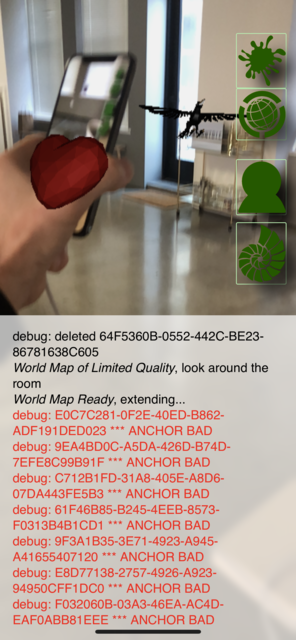
And an image of two players – each player can see the other player’s phone in 3d space and a heart placed on top of that in 3d:
You’ll need the WebXR Viewer for iOS, which you can get on the iTunes store. (WebXR standards are still maturing so this doesn’t yet run directly in most browsers.)
This work is open source, it’s intended to be re-used and intended to be played with, but also — because it works against non-standard browser extensions — it cannot be treated as something that somebody could build a commercial product with (yet).
The videos embedded above offer a good description: Basically, you open ARPersist, (using the WebXR viewer linked above on an iPhone 6s or higher), by going to the URL (arpersist.glitch.me). This drops you into a pass-through vision display. You’ll see a screen with four buttons on the right. The “seashell” button at the bottom takes you to a page where you can load and save maps. You’ll want to “create an anchor” and optionally “save your map”. At this point, from the main page, you can use the top icon to add new features to the world. Objects you place are going to stick to the nearest floor or wall. If you join somebody else’s map, or are at a nearby geographical location, you can see other players as well in real time.
This app features downloadable 3d models from Sketchfab. These are the assets I’m using:
What went well
Coming out of that initial phase of development I’ve had many surprising realizations, and even a few eureka moments. Here’s what went well, which I describe as essential attributes of the AR experience:
- Webbyness. Doing AR in a web app is very very satisfying. This is good news because (in my opinion) mobile web apps more typically reflects how developers will create content in the future. Of course there are questions still such as payment models and difficulty in encrypting or obfuscating art assets if those assets are valuable. For example a developer can buy a 3d model off the web and trivially incorporate that model into a web app but it’s not yet clear how to do this without violating licensing terms around re-distribution and how to compensate creators per use.
- Hinting. This was a new insight. It turns out semantic hints are critical, both for intelligently decorating your virtual space with objects but also for filtering noise. By hints I mean being able to say that the intent of a virtual object is that it should be shown on the floor, or attached to a wall, or on top of the watercooler. There’s a difference between simply placing something in space and understanding why it belongs in that position. Also, what quickly turns up is an idea of priorities. Some virtual objects are just not as important as others. This can depend on the user’s context. There are different layers of filtering, but ultimately you have some collection of virtual objects you want to render, and those objects need to argue amongst themselves which should be shown where (or not at all) if they collide. The issue isn’t the contention resolution strategy — it’s that the objects themselves need to provide rich metadata so that any strategies can exist. I went as far as classifying some of the kinds of hints that would be useful. When you make a new object there are some toggle fields you can set to help with expressing your intention around placement and priority.
- Server/Client models. In serving AR objects to the client a natural client server pattern emerges. This model begins to reflect a traditional RSS pattern — with many servers and many clients. There’s a chance here to try and avoid some of the risky concentrations of power and censorship that we see already with existing social networks. This is not a new problem, but an old problem that is made more urgent. AR is in your face — and preventing centralization feels more important.
- Login/Signup. Traditional web apps have a central sign-in concept. They manage your identity for you, and you use a password to sign into their service. However, today it’s easy enough to push that back to the user.
This gets a bit geeky — but the main principle is that if you use modern public key cryptography to self-sign your own documents, then a central service is not needed to validate your identity. Here I implemented a public/private keypair system similar to Metamask. The strategy is that the user provides a long phrase and then I use Ian Coleman’s Mnemonic Code Converter bip39 to turn that into a public/private keypair. (In this case, I am using bitcoin key-signing algorithms.)
In my example implementation, a given keypair can be associated with a given collection of objects, and it helps prune a core responsibility away from any centralized social network. Users self-sign everything they create.
- 6DoF control. It can be hard to write good controls for translating, rotating and scaling augmented reality objects through a phone. But towards the end of the build I realized that the phone itself is a 6dof controller. It can be a way to reach, grab, move and rotate — and vastly reduce the labor of building user interfaces. Ultimately I ended up throwing out a lot of complicated code for moving, scaling and rotating objects and replaced it simply with a single power, to drag and rotate objects using the phone itself. Stretching came for free — if you tap with two fingers instead of one finger then your finger distance is used as the stretch factor.
- Multiplayer. It is pretty neat having multiple players in the same room in this app. Each of the participants can manipulate shared objects, and each participant can be seen as a floating heart in the room — right on top of where their phone is in the real world. It’s quite satisfying. There wasn’t a lot of shared compositional editing (because the app is so simple) but if the apps were more powerful this could be quite compelling.
Challenges that remain
We also identified many challenges. Here are some of the ones we faced:
- Hardware. There’s a fairly strong signal that Magic Leap or Hololens will be better platforms for this experience. Phones just are not a very satisfying way to manipulate objects in Augmented Reality. A logical next step for this work is to port it to the Magic Leap or the Hololens or both or other similar emerging hardware.
- Relocalization. One serious, almost blocker problem had to do with poor relocalization. Between successive runs I couldn’t reestablish where the phone was. Relocalization, my device’s ability to accurately learn its position and orientation in real world space, was unpredictable. Sometimes it would work many times in a row when I would run the app. Sometimes I couldn’t establish relocalization once in an entire day. It appears that optimal relocalization is demanding, and requires very bright sunlight, stable lighting conditions and jumbled sharp edge geometry. Relocalization on passive optics is too hard and it disrupts the feeling of continuity — being able to quit the app and restart it, or enabling multiple people to share the same experience from their own devices. I played with a work-around, which was to let users manually relocalize — but I think this still needs more exploration.
This is ultimately a hardware problem. Apple/Google have done an unbelievable job with pure software but the hardware is not designed for the job. Probably the best short-term answer is to use a QRCode. A longer term answer is to just wait a year for better hardware. Apparently next-gen iPhones will have active depth sensors and this may be an entirely solved problem in a year or two. (The challenge is that we want to play with the future before it arrives — so we do need some kind of temporary solution for now.)
- Griefing. Although my test audience was too small to have any griefers — it was pretty self-evident that any canonical layer of reality would instantly be filled with graphical images that could be offensive or not safe for work (NSFW). We have to find a way to allow for curation of layers. Spam and griefing are important to prevent but we don’t want to censor self-expression. The answer here was to not have any single virtual space but to let people self select who they follow. I could see roles emerging for making it easy to curate and distribute leadership roles for curation of shared virtual spaces — similar to Wikipedia.
- Empty spaces. AR is a lonely world when there is nobody else around. Without other people nearby it’s just not a lot of fun to decorate space with virtual objects at all. So much of this feels social. A thought here is that it may be better, and possible, to create portals that wire together multiple AR spaces — even if those spaces are not actually in the same place — in order to bring people together to have a shared consensus. This begins to sound more like VR in some ways but could be a hybrid of AR and VR together. You could be at your house, and your friend at their house, and you could join your rooms together virtually, and then see each others post-it notes or public virtual objects in each others spaces (attached to the nearest walls or floors as based on the hints associated with those objects).
- Security/Privacy. Entire posts could be written on this topic alone. The key issue is that sharing a map to a server, that somebody else can then download, means leaking private details of your own home or space to other parties. Some of this simply means notifying the user intelligently — but this is still an open question and deserves thought.
- Media Proxy. We’re fairly used to being able to cut and paste links into slack or into other kinds of forums, but the equivalent doesn’t quite yet exist in VR/AR, although the media sharing feature in Hubs, Mozilla’s virtual reality chat system and social environment, is a first step. It would be handy to paste not only 3d models but also PDFs, videos and the like. There is a highly competitive anti-sharing war going on between rich media content providers and entities that want to allow and empower sharing of content. Take the example of iframely, a service that aims to simplify and optimize rich media sharing between platforms and devices.
Next steps
Here’s where I feel this work will go next:
- Packaging. Although the app works “technically” it isn’t that user friendly. There are many UI assumptions. When capturing a space one has to let the device capture enough data before saving a map. There’s no real interface for deleting old maps. The debugging screen, which provides hints about the system state, is fairly incomprehensible to a novice. Basically the whole acquisition and tracking phase should “just work” and right now it requires a fair level of expertise. The right way to exercise a more cohesive “package” is to push this experience forward as an actual app for a specific use case. The AirBNB decoration use case seems like the right one.
- HMD (Head-mounted display) support. Magic Leap or Hololens or possibly even Northstar support. The right place for this experience is in real AR glasses. This is now doable and it’s worth doing. Granted every developer will also be writing the same app, but this will be from a browser perspective, and there is value in a browser-based persistence solution.
- Embellishments. There are several small features that would be quick easy wins. It would be nice to show contrails of where people moved through space for example. As well it would be nice to let people type in or input their own text into post-it notes (right now you can place gltf objects off the net or images). And it would be nice to have richer proxy support for other media types as mentioned. I’d like to clarify some licensing issues for content as well in this case. Improving manual relocalization (or using a QRCode) could help as well.
- Navigation. I didn’t do the in-app route-finding and navigation; it’s one more piece that could help tell the story. I felt it wasn’t as critical as basic placement — but it helps argue the use cases.
- Filtering. We had aspirations around social networking — filtering by peers that we just didn’t get to test out. This would be important in the future.
Several architecture observations
This research wasn’t just focused on user experience but also explored internal architecture. As a general rule I believe that the architecture behind an MVP should reflect a mature partitioning of jobs that the fully-blown app will deliver. In nascent form, the MVP has to architecturally reflect a larger code base. The current implementation of this app consists of these parts (which I think reflect important parts of a more mature system):
- Cloud Content Server. A server must exist which hosts arbitrary data objects from arbitrary participants. We needed some kind of hosting that people can publish content to. In a more mature universe there could be many servers. Servers could just be WordPress, and content could just be GeoRSS. Right now however I have a single server — but at the same time that server doesn’t have much responsibility. It is just a shared database. There is a third party ARCloud initiative which speaks to this as well.
- Content Filter. Filtering content is an absurdly critical MVP requirement. We must be able to show that users can control what they see. I imagine this filter as a perfect agent, a kind of copy of yourself that has the time to carefully inspect every single data object and ponder if it is worth sharing with you or not. The content filter is a proxy for you, your will. It has perfect serendipity, perfect understanding and perfect knowledge of all things. The reality of course falls short of this — but that’s my mental model of the job here. The filter can exist on device or in the cloud.
- Renderer. The client-side rendering layer deals with painting stuff on your field of view. It deals with contention resolution between objects competing for your attention. It handles presentation semantics — that some objects want to be shown in certain places — as well as ideas around fundamental UX paradigms for how people will interact with AR. Basically it invents an AR desktop — a fundamental AR interface — for mediating human interaction. Again of course, we can’t do all this, but that’s my mental model of the job here.
- Identity Management. This is unsolved for the net at large and is destroying communication on the net. It’s arguably one of the most serious problems in the world today because if we can’t communicate, and know that other parties are real, then we don’t have a civilization. It is a critical problem for AR as well because you cannot have spam and garbage content in your face. The approach I mentioned above is to have users self-sign their utterances. On top of this would be conventional services to build up follow lists of people (or what I call emitters) and then arbitration between those emitters using a strategy to score emitters based on the quality of what they say, somewhat like a weighted contextual network graph.
An architectural observation regarding geolocation of all objects
One other technical point deserves a bit more elaboration. Before we started we had to answer the question of “how do we represent or store the location of virtual objects?”. Perhaps this isn’t a great conversation starter at the pub on a Saturday night, but it’s important nevertheless.
We take so many things for granted in the real world – signs, streetlights, buildings. We expect them to stick around even when you look away. But programming is like universe building, you have to do everything by hand.
The approach we took may seem obvious: to define object position with GPS coordinates. We give every object a latitude, longitude and elevation (as well as orientation).
But the gotcha is that phones today don’t have precise geolocation. We had to write a wrapper of our own. When users start our app we build up (or load) an augmented reality map of the area. That map can be saved back to a server with a precise geolocation. Once there is a map of a room, then everything in that map is also very precisely geo-located. This means everything you place or do in our app is in fact specified in earth global coordinates.
Blair points out that although modern smartphones (or devices) today don’t have very accurate GPS, this is likely to change soon. We expect that in the next year or two GPS will become hyper-precise – augmented by 3d depth maps of the landscape – making our wrapper optional.
Conclusions
Our exploration has been taking place in conversation and code. Personally I enjoy this praxis — spending some time talking, and then implementing a working proof of concept. Nothing clarifies thinking like actually trying to build an example.
At the 10,000 foot view, at the idealistic end of the spectrum, it is becoming obvious that we all have different ideas of what AR is or will be. The AR view I crave is one of many different information objects from many of different providers — personal reminders, city traffic overlays, weather bots, friend location notifiers, contrails of my previous trajectories through space etc. It feels like a creative medium. I see users wanting to author objects, where different objects have different priorities, where different objects are “alive” — that they have their own will, mobility and their own interactions with each other. In this way an AR view echoes a natural view of the default world— with all kinds of entities competing for our attention.
Stepping back even further — at a 100,000 foot view — there are several fundamental communication patterns that humans use creatively. We use visual media (signage) and we use audio (speaking, voice chat). We have high-resolution high-fidelity expressive capabilities, that includes our body language, our hand gestures, and especially a hugely rich facial expressiveness. We also have text-based media — and many other kinds of media. It feels like when anybody builds a communication medium that easily allows humans to channel some of their high-bandwidth needs over that pipeline, that medium can become very popular. Skype, messaging, wikis, even music — all of these things meet fundamental expressive human drives; they are channels for output and expressiveness.
In that light a question that’s emerging for me is “Is sharing 3D objects in space a fundamental communication medium?”. If so then the question becomes more “What are reasons to NOT build a minimal capability to express the persistent 3d placement of objects in space?”. Clearly work needs to make money and be sustainable for people who make the work. Are we tapping into something fundamental enough, valuable enough, even in early incarnations, that people will spend money (or energy) on it? I posit that if we help express fundamental human communication patterns — we all succeed.
What’s surprising is the power of persistence. When the experience works well I have the mental illusion that my room indeed has these virtual images and objects in it. Our minds seem deeply fooled by the illusion of persistence. Similar to using the Magic Leap there’s a sense of “magic” — the sense that there’s another world — that you can see if you squint just right. Even after you put down the device that feeling lingers. Augmented Reality is starting to feel real.
The post Augmented Reality and the Browser — An App Experiment appeared first on Mozilla Hacks - the Web developer blog.