Это цитата сообщения Seniorin Оригинальное сообщение
Ярко-оранжевый, солнечно-желтый, огненно-красный и белоснежный – хризантемы поражают своим разнообразием красок и форм. Они могут быть нежными и суровыми, застенчивыми и агрессивными, самоуверенными и робкими. И если Вы хотите увидеть это настоящее буйство красок на фоне полуспящей осенней природы, которое можно сравнить с ночным фейерверком, Вам нужно отправиться в немецкий идиллический городок у подножия Шварцвальда Лар (Lahr, Schwarzwald, Deutschland), где с 22 октября по 13 ноября проходит самый большой в Германии осенний праздник цветов
  |

Это цитата сообщения Seniorin Оригинальное сообщение
| |
Родина бонсай — Китай. Первые изображения миниатюрных ландшафтов с деревцами и камнями датируются временем правления династии Хань — 200 годом до н.э. В Японию это зернышко великой китайской цивилизации попало значительно позже, лишь в средние века, в период позднего Камакура (1249-1382 гг.). Если быть точнее в (XI), японские монахи, поехавшие в Китай изучать буддистскую философию, вместе с буддизмом привезли из командировки искусство создания бонсай. В Японии оно сразу стало привилегией богатых, ведь только богатый человек мог себе позволить тратить столько времени, на создание живого чуда.

Это цитата сообщения Логово_Белой_Волчицы Оригинальное сообщение
 [700x72]
 [показать]

Longwood Gardens ( Pennsylvania) - Сады Дюпона. Пенсильвания
Изящные цветы, величественные деревья, ослепительные фонтаны, роскошная оранжерея, называемая консерваторией, звездный театр и великолепный орган — все это достоинства магического сада.
Сады Дюпона расположены в штате Пенсильвания и официально называются Садами Длинного Леса (имеют более чем 200-летнюю историю). Сегодня — это огромный парк с 20-ю внешними и 20-ю внутренними садами.
Оранжерея включает в себя множество залов: совершенно удивительный — кактусовый, не менее интересен — тропический с экзотическими пальмами и лианами, ручьем и водопадом. Завораживает своей необычностью зал бонсай.Во внутреннем дворике устроено несколько водоемов с подогревающейся водой, где прекрасно чувствуют себя водяные лилии. Некоторые из них распускаются только ночью, освещаемые дополнительными подсветками.
 [показать]
Andy Szekely este trainer, speaker şi unul dintre fondatorii pieței de dezvoltare personală din România. A început cu 20 de ani în urmă să fie pasionat de dezvoltare personală și a devenit în acești ani unul dintre cei mai importanți promotori ai dezvoltării personale.
Andy impresionează prin modalitatea sa de a reda lucrurile ce par a fi simple la prima vedere într-un mod clar, prin exprimările la obiect, elucidarea exemplelor frumoase, preluate din viaţa de zi cu zi, cu multe metafore şi cu umor...
Это цитата сообщения Путь_к_истинной_себе Оригинальное сообщение
Как уменьшить объём желудка
1. Если вы хотите сократить размеры желудка, первое, на что нужно обратить внимание – это объем потребляемой пищи. Чем больше и чаще вы кушаете, тем больше становится желудок. Поэтому, если со времени приема пищи не прошло и трех часов, вместо еды лучше выпейте стакан воды или чашку зеленого чая.
У всех у нас одна цель в жизни - найти свое счастье. И единственное препятствие к этому - мы сами. Мы каждый день ограничиваем себя, намерено или сами того не осознавая. Есть очень много способов избежать этих ограничений. Либо ты принимаешь жизнь, либо прячешься от нее. Перестань всё усложнять и просто живи. Было бы намного проще жить, если бы мы научились преодолевать эти препятствия. Давай посмотрим на то, от чего нужно избавиться, чтобы стать более счастливым.
1. Одобрение других
Какая разница, что думают другие? Если ты доволен принятыми тобой решениями, это не касается никого, кроме тебя. Подумай, чего бы ты мог достичь, если бы не позволял другим решать, как тебе жить. Будь собой и делай то, что сам считаешь полезным для себя.
2. Гнев и раздражение
Гнев будет поедать тебя изнутри. Научись жить в мире с теми, кто причинил тебе зло. И важно здесь совсем не то, что ты простишь этого человека. Главное - облегчить боль, которая тебя переполняет. Помни: тот, кто тебя раздражает, имеет над тобой контроль.
«Жизнь станет легче, если ты научишься забывать обиды».
3. Неприятие своего тела
Тебя должно беспокоить мнение только одного человека о твоей внешности - тебя самого. Нет «правильного» типа фигуры. Самое главное, чтобы тебе было комфортно в своем теле и ты был здоров. Не позволяй другим говорить, что ты некрасив, ведь если ты сам считаешь себя красивым, то так и есть.
4. Желание найти идеального спутника жизни
Такого не существует, так что даже не пытайся искать. Двигаться дальше и развиваться нам мешает тот образ идеального спутника жизни, который засел у нас в мозгу. Найди подходящего тебе человека, того, кого ты будешь любить всем сердцем, с кем тебе будет комфортно, и который будет принимать тебя такой/таким, какой ты есть. Чем быстрее ты осознаешь, что не найдешь идеального человека, тем легче тебе станет жить.
«Он не идеален. И ты не идеальна. Вы оба никогда не будете идеальными. Но если ему удалось хоть раз рассмешить тебя, заставить тебя хотя бы дважды задуматься, если ему не чуждо ничто человеческое и он прощает ошибки, не отпускай его и заботься о нем. И пусть он не будет читать тебе стихи и думать о тебе каждую минуту, но он доверит тебе частичку себя, которую ты можешь разбить. Не причиняй ему боль, не пытайся его изменить, и не ожидай от него невозможного. Не анализируй. Улыбайся, когда тебе весело рядом с ним, кричи, если он тебя рассердил, и скучай по нему, когда его нет рядом. Люби всем сердцем. Идеальных людей не существует, но всегда найдется тот, кто будет идеальным для тебя!» - Боб Марли.
5. Идеальная жизнь
Так же, как не бывает идеального спутника жизни, не бывает и самой идеальной жизни. Каждый человек - сам кузнец своего счастья, поэтому, если ты не готов усиленно трудиться, то, вероятнее всего, будешь несчастлив. Сделанный тобой выбор немедленно отразится на твоей жизни. Создание лучшего мира для тебя зависит только от тебя самого.
6. Быть богатым
Многие люди живут с мыслью о том, что когда-нибудь станут миллионерами. Для кого-то эта цель вполне реалистична, но прежде чем ее достичь придется немало потрудиться. Перестань думать только о деньгах, найди себе работу по душе и посвяти ей всего себя.
7. Мысль о том, что удача постучится в твои двери
Никогда ничего не будет падать с неба. Для того, чобы что-то получить, нужно это заслужить. Будь благодарен за то, что имеешь, и цени каждую минуту своей жизни. Живи как в последний день и извлекай максимум полезного опыта из любой ситуации.
8. Оправдания
Не ищи оправданий. Хочешь ходить в спортзал, но у тебя нет времени? Тогда вставай раньше. Находя оправдания, ты избегаешь чувства вины, что не делаешь того, что хотел бы, или должен был делать. Хочешь
Каждое произнесенное слово - чистая правда! Мы так привыкли жить исходя из того что подумают другие люди о нас, что часто теряем многое в своей жизни, находимся в депрессии, не можем достичь поставленных целей и т.д.
А оказывается все очень просто - просто нужно жить в настоящем времени, не оглядываясь на других, и жить Своей Жизнью!!!
Живя чью-то жизнь — ты уже не личность.. а просто тень рядом…
Композиция «Нас бьют, мы летаем» была написана на стихи Джахан Поллыевой. Известной она стала благодаря тому, что ее исполнила сама примадонна эстрады – Алла Пугачева. Перепеть ее старались многие безрезультатно. Но, Наргиз точно входит в число тех редких единиц, которым удалось выразить всю мощь этой песни на нужном уровне! Послушай премьеру песни в ее исполнении!
Это цитата сообщения Talya6 Оригинальное сообщение

Заливка с учетом содержимого
Убираем логотип или
нежелательные объекты с фото.
Начнём УРОК
Открываем ФШ,загружаем картинку
"Файл"-"Открыть"

Не забываем снять замочек
Кликая по нему, или перетаскиваем его в корзину

Инструментом "Лассо"
Обводим не нужный объект,в данный момент девушку.

Если вырезаемый объект Вам не нужен,
можно сразу залить с учетом содержимого,
"Редактирование"- "Выполнить заливку"


Если нужно сохранить выделяемую область
То правой кнопкой мыши по выделенной области
"Вырезать на новый слой"
девушка вырезалась.

В Слоях появился новый Слой-1
Закрываем на нем глазик и переходим на Слой-0
делаем его активным,синим.Зажимаем клавишу Ctrl
И шмякаем в слоях по Слою с картинкой

Побежали мурашки,топаем
"Выделение" - "Инверсия"

Мурашки остались только на выделении

Топаем "Редактирование"- "Выполнить заливку"

При желании можно подправить штампом.

Так же можно убрать логотип с фото
 |  |
Понравилось сохраняем в формате JPEG
"Файл"
Это цитата сообщения yaqut Оригинальное сообщение
 [показать] [показать] [показать]
 [показать] [показать] [показать] [показать]
Это цитата сообщения Vlad53 Оригинальное сообщение
Есть песни , от которых плачут даже мужчины . Вот одна из них . R.E.M. - Everybody Hurts ( Всем больно ) .
В песне поется: каждому знакомо выражение «черная полоса» и всем когда-нибудь бывает больно, но нельзя сдаваться и опускать руки, даже если кажется, что ты уже сыт по горло этой жизнью. В 1995 году песня использовалась в социальной рекламе телефона доверия для предотвращения суицидов.
| What is a Process Flow Chart
A Process Flow Chart is a type of flowchart which is mostly used in industrial, chemical and process engineering for illustrating high-level processes, major plant processes and not shows minor details. A Process Flow Chart is often used:
A Process Flow Chart usually consists of:
ConceptDraw PRO diagramming and vector drawing software extended with Flowcharts Solution from the "What is a Diagram" Area of ConceptDraw Solution Park is the best way to create Process Flow Chart and other types of flowcharts. Example 1. HR Management Process Flow Chart Benefits of Process Flow Chart The Process Flow Chart has a wide set of benefits:
ConceptDraw PRO software with Flowcharts Solution is the easiest way to create a new Process Flow Chart, Flow Process Chart, Flow Chart Process Map, or even High Level Process Flow Chart. We propose to start with a Basic Flowchart template available from ConceptDraw Solution Browser. Example 2. Basic Flowchart Template Another way is to start with one of samples included in Flowcharts solution, choose that is closely resembles your project or create new document and work in it. Filling template, changing ready sample or designing a Process Flow Chart at new document, use the predesigned vector objects offered in Flowchart and Flowcharts Rapid Draw libraries of Flowcharts solution. Each of offered objects is ready-to-use, simply drag it from the library to your document and use according to your needs. In addition each object is vector, so you can easily resize it without loss of quality and change its color style. | |||


Description:
Process Maps are detailed flow diagram of the process using color coded symbols that drill further into the high level map generated on the SIPOC.
The purpose is to visually represent the process as it is in reality. Complete the current state map by walking (GEMBA walk) and experiencing the process. This is a valuable learning experience, the team will quickly gain insight about the actual flow. Don’t sit in a room and think it through yourself or with the team. Patience, time, asking questions are all part of the completing this map.
Create a current state and a future state. Your team may want a future state with a short term target (such as 90 days) and a long term ideal state.
Objective:
To capture all the complexity and improvement opportunities by analyzing each step in detail. Seek out the 7-Wastes and enhance current value-added activities.
Levels of a Process Map
Look for:
- Automation Opportunities
- Material Handling
- Duplication
- Redundancy
- Decisions
- Delays
- Rework Loops
- Non-Value Added Steps vs. Value-Added Steps
These represent opportunity for waste elimination. Proceed with the goal to eliminate waste before settling for waste reduction. Throughout the entire process map, look for the 7-Wastes. So, before process mapping, educate the team on how to "see" waste.
Take caution when considering "automation" to take over manual processes. People are adaptable and much more flexible. Automation is fixed, constant, and often difficult to fix and maintain. In a JIT environment the decision to automate is advised with caution.
This map is considered a living document. It is meant to be reviewed and updated on a continuous basis. The more detail it contains, the better understanding you and the team will have of the true process and opportunities.
Peanut Butter & Jelly Process Map Example
A good process map gets the process from the 50,000 foot level to the ground level of the actual process.
The development of the map is a team effort and it will educate everyone on the reality of the process and most often how little of the total process is value added. Typically, there are
Four Methods:Design the ConceptCreate a Flowchart in ExcelCreate a Flowchart in WordFlow Chart HelpCommunity Q&A
Flowcharts are a great tool for breaking down difficult to understand processes into accessible concepts. Creating a successful flowchart means balancing the information you need to convey and the simplicity with which you present it. Follow this guide to make flowcharts in Excel and Word.
Method1
Design the Concept
-
1
Write out your core concepts. The key to a successful flowchart is its readability. Make sure that your core concepts are simply stated, and that the progression from concept to concept is explained in simple steps.- Make sure that you have a distinct end point for your chart planned. This will help make it easier to read.
-
2
Decide between a standard or swimlane format. A standard flowchart breaks a process down by its key concepts and required actions. If you have multiple groups involved in the process outlined by the flowchart, a swimlane format can help show who needs to do what. Each flowchart step is placed in the “Lane” for the group responsible for completing the task (Marketing, Sales, HR, etc.).- Swimlanes are typically formatted horizontally or vertically. The starting point is the top-left corner of the chart.
- Swimlanes can be difficult to design if you have multiple concepts that have to travel back and forth between departments. This will lead to muddled charts.
-
3
Layout your flowchart. Before you start designing your flowchart through software, draw it out on a scratch piece of paper. Place your starting concept at the top, and expand the chart out below it.- Most flowcharts operate on a basic binary principle. At points in the process where variations occur, the reader is presented with a Yes or No question. The answer will guide the reader to the appropriate concept.
- Use different shapes to represent different types of concepts or decisions. Adding visual cues will help with readability and comprehension.
-
4
Separate complex processes. If areas of your flowchart are becoming too dense, separate the subprocess into a new flowchart. Add a box as a reference to the subprocess in the original flowchart, and have the reader return to it when they get through the expanded section.


Method2
Create a Flowchart in Excel
-
1
Create a grid. Excel spreadsheets are formatted by default to have cells that are wider than they are tall. To create a uniform flowchart, you will want to set the cell sizes to be square. To do this, click the Select All Cells button located in the top-left corner of the spreadsheet.- Right-click on any column heading and select Column Width from the menu. Enter 2.14 into the field and

Flowcharts can be an effective, efficient way to show steps in a process. But they can also be confusing and even misleading if not properly prepared.
When designing and creating a flowchart, bear in mind that the diagram needs to be easy to understand. Here are five tips for good flowchart design. Applying them will allow you to make flowcharts that are easier to read, understand, and use.
1. Use Consistent Design Elements
Shapes, lines and texts within a flowchart diagram should be consistent.
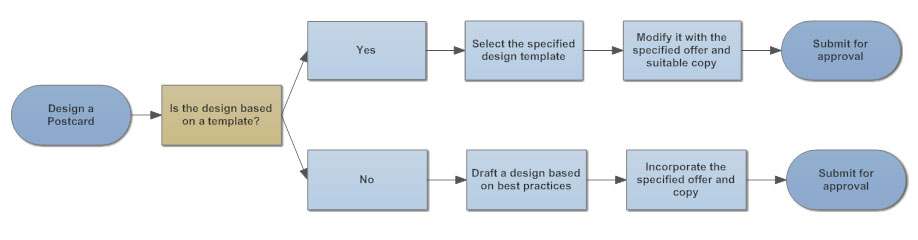
This example shows how consistency is applied. Notice how only the start and end shapes are oval. All the others are rectangles. Every shape is the same size as is the spacing between them. They also have the same outlines and are aligned uniformly.
Using consistency eliminates unnecessary distraction and makes the data flow or workflow very easy to follow.
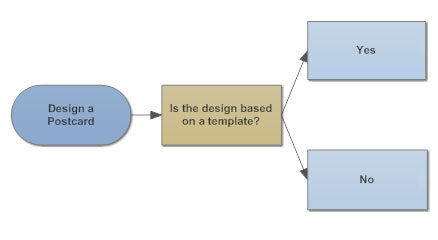
Sometimes color is helpful in making process steps clearer. Certain types of processes, such as decisions, might be shown in a different color, as might steps that require the user to return to an earlier step (such as 'Reheat' in this example.) Spacing, on the other hand, should always be consistent. Most drawing programs require you to do this manually, which can be time-consuming, so if you're looking at software, be sure to look for something with automated drawing and formatting built in.
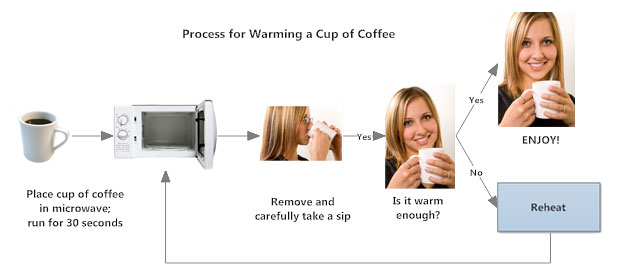
There may be times when it is acceptable, and perhaps even preferable, to draw a flowchart that moves beyond a basic, simple design scheme. Making a flowchart with photographs might be one of those situations. This can make a flowchart a more interesting element in a presentation slideshow, for example. It also might be useful in the event your audience is multi-lingual. Maybe there are steps in the process that are more clearly explained with a picture. A good software program will let you make flowcharts with photos, symbols, hyperlinks, and so forth.
2. Keep Everything on One Page
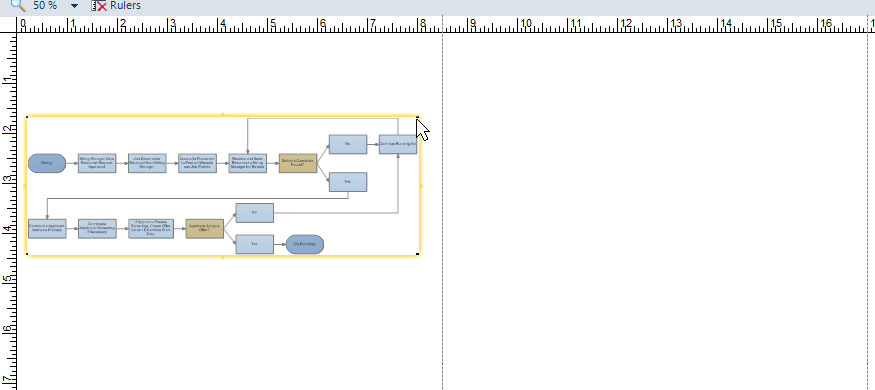
It is good practice to make sure that the flowchart fits on a single page and the text remains readable. When a diagram becomes too large to fit on a page, it's advisable to divide it into multiple charts and connect them with hyperlinks.
To keep your flowchart to one page you can try a few solutions outlined below:
A. If it's just slightly too big, try scaling it down. Remember, though, that the font you're using will also scale. For example, if you're using 10-point font and scale the diagram to 60% its original size, your font is now effectively 6 point. A tip here is to use a larger font that will offset the reduction in scale. In this example, if you re-set your font to 16 point then a 60% scale will result in 9.6-point type. Of course, using a larger font will probably increase the sizes of the symbols, so you may need to make a few adjustments to get the right look.
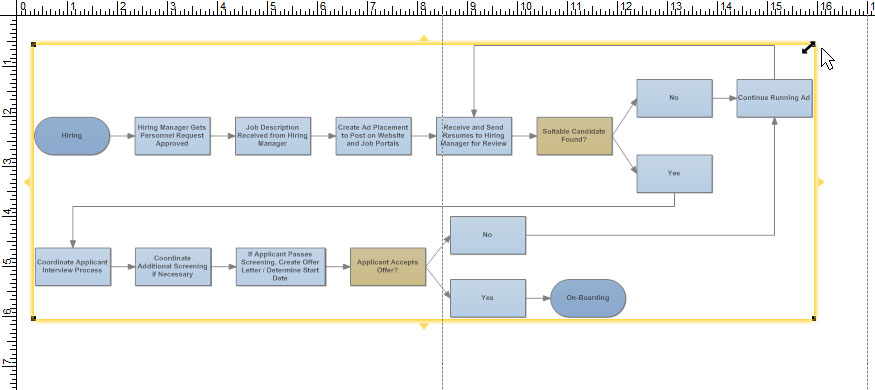
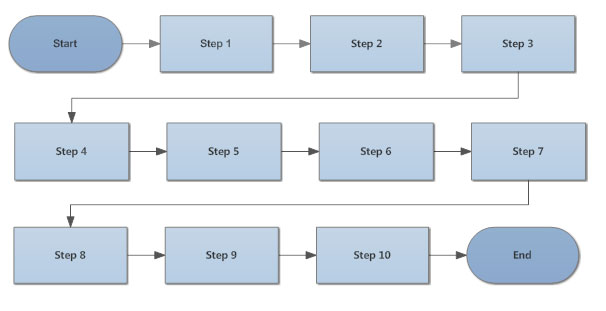
B. Depending on the number of steps, you can also have your chart flow left to right, then down to a subsequent line where it continues. It will look something like this:
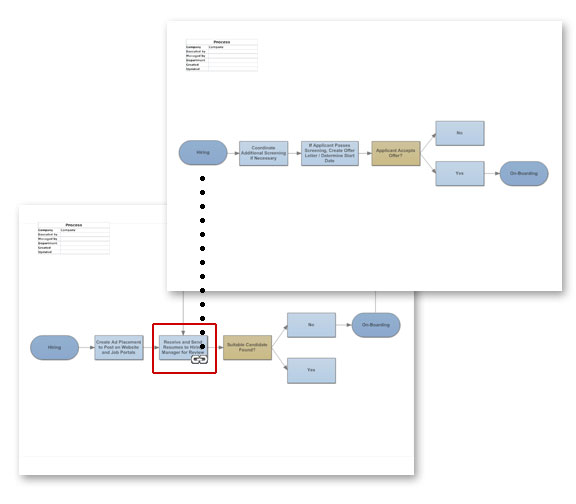
C. Another way to handle a large flowchart is to break it up into a collection of smaller ones. Do this by starting with a top-level diagram that provides a brief summary of the steps in the complete process. Each of these brief summaries will then contain a hyperlink to a separate flowchart that shows the details of that step. The steps in the detail flowcharts may themselves be summaries of even more detailed steps, or sub-processes. These will, in turn, be hyperlinked in the same manner. This may continue into several layers of detail.
3. Flow Data from Left to Right
Structuring a flowchart from left to right makes the information easier to read and comprehend.
4. Use a Split Path Instead of a Traditional Decision Symbol
Traditional flowcharts use a diamond symbol to represent a decision. There are three inherent problems with this:
- A decision symbol immediately introduces two directions of information flow,
Using flowcharts brings various benefits. Here is an automatic, full-featured flowchart program with free flowchart examples and templates available.
Top Benefits of Flowchart
1. Visual Clarity
One of the biggest benefits of a flowchart is the tool's ability to visualize multiple progresses and their sequence into a single document. Stakeholders throughout an organization can easily understand the workflow while finding out which step is unnecessary and which progress should be improved.
2. Instant Communication
Teams can use flowcharts to replace meetings. Simply clarifying progresses offers an easy, visual method to help team members instantly understand what they should do step by step.
3. Effective Coordination
For project managers and resource schedulers, the benefits of a flowchart include the ability to sequence events and reduce the potential for overburdening team members. Eliminating the unnecessary steps help to save time and resources.
4. Efficiency Increase
Efficiency increases are a significant benefit of flowcharts. The flowchart lists each step necessary to perform a process. The flowchart helps a designer remove unnecessary steps in a process, as well as errors. The flowchart should only include the steps that are requirements to reach the endpoint of the process.
5. Effective Analysis
With the help of flowchart, problem can be analyzed in more effective way. It specifically shows what type of action each step in a process requires. Generally, a rectangle with rounded edges defines the beginning or end of the process, a diamond shape shows the point at which a decision is required, and a square block shows an action taken during the process. A flowchart may also include symbols that show the type of media in which data is stored, such as a rectangle with a curved bottom to show a paper document or a cylinder to symbolize a computer hard drive.
6. Problem Solving
Flowcharts break a problem up into easily definable parts. The defined process displayed by the flowchart demonstrates the method of solving a complex problem. A flowchart reduces the chance that a necessary step for solving a problem will be left out because it appears obvious. In this way, it reduces cost and wastage of time.
7. Proper Documentation
Digital flowcharts serve as a good paperless documentation, which is needed for various purposes, making things more efficient.
https://www.edrawsoft.com/flowchart-benefits.phpFour Methods:
Deciding How to Document Your Process
Creating a Flowchart
Creating a Complex Flowchart
Analyzing a Process Document to Improve the Process
Community Q&A
Companies often document a process to make sure each worker knows how to perform it correctly, or to analyze a process for improvement. If you are asked to document a process, or decide to do it yourself, make sure you involve people who are experienced and knowledgeable about the process as a whole. Two types of flowcharts are described below, but if you think a different type of simple diagram or a text document is more suitable to your process, you may use that instead. In that case, read the general advice section to get an idea of the purpose of process documentation.
Method1
Deciding How to Document Your Process
-
1
Stick to one process at a time whenever possible. Don't try to describe your entire job in one flowchart. A series of short documents that cover each task separately will be much easier to follow.- If you have to document a large-scale process, such as the creation of a company's product from conception to sale, only use simple names to refer to each task within that process. If necessary, use additional documents to explain each task in more detail.
-
2
Break down the big picture into sub-processes. Sub-processes are the key tasks that are performed during the process. If you are not intimately familiar with the process you are documenting, interview project managers or other experts in this process to get a good understanding of the tasks involved.- In general, if a step in your document includes more than one verb, or the word "and," it can likely be broken down into two steps. For example, "Place bun and meat patty on grill" should be broken down into "Place meat patty on grill" and "Place bun on grill."
-
3
Decide whether the process is simple enough for a text document. If your process is similar every time, and involves only a couple of decisions or variations, you might want to simply write out the steps in a list. Use an electronic text document (such as a Microsoft Word file) or a sheet of lined paper.
-
4
Consider making a flowchart. A simple flowchart is an easy way to display the process visually, as described in a later section on this page. There are ways to construct more complicated flowcharts as well, but these are not required for most processes. Consider following the


